

A small aerospace supplier goes dark on a Tuesday morning. Production halts, customer orders stall, and the culprit turns out to be a server compromise that had been quietly signaling trouble for days through missed alerts. For small businesses in manufacturing, aerospace, and professional services, undetected IT issues don't stay small for long. Downtime costs money, breaches damage client trust, and noncompliance can result in serious regulatory consequences. This guide walks you through a practical, NIST-aligned IT monitoring process built specifically for small and medium-sized businesses (SMBs) that need reliable protection without a large internal IT team.
Table of Contents
- What is the IT monitoring process?
- Preparation: Tools and requirements for effective IT monitoring
- Step-by-step IT monitoring: Implementation for SMBs
- Troubleshooting, common mistakes, and continuous improvement
- A fresh take: Why a compliance mindset isn't enough for IT monitoring success
- How Symmetry Network Management supports your IT monitoring journey
- Frequently asked questions
Key Takeaways
| Point | Details |
|---|---|
| Continuous monitoring is essential | Ongoing tracking of systems and networks helps detect issues before they escalate. |
| NIST CSF guides small businesses | Using the NIST framework standardizes monitoring and supports compliance. |
| Preparation prevents mistakes | Selecting the right tools and defining clear roles leads to more effective monitoring. |
| Managed services fill gaps | Outsourcing IT monitoring allows SMBs to maintain security even with limited resources. |
| Improvement is ongoing | Reviewing and updating processes helps address new threats and ensures long-term success. |
What is the IT monitoring process?
IT monitoring means continuously tracking your systems, networks, endpoints, and logs to catch unusual activity before it becomes a serious problem. Think of it as a persistent watch over the engine room of your business. When something starts to stall, you want to know immediately, not after the damage is done.
For SMBs, the stakes are especially high. A single undetected breach can trigger regulatory penalties, halt production lines, or expose sensitive client data. The IT monitoring process for small businesses follows the NIST Cybersecurity Framework (CSF) structure, emphasizing continuous monitoring of systems, networks, logs, and security events to detect anomalies early. The NIST CSF's "Detect" function is the backbone here, covering network traffic analysis, failed login tracking, and identifying anomalous behavior in real time.
Manufacturers tied to regulations like 21 CFR Part 11 benefit directly from structured monitoring because it creates the audit trails and event records required for compliance in the manufacturing sector. Strong manufacturing network security practices also depend on consistent monitoring to isolate and respond to threats at the network level.
Here's a quick look at the difference between reactive and proactive monitoring:
| Approach | Reactive monitoring | Proactive monitoring |
|---|---|---|
| Detection timing | After an incident occurs | Before or during an incident |
| Typical response | Emergency remediation | Automated alerts and fast response |
| Risk level | High (damage already done) | Low (early intervention) |
| Compliance impact | Audit gaps, penalties | Complete records, audit-ready |
| Cost | Unpredictable and often high | Predictable, manageable |
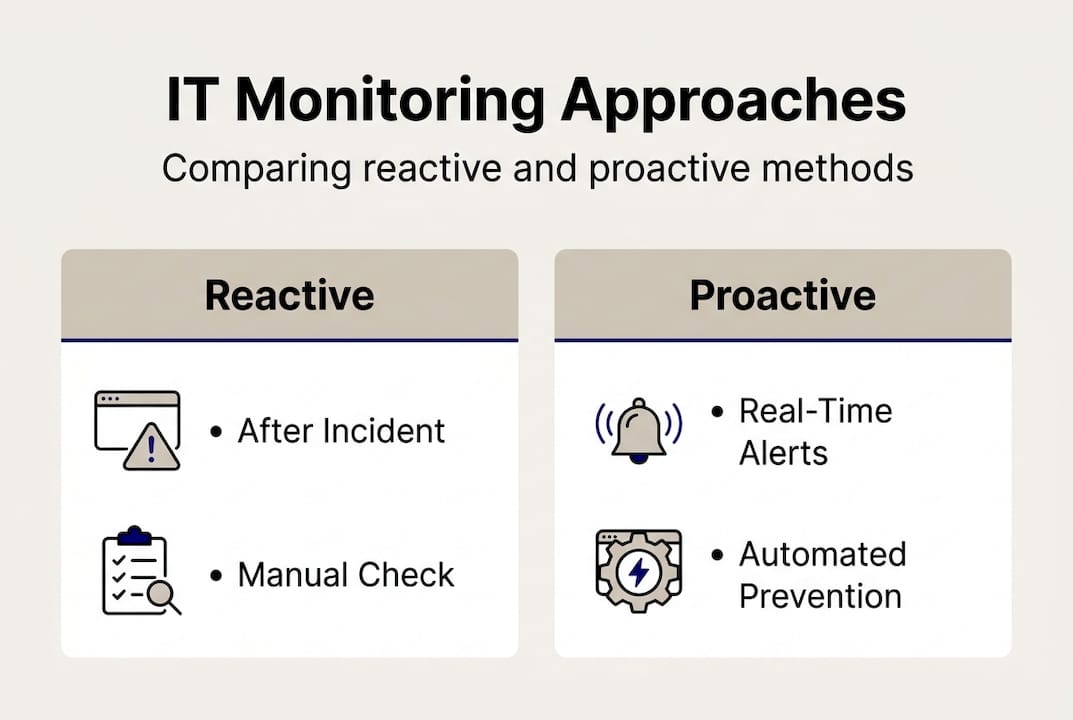
Businesses that shift from reactive to proactive monitoring see measurable improvements in both security posture and operational continuity. Monitoring for operational excellence is a principle that applies just as much to IT systems as it does to production floors.
Key functions of an effective IT monitoring process:
- Continuous network traffic analysis
- Failed login and access anomaly detection
- Log aggregation and real-time alerting
- Endpoint health and performance tracking
- Compliance event documentation
Preparation: Tools and requirements for effective IT monitoring
Now that you know what IT monitoring involves, here's what you'll need to get started. Preparation isn't just about buying software. It's about making deliberate decisions around tools, roles, and documentation before you flip the switch.
Proactive, continuous monitoring via managed services is preferred for SMBs that lack the internal resources to staff a full security operations team. That said, whether you're managing monitoring in-house or through a partner, the foundational requirements are the same.
Core tools every SMB needs:
- Monitoring software: Tracks system performance, uptime, and security events
- Log management platform: Aggregates and stores logs from servers, endpoints, and network devices
- Alerting system: Sends real-time notifications when thresholds are crossed
- Network segmentation tools: Limits the blast radius if a breach occurs
- Endpoint detection software: Monitors individual devices for threats and anomalies
Here's a practical summary of requirements to guide your setup:
| Tool/feature | Purpose | Notes |
|---|---|---|
| Monitoring software | Centralized visibility | Many affordable SaaS options exist |
| Log management | Audit trails, incident forensics | Required for 21 CFR Part 11 compliance |
| Alerting system | Real-time threat notification | Reduce response time significantly |
| Network segmentation | Containment and access control | Critical for manufacturing environments |
| Endpoint detection | Device-level threat visibility | Works alongside network monitoring |
Clearly defining roles is just as important as choosing the right tools. Someone needs to own monitoring responsibilities, whether that's an internal IT staff member, a managed service provider (MSP), or a combination. Executive sponsors should understand the compliance and business risk implications so monitoring isn't treated as a low-priority task.

If your operation uses manufacturing execution systems, integrating MES tools for efficiency with your IT monitoring strategy can improve both operational and security outcomes simultaneously.
Pro Tip: Document your monitoring policies before you go live. A written policy that defines what gets monitored, who reviews it, and how alerts are escalated will streamline future audits and create accountability across your team. It also makes onboarding new staff or partners far easier.
For businesses that want expert guidance without building the capability in-house, exploring managed IT monitoring services is often the fastest path to reliable coverage.
Step-by-step IT monitoring: Implementation for SMBs
With tools in hand, it's time to implement a reliable, NIST-guided monitoring routine. The steps below are designed for small teams that need structure without complexity.
-
Establish baseline metrics. Before you can detect anomalies, you need to know what normal looks like. Document typical network traffic volumes, login patterns, and system performance levels across your environment.
-
Configure your monitoring tools. Set up your monitoring software to watch the systems that matter most: servers, endpoints, firewalls, and any compliance-critical applications. Prioritize assets that touch sensitive data or production systems.
-
Automate alerts. Manual log reviews aren't sustainable for small teams. Configure automated alerts for high-priority events such as failed login attempts, unusual data transfers, and system outages. The Detect function in NIST CSF specifically calls for monitoring network traffic, system activity, and logs for anomalies, with alerts for failed logins and unusual activity.
"Continuous, automated monitoring is not a luxury for small businesses, it is a foundational security control that directly reduces the likelihood and impact of a cybersecurity incident." NIST Cybersecurity Framework guidance
-
Review logs on a schedule. Automated alerts catch immediate threats, but regular log reviews surface patterns that may not trigger an alert on their own. A weekly log review by a designated team member is a minimum baseline.
-
Respond to incidents with a defined protocol. Every alert should have a documented response path. Who gets notified? What gets isolated? When does escalation happen? Without this, even good monitoring can result in slow, chaotic responses.
-
Document all findings. Every incident, alert, and response action should be recorded. This documentation supports compliance audits and helps identify recurring issues over time.
A sample schedule for small teams might look like this: Daily tasks include reviewing automated alerts and checking dashboard summaries. Weekly tasks cover log reviews and access permission audits. Monthly tasks involve reviewing monitoring coverage, updating baselines, and testing incident response procedures.
Good network segmentation strategies also make implementation more effective by limiting what an attacker can reach if they do get in. And for tracking operational outcomes alongside security metrics, production monitoring frameworks offer useful parallels for small manufacturers.
Pro Tip: If your team doesn't have dedicated IT staff, a managed service provider can handle steps 3 through 6 entirely, giving you professional-grade monitoring coverage at a predictable monthly cost.
Troubleshooting, common mistakes, and continuous improvement
Even the best-laid plans need tuning. Here's how to troubleshoot and build long-term success into your IT monitoring process.
One of the most common problems SMBs face is alert fatigue. When too many low-priority notifications pile up, teams start ignoring alerts entirely, and real threats slip through. The fix is calibrating your alert thresholds carefully so that only meaningful events generate notifications.
Another frequent mistake is neglecting critical systems. Businesses often monitor servers but overlook endpoints, printers, or legacy equipment that can serve as entry points. A complete manufacturing network cybersecurity guide will help you map and prioritize all assets worth monitoring.
Here's a practical comparison of common mistakes and their quick fixes:
| Common mistake | Quick fix |
|---|---|
| Alert fatigue from too many notifications | Calibrate thresholds; prioritize critical alerts |
| Monitoring servers but not endpoints | Expand coverage to all networked devices |
| No log retention policy | Set minimum 90-day retention; align with regulations |
| Weak or undefined incident response | Create a simple, documented escalation protocol |
| Checking logs only during audits | Establish a weekly review schedule |
Signs you need to revisit your setup:
- Alerts are being dismissed without review
- Incident response time exceeds 2 hours for critical events
- Logs aren't retained long enough to support compliance audits
- No one owns the monitoring function day-to-day
Continuous improvement means treating your monitoring process like a living system. After any incident or near-miss, conduct a brief review: what was detected, what was missed, and what can be improved? Proactive, continuous monitoring via managed services integrates with compliance frameworks like NIST to support ongoing improvement rather than one-time setup.
Knowing when to call in outside experts is also part of good judgment. If your team consistently lacks time to review alerts or respond to incidents, that's a signal that external support isn't optional anymore.
A fresh take: Why a compliance mindset isn't enough for IT monitoring success
Many SMBs approach IT monitoring primarily as a compliance requirement. Meet the NIST checklist. Satisfy the 21 CFR audit. Check the box. That approach is understandable, but it creates a dangerous blind spot.
Compliance is the baseline, not the finish line. True risk reduction requires a culture of vigilance where your team treats monitoring data as operationally valuable, not just as evidence for the next audit. There's a real difference between a business that checks logs because an auditor might ask and one that checks logs because they genuinely want to catch a threat before it causes harm.
Consider a common scenario: a user account shows three failed login attempts late on a Friday afternoon. A compliance-only mindset logs the event and moves on. A security-first mindset investigates immediately and discovers a credential stuffing attempt in progress. That distinction can mean the difference between a contained incident and a full breach.
Engaging team members at all levels in monitoring awareness, even if they don't touch the tools directly, builds a culture where security is everyone's concern. Celebrate small wins. When your compliance steps and gaps get closed, share that with the team. Those moments reinforce why the process matters and keep people engaged long after initial setup.
How Symmetry Network Management supports your IT monitoring journey
Building and maintaining a reliable IT monitoring process takes more than good intentions. It requires the right tools, consistent execution, and expertise that many small businesses simply don't have on staff.
Symmetry Network Management helps SMBs in manufacturing, aerospace, and professional services implement exactly this kind of structured, proactive monitoring. From 24/7 system oversight and network segmentation advice to compliance enablement and incident response support, our managed IT services are designed to fit the operational realities of small businesses. You get enterprise-level protection at a predictable fixed cost, with U.S.-based support that knows your industry. Contact us today to schedule a free assessment and find out where your monitoring gaps are before they become real problems.
Frequently asked questions
What is the main purpose of the IT monitoring process?
The main purpose is to detect and respond to anomalies in your IT systems early, reducing downtime and keeping your business secure. Continuous monitoring aligned with the NIST CSF structure helps SMBs identify threats before they escalate.
Is managed IT monitoring necessary for small businesses?
Managed IT monitoring is highly recommended for SMBs that lack internal IT resources, as it ensures continuous protection and compliance. Proactive monitoring via managed services is the preferred approach for businesses that can't staff a full security team.
What are the first steps to set up an IT monitoring process?
Start by identifying your critical systems, selecting appropriate monitoring tools, and clearly assigning roles and responsibilities. Documenting your baseline metrics before going live is also essential for detecting anomalies accurately.
How does IT monitoring help with compliance?
IT monitoring provides logs, alerts, and audit data that make it significantly easier to meet industry and regulatory requirements. IT monitoring supports compliance through continuous tracking and complete audit trails that satisfy frameworks like NIST and regulations like 21 CFR Part 11.
Recommended
- Top 10 IT Infrastructure Mistakes Small Businesses Make - Symmetry Network Management
- IT Security Blog | Symmetry Network Management
- How to Secure Manufacturing Networks: A Practical SMB Guide | Symmetry Network Management
- Symmetry Network Management | Managed IT Services
- Complete Guide to Cybersecurity Basics for Small Business | Ibrandmedia
- The Importance of Monitoring for Smooth Operations