

Many small and mid-sized business owners assume network monitoring is something only large enterprises need. That assumption is dangerously expensive. A single breach or unplanned outage can cost an SMB thousands of dollars per hour in lost productivity, recovery expenses, and damaged client relationships. This guide breaks down what network monitoring actually is, how the core methods work, what those methods can and cannot reveal, and how to choose the right approach for your specific business. Whether you operate in manufacturing, professional services, or another compliance-sensitive industry, what follows gives you a clear, actionable foundation.
Table of Contents
- Network monitoring explained: The basics every business owner should know
- How network monitoring works: Methods and what they reveal
- The real-world impact: How monitoring transforms SMB security and compliance
- Choosing the right network monitoring for your business
- The uncomfortable truth about network monitoring most SMBs miss
- Next steps: Protect your business with expert-managed network monitoring
- Frequently asked questions
Key Takeaways
| Point | Details |
|---|---|
| Network monitoring definition | Network monitoring continuously checks device health, performance, and traffic to prevent problems and meet compliance. |
| Method strengths and limits | SNMP is fast but limited, flow analysis sees more but can delay alerts; a hybrid approach is often best. |
| Business impact | Proactive monitoring reduces downtime costs and helps meet security and regulatory requirements. |
| Common pitfalls | Too many SMBs rely on basic tools, missing critical issues—regular review and advanced methods close this gap. |
Network monitoring explained: The basics every business owner should know
Network monitoring is the continuous process of observing, tracking, and analyzing the health, performance, and security of the devices and connections that make up your business network. That includes routers, switches, servers, firewalls, workstations, printers, and any other device that communicates over your internal infrastructure or the internet.
For a small or mid-sized business, a monitored network means you get automatic alerts when a device goes offline, when bandwidth spikes unexpectedly, or when unusual traffic patterns suggest a security problem. Think of it as a smoke detector for your entire IT environment. You are not constantly checking every corner for fire; the system watches for danger and notifies you the moment something is wrong.
Core benefits of network monitoring include:
- Faster issue detection, which reduces the time between a problem starting and someone fixing it
- Early identification of security threats before they escalate into full breaches
- Documentation and audit trails that support compliance with regulations such as HIPAA and industry-specific standards
- Visibility into performance bottlenecks so your team stays productive
- Proactive maintenance that prevents small issues from growing into costly failures
One of the most persistent misconceptions among small business owners is that "I'm too small to be a target." This thinking is precisely why attackers frequently focus on SMBs. Smaller organizations tend to have fewer security controls in place, making them easier entry points. Understanding network monitoring in manufacturing and other regulated environments shows just how central monitoring has become, even for businesses with under 50 employees.
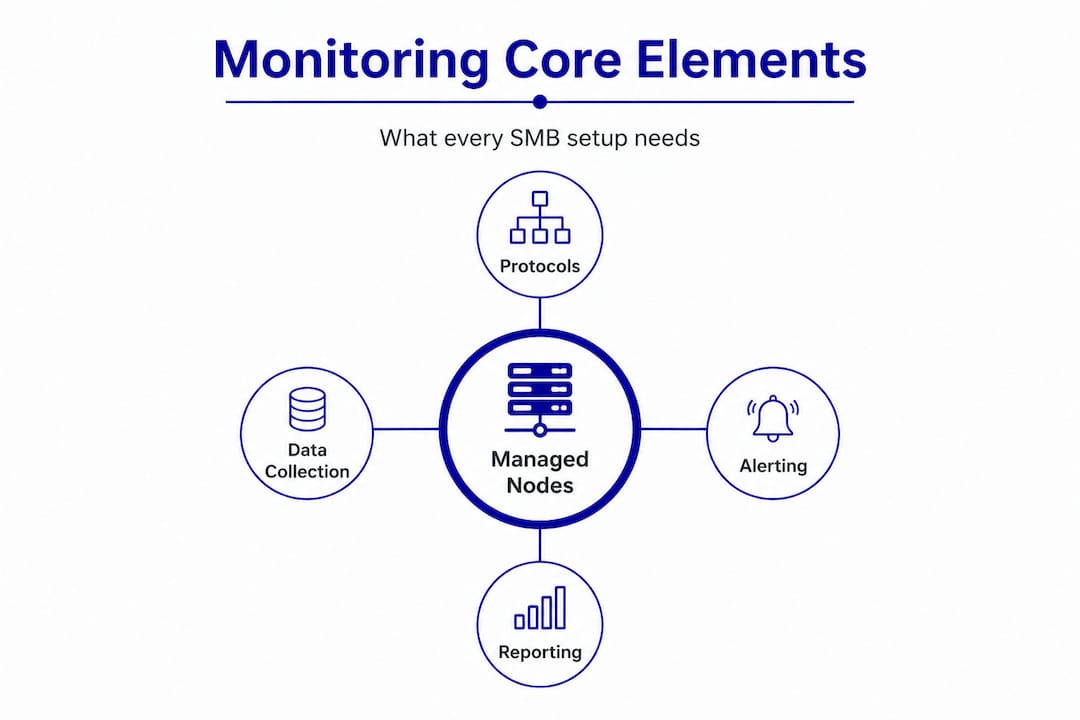
The basic components of any monitoring setup include the devices being watched (called "managed nodes"), the protocols used to collect data, and an alerting and reporting system that notifies your IT staff or managed service provider when something falls outside acceptable parameters.
Pro Tip: Even a basic monitoring setup should cover your firewall, primary switches, and any servers hosting critical business applications. Start there before expanding to endpoint-level monitoring.
How network monitoring works: Methods and what they reveal
With the basics in mind, it is important to understand exactly how network monitoring tools actually work and which methods fit SMB needs best. Three core methods dominate the industry: SNMP, flow-based monitoring, and packet capture with Deep Packet Inspection. Each reveals a different layer of what is happening on your network.
SNMP (Simple Network Management Protocol) is the most widely used method. It works by sending small queries to devices and collecting responses about status, CPU load, memory usage, interface errors, and whether the device is online. SNMP is lightweight and runs on virtually every managed network device. It is excellent for knowing if a device is up or down and for catching obvious hardware problems.

The critical limitation is that SNMP misses 80% of problems that actually cause downtime, including short-lived traffic spikes, application-layer issues, and anything happening inside the data packets themselves. If a server reports "online" but is dropping packets, SNMP will not tell you.
Flow-based monitoring (NetFlow, sFlow, IPFIX) collects summary records of traffic conversations rather than the content of each packet. It shows you who talked to whom, how much data moved, and when. This makes flow data valuable for security forensics and identifying abnormal usage patterns. The drawback is that flow data is resource-intensive and often comes with a slight delay, which means it is better for post-incident investigation than real-time alerting.
Packet capture and Deep Packet Inspection (DPI) go deeper. They capture the actual contents of network traffic (where legally and technically appropriate) and analyze packet-level issues and latency, including encrypted session metadata. DPI is the tool of choice for forensic investigations, detecting malware command-and-control traffic, and understanding exactly what went wrong during an incident.
Here is a direct comparison to help frame your thinking:
| Method | Best for | Overhead | Key limitation |
|---|---|---|---|
| SNMP | Device health, up/down status | Very low (<0.01%) | Misses application and packet-level issues |
| Flow monitoring | Traffic forensics, security auditing | Moderate (0.1% to 2%) | Delayed, does not capture packet content |
| Packet capture / DPI | Deep forensics, encrypted traffic | High | Intensive to run continuously |
| Hybrid approach | Full-spectrum visibility | Variable | Requires more planning and tooling |
A practical deployment sequence for most SMBs:
- Implement SNMP monitoring across all routers, switches, firewalls, and servers as a baseline
- Enable flow data collection on your perimeter firewall and core switches for traffic visibility
- Add DPI or packet capture capabilities for critical network segments where sensitive data moves
- Connect all sources into a centralized dashboard so alerts are consolidated and easy to act on
- Set thresholds and escalation rules so after-hours alerts reach the right person immediately
"Relying on SNMP alone is like reading a car dashboard without ever lifting the hood. You will know the engine is running, but you will not know it is about to fail."
A hybrid approach combining these methods is the most popular choice among organizations with mature monitoring programs, with a majority using integrated platforms alongside purpose-built tools for specific tasks.
The real-world impact: How monitoring transforms SMB security and compliance
Understanding the available methods is one thing, but what does effective monitoring actually deliver for your business day to day?
Start with the financial reality. Downtime for a small or mid-sized business can cost anywhere from a few hundred to several thousand dollars per hour depending on your industry, team size, and how critical your systems are. A manufacturer that loses access to its production scheduling software or a professional services firm locked out of its client database for half a day faces compounding losses: idle labor, missed deadlines, and potential contract penalties.
Effective monitoring catches the warning signs of failure before the failure occurs. A server running at 95% memory utilization for 20 minutes is about to crash. An alert generated at that moment gives your IT team or managed service provider time to intervene. Without monitoring, the first sign of trouble is the crash itself.
From a compliance perspective, monitoring is not optional for many SMBs. HIPAA requires covered entities and their business associates to implement technical safeguards that record and audit access to protected health information. PCI DSS mandates that businesses handling card payment data monitor and test their networks regularly. Aerospace and defense contractors operating under ITAR or CMMC requirements face similar obligations. In all of these frameworks, an audit trail generated by monitoring tools is often required to demonstrate compliance during assessments.
Consider what consistent monitoring delivers across these areas:
- Early breach detection: Attackers spend an average of weeks inside networks before detection in cases where monitoring is inadequate. Active alerting on unusual outbound traffic or unauthorized access attempts dramatically compresses that window.
- Policy enforcement: Monitoring can flag when employees are accessing prohibited sites, transferring large volumes of data, or using unauthorized applications, allowing managers to address policy violations promptly.
- Capacity planning: Traffic trend data tells you when your internet connection or a key server is approaching its limits, giving you time to upgrade before performance degrades for users.
- Incident documentation: When something goes wrong, logged monitoring data provides a timeline that helps determine root cause and satisfies regulatory audit requirements.
It is worth noting that protocol overhead is generally manageable even for smaller IT environments. SNMP overhead runs below 0.01%, and flow monitoring sits in the 0.1% to 2% range depending on traffic volume and configuration. For most SMBs, this is a non-issue.
Those looking to go deeper into the technical foundations of secure manufacturing networks will find that monitoring is consistently at the center of every effective security strategy.
Choosing the right network monitoring for your business
Now that you know what network monitoring can do, it is time to identify what works best for your business environment.
The first step is an honest assessment of two factors: your technical environment and your compliance obligations. A healthcare billing company with 15 employees needs to meet HIPAA requirements and should prioritize audit logging and access monitoring. A machining shop with aerospace contracts may need to satisfy ITAR or AS9100 requirements, which add another layer of specificity to what gets monitored and how records are maintained.
Here is a practical decision framework:
- List your critical assets. Identify every device, application, and data source that the business cannot afford to lose access to for more than a few hours.
- Review your regulatory requirements. Determine which compliance standards apply to your industry and what monitoring controls those standards demand.
- Start with SNMP. For most SMBs, deploying SNMP monitoring across core infrastructure is the right first move. It is low-cost, low-overhead, and gives you immediate visibility into device health.
- Layer flow monitoring for security. Once SNMP is in place, enable flow collection at your firewall and core switching layer to gain traffic-level visibility without heavy infrastructure investment.
- Add DPI for high-risk segments. If your business handles particularly sensitive data or operates under strict regulatory requirements, targeted packet-level analysis on key segments adds the forensic capability you need.
- Decide between in-house and managed. Smaller businesses without a dedicated IT staff typically get better outcomes from a managed IT services provider who handles monitoring, alerting, and response as part of a fixed-cost package.
A hybrid platform combining SNMP with flow monitoring is the most widely preferred architecture, providing real-time device visibility alongside traffic forensics without requiring separate teams to manage each tool.
Common pitfalls to avoid:
- Relying solely on SNMP and assuming your network is healthy because devices show as "up"
- Ignoring short-duration traffic spikes, which are often the early signature of a ransomware infection or data exfiltration attempt
- Failing to monitor encrypted traffic metadata, leaving a significant blind spot for modern threats
- Setting up monitoring and never reviewing the alerts or adjusting thresholds as your network evolves
Pro Tip: Review your monitoring alert thresholds every six months. Networks change as businesses grow, and thresholds set at initial deployment often become irrelevant within a year.
The uncomfortable truth about network monitoring most SMBs miss
Most buying guides and technology blogs will tell you to pick a tool, set it up, and let it run. That advice leaves out the part that actually determines whether monitoring protects your business or just gives you a false sense of security.
The uncomfortable truth is this: monitoring is not a product you install and forget. It is an ongoing operational discipline. The technology is only as useful as the people reviewing it, adjusting it, and acting on what it finds.
Many SMBs deploy basic SNMP monitoring and check the box. They see green lights and assume all is well. What they do not see are the application-layer problems, the short-lived anomalies, and the encrypted traffic patterns that simple polling cannot detect. As the data shows, SNMP sampling misses problems that cause the majority of actual downtime events. The tool looks healthy. The network is not.
There is also no universal "best" monitoring solution. A configuration that works well for a 10-person professional services firm will be inadequate for a 50-person manufacturing operation with multiple production floors, CNC machines on the network, and export-controlled data. Generic best practices point you in the right direction, but your monitoring setup must be calibrated to your specific risk profile, not someone else's.
The most critical investment is not in the software itself. It is in the human process that surrounds it. Who reviews the alerts? What is the escalation path when something triggers after hours? How often are logs examined for patterns that do not generate automatic alerts? These questions determine whether monitoring actually improves your security posture or simply generates ignored notifications.
Businesses that treat monitoring as a living part of their advanced SMB security strategies consistently outperform those that treat it as a one-time purchase. Active management, regular threshold tuning, and periodic expert review make all the difference.
Next steps: Protect your business with expert-managed network monitoring
Getting monitoring right requires more than the right tools. It requires the right process, the right expertise, and a partner who understands your industry's specific risks and compliance requirements.

Symmetry Network Management helps small and mid-sized businesses across manufacturing, aerospace, and professional services implement, manage, and optimize network monitoring as part of a broader IT security and compliance program. Our team provides 24/7 monitoring, fast U.S.-based support, and fixed-price managed services so you get enterprise-level visibility without the overhead of a full internal IT team. Explore our Managed IT Services to see how we structure monitoring and security for businesses like yours. You can also review our critical security controls guide to understand the foundational protections every SMB should have in place. Contact us today to schedule a free assessment and find out where your network stands.
Frequently asked questions
What problems does network monitoring actually detect in a small business?
Network monitoring identifies device failures, abnormal traffic patterns, and early signs of cyber attacks, providing actionable alerts so your team can respond quickly. Hybrid monitoring platforms that combine SNMP and flow data deliver the broadest detection coverage for most SMBs.
Is network monitoring required for compliance with HIPAA or PCI?
Yes. Both HIPAA and PCI DSS require technical controls that include monitoring, audit logging, and detection of unauthorized access, making consistent network monitoring a compliance necessity rather than an optional investment.
Why isn't simple SNMP monitoring enough for most businesses?
SNMP alone misses 80% of network problems that cause actual downtime, including short traffic spikes, application errors, and threats hidden inside packet payloads, so layering additional tools is strongly recommended.
Can managed services handle network monitoring for my business?
Yes. A qualified managed services provider delivers end-to-end monitoring, alert response, and ongoing tuning as part of a structured service, giving you professional-grade visibility without requiring dedicated in-house IT staff.
Recommended
- How to Secure Manufacturing Networks: A Practical SMB Guide | Symmetry Network Management
- Why use cybersecurity services: Essential protection for SMBs
- 5 Critical Security Controls Every Small Business Needs | Symmetry Network Management
- Active Directory Hardening Best Practices for Secure Windows Networks