

A secure site encrypts and authenticates the connection between your browser and the server using HTTPS/TLS. That connection protects what passes between you and the site, but it says nothing about who runs that site or what they intend to do with your information.
- What HTTPS gives you: privacy for your data in transit, tamper detection, and confirmation that you're talking to the server the domain claims to be.
- What it doesn't give you: proof the operator is legitimate. A phishing page can have a perfectly valid certificate.
Look for the padlock and https:// in the address bar as your first check. The sections below cover exactly what to look for after that.
Key Takeaways
A secure site combines valid HTTPS/TLS encryption with sound server configuration, current software, and user vigilance, since no single signal covers every risk.
| Point | Details |
|---|---|
| HTTPS is the baseline | Look for https:// and a padlock, then click it to confirm the certificate matches the domain. |
| Padlock isn't proof of trust | Phishing sites can hold valid certificates, so also check domain spelling and site reputation. |
| Mixed content undermines HTTPS | Every resource on a page, including scripts and images, needs to load over HTTPS too. |
| Owners need more than a certificate | HSTS, secure cookies, CSP, and automated renewal close gaps a certificate alone leaves open. |
| Updates close the biggest gap | Unpatched CMS software and plugins cause more breaches than weak encryption does. |
Table of Contents
- What Is a Secure Site, Technically Speaking?
- How to Tell if a Site Is Secure in Your Browser
- What HTTPS Actually Protects, and Where It Falls Short
- Mixed Content, HSTS, and the Headers Behind a Truly Secure Site
- How to Secure a Website: A Practical Checklist for Owners
- What Happens When a Site Isn't Secure
- Everyday Safety Steps Before You Type Anything Sensitive
- When a Small Business Needs Managed IT Support
- Threats a Padlock Won't Stop
- Why Software Updates Matter as Much as the Certificate
- What the Padlock Doesn't Tell You
- Frequently Asked Questions
- Sources
What Is a Secure Site, Technically Speaking?
HTTPS is HTTP running inside TLS, the encryption protocol that replaced SSL after researchers found serious flaws in older SSL versions. When your browser connects to a site over HTTPS, TLS handles the handshake, verifies the server's certificate, and then encrypts everything that follows, from page content to form submissions.
TLS does three specific jobs, and understanding them clears up most of the confusion around what "secure" actually means:
- Confidentiality — it encrypts data so anyone intercepting the traffic (a snooping router on public Wi-Fi, for instance) sees scrambled noise instead of your password or credit card number.
- Integrity — it detects tampering. If someone tries to alter data mid-transit, the connection breaks rather than silently delivering corrupted content.
- Authentication — it confirms the server presenting the certificate actually controls the domain you typed, using cryptographic checks defined in RFC 2818.
Encrypted traffic runs almost exclusively over port 443, the standard port browsers use for HTTPS. Port 80, the old HTTP default, still exists mostly to redirect visitors to the secure version.
Here's the detail most explainers skip: modern browsers gate certain features behind what's called a "secure context." Service workers, geolocation APIs, camera and microphone access, and clipboard permissions typically won't run at all on a plain HTTP page. HTTPS isn't just a trust signal anymore. It's a technical requirement for a site to function the way modern users expect.
How to Tell if a Site Is Secure in Your Browser
You don't need technical training to run this check. It takes fifteen seconds once you know where to look.
- Confirm the URL starts with
https://, nothttp://. - Look for a padlock icon to the left of the address bar.
- Click the padlock to open certificate details: check the issuer, the "issued to" name, and the expiration date.
- Verify the domain in the certificate matches the site you meant to visit, not a lookalike.
- Note any organization name shown, which only appears on higher validation certificates.
Browser icons carry specific meanings, and mixing them up is where a lot of people get tripped up. A solid padlock means the connection is encrypted. A padlock with a warning triangle, or an "i" in a circle, usually signals mixed content or a certificate the browser only partly trusts. A red strike-through or an explicit "Not Secure" label means the connection isn't encrypted at all, or something about the certificate failed validation. CISA's guidance on accessing websites securely recommends treating any of these warnings as a stop sign, not a suggestion.
On mobile, the checks are the same but the real estate is tighter. iOS Safari shows the padlock directly in the address bar; tapping it reveals certificate info in a smaller pop-up. Android Chrome puts a similar icon near the URL, though some Android browsers hide certificate details behind an extra tap on "Site information" or a settings menu.
Pro Tip: Before entering payment or login information on any site, tap the padlock once. If the certificate was issued days ago for a domain that claims to be a twenty-year-old company, treat that as a red flag worth investigating further.
What HTTPS Actually Protects, and Where It Falls Short
TLS earns its keep in three concrete ways: it prevents eavesdropping on the wire, it blocks certain man-in-the-middle tampering attempts, and it forces the server to present a certificate cryptographically tied to the domain. That last point matters because RFC 2818 requires clients to check the certificate's identity fields against the hostname you actually requested, which is what prevents an attacker from silently swapping in their own server.
Here's where the padlock stops being a complete answer.
Encryption alone does not validate a site's intent. Security is holistic: server configuration, secure development practices, and user verification all play a role that the padlock icon can't capture on its own.
A phishing page built to steal banking credentials can obtain a valid, browser-trusted certificate in minutes through free automated issuance. The padlock will show green. The domain will resolve correctly. None of that confirms the operator behind it is who they claim to be, a point DigiCert has documented in explaining why certificate presence isn't the same as vetted identity.
Two other scenarios worth recognizing: an expired certificate usually means the site owner forgot to renew, not that the site is malicious, though you should still be cautious. A self-signed certificate, one not issued by a trusted certificate authority, typically triggers a hard browser warning and should not be bypassed on any site asking for sensitive information.
Mixed Content, HSTS, and the Headers Behind a Truly Secure Site
A site can serve its main page over HTTPS and still leak data if it loads images, scripts, or stylesheets over plain HTTP. That's called mixed content, and browsers increasingly block it outright rather than just warning about it, because an attacker who compromises one insecure resource can often manipulate the entire page around it.
A handful of server-side settings close the remaining gaps:
- HSTS (HTTP Strict Transport Security): a header that tells the browser to never attempt an unencrypted connection to that domain again, closing the window for downgrade or "SSL stripping" attacks.
- HSTS preload: submitting a domain to the browser-maintained preload list removes even the first-visit risk, though MDN's implementation guidance notes it requires includeSubDomains and a minimum one-year max-age before submission.
- Secure cookie attribute: marks cookies so they're only ever sent over encrypted connections, never leaked over an accidental HTTP request.
- Content Security Policy (CSP): a header that restricts which scripts and resources a page is allowed to load, cutting down the damage a compromised third-party script can do.
- upgrade-insecure-requests: a CSP directive that automatically upgrades any stray HTTP resource requests to HTTPS.
Pro Tip: If you manage a site, set HSTS with a long max-age before you consider preload submission. Removing a domain from the preload list later is far harder than adding it, so test thoroughly first.
How to Secure a Website: A Practical Checklist for Owners
Getting a site to "secure" status isn't one action. It's a sequence, and skipping steps is how sites end up with expired certificates or half-configured HTTPS that still allows mixed content.
- Obtain a TLS certificate. Choose based on your needs: Domain Validation (DV) confirms only domain ownership and issues fast; Organization Validation (OV) verifies the business behind it; Extended Validation (EV) requires the most rigorous vetting and can display the organization name in some browser interfaces.
- Install and configure TLS on your server, favoring modern cipher suites and forward secrecy so a compromised private key in the future can't decrypt past sessions.
- Redirect all HTTP traffic to HTTPS using a 301 redirect, so no page is ever reachable over the insecure protocol.
- Set HSTS headers with includeSubDomains and an appropriate max-age, per the MDN TLS implementation guide.
- Mark cookies as secure and, where applicable, HttpOnly, so they can't be read by client-side scripts or transmitted unencrypted.
- Add a Content Security Policy appropriate to your site's scripts and third-party resources.
- Test the configuration with an online TLS scanner and your browser's own site-information panel, then automate certificate renewal so nothing lapses silently.
Manufacturers and other regulated small businesses juggling this alongside production schedules often find the maintenance burden heavier than the initial setup; our guide to quality control best practices for manufacturing pros explains how cybersecurity integrates with operational reliability. Symmnet's manufacturing IT security guidance covers how ongoing configuration work fits into a broader security routine.
What Happens When a Site Isn't Secure
For a visitor, an unencrypted or misconfigured site opens the door to credential theft, intercepted payment details, exposed personal information, and malware slipped into unprotected page content.
- Credentials typed into an HTTP login form can be captured by anyone on the same network.
- Payment data sent without encryption is interceptable in transit.
- Manipulated, unencrypted pages can be used to deliver malicious downloads without your knowledge.
For the business running that site, the consequences compound. Browsers now flag non-HTTPS sites as "Not Secure" directly in the address bar, which erodes visitor trust the instant the page loads. Search visibility often suffers too, since HTTPS adoption is treated as baseline best practice across the web. For manufacturers, aerospace suppliers, and other regulated operators, exposed customer or partner data can trigger real compliance and legal exposure on top of the reputational damage.
If you've entered information on a site and then noticed a certificate warning or mismatched domain, change that password immediately and monitor the associated account for unusual activity.
Everyday Safety Steps Before You Type Anything Sensitive
You don't need to audit every site's TLS configuration. A short habit loop covers most of the risk.
- Check the domain spelling carefully. Attackers register lookalikes (a swapped letter, an extra hyphen) that are easy to miss at a glance.
- Confirm
https://and the padlock before entering any password or payment information. - Click the padlock if anything feels off, and check the certificate's issued-to name and expiration.
- Keep your browser and operating system updated, since patches close vulnerabilities attackers actively target.
- Use a password manager and enable two-factor authentication wherever it's offered.
Pro Tip: A password manager won't autofill credentials on a lookalike domain the way you might by habit, which makes it one of the simplest defenses against a convincing phishing page.
When a Small Business Needs Managed IT Support
Not every business needs a dedicated IT security team, but certain conditions make outside help worth the investment. Handling regulated or customer data, running without in-house IT staff, facing repeated security incidents, or managing infrastructure that requires segmentation and documented backups are all signals it's time to bring in help.
A managed provider typically handles certificate issuance and renewal automation, TLS configuration hardening, HSTS and CSP setup, ongoing patch monitoring, and incident response when something does go wrong.
Small businesses in manufacturing, aerospace, and professional services often carry compliance obligations that make a misconfigured certificate far more than a technical inconvenience.
For businesses that fit that profile, Symmnet's managed IT services are built specifically around this kind of proactive, fixed-price support.
Threats a Padlock Won't Stop
HTTPS solves the encryption problem. It does nothing for the threats that don't depend on an unencrypted connection, and those are often the ones that do the most damage.

Phishing remains the most common way attackers bypass HTTPS entirely: a convincing email links to a lookalike domain that is fully encrypted, fully padlocked, and entirely fake. Because certificate issuance for basic DV certificates is automated and fast, attackers routinely secure their fraudulent domains just as easily as legitimate businesses do.
Malware delivered through compromised ad networks, infected plugins, or outdated content management system software doesn't care whether the delivering page uses HTTPS. The encrypted tunnel just means the malicious payload arrives with a green padlock attached.
Weak or reused passwords remain one of the most exploited weaknesses on the web, regardless of how well a site's TLS is configured. An attacker who obtains credentials through a breach on one site will try them everywhere else, a technique called credential stuffing that no amount of server-side encryption prevents.
The practical takeaway: HTTPS is necessary infrastructure, not a complete defense. Site owners who stop at "we have a certificate" are leaving the door open to threats that live entirely outside the TLS layer, which is exactly why security postures built around monitoring and layered controls, not a single checkbox, hold up better over time.
Why Software Updates Matter as Much as the Certificate
A perfectly configured TLS setup won't protect a site running outdated content management system software, plugins with known vulnerabilities, or an unpatched server operating system. Most real-world breaches trace back to a known, published vulnerability that simply hadn't been patched yet, not some novel attack technique.
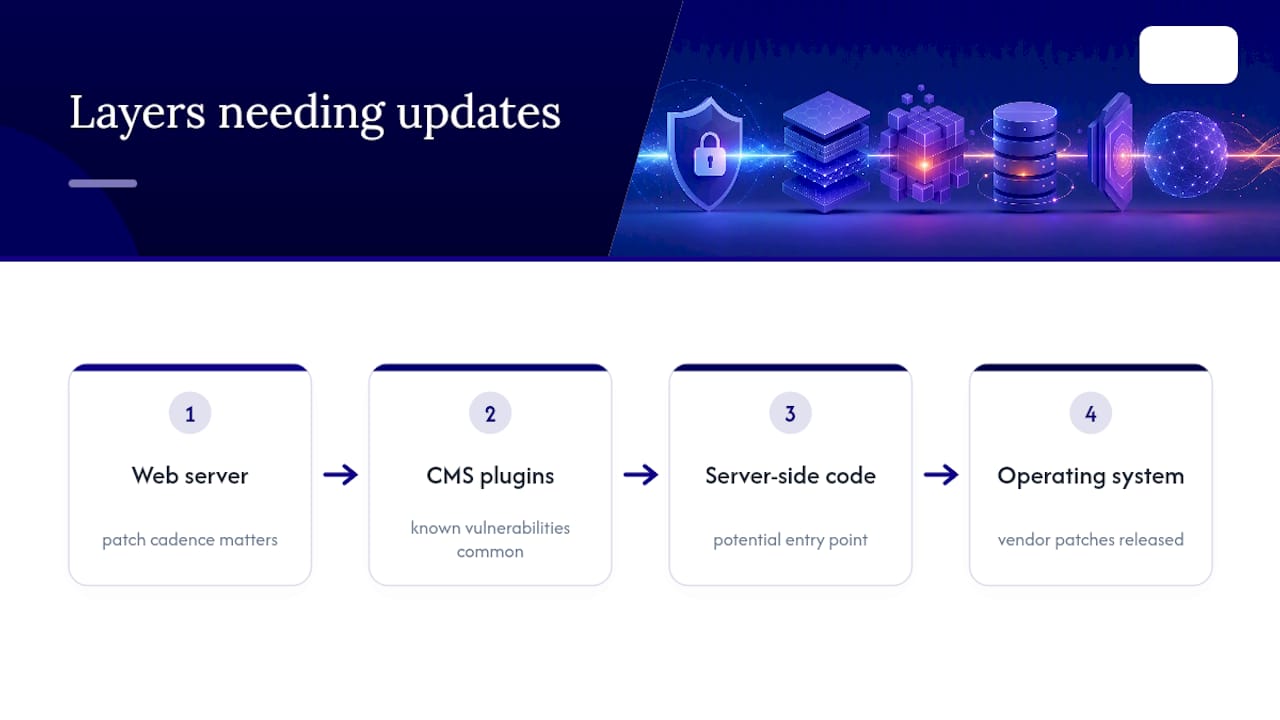
Update cadence matters at every layer: the web server software itself, any CMS plugins or themes, server-side scripting languages, and the underlying operating system. Each represents a potential entry point, and vendors regularly release patches specifically because someone found and disclosed a flaw.
For small businesses without dedicated IT staff, this is often where security postures quietly erode. A site gets built, HTTPS gets configured correctly at launch, and then nobody revisits the update schedule for a year. By that point, a dozen security patches may have gone unapplied. Automating updates where possible, and reviewing manually where automation isn't safe, keeps that gap from opening in the first place. Symmnet's manufacturing cybersecurity checklist walks through how patch cadence fits into a broader maintenance routine for operators managing this alongside daily production demands.
What the Padlock Doesn't Tell You
Most guidance on this topic treats the padlock as the finish line. It isn't. The research behind this article points to a more uncomfortable conclusion: HTTPS has become so cheap and automated to obtain that its presence tells you almost nothing about whether a site deserves your trust. It only tells you the connection is private.
That gap is where I think the conventional advice fails small business owners specifically. Plenty of guides tell readers to "look for the lock" and stop there, which was reasonable advice a decade ago when certificates cost money and required real vetting. Today, a scam site and a legitimate bank can both show identical green padlocks.
If you run a site, the priority isn't just getting a certificate. It's building the habit of checking for mixed content, keeping software patched, and treating HTTPS as one control among several, not the whole security posture. If you're a visitor, the padlock earns a glance, not blind confidence. The domain spelling deserves more scrutiny than the icon does.
Frequently Asked Questions
What is a secure site, in the simplest terms? A secure site uses HTTPS, which relies on TLS encryption, to protect data moving between your browser and the server. It confirms the connection is private and that you're reaching the actual server behind that domain.
How can I tell if a site is secure without technical knowledge?
Check for https:// in the address bar and a padlock icon next to it. Clicking the padlock shows certificate details, including the issuer and expiration date, which is enough for most everyday browsing decisions.
Does HTTPS mean a website is trustworthy? No. HTTPS confirms the connection is encrypted, not that the site's operator is honest. Phishing sites frequently hold valid certificates, so domain spelling and site reputation still matter.
What does SSL mean, and is it different from TLS? SSL was the original encryption protocol for web traffic. TLS replaced it after security researchers found significant flaws in SSL, and virtually all modern "secure" connections run on TLS despite the older term still appearing in casual use.
What's the difference between DV, OV, and EV certificates? Domain Validation (DV) confirms only that you control the domain. Organization Validation (OV) verifies the business behind it. Extended Validation (EV) requires the most thorough vetting and can surface the organization's name in some browser displays.
Is my website secure just because I installed a certificate? Installing a certificate is the starting point, not the finish line. Mixed content, outdated software, missing security headers, and weak passwords can all undermine a site that technically has valid HTTPS.