

Immutable backups are write-once, tamper-proof recovery copies that no one, not even an administrator with valid credentials, can alter or delete before their retention period expires. They matter now because ransomware crews routinely target backup systems first, and a locked, unmodifiable recovery point is often the only clean copy left standing. Immutability is a recovery control, not a prevention tool, so it works best paired with the access controls and monitoring covered below.
TL;DR:
- Most immutable backups are protected by retention locks that cannot be bypassed, even by administrators, making them highly resistant to ransomware tampering.
- Compliance mode in object lock systems provides the strongest guarantee against insider threats, blocking all override attempts during the retention period.
- Reinforcing immutability with credential separation, MFA, and role-based access control is essential to prevent attackers from changing retention settings.
- Regular testing of restore processes, including deletion attempts and timing drills, is crucial to verify backups can be reliably recovered within business RTOs.
- Locking every backup environment is ineffective unless accompanied by proven, frequent restores, and selective immutability on core systems balances security with cost management.
Table of Contents
- What Are Immutable Backups, Exactly?
- Why Immutability Matters for Ransomware and Insider Risk
- How Immutable Storage Actually Gets Enforced
- Building Immutable Backups Without Breaking Operations
- How Long Should You Keep Immutable Backups?
- Testing Immutability: The Step Everyone Skips
- Why Most Small Businesses Get Immutability Backwards
- Get Immutable Backups Set Up the Right Way
- Sources
What Are Immutable Backups, Exactly?
The technical term for this is Write-Once-Read-Many, or WORM, and it's been around for decades in tape and optical storage before cloud vendors adapted it for object storage. Once data lands in a WORM-protected repository, a retention lock prevents any process, human or automated, from overwriting or deleting it until the clock runs out. That lock lives at the storage layer, not inside your backup software, which is why it survives even if an attacker steals your backup admin's password.
A handful of implementations dominate the field right now:
- Object lock (as used in Amazon S3 and compatible storage) applies retention rules directly to stored objects, with governance and compliance modes offering different levels of protection.
- Hardened Linux repositories use kernel-level immutable file attributes to block deletion, even from root accounts, for a set retention window.
- Physical WORM media, including specialized tape, still shows up in regulated industries that need a true offline copy.
- Air-gapped storage, logical or physical, disconnects the immutable copy from the network entirely, ensuring secure handling of sensitive data during transitions as detailed by Move Craft Moving Solutions LLC.
It helps to separate immutable backups from immutable snapshots. A snapshot freezes a volume's state for fast rollback, useful for quick recovery from a bad patch, but many snapshot systems live inside the same storage fabric an attacker can reach. Immutable backups sit outside that blast radius by design, according to IBM's overview of immutable backup technology. Think of snapshots as your seatbelt and immutable backups as the airbag you hope you never need but absolutely want installed.
Why Immutability Matters for Ransomware and Insider Risk
Modern ransomware operators don't just encrypt your files. They hunt for backup repositories first and delete or corrupt them before triggering encryption, because a business with clean backups won't pay a ransom. That sequencing is exactly why the Cybersecurity and Infrastructure Security Agency's ransomware guidance lists offline or isolated encrypted backups as a baseline defensive control, not an optional extra.
An immutable copy breaks that attack pattern. Even if an attacker compromises domain admin credentials and your backup console login, the retention lock on an immutable repository doesn't care who's asking. The data stays frozen until the window closes.
Statistic Callout: Average ransomware payments have been reported at a substantial amount in recent years, highlighting the risk that immutable backups help mitigate, according to Cohesity's data on ransomware costs. A single clean recovery point can be the difference between a bad week and a six-figure payout.
Insurers and auditors have caught on. Many cyber-insurance underwriters now ask pointed questions about backup immutability during policy renewal, and industries under regulatory scrutiny, aerospace suppliers and FDA-regulated manufacturers among them, increasingly treat it as a documented control rather than a nice-to-have.
How Immutable Storage Actually Gets Enforced
The mechanics differ depending on where your data lives, and the choice you make changes your recovery speed as much as your security posture.
Object lock comes in two flavors, and the difference matters more than most IT teams realize. Governance mode lets users with special permissions override or shorten a retention lock. Compliance mode blocks that override entirely, even for root or admin accounts, for the life of the retention period. If your insurer or auditor demands proof that nobody, including a rogue insider, could touch the data, compliance mode is the only mode that actually delivers that guarantee.
Hardened repositories apply similar logic on-premises. A Linux-based backup repository configured with immutable file flags at the kernel level resists tampering even from a compromised root account, which makes it a solid fit for businesses that want immutability without shifting everything to the cloud.
Air-gapped storage offers the strongest isolation but the slowest recovery. A true offline or physically disconnected copy can't be reached by network-based ransomware at all, but retrieving it takes longer, which pushes out your recovery time objective (RTO). Weigh that trade-off against how much downtime your business can actually absorb.
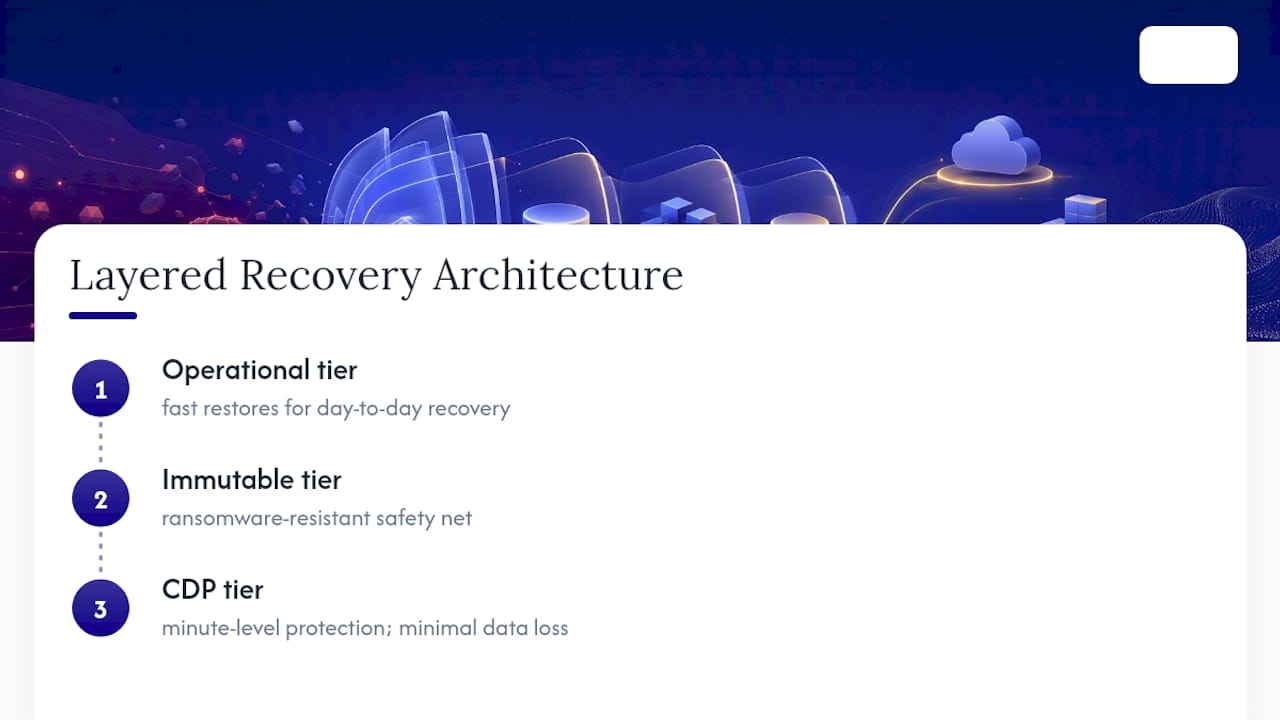
Most well-designed architectures layer these approaches rather than picking one. A fast operational backup tier handles day-to-day restores, an immutable tier serves as your ransomware-resistant safety net, and continuous data protection (CDP) fills the gap for systems where losing even a few minutes of data is unacceptable.
Pro Tip: Don't make your entire backup environment immutable by default. Start with your most critical systems, financial data, customer records, production databases, and expand once you've proven restores work reliably.
Building Immutable Backups Without Breaking Operations
Adding immutability to an existing backup chain doesn't require a rebuild. It requires sequencing.
- Pick your target architecture first. Match cloud object lock, a hardened repository, or an air-gapped archive to your actual RTO and recovery point objective (RPO) needs and your budget, not to whatever a vendor pitched you last.
- Separate the control plane. The credentials that manage your immutable backup repository should never be the same ones that manage production systems or Active Directory. If one login can touch both, an attacker only needs to compromise it once.
- Turn on MFA and role-based access control (RBAC) for every backup administrator account. This single step closes the gap that SentinelOne identifies as a common operational failure: shared or overly broad credentials that let attackers bypass immutability entirely.
- Set retention windows based on realistic dwell time. Ransomware often sits undetected for weeks before triggering, so a retention lock shorter than that dwell time defeats the purpose.
- Enable alerting on retention changes and object-lock state. Any attempted modification to a locked object is itself a signal worth investigating immediately.
- Decide scope deliberately. Protect the systems that would hurt the most if lost, then expand to secondary workloads and SaaS data like Microsoft 365 mailboxes once the core protection is proven.
Pro Tip: Document who owns each step of this checklist by name. "The IT team" isn't an owner. A specific person with a specific Tuesday-morning task is.
If your team doesn't have the bandwidth to manage this internally, a backup retention policy built with clear ownership keeps the process from quietly lapsing after the initial setup enthusiasm fades.
How Long Should You Keep Immutable Backups?
Retention windows aren't one-size-fits-all, and setting them too short defeats the entire point.
Operational immutable backups commonly run 30 to 90 days, long enough to outlast typical ransomware dwell time without creating unmanageable storage growth, according to AvePoint's guidance on immutable backup configuration. Regulated archives, financial records, aerospace compliance documentation, FDA audit trails, often need retention measured in years rather than months, sometimes up to seven years depending on the framework governing your industry.
Statistic Callout: Immutable storage typically adds more cost compared to traditional backup storage, but this premium is usually the cheaper bet compared to ransomware payouts, as documented by Cohesity. Weighed against a six-figure ransomware payout, that premium is usually the cheaper bet.
The real risk isn't cost. It's bloat and inflexibility. Locked data can't be purged even when you discover it was backed up by mistake, and unmanaged immutable tiers grow fast. A tiered approach limits the damage: keep your everyday operational backups on standard storage, apply immutability selectively to the systems that actually warrant it, and route long-term compliance data to cheaper archive-class storage rather than paying premium rates for years of untouched files. Our own guide to data backup best practices walks through how to draw that line.
Testing Immutability: The Step Everyone Skips
An immutable backup you've never tried to restore is a theory, not a defense. Locking data down proves nothing if nobody has confirmed you can actually get it back within your recovery window.
- Run controlled deletion tests. Attempt to delete or modify data in your immutable repository from several different accounts, including admin-level ones, to confirm the lock actually holds.
- Schedule quarterly restore drills. Measure real elapsed time from "we need this file back" to "it's restored and verified," not the vendor's marketing number.
- Automate integrity checks and malware scanning on recovery points themselves, since a clean-looking backup can still contain dormant malware waiting to reactivate.
- Document restore playbooks with a named owner for each step, including dependencies like DNS and Active Directory that often get forgotten until a real recovery is underway.
Immutable copies can still miss recovery time objectives if the people running the restore don't know the steps, according to Acronis's analysis of ransomware recovery. Our walkthrough on testing your backup covers the drill cadence in more detail.
| What to test | How often | What it proves |
|---|---|---|
| Deletion attempt from admin account | Once per quarter | Retention lock holds under real conditions |
| Full restore drill with timing | Quarterly | Actual RTO matches business needs |
| Integrity and malware scan of recovery points | Monthly or automated | Recovery point is clean, not just present |
| Dependency check (DNS, AD, licensing) | With each drill | Restored systems actually come back online |
Why Most Small Businesses Get Immutability Backwards
Here's the pattern I keep seeing: a business locks down every backup it has, congratulates itself on being "ransomware-proof," and never once tries to restore from that locked repository until the day it actually needs to. That's backwards. The lock is the easy part. Proving the restore works within a timeframe your business can survive is the part that actually matters, and it's the part everyone skips.
The conventional wisdom treats immutability as a checkbox: turn on object lock, done. That mindset misses the credential-separation piece almost entirely. I've reviewed plenty of environments where the backup admin account and the domain admin account were, functionally, the same person with the same password reused across both. Immutability doesn't help if the attacker who compromised your network can still reach the console that manages retention settings, even if they can't touch the locked data itself.
The other blind spot is cost anxiety. Business owners hear "15 to 30% more storage cost" and flinch,, without weighing that number against what a six-figure ransomware payment actually costs. Selective immutability on your crown-jewel systems, not your entire environment, solves both problems at once.
— Michael
Get Immutable Backups Set Up the Right Way
Managed IT and cybersecurity providers often build and manage immutable backup strategies as part of broader backup and disaster recovery services for small businesses in manufacturing, aerospace, and professional services, industries with strict audit and insurance expectations and limited internal IT resources.

An effective approach starts by mapping existing backup systems, identifying retention gaps, and assessing the separation between backup credentials and production access. From there, an immutable tier sized to actual risk is scoped, avoiding blanket policies that inflate storage costs for data without extended retention needs. Implementing MFA, RBAC, and quarterly restore validation as standard practices ensures robust backup strategies.
If you're not sure whether your current backups would actually survive a targeted ransomware attack, Symmnet's free assessment identifies the gaps and maps a practical path to a properly immutable, tested recovery tier, sized for your budget and your compliance obligations.
Sources
- Stop Ransomware | CISA
- Immutable backup | Cohesity glossary
- What is immutable backup? | AvePoint blog
- Immutable backups | SentinelOne
- Immutable backup: why it matters for ransomware recovery | Acronis