

A small business backup process is a systematic, repeatable approach to copying and protecting critical data so your business can recover quickly after loss, corruption, or attack. 60% of small businesses fail within six months of a major data loss event. That number alone makes backup planning one of the most consequential decisions you can make. The NIST Cybersecurity Framework 2.0 and CISA both classify backup as a foundational control, not an optional IT task. A well-built backup process protects your finances, your customers, and your ability to stay open.
What should a small business backup process include?
The first step in any backup process is knowing exactly what you need to protect. Treating all data equally wastes resources and slows recovery. Prioritizing data by business impact lets you back up the most critical assets most frequently and recover them first.
Organize your data into three tiers:
- Critical data requires the most frequent backups and the fastest recovery. This includes customer records, financial files, contracts, payroll data, and active project files. Losing this data stops your business immediately.
- Important data supports daily operations but can tolerate a short recovery delay. Examples include email archives, vendor communications, HR documents, and marketing assets.
- Non-essential data includes archived files, old reports, and temporary files. Back these up less frequently to conserve storage and bandwidth.
Beyond files, your backup process must cover system configurations, application settings, database snapshots, website files, and security credentials. Many small businesses back up their documents but forget their accounting software database or their firewall configuration. Restoring a server without its configuration files can add hours to your recovery time.
A practical starting point is a data inventory spreadsheet. List every system, application, and file location your business depends on. Assign each a recovery priority and a backup frequency. This document becomes the foundation of your entire data protection strategy.
How do you choose the right backup methods for small businesses?
Once you know what to protect, you need to choose how to protect it. Four backup types cover most small business needs.

| Backup type | How it works | Best use case |
|---|---|---|
| Full backup | Copies all selected data every time | Weekly baseline; easy to restore |
| Incremental backup | Copies only data changed since the last backup | Daily backups; fast and storage-efficient |
| Differential backup | Copies all data changed since the last full backup | Balances speed and restore simplicity |
| Continuous data protection | Captures every change in near real time | High-value systems with low tolerance for data loss |
Your choice of backup type should align with two recovery objectives. The Recovery Point Objective (RPO) defines how much data loss is acceptable, measured in time. The Recovery Time Objective (RTO) defines how quickly you need systems back online. Small businesses lose an average of $8,500 per hour during downtime, yet 45% have never defined their RTO or RPO. Without those targets, you cannot choose the right backup frequency or method.
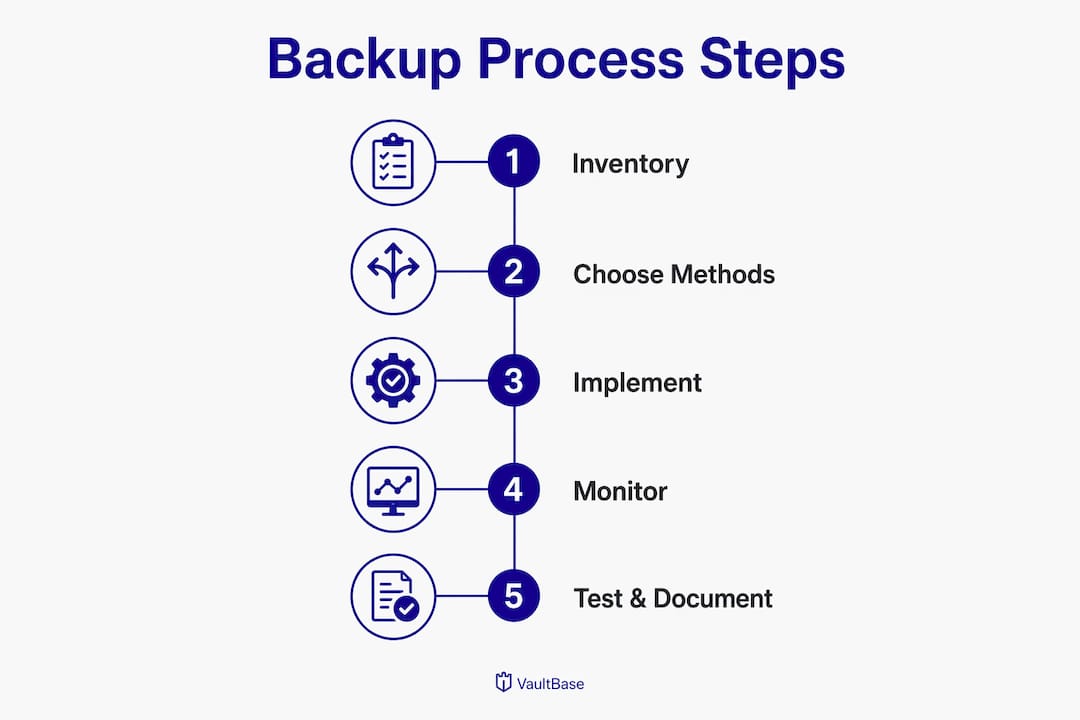
A hybrid architecture combines local backups with cloud backup solutions for businesses. Local backups on a NAS device or external drive give you fast restore speeds. Cloud backups provide offsite protection against fire, flood, or theft. Together, they cover the scenarios that either option alone cannot handle. Automated, monitored backups reduce human error and catch silent failures before they become disasters.
Pro Tip: Set up email or SMS alerts for every backup job. A backup that runs silently and fails silently is no backup at all. Alerts give you a daily confirmation that your data is protected.
What is the 3-2-1-1-0 backup rule and why does it matter?
The 3-2-1-1-0 rule is the current industry standard for backup architecture. It extends the older 3-2-1 rule to address ransomware threats specifically. Each number represents a requirement.
- 3 total copies of your data
- 2 different storage media types (for example, local drive and cloud)
- 1 copy stored offsite
- 1 copy that is immutable or air-gapped
- 0 errors confirmed through verified testing
The immutable copy is the critical addition. Immutable, air-gapped backups prevent ransomware from encrypting your backup files. Ransomware attacks now routinely target connected backup drives before encrypting production data. If your only backup is a USB drive plugged into your server, ransomware will encrypt that too. An air-gapped copy sits completely offline or in a write-once cloud storage bucket, beyond the reach of any malware.
The financial stakes are real. Small businesses face average ransomware payments of $116,000, and 80% of businesses that pay get reinfected. A properly implemented 3-2-1-1-0 architecture makes paying a ransom unnecessary.
Here is how a practical implementation looks for a small business. Keep one local backup on a NAS device connected to your network. Keep a second copy in a cloud backup service with versioning enabled. Keep a third copy on an external drive stored offsite or in a write-once cloud storage tier. Run automated verification after every backup job to confirm zero errors.
Pro Tip: Use a cloud storage tier that supports object lock or WORM (Write Once, Read Many) settings. This creates an immutable copy without requiring physical air-gapping, which is difficult to manage manually.
How do you test, document, and maintain your backup process?
An untested backup is not a backup. It is a hope. 25% of businesses never test backup integrity, which means one in four businesses will discover their backup is broken at the worst possible moment.
Testing should follow a quarterly schedule with four levels of verification:
- Random file restore: Pull a handful of files from the backup and confirm they open correctly. Do this monthly.
- Application data restore: Restore a database or application to a test environment and confirm it functions. Do this quarterly.
- Full system restore: Restore an entire server or workstation image to a test machine. Measure actual recovery time against your RTO. Do this twice a year.
- Disaster simulation: Run a tabletop exercise where your team walks through a full recovery scenario. Do this annually.
Quarterly restore tests confirm backup validity and reveal real recovery times. Many businesses discover their actual RTO is three times longer than their target only during a real incident.
Documentation is equally critical. Clear documentation and defined roles reduce recovery errors under pressure. Your disaster recovery manual should include step-by-step restoration procedures, the names and contact details of every person responsible for recovery, vendor support numbers, software license keys, and your target RTO and RPO for each system.
Pro Tip: Store your disaster recovery manual in at least two places outside your primary systems: a printed copy in a secure location and a copy in a cloud document service your team can access from any device.
Continuous monitoring catches problems that testing misses between cycles. Backup software that logs job status, flags incomplete runs, and alerts on storage capacity issues keeps your process reliable day to day. Visit backup testing best practices for a deeper look at building a verification schedule.
What are the most common small business backup mistakes?
Most backup failures trace back to a short list of predictable errors. Recognizing them before they cost you is far cheaper than recovering from them after.
- Skipping offsite copies. A local-only backup cannot survive a fire, flood, or office theft. Offsite or cloud backup is not optional.
- Using connected drives as the only backup. Any drive permanently connected to your network is vulnerable to ransomware. Rotate drives offline or use immutable cloud storage.
- Never testing restores. Backup software can report success while writing corrupted data. Only a restore test proves the backup works.
- Ignoring RTO and RPO. Without defined recovery targets, you cannot measure whether your backup process actually meets your business needs.
- Backing up everything at the same frequency. This wastes storage and slows recovery. Tier your data and match backup frequency to business impact.
Ransomware does not just encrypt your files. It hunts for connected backup drives and encrypts those first. A backup stored on a drive that is always online offers almost no protection against a modern ransomware attack. The only reliable defense is a copy that ransomware cannot reach.
Silent failures are the most dangerous mistake of all. A backup job that completes with errors but reports success will fail at restore time. Automated monitoring with email alerts catches these failures before they accumulate into unrecoverable gaps. Review your data backup tips to build a checklist that prevents the most common errors.
Key Takeaways
A reliable small business backup process requires tiered data prioritization, the 3-2-1-1-0 architecture, automated monitoring, and quarterly restore testing to meet defined RTO and RPO targets.
| Point | Details |
|---|---|
| Tier your data | Categorize data as critical, important, or non-essential to match backup frequency to business impact. |
| Apply the 3-2-1-1-0 rule | Keep three copies on two media types, one offsite, one immutable, and verify zero errors after every job. |
| Define RTO and RPO | Set recovery time and recovery point targets before choosing backup methods or tools. |
| Test restores regularly | Run quarterly application restores and twice-yearly full system restores to confirm real recovery times. |
| Document and monitor | Maintain a recovery manual outside your primary systems and use automated alerts to catch silent failures. |
Why most small businesses get backup wrong
I have worked with enough small business owners to know that backup almost always starts as an afterthought. Someone sets up a cloud sync folder, calls it a backup, and moves on. Then a ransomware attack hits or a server drive fails, and they discover that synced files are not the same as verified, versioned backups.
The part that surprises most owners is not the technology. The technology is straightforward. The part that trips businesses up is the human side: no one owns the process, no one tests it, and the documentation lives in the head of the one person who set it up three years ago.
I have seen businesses with perfectly configured backup software lose days of data because no one checked the alert emails. The software flagged failures for weeks. Nobody noticed. That is not a technology failure. That is a process failure.
The businesses that recover fastest from incidents are not the ones with the most expensive tools. They are the ones where someone runs a restore test every quarter, where the recovery manual is printed and stored in a drawer, and where backup monitoring is someone's actual job responsibility. Automation handles the heavy lifting, but human accountability closes the gaps that automation cannot see.
Backup is insurance. You do not buy insurance and then never check whether the policy is still valid. Treat your backup process the same way.
— Michael
How Symmnet helps small businesses protect critical data
Building and maintaining a reliable backup process takes consistent attention, and most small business owners are already stretched thin.

Symmnet's managed IT services include automated backup configuration, continuous monitoring, and scheduled restore testing designed specifically for small businesses in manufacturing, professional services, and other regulated industries. The team handles backup job monitoring, alert response, and documentation so your recovery process works when you actually need it. If you want to know where your current backup process stands, Symmnet offers a free IT assessment to identify gaps and recovery risks before an incident forces the issue. Reach out to the Symmnet team at symmnet.com to get started.
FAQ
What is a small business backup process?
A small business backup process is a documented, repeatable system for copying critical data to secure locations so the business can recover quickly after data loss, hardware failure, or a cyberattack.
How often should a small business back up its data?
Critical data should be backed up daily at minimum, with high-value systems using continuous data protection. Less critical data can be backed up weekly based on your defined RPO.
What is the 3-2-1-1-0 backup rule?
The 3-2-1-1-0 rule requires three copies of data on two media types, one stored offsite, one immutable or air-gapped, and zero errors confirmed through verification. It is the current industry standard for ransomware-resilient backup architecture.
Why do small business backups fail during recovery?
25% of businesses never test backup integrity, so failures go undetected until a real incident. Silent errors, corrupted files, and misconfigured restore settings are the most common causes of recovery failure.
What is the difference between RTO and RPO?
RTO (Recovery Time Objective) is how quickly you need systems restored after an incident. RPO (Recovery Point Objective) is how much data loss, measured in time, your business can tolerate. Both targets must be defined before selecting backup methods.