

A phishing simulation is a controlled send of fake phishing messages that measures how employees actually behave, then triggers immediate remediation when someone clicks. The single best first move is to pick a small pilot group and confirm the sending domain is allowlisted before you launch anything. Get delivery right first; everything else, from click rates to coaching, depends on it.
TL;DR:
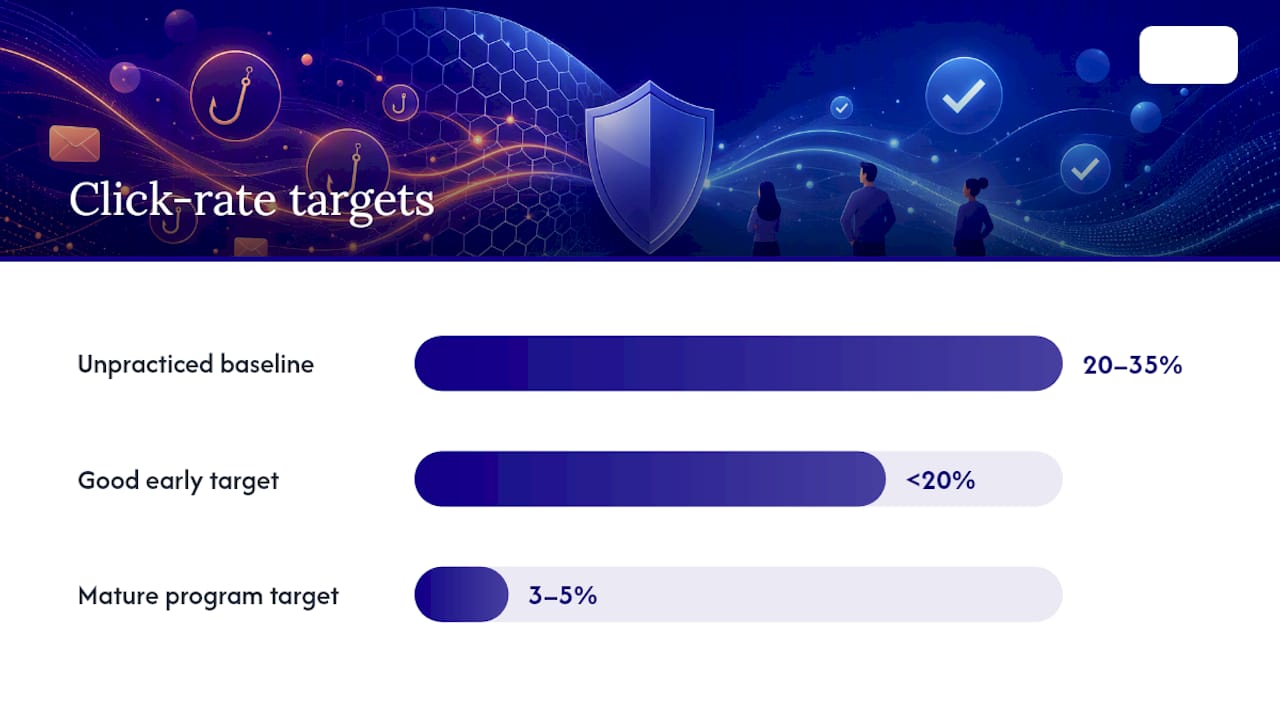
- Most small businesses experience baseline click rates of 20% to 35%, which can be reduced to 3% to 5% with consistent, spaced training over 12 months.
- Ensuring email delivery by properly allowlisting in Microsoft 365 and Google Workspace is critical, as overlooked setup can skew results or cause filtering issues.
- Ongoing simulations, role-based scenarios, and low-stakes templates build familiarity and reduce click susceptibility without creating anxiety or distrust.
- Immediate follow-up and micro-training after each click significantly improve retention and help employees recognize red flags more effectively.
- Outsourcing phishing simulation management to providers like Symmnet simplifies setup, guarantees technical compliance, and maintains program consistency for resource-strapped SMBs.
Table of Contents
- What Phishing Simulations Are and Why They Matter for Small Businesses
- How to Choose an Approach and Platform That Fits an SMB
- Step-by-Step: Configure and Launch Your First Phishing Simulation Campaign
- Measure Results: Metrics to Track and What They Really Mean
- Remediation and Training After Failures: Using the Teachable Moment
- Practical Scenarios and Templates to Start With
- Legal, Policy, and Communications Checklist
- Symmetry's Recommended Managed Approach and Proof Points
- Author's Perspective: Practical MSP Advice for SMB IT Managers
- Get a Managed Phishing Simulation Program Without the Setup Burden
- Sources
What Phishing Simulations Are and Why They Matter for Small Businesses
Phishing simulation for employees is a training exercise, not a security test of your network. That distinction trips up a lot of IT managers who are used to thinking in terms of vulnerability scans and penetration tests. A pentest probes your firewalls, servers, and applications for exploitable weaknesses. A phishing simulation probes something harder to patch: human judgment under a moment of pressure or distraction. You send a realistic but harmless fake phishing email, then watch what people actually do with it.
The exercise measures three behaviors, and each tells you something different:
- Click rate — who opened a link, showing initial susceptibility to the lure.
- Submission rate — who entered credentials or data, showing the deepest level of compromise.
- Report rate — who flagged the message to IT or security, showing your best defense in action.
For companies running their first campaign with an untrained staff, baseline click rates commonly land between 20% and 35%. That number tends to shock small business owners who assume their team is more careful than that. It usually isn't, not because employees are careless, but because a well-crafted lure exploits normal workplace habits: trust in a coworker's name, urgency in a subject line, the reflex to click before thinking.
Well-run programs can push that click rate down to 3% to 5% within about 12 months. That kind of improvement doesn't come from a single scary email blast. It comes from repetition spaced over time. Memory research on the forgetting curve shows that spaced repetition improves retention far more reliably than one intensive session. Run one simulation and a lecture in January, and by June most of that lesson has evaporated. Run short, varied simulations every month, and the lesson becomes muscle memory.
This is why phishing simulation for employees works best as an ongoing employee phishing training habit, not a one-time compliance checkbox. Your goal isn't to catch people failing. It's to lower the click rate, raise the report rate, and shrink the time it takes someone to flag a suspicious email to your team.
How to Choose an Approach and Platform That Fits an SMB
Small businesses don't need enterprise-grade complexity. What they need is fast setup, reliable automation, and remediation that happens the moment someone clicks, without demanding a full-time analyst to babysit the dashboard.
Before you commit to a platform or vendor, run through this checklist:
- Template library with realistic, regularly updated scenarios (not stale templates from three years ago).
- Role-based targeting so finance, HR, and operations can each receive relevant lures.
- Scheduling and staggering so sends don't all land in the same hour and tip off the whole office at once.
- Automatic remediation triggered instantly on a click, not queued for a weekly training session.
- Clear reporting that a non-specialist manager can read in five minutes, not a raw data export.
Broadly, you have three paths: a fully managed service that runs the program for you, a hosted SaaS platform you configure yourself, and self-hosted open-source tooling. Managed services cost more per month but require almost no internal time. Hosted SaaS tools sit in the middle: lower cost, but someone on your team has to own setup, template selection, and follow-up. Self-hosted tools are the cheapest on paper and the most demanding in practice, since you're responsible for deliverability, updates, and troubleshooting every failed send yourself.
Whichever path you choose, allowlisting compatibility matters more than almost any other feature. If you run Microsoft 365, you'll need to configure the Advanced Delivery policy in Microsoft Defender's Attack simulation training so simulated messages bypass spam filtering and quarantine. Google Workspace requires a similar allowlist entry for your sending domain and IP range. Skip this step and your "results" will actually measure your spam filter's effectiveness, not your employees' judgment.
Pro Tip: Before you evaluate any platform's price or feature list, ask the vendor exactly how their allowlisting instructions work for Microsoft 365 and Google Workspace. If they can't give you a clear answer in one paragraph, that's a sign the setup will eat more of your time than the sales page suggests.
For a business without a dedicated security hire, the honest math usually favors a managed option once you factor in the hours it takes to configure templates, chase down bounced test emails, and interpret results correctly.
Step-by-Step: Configure and Launch Your First Phishing Simulation Campaign
Running your first phishing test for staff well depends far more on preparation than on the cleverness of the fake email itself. Rushing setup is the most common reason first campaigns produce garbage data.
Pre-launch checklist:
- Define one measurable goal (for example, "reduce click rate on generic lures by half in six months").
- Get written sign-off from leadership confirming the program is authorized.
- Draft and circulate a short no-blame policy statement before the first send.
- Set up a reporting channel (a dedicated inbox or a one-click "Report Phish" button).
- Select a pilot group of 10 to 20 employees across at least two departments.
Technical prep:
- Allowlist the simulation platform's sending domains and IP ranges in your email security gateway.
- Send a test message to a seed mailbox to confirm it lands in the inbox, not spam or quarantine.
- Confirm SPF, DKIM, and DMARC records won't flag or reject the simulated sender.
- Build or verify the landing page employees see after a click, making clear within seconds that it was a simulation.
Campaign setup:
Choose a scenario that matches your pilot group's baseline risk. Start with something generic and low-stakes rather than a high-pressure executive impersonation. Calibrate difficulty deliberately: an "easy" lure has obvious red flags (a misspelled domain, a generic greeting), while a "medium" lure mimics a real internal process more closely. Decide on your landing page type, whether it simply reveals the test or leads into an immediate short lesson. Then schedule the send with staggered delivery times, since a burst of identical timestamps makes a campaign easy to spot once one person reports it in the group chat.
Launch monitoring:
Watch the first hour closely. Confirm delivery rates match your recipient count; a big gap usually means a filtering rule blocked messages somewhere you didn't anticipate. If delivery looks wrong, pause the campaign, fix the allowlist entry, and resend rather than letting bad data pile up. Track clicks and reports in real time for the first day, since that's when most of the action happens.
Measure Results: Metrics to Track and What They Really Mean
Four numbers tell you almost everything you need to know about a phishing awareness program: click rate, submission rate, report rate, and time-to-report.
Click rate shows how many people took the bait at all. Submission rate, typically lower, shows how many went further and handed over credentials or data, which represents your worst-case exposure. Report rate is the number to watch most closely over time, since it reflects a positive behavior you're trying to build rather than a failure you're trying to eliminate. Time-to-report, the average minutes between delivery and the first internal report, tells you how fast your team could realistically respond to a real attack.
| Metric | What it measures | Good early target | Mature program target |
|---|---|---|---|
| Click rate | Employees who clicked a link | Below 20% | 3% to 5% |
| Submission rate | Employees who entered data | Lower than click rate | 0% |
| Report rate | Employees who flagged the message | Rising month over month | Majority of recipients |
| Time-to-report | Speed of the first internal report | Same-day | within minutes |
The baseline range for an unpracticed team runs 20% to 35% on click rate, and programs that stay consistent for about a year commonly bring that down to single digits. Don't compare a hard finance-themed lure to an easy generic one and call the difference "progress" or "decline." Match difficulty levels across campaigns before you draw conclusions, and segment results by role, since a finance team's exposure to invoice fraud looks nothing like an operations team's exposure to shipping notice scams.
Filter out noise before you report numbers to leadership. Automated link scanners built into some email security tools will "click" links without a human ever seeing the message, and delivery failures shouldn't count against your click rate denominator. A clean report distinguishes those from genuine human responses, or your metrics will lie to you in both directions.
Remediation and Training After Failures: Using the Teachable Moment
The moment right after someone clicks a simulated phishing link is the single highest-value teaching opportunity in the entire program. Waste it with a delayed, generic training module weeks later, and most of the lesson is gone.
The most effective remediation follows a short, consistent structure:
- Reveal immediately that the message was a simulation, not a real attack.
- Explain the three specific red flags that should have raised suspicion.
- Deliver a 3 to 5 minute interactive micro-module tied to that exact scenario.
- Encourage, closing with a plain statement that clicking is common and reporting next time is the goal.
Immediate remediation, delivered within minutes of the click, produces stronger retention than training bundled into a quarterly all-hands session. The employee still remembers exactly what they were thinking when they clicked, which makes the lesson concrete instead of abstract. Short modules also get finished. A 3 to 5 minute module has a far higher completion rate than an hour-long annual training video that everyone clicks through while checking email.
Pro Tip: Reserve private, one-on-one coaching for repeat clickers only, and keep that conversation confidential between the employee and their manager or IT contact. Broadcasting individual results, even accidentally through a shared spreadsheet, is the fastest way to kill trust in the entire program.
Punitive consequences for clicking, docked bonuses, mandatory write-ups, public leaderboards naming failures, backfire in a specific way: they suppress reporting. Employees who fear punishment for clicking start hiding real suspicious emails instead of reporting them, which is the opposite of what you're trying to build. Frame every follow-up conversation around skill-building, never discipline.
Practical Scenarios and Templates to Start With
Your first few campaigns should feel low-stakes and easy to recognize once explained, not clever enough to embarrass anyone. Save the harder material for later, once your no-blame culture is established and people trust the program.
Safe starter lures for the early campaigns:
- A fake delivery notice from a shipping carrier requiring "tracking confirmation."
- A shared document notification mimicking a common file-sharing tool.
- An account password reset request with a slightly off sender domain.
- A generic invoice email asking for urgent review.
Reserve spear-phishing and finance-themed lures like wire transfer requests or executive impersonation for phase two, once your baseline click rate has already started dropping. These campaigns rely on more sophisticated pretexts, and firing them off before employees understand the exercise can create outsized anxiety, especially among finance staff already sensitive to fraud attempts.
A sensible rollout order looks like this:
- Month 1 to 2: generic, easy scenarios across the whole pilot group.
- Month 3 to 4: role-based scenarios, tailored to finance, HR, and operations separately.
- Month 5 onward: increased difficulty and occasional harder spear-phishing scenarios for higher-risk roles.
Industry guidance generally settles on one to two simulations per month as the sweet spot for SMBs, frequent enough to build habit, infrequent enough to avoid burnout. Stagger send times across the group rather than blasting everyone at 9:00 AM sharp; a single early reporter mentioning the test in a team chat can sterilize your entire dataset if the rest of the group hasn't received it yet. Role-based templates also surface department-specific weak spots early, letting you target remediation where it actually matters instead of running one generic program for everyone.
Legal, Policy, and Communications Checklist
Running a phishing risk assessment inside your own company is generally straightforward from a legal standpoint in the United States, since you're testing your own employees on your own systems with leadership's knowledge. That said, a few minimum steps keep the program clean and trustworthy.
- Get written sign-off from an executive or owner before the first send, and keep it on file.
- Publish a brief policy statement telling employees a phishing awareness program exists, without revealing timing or content.
- Never capture real passwords on landing pages; log only whether a submission occurred.
- Report results in aggregate, not by naming individuals outside their direct manager.
- Loop in HR ahead of time for any edge case, such as an employee on leave or new hires still in onboarding.
- Consult employment counsel if your state has specific monitoring-disclosure requirements.
A short internal announcement works better than a detailed one. Something like: "As part of our ongoing security awareness program, employees may occasionally receive test emails designed to build better habits around identifying suspicious messages. There are no penalties for clicking; the goal is training, not punishment." Skip specifics about timing, scenario themes, or which departments go first. That information belongs to your program, not the announcement.
Symmetry's Recommended Managed Approach and Proof Points
Small businesses in manufacturing, aerospace, and professional services often lack the staff hours to run this program well on their own, even when they understand exactly what needs to happen. Symmnet builds phishing simulation into its broader managed IT and cybersecurity services, alongside 24/7 monitoring, endpoint security, and compliance support for regulated industries.
Symmnet handles the technical groundwork that trips up most first-time in-house attempts: domain allowlisting across Microsoft 365 and Google Workspace, seed mailbox testing before launch, and aggregated reporting that protects individual employee privacy while still giving leadership a clear trend line.
If your team has the time and a genuine interest in owning the program, DIY works. If you're stretched across helpdesk tickets, compliance paperwork, and everything else that lands on a small IT department, outsourcing the setup and monitoring is usually the more realistic path to consistent results.
Author's Perspective: Practical MSP Advice for SMB IT Managers
Start small. That's the entire secret nobody wants to hear, because it sounds too simple to be advice. Pick a pilot group of fifteen people, confirm your allowlist actually works, and run one easy campaign before you touch a spreadsheet full of metrics.
What I'd push back on is the instinct to judge a program by a single campaign's click rate. One bad number means almost nothing; a downward trend across six months means everything. Automate the sending and remediation wherever you can, protect your program's reputation by keeping it no-blame from day one, and resist the urge to make the first lure clever. Boring and repeatable beats brilliant and one-off, every time.
If none of this fits inside your current workload, a free assessment is a reasonable way to find out what a managed version would actually look like for your team.
— Michael
Get a Managed Phishing Simulation Program Without the Setup Burden
Symmnet is the practical alternative to building this program from scratch with a stretched internal team. Instead of spending weeks configuring allowlist entries, chasing failed test sends, and building remediation content in-house, you get a managed phishing-simulation program bundled into ongoing IT and cybersecurity support, run by people who already do this setup work daily.

Symmnet's approach covers the full cycle: campaign scheduling and template selection, allowlisting across Microsoft 365 and Google Workspace, remediation coaching after clicks, and reporting dashboards that show trends instead of raw noise, making it an ideal solution for modern manufacturing environments in the context of a smart factory. It fits particularly well for small manufacturers, aerospace suppliers, and professional services firms that already carry compliance obligations but don't have a dedicated security analyst on staff. If your business runs regulated equipment or handles sensitive client data, pairing simulations with broader protections like network segmentation closes gaps a training program alone can't touch.
Start with a free assessment to see where your current click and report rates likely stand, and what a managed rollout would look like for your specific team size and industry.
Sources
- Simulate a phishing attack with Attack simulation training
- How to Run a Phishing Simulation: Step-by-Step Playbook
- Phishing simulation for businesses: a practical 2026 guide
- The Small Business Checklist: A Phishing Awareness Training Implementation Guide in 5 Steps - OutPhish