

Security awareness training is a structured program that teaches employees to recognize, avoid, and report cyber threats — and for small and medium businesses, it's one of the most cost-effective controls available. The core outcome is simple: fewer employees fall for phishing, social engineering, and credential attacks, which means fewer incidents, lower remediation costs, and a stronger compliance posture. Both NIST SP 800-50 and CISA treat this kind of program as a foundational requirement, not an optional extra. Symmnet works with small U.S. businesses every day to design and manage exactly these programs.

Table of Contents
- How security awareness training actually works
- Why SMBs run security awareness training
- What your security awareness program should teach
- How to design and run a security awareness program for your small business
- Measuring effectiveness: which KPIs actually matter
- Which training formats and platform features should you prioritize?
- Practical best practices and quick wins for small businesses
- How Symmnet implements security awareness training for small U.S. businesses
- Key Takeaways
- Why the "human firewall" framing misses the point
- Symmnet's free security assessment: a practical starting point
- Authoritative sources and further reading
How security awareness training actually works
NIST SP 800-50 draws a clear line between awareness and training: awareness focuses attention on a risk, while training builds the specific skill to handle it. Both matter, and a well-designed program moves employees through both stages deliberately.
Common delivery methods:
- Microlearning modules: short, focused lessons on one topic at a time that fit into a workday without disrupting schedules and are effective at changing behavior. They are far more effective at changing behavior than a single annual session and fit into a workday without disrupting production schedules.
- Phishing simulations: realistic fake phishing emails sent to staff. When someone clicks, they get immediate, in-context coaching rather than a lecture two weeks later. This is the single highest-impact activity for most SMBs.
- Live workshops or lunch-and-learns: useful for onboarding, policy rollouts, or high-risk teams. They allow Q&A and scenario discussion that self-paced modules cannot replicate.
- Just-in-time help: pop-up warnings, email banners, or browser alerts that coach employees at the moment of a risky action.
Here's a practical scenario. An employee receives an email that appears to come from their bank, asking them to verify account credentials via a link. A trained employee notices the sender domain is slightly off, hovers over the link without clicking, sees a mismatched URL, and reports it to IT using the company's one-click reporting button. An untrained employee clicks, enters credentials, and the breach begins. The difference between those two outcomes is a phishing simulation run three months earlier.
Pro Tip: Run a baseline phishing simulation before any formal training begins. The click rate you see in week one is your benchmark — every subsequent simulation should show a declining trend. Without that baseline, you have no way to prove the program is working.
Cadence matters as much as content. Research from NINJIO confirms that more frequent microlearning combined with periodic phishing simulations outperforms annual multi-hour sessions for behavior change and retention.
Why SMBs run security awareness training

Attackers frequently exploit employee habits and social engineering to breach small businesses, targeting human behavior rather than purely technical vulnerabilities. That pattern makes your workforce both the biggest risk and the most accessible control point you have.
The business case for security training programs breaks down into four categories:
- Incident reduction: employees who can identify phishing and social engineering attempts stop attacks before they reach your network or data.
- Faster detection and reporting: trained staff report suspicious activity sooner, cutting the window attackers have to move laterally or exfiltrate data.
- Compliance readiness: HIPAA, PCI DSS, and other frameworks require documented evidence that employees have been trained. HHS HIPAA guidance specifically calls out training records as an audit requirement.
- Cyber insurance: underwriters increasingly expect documented, frequent training as a condition of coverage or favorable premiums. Industry advisories show that insurers want evidence of regular training before they extend or renew a policy.
The FTC's cybersecurity guidance for small businesses recommends tracking employee participation and updating training content whenever new threats emerge. That's not bureaucracy — it's the paper trail that protects you when an insurer or auditor asks what you did to prevent an incident.
For manufacturers and regulated businesses, the stakes are higher still. A breach that exposes customer data or disrupts production carries remediation costs, regulatory fines, and reputational damage that dwarf the cost of a well-run training program. Understanding IT security risks for small manufacturers puts those costs in sharper perspective.
What your security awareness program should teach
The importance of security awareness comes down to what employees actually learn. A program that covers phishing but ignores remote work hygiene leaves a gap attackers will find. NIST guidance for small businesses recommends tailoring content to workers' actual systems and daily contexts rather than using generic, off-the-shelf material.
Core topics every program should include:
- Phishing and spear-phishing recognition (email, SMS, voice)
- Social engineering tactics (pretexting, impersonation, urgency cues)
- Password hygiene and the use of password managers
- Multi-factor authentication (MFA) setup and why it matters
- Device hygiene: locking screens, patching, avoiding public Wi-Fi
- Safe remote work practices, including VPN use and home network security
- Data handling and classification: what can be shared, stored, or emailed
- Acceptable use policies for company devices and accounts
- Incident reporting: how to flag suspicious activity and who to contact
Role-based variations matter. Frontline staff need to recognize phishing and know how to report it. Managers need to understand social engineering targeting executives (business email compromise is a common attack vector). IT and operations staff need deeper training on access controls, patch management, and network hygiene. Contractors and vendors who access your systems need a condensed version of your acceptable use and reporting policies.
For regulated businesses, training content should address the specific frameworks that govern your industry. HIPAA requires documented training for anyone who handles protected health information. PCI DSS mandates security awareness for staff who process payment card data. HIPAA security guidance from HHS treats training records as audit evidence, not just good practice.
| Role | Priority Topics |
|---|---|
| All staff | Phishing, MFA, incident reporting, acceptable use |
| Managers/executives | Business email compromise, wire fraud, social engineering |
| IT/operations | Access controls, patching, network hygiene, log review |
| Contractors/vendors | Acceptable use, data handling, reporting procedures |
How to design and run a security awareness program for your small business
A program does not need to be complex to be effective. The goal is a repeatable system that runs with minimal manual effort and produces evidence you can show an auditor or insurer.
-
Assign an owner. Someone must be accountable. For most SMBs, this is the business owner or operations manager, with day-to-day execution handled by an outsourced IT provider or managed security service provider (MSSP). Without a named owner, programs stall.
-
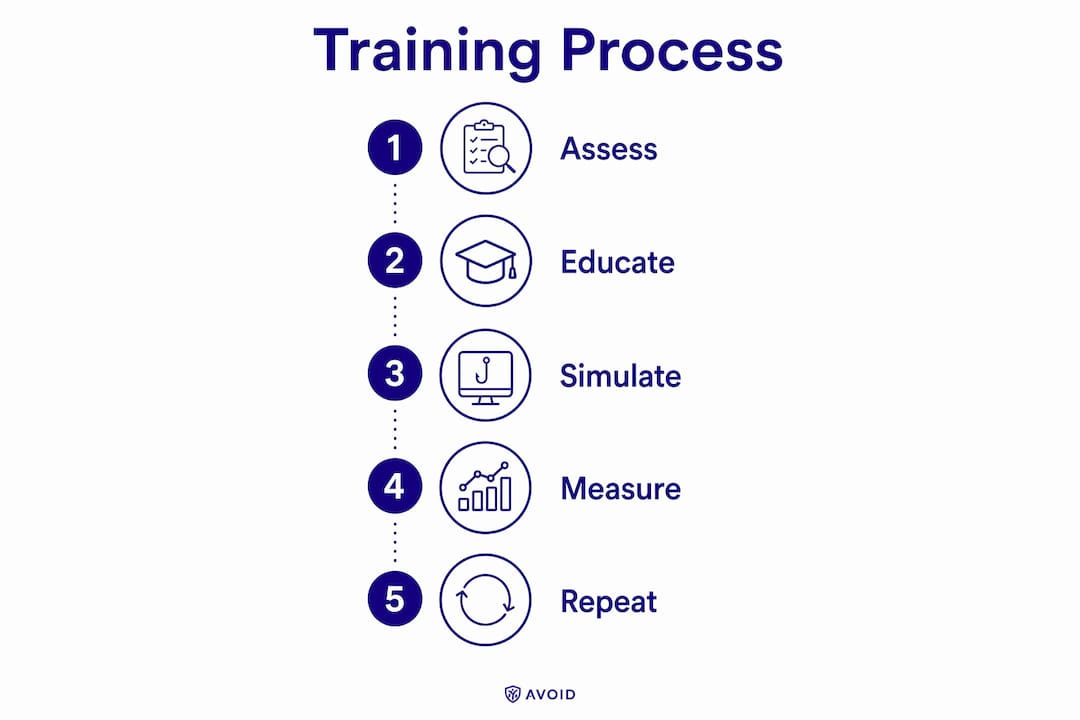
Run a baseline phishing simulation. Before any training, send a simulated phishing email to all staff. Record the click rate. This is your starting benchmark and the first piece of audit evidence.
-
Choose your platform or partner. Entry-level hosted platforms handle module delivery and phishing simulations for small teams. Enterprise LMS platforms suit larger organizations with complex role structures. MSP-managed services handle everything — content, simulations, reporting, and evidence collection — for a fixed monthly fee. CISA's small business resources also point to free government toolkits as a starting point when budgets are tight.
-
Build a 30/60/90-day rollout plan.
- Days 1–30: baseline simulation, policy acknowledgment, first microlearning module (phishing recognition), MFA enabled on all accounts.
- Days 31–60: second module (passwords and remote work), second phishing simulation, review click rates and reporting rates.
- Days 61–90: third module (data handling and incident reporting), review completion rates, generate first audit-ready report.
-
Set the ongoing cadence. Monthly microlearning modules plus a quarterly phishing simulation is the standard that NINJIO's research and practitioner experience both support. Annual-only training does not produce lasting behavior change.
-
Collect and store evidence. Every completed module, every simulation result, and every policy acknowledgment should generate a timestamped record. Modern platforms and MSP services automate this. Those records are what you hand an auditor during a HIPAA review or an insurer during underwriting.
-
Update content regularly. Threat tactics change. Add new phishing examples, update remote work guidance when your tools change, and refresh role-based content at least annually.
Measuring effectiveness: which KPIs actually matter
A training program without measurement is a compliance checkbox, not a security control. These four metrics tell you whether behavior is actually changing.
| Metric | How to calculate it | SMB target |
|---|---|---|
| Phish-prone rate | % of staff who click a simulated phishing link | Trending down month over month |
| User reporting rate | Rate of simulated phishing emails reported (not just ignored) | Trending upward is strong |
| Training completion rate | Portion of assigned modules completed on time | High rates indicate good compliance |
| Mean time to report | Average hours between receiving a suspicious email and reporting it | Decreasing over time |
The phish-prone rate is the headline metric, but the reporting rate is often more revealing. An employee who spots a phishing email and deletes it without reporting it has not fully internalized the program. You want staff who actively flag threats, because that behavior is what gives your IT team early warning.
How to collect evidence:
- Use a platform that generates timestamped completion certificates automatically.
- Export simulation results after each campaign and store them in a shared compliance folder.
- Log reporting-rate data alongside completion rates so you can show trend lines to an insurer or auditor.
Cyber insurance underwriters want to see this data during underwriting reviews. A clean, timestamped record of monthly training and quarterly simulations is a tangible asset when you're negotiating coverage terms. Understanding why cyber insurance matters for small businesses helps frame the investment correctly.
Revisit the program quarterly. If the phish-prone rate is not declining after three simulations, the content or delivery method needs adjustment. If completion rates drop below 90%, the cadence or module length may need recalibration.
Which training formats and platform features should you prioritize?
Format choice depends on your team size, budget, and how much internal bandwidth you have to manage the program.
| Format | Pros | Cons | Best fit |
|---|---|---|---|
| Live workshops | High engagement, Q&A possible | Time-intensive, hard to scale | Onboarding, policy launches |
| E-learning micromodules | Flexible, trackable, low disruption | Requires a platform | Most SMBs, ongoing training |
| Phishing simulations | Immediate behavioral feedback | Needs realistic templates | All businesses, quarterly |
| LMS integration | Centralizes records, role-based paths | Higher cost, more setup | Mid-size teams with HR systems |
| MSP-managed service | Turnkey, audit-ready, fixed cost | Less internal control | SMBs without dedicated IT staff |
Features checklist when evaluating any platform or service:
- Automated reporting with timestamped completion certificates
- Phishing simulation engine with customizable templates
- Role-based content paths (not one-size-fits-all modules)
- SSO or MFA integration for easy staff access
- Compliance reporting exports (PDF or CSV for auditors)
- Content library updated regularly with current threat examples
Free resources from CISA and NIST's online learning content are worth using as supplements, especially during Cybersecurity Awareness Month in October. They do not replace a structured platform, but they add variety to your content mix at no cost.
Practical best practices and quick wins for small businesses
The most effective programs are not the most expensive ones. They're the ones that run consistently and adapt when something isn't working.
High-impact quick wins you can act on this week:
- Enable MFA on every account that supports it. CISA recommends this as a top-priority action for all staff.
- Reduce admin rights: most employees do not need local administrator access on their machines.
- Run a baseline phishing simulation before any formal training begins.
- Require a short phishing-recognition module for every new hire during onboarding.
- Use low-cost awareness activities year-round: posters, brief email advisories, and monthly security tips in team meetings. NIST notes these simple activities can be scaled into a formal program over time.
Engagement techniques that actually work:
- Gamification: leaderboards, completion badges, and small rewards for reporting simulated phishing keep participation high without requiring a big budget.
- Executive participation: when leadership completes the same modules as staff, it signals that security is a company priority, not just an IT mandate.
- Short, specific reminders: a one-paragraph email after a real-world phishing incident in your industry is more memorable than a 45-minute annual refresher.
Common pitfalls to avoid:
- Annual-only training: it does not produce lasting behavior change. Monthly microlearning is the standard.
- One-size-fits-all content: a shop-floor operator and a finance manager face different threats. Role-based content is worth the extra setup.
- No evidence collection: if you cannot prove training happened, it did not happen in the eyes of an auditor or insurer.
Pro Tip: After each phishing simulation, send a brief all-staff message sharing the results (anonymized) and one specific tip based on what people missed. That feedback loop reinforces learning far more effectively than the simulation alone.
Pro Tip: Schedule your quarterly phishing simulations to coincide with real-world threat events — tax season, major software updates, or industry news. Timely simulations produce more realistic click rates and better learning outcomes.
How Symmnet implements security awareness training for small U.S. businesses
Symmnet's approach starts with a security assessment that identifies gaps in both technical controls and employee awareness. From there, the team builds a tailored training cadence matched to the business's industry, compliance requirements, and staff roles.
A typical Symmnet implementation for a small manufacturing or professional services firm looks like this:
- Assessment phase: identify which staff roles face the highest risk, which compliance frameworks apply (HIPAA, PCI DSS, CMMC), and what baseline phish-prone rate looks like before training begins.
- Program setup: configure monthly microlearning modules, build role-based content paths, and schedule quarterly phishing simulations with realistic, industry-relevant templates.
- Automated reporting: every completed module and simulation result generates a timestamped record, stored and organized for audit or insurer review without manual effort from the client.
- Ongoing management: Symmnet monitors completion rates and phish-prone trends, adjusts content when metrics stall, and updates the program as new threats emerge.
Symmnet services that directly support a security awareness program include:
- 24/7 system monitoring to detect incidents that training alone cannot prevent
- Endpoint security and firewall management to reduce the attack surface
- Compliance and audit documentation for HIPAA, PCI DSS, and industry-specific frameworks
- Microsoft 365 management, including email filtering and MFA configuration
- Backup and disaster recovery for when an incident does occur despite training
For SMBs in manufacturing, the manufacturing cybersecurity checklist is a practical companion resource that maps training topics to shop-floor controls.
The free security assessment Symmnet offers identifies gaps in both technical and human-layer defenses, prioritizes fixes by risk level, and produces a documented starting point for a training program. It's a low-friction way to understand where your business stands before committing to a full program.
Key Takeaways
Security awareness training is the most direct way to reduce human-layer cyber risk in a small business — and a structured, monthly program with quarterly simulations produces measurable behavior change that annual training cannot.
| Point | Details |
|---|---|
| Define the baseline first | Run a phishing simulation before any training to establish a click-rate benchmark. |
| Monthly cadence beats annual | Short monthly modules combined with quarterly simulations outperform once-yearly sessions for retention. |
| Evidence collection is non-negotiable | Timestamped completion records are required for HIPAA audits, PCI DSS reviews, and cyber insurance underwriting. |
| Role-based content outperforms generic | Tailor topics to frontline staff, managers, IT teams, and contractors for measurable improvement. |
| Symmnet manages the full program | Symmnet handles assessment, tailored content, automated reporting, and audit-ready documentation for small U.S. businesses. |
Why the "human firewall" framing misses the point
Most security awareness content frames the goal as turning employees into a "human firewall." It's a tidy metaphor, but it sets the wrong expectation. Firewalls block threats automatically. Employees make judgment calls under time pressure, with incomplete information, while doing their actual jobs. Expecting firewall-level reliability from human beings leads to programs that blame staff for clicking rather than examining why the training didn't prepare them better.
The more useful frame, one that NIST's own guidance supports, is organizational culture. A business where security is embedded in daily habits — where reporting a suspicious email is as normal as locking a door — is far more resilient than one where employees fear punishment for mistakes. That cultural shift takes consistent reinforcement over months, not a single annual training event.
The other thing most guides understate: the measurement side. Completion rates tell you whether people finished a module. They do not tell you whether behavior changed. The reporting rate — how many staff actively flag suspicious emails rather than just deleting them — is the metric that actually reflects a security culture taking hold. If your reporting rate is flat after six months of training, the content or the delivery model needs to change, not just the frequency.
For SMBs specifically, the managed service model often delivers faster results than a self-administered platform. Not because the technology is different, but because someone is actually watching the metrics and adjusting the program when something isn't working. That's the difference between a compliance checkbox and a program that genuinely reduces risk.
Symmnet's free security assessment: a practical starting point
Running a security awareness program without knowing your current exposure is like installing a lock without checking which doors are already open. Symmnet's free security assessment gives small business owners a clear picture of where their human-layer and technical defenses stand today.

The assessment covers gap identification across both employee awareness and technical controls, a prioritized list of fixes ranked by risk level, and a documented starting point that satisfies the first evidence requirement for most compliance frameworks. It's designed for businesses that don't have a dedicated IT team and need a fast, honest read on their security posture.
From there, Symmnet's managed IT and cybersecurity services handle the ongoing program: monthly training modules, quarterly phishing simulations, automated reporting, and audit-ready documentation — all at a fixed monthly price with no internal IT overhead required. Schedule your free assessment at symmnet.com and get a clear picture of where to start.
Authoritative sources and further reading
These are the primary references used throughout this article. Each one is worth bookmarking if you're building or reviewing a security awareness program for your business.
-
NIST SP 800-50: Building an IT Security Awareness and Training Program — The foundational federal standard for designing, implementing, and evaluating a security awareness and training program. Defines the distinction between awareness and training and provides a life-cycle framework for program management.
-
NIST Small Business Cybersecurity: Employee Awareness — Practical aids and materials specifically for small businesses, including links to free resources, awareness activities, and guidance on building a security culture without a large IT team.
-
NIST Cybersecurity Framework 2.0: Small Business Quick-Start Guide — A concise, action-oriented guide that maps CSF 2.0 outcomes to small business activities, including training requirements under the Protect function.
-
CISA Cyber Guidance for Small Businesses — CISA's practical checklist for small businesses, covering MFA, patching, phishing awareness, and reporting procedures. Free toolkits and templates are available here.
-
FTC Cybersecurity for Small Business — The FTC's guidance on training staff, tracking participation, and updating content as threats evolve. Includes specific advice on phishing simulations and remote work security.
-
HHS HIPAA Security Guidance — The authoritative source for HIPAA security rule requirements, including the documentation and training record obligations that apply to any business handling protected health information.
-
NIST Small Business Information Security: The Fundamentals (IR 7621) — A readable, practical guide covering employee training requirements, policy development, and basic security controls for small businesses. Useful as a plain-language companion to the more technical NIST publications.