

Shadow IT discovery is the process of identifying every SaaS application, cloud service, and browser-based tool employees use without formal IT approval, using telemetry like network logs, identity provider records, and email data. Run correctly, it produces one deliverable: a prioritized, risk-ranked inventory of unauthorized applications paired with a governance plan for what to sanction, restrict, or block. The strongest programs anchor that inventory to identity provider logs and a zero-trust enforcement model, not a one-time scan.
TL;DR:
- Combining identity provider logs and email analysis effectively captures the majority of shadow IT, including fast-growing SaaS and free-tier signups.
- Discovery methods must be layered, as each has blind spots; for example, network logs miss encrypted traffic and personal devices, and IdP logs overlook apps without OAuth or SSO.
- Conducting a 30-day discovery baseline involves collecting logs, prioritizing apps by user count and data volume, and engaging stakeholders before enforcement.
- Enforcement should escalate gradually, starting with tenant restrictions and user coaching, and reserve blocking for apps handling regulated data without compliance options.
- Regular measurement of app usage, classification progress, and remediation timelines supports ongoing governance and demonstrates control to leadership and auditors.
Table of Contents
- What Discovery Methods Actually Find Shadow IT?
- How Do You Run a 30-Day Shadow IT Discovery Baseline?
- How Do You Evaluate Shadow IT Discovery Tools?
- How Should You Govern Apps Once They're Found?
- What Should You Measure After Discovery?
- How Symmetry Runs Discovery for Small Businesses
- What Surprises SMBs Most During Discovery
- Get a Free Shadow IT Assessment From Symmnet
- Sources
What Discovery Methods Actually Find Shadow IT?
No single data source catches everything. Every discovery method has a blind spot, and the practitioners who get burned are usually the ones who trusted one telemetry feed to tell the whole story. Here's what each method actually surfaces, and where it fails you.
Network traffic and secure web gateway (SWG) logs capture outbound connections to SaaS domains in real time, including app names, data volume, and user counts. This is often the fastest way to see scale. CASB and SWG deployments routinely surface 5 to 10 times more applications than IT expected going in, sometimes 500 to 1,500 distinct apps on a first pull. The blind spot: encrypted traffic without TLS inspection shows domains but not app-level detail, and any device that bypasses the corporate network (personal phones, home laptops) never shows up at all.
DNS query logs are cheaper and less invasive than full SWG inspection. They reveal which domains employees are resolving, which is often enough to flag a new SaaS vendor. But DNS alone can't tell you what data moved or who specifically used the app, and cached or proxied DNS queries can mask real usage.
IdP and SSO logs (Okta, Microsoft Entra ID, Google Workspace) show every OAuth grant and login attempt tied to a real identity. This is arguably the highest-signal source available, because it ties usage directly to a person rather than a device. The blind spot: it only catches apps that use SSO or OAuth. Anyone who signs up with a personal email and a password sails right past it.
Email log analysis picks up what IdP logs miss: confirmation emails, invoice receipts, and trial signup notifications. Parsing corporate inboxes for these patterns is a high-yield way to catch free-tier signups that never touch your identity provider. The trade-off is privacy sensitivity. Scanning employee email requires clear policy boundaries and, in many cases, legal review before you start.
Expense and credit card mining works backward from the finance side. If a department is expensing a SaaS subscription, that's a paper trail IT never saw. It's slow and manual unless you have an automated finance connector, but it catches paid tools that never generate meaningful network traffic.
Endpoint and browser agents monitor installed software and browser extensions directly on the device, which is the only reliable way to catch locally installed apps and, increasingly, browser-based AI tools that route through consumer accounts rather than corporate SSO. The blind spot is coverage: agents only see what's installed on managed devices, so BYOD and contractor laptops stay invisible.
API-based discovery through CASB integrations connects directly to platforms like Microsoft 365 or Google Workspace and inventories connected third-party apps and OAuth tokens, including service accounts that never touch a human login screen. This is essential for catching integration sprawl, where one approved app quietly grants access to a dozen others.
No method here reaches full coverage alone. Cloud Security Alliance survey data backs up what most practitioners already suspect: unsanctioned SaaS use is widespread enough that discovery has to be continuous and multi-signal. Pairing IdP logs with email analysis catches the fastest wins with the least infrastructure lift. Layering in endpoint agents closes the gap on browser-based AI tools and locally installed software that identity-based methods miss entirely.
How Do You Run a 30-Day Shadow IT Discovery Baseline?
Treat discovery as a quarter-length project with a hard first milestone, not an open-ended audit. Here's the sequence that keeps momentum without triggering panic across departments.
- Weeks 1 to 2: Pull logs in monitor-only mode. Collect SWG or firewall logs, IdP/SSO authentication records, and DNS query logs. At minimum, capture app name, user identity, data volume, and timestamp. Don't block anything yet. Microsoft's Cloud Discovery tutorial walks through exactly which log connectors to configure for this stage if you're already in the Microsoft 365 ecosystem.
- Weeks 2 to 3: Build the top-20 list. Rank discovered apps by user count and data volume, not alphabetically. Most organizations find the long tail of low-use apps isn't worth chasing yet, so focus governance effort on the top applications first.
- Week 3: Classify and risk-rank. Score each app against a simple matrix: data sensitivity (low, medium, high), user count, and compliance exposure (does it touch regulated data, financial records, or customer PII). An app with a greater number of users and access to customer files ranks far above a low-use marketing tool with minimal data access.
- Week 3 to 4: Stakeholder outreach. Contact department leads before you contact end users. A short, non-accusatory email explaining what was found and why it matters goes a long way. Frame it as a risk conversation, not a compliance ambush.
- Week 4 and ongoing: Remediation runway. Map each tier to an action: sanction and integrate with SSO, tolerate with monitoring, or block and migrate users to an approved alternative. Give teams a 30 to 60 day runway for anything you're phasing out.
Pro Tip: Never lead with a block. Announcing an app will be sanctioned or replaced, then giving users two weeks' notice, cuts resistance dramatically compared to silent enforcement that breaks someone's workflow without warning.
The risk matrix is what keeps this from becoming a full-time job. An SMB with limited IT staff can't chase every app with data-sensitivity and compliance flags. It should jump the line regardless of how few people use it.
How Do You Evaluate Shadow IT Discovery Tools?
Vendor comparisons distract from the question that actually matters: does the tool cover the capability buckets your organization needs, without creating more operational overhead than it removes? Evaluate by function, not by brand name.
- IdP and SSO connector scanning — does it ingest OAuth grants directly from Okta, Entra ID, or Google Workspace without custom engineering?
- Email log parsing — can it flag confirmation and invoice emails for free-tier signups, and does it respect the privacy boundaries your legal team requires?
- Continuous monitoring versus point-in-time scan — a one-time discovery report is stale within weeks; you need ongoing visibility, not a snapshot.
- Tenant restriction support — can it enforce restrictions at the identity layer (blocking logins to unauthorized tenants of approved apps like Google or Microsoft) rather than just reporting on them?
- Remediation workflow integration — does it hand off findings into a ticketing or offboarding system, or does someone have to manually re-enter every finding?
On deployment trade-offs: TLS inspection through an SWG gives you app-level visibility but adds latency and certificate management overhead. DNS-only monitoring is lighter to deploy but leaves you guessing at data volume. Agent-based endpoint tools catch more detail but require rollout and maintenance across every managed device; agentless, API-based scanning is faster to stand up but blind to anything happening outside your sanctioned cloud tenants. For most SMBs, the right answer is layered: agentless API scanning plus IdP integration first, endpoint agents added once budget and staff time allow.
How Should You Govern Apps Once They're Found?
Discovery without a governance layer just produces a longer list of things nobody acts on. Every shadow IT policy needs five elements: scope (which departments and device types it covers), telemetry sources, privacy guardrails for anything touching email or personal devices, a named policy owner, and a review cadence, typically quarterly.
Classify every discovered app into one of three tiers:
- Sanctioned — approved, integrated with SSO, and monitored going forward.
- Tolerated — allowed temporarily under monitoring while a migration plan is built.
- Prohibited — blocked outright, usually because it touches regulated data with no compliance path.
Enforcement should escalate, not jump straight to blocking. Start with tenant restriction (allowing only the corporate tenant of an app like Microsoft or Google), move to user coaching for repeat low-risk violations, and reserve hard blocks for prohibited-tier apps. This aligns with zero-trust principles that treat identity and continuous verification, not perimeter blocking, as the primary control.
Pro Tip: Wire discovery findings into your joiner-mover-leaver process. Discovered apps tied to a departing employee's identity should trigger automatic access review, not sit in a spreadsheet until someone remembers to check. Discovery without lifecycle enforcement leaves the underlying risk unchanged, since an app you found but never revoked access to is still a live exposure.
What Should You Measure After Discovery?
Track a small set of numbers that leadership and IT both understand:
- Top 20 apps by user count and data volume, reviewed monthly.
- Number of apps moved from "unknown" to a classified tier each quarter.
- Percentage of discovered apps integrated with SSO versus still standalone.
- Time from discovery to remediation action, by risk tier.
Re-run full discovery quarterly, with lightweight continuous monitoring in between. When an auditor asks how you handle unauthorized applications, a dated classification log and remediation timeline turns a compliance question into a five-minute conversation instead of a scramble.
How Symmetry Runs Discovery for Small Businesses
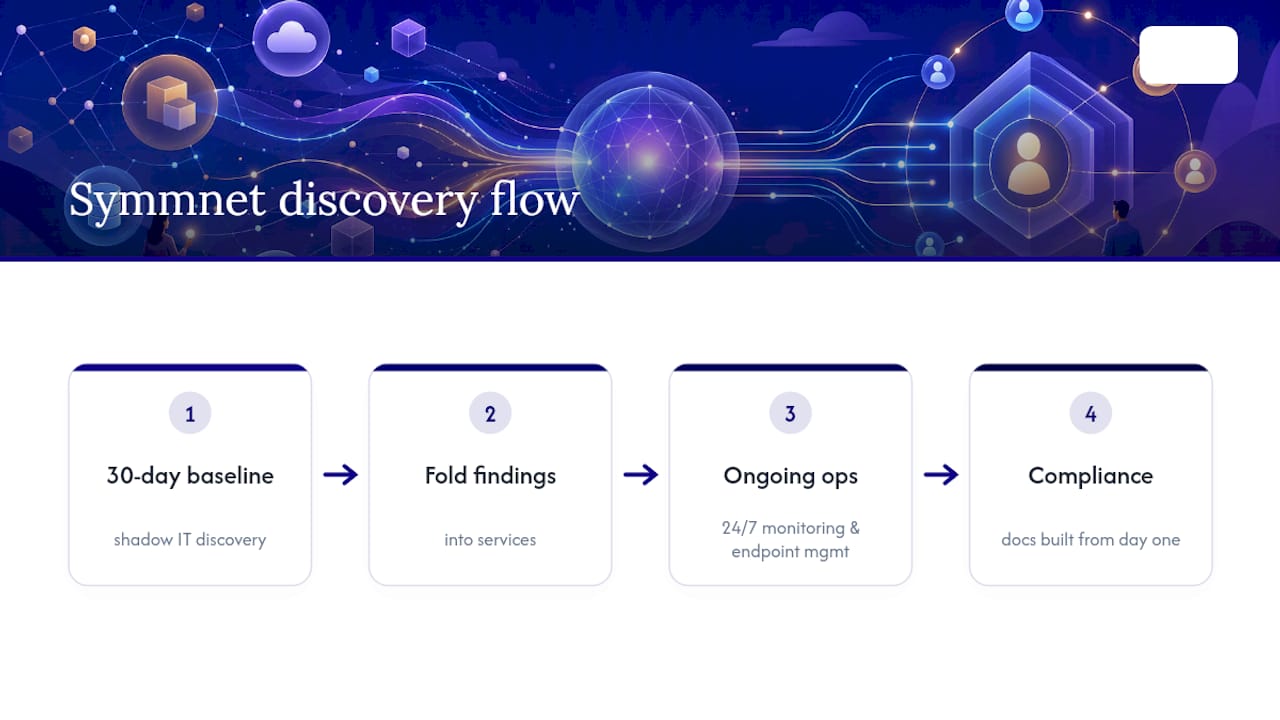
Symmnet builds shadow IT discovery into a 30-day baseline for manufacturing, aerospace, and professional services clients, then folds findings into ongoing 24/7 monitoring, endpoint management, and Microsoft 365 administration. Compliance documentation gets built in from day one, not bolted on after an audit request.
What Surprises SMBs Most During Discovery
The number always surprises leadership more than IT. Most SMB owners expect a handful of rogue apps; they usually find dozens, often including a marketing tool nobody remembers approving. The fastest wins come from tackling the top three or four apps by user count first, not the scariest-looking one. In regulated shops (aerospace, FDA-adjacent manufacturing), the compliance conversation moves faster once leadership sees the risk matrix in writing.
— Michael
Get a Free Shadow IT Assessment From Symmnet
Building this entire program in-house, log collection, classification, policy writing, ongoing monitoring, takes real staff hours most small businesses don't have to spare. Symmnet runs the full discovery-to-governance cycle as part of its managed IT services: a 30-day log baseline across your identity provider and network traffic, a prioritized remediation plan ranked by risk, and direct integration into your ongoing monitoring and compliance documentation. No separate project to manage, no software to license and configure yourself.

If you suspect your team has more unsanctioned apps running than you'd like to admit, a free assessment is the fastest way to find out exactly what's out there and what to do about it. Request your free assessment and get a real inventory instead of a guess.
Sources
This guide draws on NIST's Zero Trust Architecture, Microsoft's Defender Cloud Apps discovery tutorial, the Cloud Security Alliance's SaaS security survey, and practitioner discovery playbooks cited throughout.