

A well-planned small business IT infrastructure setup is the foundation that keeps your operations running, your data protected, and your team productive. IT infrastructure, in industry terms, refers to the combined hardware, software, network components, and security systems that support daily business functions. For small businesses, getting this foundation right from the start prevents costly downtime, data loss, and compliance failures. Tools like Microsoft 365, Google Workspace, and security practices such as multi-factor authentication (MFA) are not optional extras. They are the baseline for any business operating in 2026.
What essential hardware and network components make up small business IT infrastructure?
The physical layer of IT infrastructure for small businesses starts at the internet connection and extends to every device on the floor. Getting this layer right determines the reliability of everything built on top of it.
Core network hardware
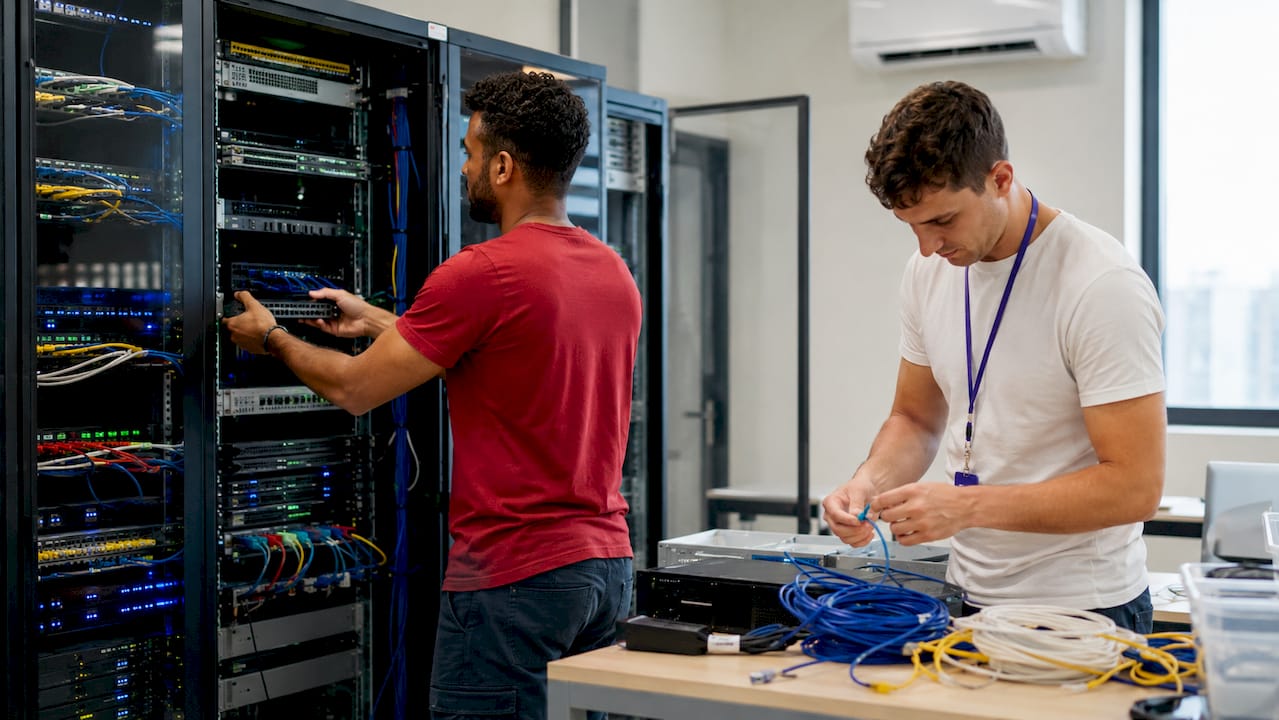
A typical 20-person office IT network setup costs between $6,500 and $11,000 for hardware. That budget covers the ISP handoff point, a managed gateway or firewall, Power over Ethernet (PoE) switches, wireless access points, and uninterruptible power supply (UPS) units. Each component plays a specific role. The firewall filters traffic between your network and the internet. Managed PoE switches power and connect devices like IP phones and access points through a single cable. UPS units protect equipment from power surges and give staff time to save work during outages.
Network segmentation
Network segmentation divides your traffic into separate zones. The standard approach creates at least three segments: staff, guest, and devices such as printers or cameras. Proper segmentation goes further by adding VLANs for voice, point-of-sale systems, security cameras, and infrastructure management. This limits the damage if one segment is compromised. A breach on the guest Wi-Fi cannot reach your accounting system if the networks are properly isolated.
Pro Tip: Run wired Ethernet connections to all fixed, critical devices such as desktops, servers, and VoIP phones. Reserve Wi-Fi for mobile devices. Wired connections are faster, more reliable, and harder to intercept.
| Component | Purpose | Estimated Cost (20 users) |
|---|---|---|
| Managed firewall/gateway | Traffic filtering and VPN | $500–$1,500 |
| PoE managed switch | Device connectivity and power | $300–$800 |
| Wi-Fi access points | Wireless coverage | $200–$600 each |
| UPS units | Power protection | $150–$400 each |
| Patch panels and cabling | Structured wiring | $500–$2,000 |
Which software platforms should small businesses deploy for productivity and security?
The software layer is where most small businesses either get it right or leave serious gaps. The right platforms handle email, file storage, identity management, endpoint security, and backup.
Productivity suites
Microsoft 365 and Google Workspace are the two dominant choices for small business technology setup. Small businesses with 5–50 employees typically spend $12.50–$14.00 per user monthly on these suites. Microsoft 365 Business Standard includes Teams, SharePoint, and desktop Office apps. Google Workspace Business Starter covers Gmail, Drive, and Meet. The right choice depends on your existing workflows and whether your team is already familiar with one ecosystem.
Endpoint management and security
Microsoft Intune is the standard endpoint management tool for businesses running Microsoft 365. It lets IT managers enforce security policies, push software updates, and wipe lost devices remotely. Endpoint management and security bundles cost approximately $22.00 per user per month. Email security add-ons run $3–$7 per user, and password managers such as 1Password or Bitwarden cost $4–$8 per user monthly.
Backup strategy
The 3-2-1 backup rule is the industry standard: keep three copies of data, on two different media types, with one copy stored offsite. Cloud providers like Microsoft and Google do not protect against accidental deletion or ransomware. You need a separate backup service for your SaaS data. Tools like Veeam, Acronis, or Datto cover this gap for small businesses.
Pro Tip: Never assume your cloud files are automatically backed up. Microsoft 365 and Google Workspace retain deleted files for a limited window only. A dedicated third-party backup service closes that gap permanently.
| Software Category | Recommended Tools | Monthly Cost per User |
|---|---|---|
| Productivity suite | Microsoft 365, Google Workspace | $12.50–$14.00 |
| Endpoint management | Microsoft Intune | Included in bundles |
| Email security | Proofpoint, Defender for Office 365 | $3–$7 |
| Password manager | 1Password, Bitwarden | $4–$8 |
| Backup | Veeam, Acronis, Datto | Varies by storage |
How do you plan and execute a step-by-step IT infrastructure setup?
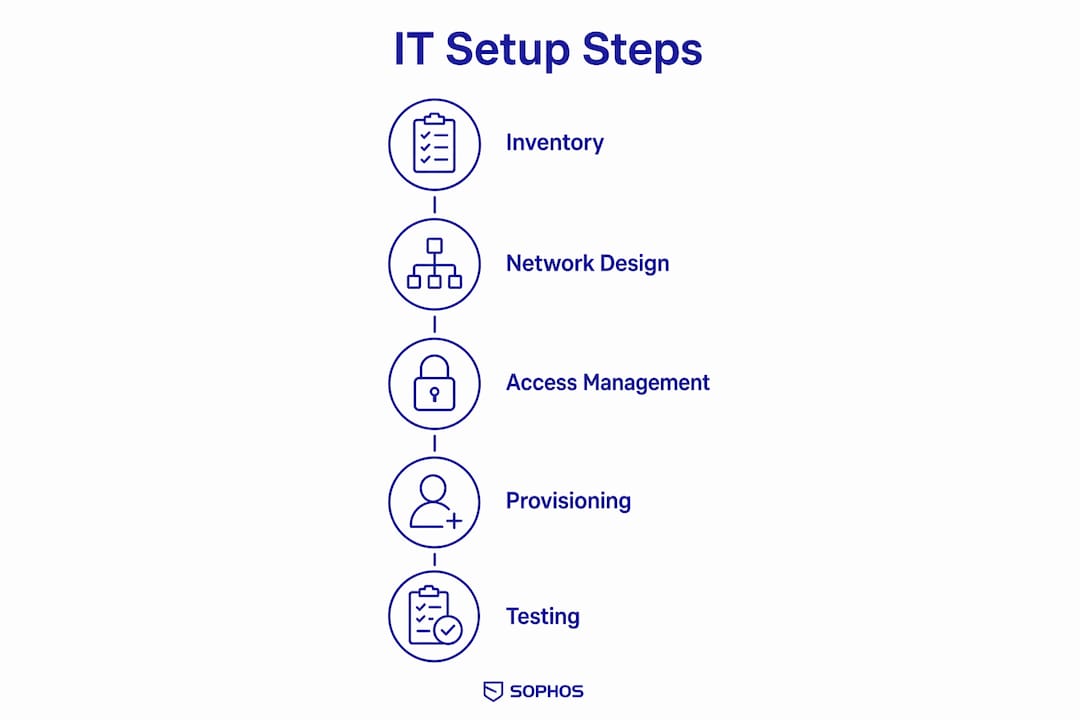
Setting up IT infrastructure for small businesses works best as a phased process. Trying to do everything at once leads to missed steps and security gaps.
Step 1: Inventory and assess
Start by inventorying every laptop, desktop, SaaS subscription, domain, and shared credential in the business. This step is consistently underestimated. Most businesses discover subscriptions they forgot about and devices that are unmanaged. A complete inventory is your baseline for every decision that follows.
Step 2: Design your network architecture
Map out how traffic will flow from the internet connection to each device. Define your VLAN structure before buying any hardware. Decide which devices need wired connections and where access points will be placed for full wireless coverage. Document this design so any IT manager or technician can understand the setup without asking questions.
Step 3: Set up identity and access management
Identity management means controlling who can access what. Deploy Microsoft Entra ID (formerly Azure Active Directory) or Google Workspace's admin console to manage user accounts centrally. Assign permissions based on job role, not individual preference. This limits exposure if an account is compromised.
Step 4: Provision compute and storage
Cloud-hosted virtual machines from AWS, Azure, or Google Cloud Platform are the preferred compute option for most small businesses. A single instance starts at around $20 per month and scales without requiring physical hardware purchases. This approach reduces maintenance overhead and gives you an upgrade path as the business grows.
Step 5: Test before going live
- Verify that each network segment is isolated by attempting to ping devices across VLANs.
- Test a full backup restore from your backup service, not just a file recovery.
- Confirm MFA is active on every user account before granting access to production systems.
- Run a phishing simulation or security awareness check with staff.
- Document your network diagram, device inventory, and escalation contacts.
Pro Tip: A backup you have never restored is not a real backup. Schedule a restore test before your setup goes live and repeat it quarterly.
What are the key cybersecurity best practices for small business IT infrastructure?
Cybersecurity is not a one-time configuration. It is an ongoing practice built into how your infrastructure operates every day.
MFA is non-negotiable
Enabling MFA across every account is the single most effective security measure a small business can implement. It takes about 10 minutes per service to configure. MFA blocks the vast majority of credential-based attacks, including phishing and password spraying. Every email account, VPN, and cloud service should require MFA before granting access.
Network and endpoint hygiene
- Separate guest Wi-Fi from your main business network. This takes about 10 minutes on most modern routers and prevents visitors from reaching internal resources.
- Apply security patches to operating systems and applications within 30 days of release.
- Use endpoint detection and response (EDR) tools on every company device.
- Disable local administrator accounts on employee workstations.
- Review and revoke access for departed employees on the same day they leave.
Staff training and documentation
Staff behavior is the most common entry point for cyberattacks. Train employees to recognize phishing emails, avoid public Wi-Fi without a VPN, and report suspicious activity immediately. Keep your cybersecurity incident response plan documented and accessible. Every team member should know who to call and what to do if something goes wrong.
"Schedule quarterly IT reviews to fix gaps, update documentation, and reassess security and infrastructure scale." — IT Management for a Small Business, Flamingo
Pro Tip: Build a manufacturing cybersecurity checklist or equivalent for your industry and review it every quarter. Checklists catch the gaps that memory misses.
Key takeaways
A complete small business IT infrastructure setup requires layered hardware, managed software, tested backups, and enforced MFA to protect operations and data effectively.
| Point | Details |
|---|---|
| Budget for hardware realistically | A 20-person office network costs $6,500–$11,000 for core hardware components. |
| Use the 3-2-1 backup rule | Keep three data copies on two media types with one stored offsite, separate from cloud providers. |
| Enable MFA immediately | MFA takes 10 minutes per service to configure and blocks most credential-based attacks. |
| Inventory everything first | Cataloging all devices, subscriptions, and credentials before setup prevents overlooked vulnerabilities. |
| Schedule quarterly reviews | Regular IT reviews catch security gaps, outdated documentation, and infrastructure that no longer fits your needs. |
What I have learned from building small business IT setups
The biggest mistake I see small business owners make is treating IT infrastructure as a one-time project. They buy the hardware, set up the software, and move on. Six months later, patches are overdue, backups have never been tested, and half the staff are reusing passwords across personal and work accounts.
The businesses that get this right treat their IT setup as a living system. They document everything from day one. Network diagrams, device inventories, software licenses, and escalation contacts all live in a shared location that any team member can access. When something breaks at 2 a.m., that documentation is the difference between a 20-minute fix and a four-hour crisis.
I have also seen businesses over-invest in hardware and under-invest in identity management. A $3,000 firewall does very little if your staff are sharing admin passwords in a group chat. The cheapest and most effective security investment is MFA, followed closely by a password manager. Get those right before spending money on anything else.
Cloud-first infrastructure is the right call for most small businesses today. AWS, Azure, and Google Cloud Platform let you scale compute resources without buying physical servers. The maintenance burden drops significantly, and you get enterprise-grade reliability at a fraction of the cost. Physical servers still make sense in specific scenarios, such as manufacturing environments with low-latency requirements, but they are the exception rather than the rule.
One more thing: do not skip the restore test. I cannot count how many businesses I have worked with that had backups running for months, only to discover during a ransomware incident that the restore process was broken. Test your backups before you need them.
— Michael
How Symmnet supports small business IT infrastructure
Setting up and maintaining IT infrastructure takes time, expertise, and consistent attention. For many small businesses, that is time better spent on the work that actually generates revenue.
Symmnet provides managed IT services built specifically for small U.S.-based businesses in manufacturing, aerospace, and professional services. The team handles 24/7 system monitoring, endpoint security, firewall management, backup and recovery, and helpdesk support under a fixed monthly price. There are no surprise bills and no gaps in coverage. Symmnet also offers a free assessment to identify security vulnerabilities and infrastructure gaps before they become problems. If your business needs a reliable IT partner without the overhead of an internal IT team, Symmnet is worth a conversation.
FAQ
What does a small business IT infrastructure setup include?
A complete setup includes business-grade internet, a managed firewall, network switches, Wi-Fi access points, endpoint devices, a productivity suite such as Microsoft 365 or Google Workspace, MFA, and a tested backup solution.
How much does IT infrastructure cost for a small business?
A 20-person office network hardware setup costs between $6,500 and $11,000. Software costs add approximately $12.50–$22.00 per user per month depending on the tools selected.
What is the 3-2-1 backup rule?
The 3-2-1 rule means keeping three copies of data on two different media types with one copy stored offsite. Cloud providers do not automatically protect against ransomware or accidental deletion, so a separate backup service is required.
How long does it take to enable MFA?
MFA takes approximately 10 minutes per service to configure. It is the fastest and most effective security measure a small business can implement immediately.
Should small businesses use cloud or physical servers?
Cloud-hosted virtual machines from AWS, Azure, or Google Cloud Platform are the better choice for most small businesses. They cost less, require less maintenance, and scale without physical hardware purchases.