

Cyberattacks against small U.S. manufacturers, aerospace suppliers, and professional services firms are no longer rare events. In 2024, a ransomware attack crippled a mid-sized Ohio parts supplier for nearly three weeks, halting production and triggering contractual penalties that nearly closed the business. If a similar attack hit your facility tomorrow, would your network hold? The threat landscape for 2026 is more aggressive than ever, and a network security checklist built around current frameworks gives you a structured, repeatable way to close the gaps before attackers find them. This guide walks you through exactly what to prepare, what to execute, and how to verify your work.
Table of Contents
- What you need before starting your 2026 security checklist
- Step-by-step: Your essential network security checklist for 2026
- Tools, approaches, and what works best for small businesses
- Avoiding common mistakes and verifying your security
- What most checklists miss: A strategic mindset for security maturity
- How Symmetry Network Management can help secure your business
- Frequently asked questions
Key Takeaways
| Point | Details |
|---|---|
| Segment your network | Separating devices and systems limits hacker movement if a breach occurs. |
| Update and document | Regularly refresh your network map and security controls for effective incident response. |
| Layer your defenses | Use firewalls, IDPS, and VPNs together to close security gaps. |
| Verify, don't assume | Test and review your security setup to catch missed weaknesses. |
What you need before starting your 2026 security checklist
Good security execution starts well before anyone opens a laptop to configure a firewall. Think of this phase as laying the foundation: the stronger it is, the less likely your checklist work will miss something critical.
Update your network map and asset inventory first. You cannot protect what you cannot see. Before checking a single box on your list, you need a current, accurate picture of every device on your network, including servers, workstations, switches, wireless access points, printers, IP cameras, and any operational technology (OT) or Internet of Things (IoT) equipment on the shop floor or in the lab. Many small businesses are surprised to discover shadow IT, meaning devices employees added without IT approval, during this step.
Gather these resources before starting:
- A current network diagram showing all devices, IP ranges, and connections
- An up-to-date hardware and software asset inventory
- Documentation for all existing firewall, VPN, and wireless configurations
- Copies of any current security policies (acceptable use, remote access, incident response)
- Contact information for all third-party vendors with network access
- A list of staff members responsible for each infrastructure layer
Selecting the right framework matters, too. Three major frameworks guide small business network security today: the National Institute of Standards and Technology (NIST) Cybersecurity Framework, the Center for Internet Security (CIS) Controls, and CISA's Cross-Sector Cybersecurity Performance Goals (CPGs). For most small manufacturers, aerospace contractors, and professional services firms, the CISA CPGs represent a practical, achievable minimum floor. CISA explicitly recommends that businesses implement network segmentation to limit how far an attacker can move laterally if they breach one system.
For a deeper look at how these frameworks apply to your sector, the cybersecurity guide for US small manufacturers is a useful starting point before diving into checklist execution.
| Framework | Best for | Complexity level | Cost |
|---|---|---|---|
| CISA CPGs | Small to mid-size businesses | Low to moderate | Free |
| CIS Controls | Orgs needing prioritized steps | Moderate | Free (basic) |
| NIST CSF 2.0 | Broader risk management | High | Free |
Pro Tip: Assign a named owner to each checklist section before you begin. When everyone knows who is responsible for firewall review versus wireless security review, the entire process moves faster and accountability is clear.
Step-by-step: Your essential network security checklist for 2026
With your inventory updated, your documentation in hand, and your framework chosen, it is time to work through the actual checklist. These steps are ordered by impact and practicality for small business environments.
1. Configure and harden your firewalls. A firewall that runs on factory-default settings is barely better than no firewall at all. Firewall configuration requires default deny rules, meaning all traffic is blocked unless explicitly permitted, along with firmware updates and a full review of inbound and outbound rules. Permit only the traffic your operations genuinely require. Audit your rule sets at least quarterly and remove any rules that are outdated or overly permissive. For practical guidance on this step, review these firewall essentials tailored specifically for small businesses.
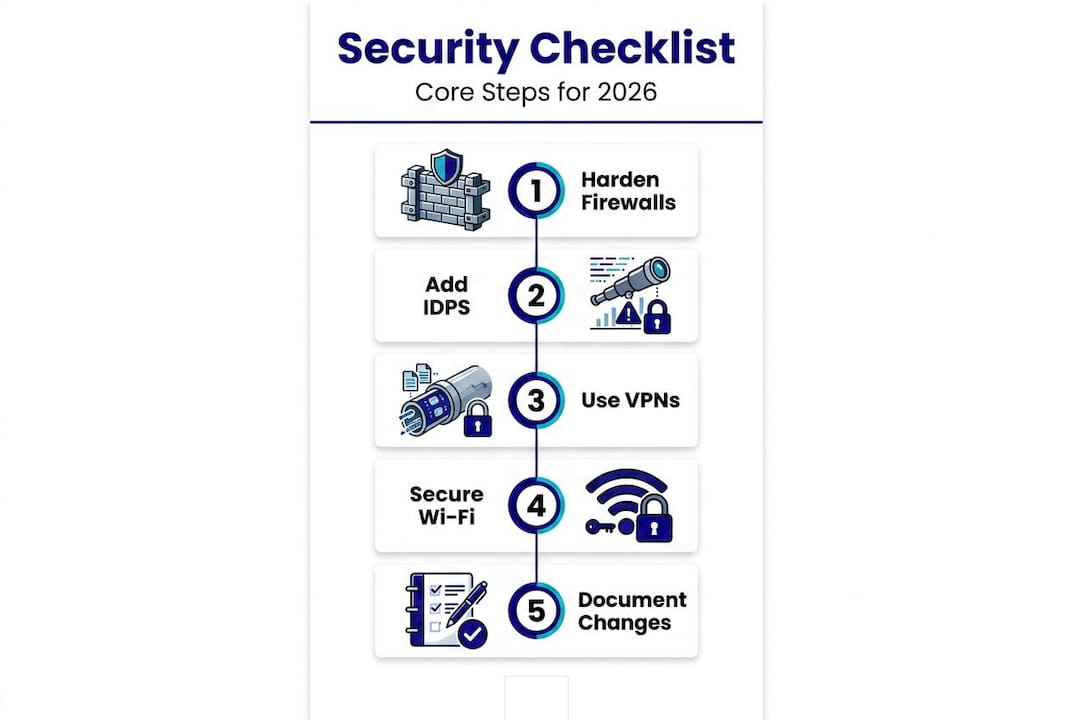
2. Deploy Intrusion Detection and Prevention Systems (IDPS). An IDPS monitors your network for suspicious behavior and, in prevention mode, blocks threats automatically. IDPS deployment provides continuous monitoring for malicious activity, covering everything from port scans to lateral movement after a breach. IDPS tools range from enterprise-grade commercial options to capable open source solutions like Snort or Suricata. The key is ensuring the system is actively tuned to your environment, not just installed and forgotten.
3. Encrypt all remote connections with a VPN. Remote workers, traveling executives, and third-party vendors all represent potential entry points if their connections are unencrypted. A Virtual Private Network (VPN) creates an encrypted tunnel between a remote device and your internal network, preventing eavesdropping even on public Wi-Fi. This step is equally important for wired-only offices, because suppliers and contractors connecting remotely still introduce risk.
4. Secure your wireless networks. Wireless security is one of the most commonly neglected areas in small business environments. WPA3 encryption, changed default passwords, and MAC address filtering are all required steps. Disabling SSID broadcast for sensitive networks adds another layer of friction for attackers. Create a separate guest network for visitors and keep it isolated from your production systems. Change Wi-Fi passwords at least annually and whenever an employee with access leaves the organization.
5. Document your network topology annually. Incident response moves faster when responders know exactly how the network is laid out. Annual topology documentation and updates after any network change are required by CISA's CPGs and are considered a foundational practice for effective incident response. This documentation should be stored securely and accessible to designated staff during an incident.
6. Segment your network, especially for OT and IoT. Network segmentation means dividing your network into isolated zones so that a compromise in one area cannot spread freely to others. For manufacturers and aerospace suppliers running OT equipment alongside standard IT systems, this step is critical. Separating production control systems from office networks prevents ransomware from jumping from an email attachment to a CNC machine. For more detail on how to structure this, explore improving network security for small businesses and the specific guidance on securing manufacturing networks.
"Network segmentation is not a luxury for large enterprises. For any business running OT or IoT devices alongside standard IT systems, segmentation is the single most effective way to contain a breach before it becomes a shutdown."
Pro Tip: After completing each checklist step, document the configuration change, who made it, and the date. This log becomes your audit trail and makes the next annual review significantly easier.
Tools, approaches, and what works best for small businesses
Knowing what to do is one thing. Choosing the right tools to do it efficiently with a small IT team is another. The good news is that effective network security does not require an enterprise budget.

Comparing your main options:
| Category | Commercial option | Open source option | Best for |
|---|---|---|---|
| Firewall | Palo Alto, Fortinet FortiGate | pfSense, OPNsense | pfSense for budget-conscious firms |
| IDS/IPS | Cisco Secure IPS, Darktrace | Snort, Suricata | Suricata for SMB environments |
| VPN | Cisco AnyConnect, Palo Alto GlobalProtect | WireGuard, OpenVPN | WireGuard for simplicity and speed |
| Wi-Fi security | Cisco Meraki, Aruba | Hostapd with WPA3 | Meraki for easy management |
| Network monitoring | SolarWinds, PRTG | Zabbix, Nagios | Zabbix for cost-effective alerting |
The most resilient approaches for small businesses combine commercial firewalls with open source monitoring tools, balancing reliability with cost. Commercial firewalls from vendors like Fortinet and Palo Alto come with manufacturer support and regular updates, while open source IDS tools like Suricata can handle traffic analysis at no licensing cost.
More than 45% of attacks exploit unsegmented networks in small business environments, meaning attackers move freely between zones once they gain initial access. Segmentation is not complex to implement in a small environment, especially with modern managed switches that support VLANs (Virtual Local Area Networks).
Quick-win action steps for 2026:
- Enable automatic firmware updates on all network devices or schedule monthly manual checks
- Replace any device still using WPA2 wireless encryption with WPA3-capable hardware
- Add multi-factor authentication (MFA) to VPN access for all users immediately
- Review firewall rules and remove any that have not been used in the past 90 days
- Deploy a free VLAN-based segmentation configuration to isolate IoT devices this quarter
These steps require minimal budget and can dramatically reduce your attack surface within 30 days.
Avoiding common mistakes and verifying your security
Completing a checklist and having a secure network are not the same thing. Verification is where many small businesses fall short, and it is precisely where attackers find their openings.
Verification methods that actually work:
- Vulnerability scanning: Use tools like Nessus Essentials (free tier) or OpenVAS to scan your network for known vulnerabilities after completing each checklist phase. Run scans quarterly at minimum.
- Access reviews: Review all user accounts with network access every 90 days. Remove or disable accounts for former employees, inactive vendors, and roles that no longer require access.
- Tabletop exercises: Gather your key staff and walk through a simulated ransomware scenario. Who does what? Who calls whom? What systems get isolated first? These exercises reveal gaps in your incident response plan faster than any technical audit.
- Penetration testing: At least annually, hire an external party to attempt to breach your defenses. Their findings will show you exactly where your checklist execution fell short.
Common mistakes to avoid:
- Leaving default passwords in place on routers, switches, or wireless access points
- Skipping segmentation for OT and IoT devices because "they're on a separate floor"
- Documenting the network once and never updating the diagram after equipment changes
- Treating firewall rules as permanent once set, rather than reviewing them regularly
- Assuming a purchased security tool is effective without configuring it for your environment
The CISA CPGs are explicit: logical and physical network segmentation limits how far an attacker can move after initial access. Skipping this step, especially for shops running OT equipment, is one of the most consequential oversights a small manufacturer can make.
"The most dangerous assumption in small business cybersecurity is that a completed checklist is a finished job. Security requires ongoing attention, not one-time configuration."
For a broader look at what foundational steps look like in practice, the proven cybersecurity steps for small U.S. businesses provides solid context alongside this verification process.
Pro Tip: Peer review catches more mistakes than solo review. After completing a section of your checklist, have a colleague or second team member walk through the same configuration independently and compare notes before moving on.
What most checklists miss: A strategic mindset for security maturity
Here is a perspective that most security guides will not share directly: a completed checklist can actually create a false sense of security if the team behind it stops thinking critically.
Checklists are tools, not strategies. They represent a point-in-time snapshot of best practices. Threat actors, on the other hand, adapt constantly. In 2026, attackers are increasingly targeting OT environments in small manufacturers and aerospace suppliers because they know these firms often have less mature defenses than their large-enterprise customers. A checklist built for 2024 may already have blind spots against current attack vectors.
The businesses that maintain genuinely strong security postures over time share one trait: they treat their security documentation as a living document. Every new device added to the network triggers an update to the network map. Every emerging vulnerability in the news prompts a quick internal review of whether that vector applies to their environment. Every staff change triggers an access review. This is not complicated. It is disciplined.
Cross-department commitment is the other ingredient most checklists ignore. IT cannot carry network security alone in a small manufacturing or aerospace firm. Operations managers who authorize new equipment on the shop floor, finance staff who approve vendor contracts, and HR teams that manage onboarding all have roles to play. When security is understood as a shared responsibility rather than a technical burden, the entire organization becomes more resilient.
For small manufacturers especially, the stakes of treating IT security as essential rather than optional have never been higher. Regulatory scrutiny is increasing, customer contracts increasingly require security certifications, and cyber insurance underwriters are asking harder questions at renewal. The organizations that treat security maturity as a competitive advantage, not just a compliance exercise, are the ones that win long-term contracts and avoid catastrophic losses.
The best security posture is one that evolves with threats, earns buy-in from every level of the organization, and treats the checklist as a starting point rather than a finish line.
How Symmetry Network Management can help secure your business
Running through a network security checklist is a significant undertaking for any small business team. Staying current as threats evolve, managing the right tools, and verifying your defenses requires time and expertise that most small manufacturers, aerospace suppliers, and professional services firms cannot maintain internally.
Symmetry Network Management provides managed IT services built specifically for small U.S. businesses in your industries. From firewall management and IDPS deployment to network segmentation for OT and IoT environments, Symmetry's team handles the technical execution so you can focus on operations. Symmetry also provides backup validation and testing to ensure your recovery plan actually works when you need it most. Fixed pricing, U.S.-based support, and customized plans mean you get enterprise-level protection without enterprise-level overhead. Reach out today to schedule a free security assessment.
Frequently asked questions
What is the most important network security step for small manufacturers in 2026?
Segmenting your network and regularly updating firewall rules reduces threat exposure most effectively. CISA CPGs specifically recommend logical and physical segmentation to limit how far an attacker can move after initial access.
How often should I update my network topology documentation?
You should update documentation at least once per year and immediately after any network changes. CISA's CPGs require annual topology updates and revisions following any infrastructure change to support effective incident response.
Can I rely on default device passwords for network security?
No. Leaving default passwords in place is one of the most common and exploitable vulnerabilities. Strong passwords and WPA3 encryption, combined with MAC filtering and SSID management, are required baseline controls for any wireless device.
Is a VPN necessary if my business only uses wired connections?
Yes. A VPN is still necessary because remote workers, traveling staff, and third-party vendors connecting from outside your facility introduce eavesdropping risk regardless of whether your internal network is wired. Encrypted VPN connections protect data in transit for all remote access scenarios.