

User access control is defined as the practice of restricting access to systems, applications, and data based on a user's identity, role, and authorization level. Frameworks like NIST, ISO 27001, and SOC 2 all treat it as a foundational security requirement. Implementing core measures like multi-factor authentication (MFA) and least privilege can prevent or mitigate approximately 80% of common cybersecurity breaches. For small businesses, that number represents the difference between a manageable incident and a catastrophic one. This guide explains what user access control means in practice, how it works, and what you need to do to implement it correctly.
What is user access control and why does it matter?
User access control, formally called identity and access management (IAM), governs who can reach which resources inside your organization and under what conditions. The goal is simple: the right person gets access to the right resource at the right time, and nobody else does. Every major compliance framework, from NIST SP 800-53 to ISO 27001 to SOC 2 Type II, requires documented access control policies as a baseline security control.
The importance of user access is not theoretical. When an employee logs into your accounting software, your network, or your cloud storage, access control determines what they can see, edit, or delete. Without defined user access permissions, every employee effectively has the keys to every room in the building. That creates risk at every level, from accidental data deletion to deliberate theft.

Access control also defines your compliance posture. Regulations like HIPAA, CMMC, and state-level data privacy laws require businesses to demonstrate that sensitive data is accessible only to authorized personnel. Failing that requirement carries financial penalties and reputational damage that most small businesses cannot absorb.
What are the core principles and methods of user access control?
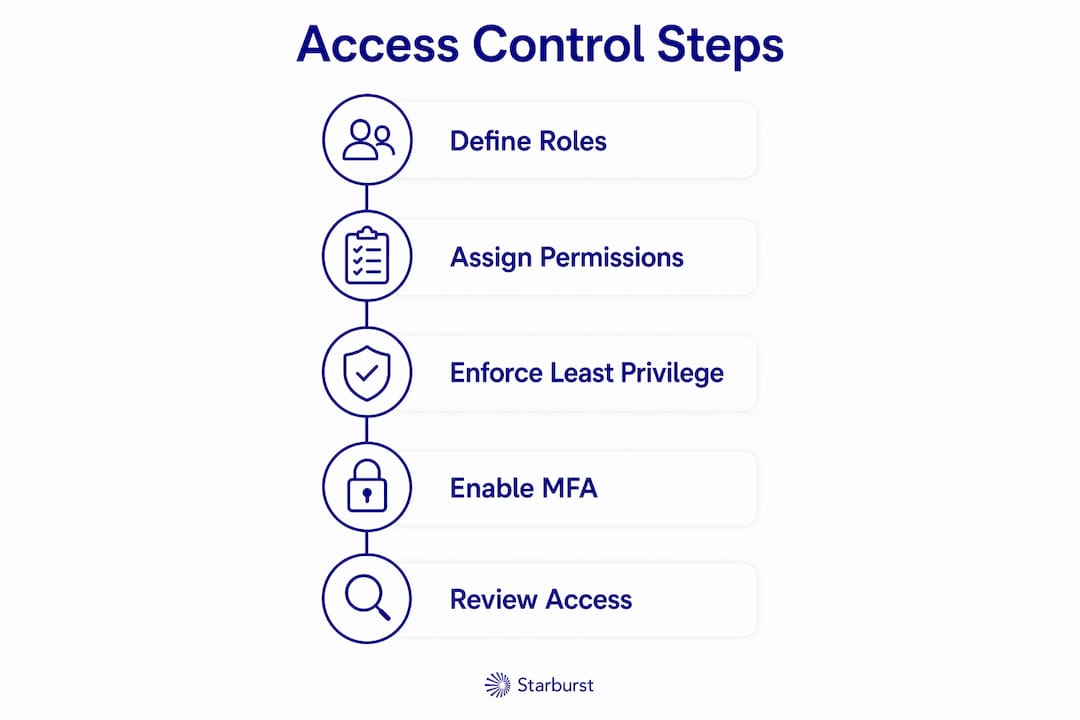
Three principles govern every effective access control program: least privilege, role-based access control (RBAC), and multi-factor authentication. Each one addresses a different layer of risk.
Least privilege
The principle of least privilege states that every user should have only the minimum permissions required to do their current job. Nothing more. A billing coordinator does not need access to your source code repository. A warehouse manager does not need admin rights on your HR system. Least privilege limits the damage any single compromised account can cause.
Role-based access control
RBAC simplifies permission management by assigning access based on defined job roles rather than individual users. Instead of configuring permissions for each person, you create roles like "Sales Rep," "Finance Manager," or "IT Admin" and assign the appropriate access to each role. When a new employee joins, you assign them a role and they inherit the correct permissions automatically. This approach reduces over-provisioning and makes audits far easier.
Multi-factor authentication
MFA blocks 99% of automated hacking attempts against protected accounts. That figure alone makes MFA the single highest-return security control available to small businesses. MFA requires users to verify their identity through two or more factors: something they know (a password), something they have (a phone or hardware token), or something they are (a fingerprint). You can learn more about how MFA works and why it belongs on every privileged account in your organization.
Standard vs. administrator accounts
Shared administrator accounts used for daily tasks represent a critical vulnerability. Best practice calls for only 1–2 IT staff to hold full admin rights, and those staff should use separate accounts for daily work versus administrative tasks. An IT manager who browses the web and manages servers from the same admin account is one phishing email away from a full network compromise.
Pro Tip: Assign every IT staff member two accounts: a standard account for daily email and browsing, and a separate admin account used only for system administration tasks. This single change dramatically limits your exposure.
How does user access control protect small businesses from cyber threats?
Access control limits the scope of damage when an attack succeeds. No security tool prevents every breach, but proper access controls contain the blast radius. When a threat actor compromises one account, they can only reach what that account is authorized to access. Without access controls, they can move laterally across your entire network.
Small businesses often operate on an 'implicit trust' model where most users have broad access, making them vulnerable to ransomware spreading across networks. Over-privileged access is the primary vector for lateral movement in attacks, meaning attackers exploit excessive permissions to jump from one system to the next until they reach their target.
Ransomware is the clearest example of why this matters. If every employee has write access to every shared drive, a single infected endpoint can encrypt your entire file system in minutes. If access is segmented by role, the same attack might only reach one department's files. The difference in recovery cost and downtime is enormous.
Continuous monitoring and auditing of access logs also gives you early warning when something goes wrong. Access logs record who accessed what, when, and from where. Anomalies, like a finance employee accessing engineering files at 2:00 AM, surface quickly when someone is watching. For small businesses without a dedicated security team, this is where a managed IT provider earns its value.
The implicit trust model is the default state for most small businesses that have grown without a formal IT structure. Everyone gets access to everything because it feels easier. That convenience is the reason small businesses are disproportionately targeted by ransomware operators. Fixing it does not require expensive tools. It requires policy, role mapping, and consistent enforcement.
What are best practices for implementing user access control?
Effective access control is not a one-time setup. It requires ongoing processes tied to your employee lifecycle, regular reviews, and clear policies. The following steps give you a practical framework.
-
Define your joiners, movers, and leavers (JML) process. Every new hire (joiner) should receive access based on their role, not based on what the previous person in that seat had. Every internal transfer (mover) should have their old permissions revoked and new ones assigned. Every departure (leaver) should trigger immediate account suspension.
-
Disable, do not delete, terminated accounts. Disabling rather than deleting a terminated user's account preserves the audit trail needed for forensic investigations. Deleting the account destroys evidence of what data was accessed, which can cripple a breach investigation.
-
Separate admin and daily-use accounts. As noted above, no IT staff member should use an admin account for routine tasks. This applies even in a two-person IT team.
-
Conduct quarterly access reviews. Pull a report of every user's current permissions and compare it against their current job role. Remove any access that is no longer needed. This process catches permission creep, where employees accumulate access over time without anyone noticing.
-
Use a password vault for privileged credentials. Shared passwords written on sticky notes or stored in spreadsheets are not access control. A password vault like those built into enterprise identity platforms stores credentials securely, logs usage, and supports access approval workflows.
-
Enforce MFA on all sensitive accounts. Prioritize email, VPN, cloud storage, and any system containing customer or financial data. Extend MFA to physical and network access control points where your environment warrants it.
Pro Tip: Run your first access review as a discovery exercise. You will almost certainly find former employees with active accounts, contractors with broader access than their work required, and shared logins that nobody can trace to a specific person.
The table below summarizes the key controls and their primary purpose:
| Control | Primary purpose |
|---|---|
| Least privilege | Limits damage from compromised or misused accounts |
| RBAC | Simplifies permission assignment and reduces over-provisioning |
| MFA | Blocks unauthorized login attempts on protected accounts |
| JML process | Keeps access current with employee status changes |
| Access reviews | Catches permission creep and orphaned accounts |
| Account disabling | Preserves audit trails for breach investigations |
How do you manage non-human identities in access control?
Access control does not stop at human users. Every modern business environment includes non-human identities (NHIs): service accounts, API keys, automation scripts, and software integrations. These identities connect your systems to each other, and they carry significant risk when left unmanaged.
97% of non-human identities carry excessive privileges without proper governance. That figure reflects how rarely businesses apply least privilege to their automated systems. A service account set up to run one nightly backup job often ends up with read and write access to the entire server because nobody revisited its permissions after the initial setup.
Key practices for managing NHIs include:
- Inventory all service accounts and API keys. You cannot protect what you cannot see. Start with a full list of every non-human identity in your environment.
- Apply least privilege to service accounts. Each service account should have only the permissions it needs for its specific function. Nothing more.
- Rotate credentials regularly. API keys and service account passwords should be rotated on a defined schedule, not left static indefinitely.
- Log and monitor NHI activity. Service accounts that suddenly access new systems or generate unusual traffic volumes are a strong indicator of compromise or misuse.
- Use privileged access management (PAM) controls for elevated service credentials. PAM tools enforce just-in-time access, meaning elevated permissions are granted only when needed and revoked immediately after.
Mature access control programs treat NHI governance as equal in priority to human user management. For small businesses, the practical starting point is simply knowing what service accounts exist and reviewing their permissions against current needs. Many businesses discover accounts tied to software they no longer use, still active and still connected to live systems. Those are open doors.
Key takeaways
User access control is the most cost-effective cybersecurity investment a small business can make, because it limits damage from both external attacks and internal mistakes.
| Point | Details |
|---|---|
| Define access by role | Use RBAC to assign permissions based on job function, not individual preference. |
| Apply least privilege everywhere | Restrict every account, human or automated, to the minimum access it needs. |
| Enforce MFA on sensitive accounts | MFA blocks 99% of automated attacks against protected accounts. |
| Run a JML process | Tie access changes directly to hiring, transfers, and terminations. |
| Audit non-human identities | Review service accounts and API keys regularly to close unmanaged backdoors. |
Why access control is the security investment most small businesses skip
I have worked with small businesses across manufacturing, professional services, and aerospace, and the pattern is consistent. Access control is the last thing they think about and the first thing attackers exploit. The implicit trust model feels harmless until the moment it is not.
What I have found is that most small businesses do not lack the tools. They lack the process. RBAC is not expensive to implement. MFA is often free or nearly free through existing software licenses. The ROI on access control is higher than almost any other security investment because it reduces the cost of every other type of incident.
The mistake I see most often is treating access control as a one-time configuration. You set up roles during an IT project, then nobody reviews them for three years. By then, you have former employees with active accounts, contractors with admin rights, and service accounts nobody can explain. That is not a technology failure. It is a process failure.
My honest advice: start with a single access review. Pull every active account, map it to a current employee or system, and disable anything that does not match. That exercise alone will close more risk than most security tools you could buy. Then build the JML process so the next review is easier. Check out data breach lessons from businesses that skipped this step and paid for it.
— Michael
How Symmnet helps small businesses take control of access security
Small businesses rarely have the internal bandwidth to build and maintain a full access control program on their own. Symmnet's managed IT services include access control setup, ongoing user access management, MFA deployment, and regular access reviews tailored to your industry and compliance requirements.

Symmnet works with small businesses in manufacturing, aerospace, and professional services to map roles, enforce least privilege, and monitor access continuously. The team handles the technical configuration so you can focus on running your business. If you are not sure where your access control gaps are, Symmnet offers a free security assessment to find out. Contact Symmnet to schedule yours and get a clear picture of who has access to what inside your organization.
FAQ
What is user access control in simple terms?
User access control is the practice of deciding who can access specific systems and data inside your organization. It uses rules, roles, and verification methods to block unauthorized access.
What are the main types of access control?
The main types are role-based access control (RBAC), attribute-based access control (ABAC), and discretionary access control (DAC). RBAC is the most widely adopted model for small businesses because it ties permissions to job roles rather than individuals.
Why is MFA considered a critical access control measure?
MFA blocks 99% of automated hacking attempts against protected accounts. It adds a second verification step beyond a password, making stolen credentials far less useful to attackers.
How often should small businesses review user access permissions?
Quarterly access reviews are the recommended standard. Reviews should also be triggered immediately by any employee departure, role change, or contractor engagement ending.
What happens if you delete a terminated employee's account instead of disabling it?
Deleting the account destroys the audit trail needed to investigate what data the employee accessed. Disabling the account preserves that evidence while blocking further login attempts, which is the correct procedure under security frameworks like the CIS Critical Security Controls v8.1.