

Access control is defined as the security practice of verifying identities and enforcing permissions to determine who can access specific systems, data, or physical spaces. It combines authentication and authorization to restrict resources to authorized users only, while keeping operations running smoothly. For IT managers and security professionals at small to mid-sized businesses, this is not an optional layer. Standards like PCI DSS require it, and frameworks like Zero Trust are built on it. Getting access control right means protecting critical data without creating friction that slows your team down.
What is access control and why does it matter for SMBs?
Access control is the process of deciding who gets in, what they can do, and when their access ends. It operates across two domains: physical access (building entry, server room locks, badge readers) and logical access (network logins, file permissions, application access). Both domains rely on identity management and audit logging for accountability.
For small and mid-sized businesses, the stakes are high. A single misconfigured permission can expose financial records, customer data, or proprietary manufacturing processes. Access control supports compliance with PCI DSS and Zero Trust by enforcing strict policies and the principle of least privilege, which means users get only the access they need to do their jobs. Nothing more.

The term "access control" covers both the policy decisions and the technical systems that enforce them. Thinking of it as just a software setting is a common mistake. It is a continuous risk management strategy that spans people, processes, and technology.
What are the primary models of access control?
Four models define how permissions are assigned and enforced. Each fits different environments and risk profiles.
Discretionary Access Control (DAC)
DAC lets resource owners set permissions themselves. A file owner decides who can read, edit, or share it. This model is flexible and easy to manage at small scale, but it creates risk when employees make poor permission decisions or leave the company without proper offboarding.
Mandatory Access Control (MAC)
MAC assigns access based on security clearance levels set by a central authority, not the resource owner. The system enforces rules automatically. MAC is common in government and defense environments where data classification is strict. For most SMBs, it is too rigid for daily operations.
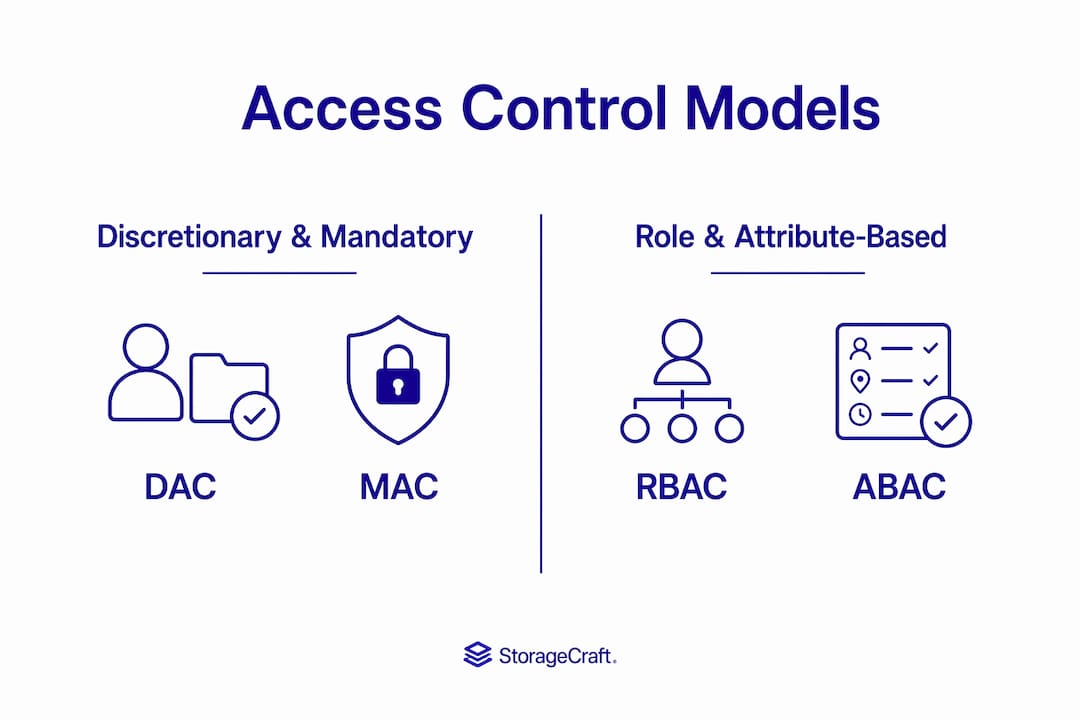
Role-Based Access Control (RBAC)
RBAC is the standard model for commercial environments. Permissions are tied to job roles, not individuals. A payroll manager gets access to payroll systems. A warehouse technician gets access to inventory tools. RBAC is standard for commercial use because it scales cleanly as teams grow and simplifies onboarding and offboarding.
Attribute-Based Access Control (ABAC)
ABAC makes access decisions based on attributes: user department, device type, location, time of day, and more. It handles complex, dynamic scenarios that RBAC cannot. A contractor accessing your system from an unrecognized device at 2 a.m. can be blocked automatically, even if their role would normally allow access.
| Model | How permissions are assigned | Best fit |
|---|---|---|
| DAC | Resource owner decides | Small teams, low-sensitivity data |
| MAC | Central authority, clearance levels | Regulated or classified environments |
| RBAC | Job role determines access | Most SMB commercial environments |
| ABAC | Context attributes (location, device, time) | Cloud, hybrid, or high-risk scenarios |
For most SMBs, RBAC forms the core framework. ABAC adds a context layer on top for situations where role alone is not enough.
How do physical and logical access control systems work together?
Physical and logical access control address different attack surfaces, but they must operate as one system. Physical controls include building entry systems, server room door locks, biometric scanners, and badge readers. Logical controls cover network authentication, file system permissions, application logins, and identity policies.
The gap between them is where breaches happen. A digital firewall is ineffective if physical access is unprotected. An attacker who walks into your server room bypasses every software control you have. Unified logging across both domains is the mark of a mature security posture.
Practical integration looks like this:
- Badge access to the server room is logged in the same system as network login events
- A terminated employee's badge and network credentials are revoked simultaneously
- Security cameras and door sensors feed into the same monitoring dashboard as endpoint alerts
- Physical security credentialing like ID badges is treated as part of the identity management lifecycle, not a separate HR task
Pro Tip: Many SMBs invest heavily in firewalls and endpoint protection but leave server room doors on basic key locks. A physical breach can render your entire digital security investment worthless. Audit physical access points with the same rigor you apply to network permissions.
What mechanisms implement access control in practice?
Access control enforcement relies on three technical pillars: authentication, authorization, and auditing. Each plays a distinct role.
Authentication confirms who you are. Methods range from passwords and PINs to biometrics (fingerprint, facial recognition) and multi-factor authentication (MFA). MFA requires two or more verification factors, making credential theft far less effective. For any SMB handling sensitive data, MFA is the baseline, not a bonus.
Authorization determines what you can do after authentication. This is where role assignments, policy rules, and attribute evaluations happen. Modern systems use identity standards like OAuth 2.0 and JWT tokens to pass authorization decisions securely between applications. This matters especially in cloud and SaaS environments where your users authenticate once and access multiple systems.
Auditing creates the record of what happened. Every access request, approval, denial, and permission change should generate a log entry. These logs serve two purposes: detecting anomalies in real time and providing evidence during compliance audits.
The access control process follows a clear sequence:
- A user or system requests access to a resource
- The identity provider authenticates the requestor's credentials
- The authorization engine checks the requestor's role, attributes, and applicable policies
- Access is granted or denied based on the policy decision
- The decision and context are logged for audit and monitoring purposes
This flow applies whether someone is logging into a cloud application, opening a door with a badge, or an API is calling another service. The mechanism is the same. The stakes vary.
What are the best practices for managing user permissions in SMBs?
Permission management is where access control either holds or falls apart. The most common failure mode is access creep: users accumulate permissions over time as they change roles, join projects, or receive temporary access that never gets revoked. Access creep is a major vulnerability that periodic automated access reviews are designed to prevent.
The principle of least privilege is the core discipline here. Every user account, service account, and application should have only the permissions required for its current function. Applying this consistently requires:
- A centralized identity directory (such as Active Directory or a cloud identity provider) that reflects current roles accurately
- Automated provisioning and deprovisioning tied to HR systems so access changes when employment status changes
- Quarterly or semi-annual access reviews where managers certify that their team's permissions are still appropriate
- Separation of duties for sensitive functions, so no single user can both approve and execute a high-risk action
Clean, centralized identity data is the foundation of effective permission management. Outdated or fragmented identity records make every other control unreliable.
For SMBs that have grown organically, role sprawl is a real problem. Teams create new roles for every edge case until the role catalog becomes unmanageable. A hybrid RBAC and ABAC model solves this by defining a clean set of standard roles and using attribute-based rules to handle exceptions, without multiplying the number of roles.
Pro Tip: Before designing your role framework, map your actual job functions, not your org chart titles. Two people with the same title often need very different access. Starting from real workflows prevents role explosion before it starts.
Access control also requires strong organizational policies, not just technical tools. A policy that defines who approves access requests, how long temporary access lasts, and what triggers an immediate revocation is as important as the software enforcing it. For SMBs in manufacturing or professional services, connecting these policies to your security policy framework creates a defensible, auditable security posture.
For environments with segmented networks, access control policies should align with your network segmentation architecture to prevent lateral movement if a credential is compromised.
Key takeaways
Access control is a continuous lifecycle combining authentication, authorization, and auditing across physical and logical domains, enforced through clear policies and regular permission reviews.
| Point | Details |
|---|---|
| Start with RBAC | Assign permissions by job role to simplify management and reduce error. |
| Integrate physical and logical controls | Unified logging across both domains closes the gaps attackers exploit. |
| Apply least privilege consistently | Users should have only the access their current role requires, reviewed regularly. |
| Automate access reviews | Automated reviews prevent access creep before it becomes a security liability. |
| Back controls with policy | Technical tools fail without written policies defining approval, duration, and revocation. |
Access control is a process, not a product
After years of working with small and mid-sized businesses on their security posture, the pattern I see most often is this: a company invests in good tools, sets up RBAC during an IT project, and then treats it as done. Six months later, a departed employee's account is still active. A contractor has admin rights they needed for one week two years ago. A shared service account has access to three systems it no longer touches.
Access control fails not because the technology is wrong, but because no one owns the ongoing process. The technical setup is the easy part. The hard part is building the habit of reviewing, revoking, and updating permissions as the business changes.
I have also seen SMBs in manufacturing and aerospace focus entirely on network security while leaving server room access on a basic lock and a shared key. That is not a gap in their software. It is a gap in their thinking. Physical and logical controls are one system. Treating them separately creates exactly the kind of blind spot that a determined attacker will find.
The shift toward context-aware access models like ABAC is real and relevant for SMBs, especially those running hybrid cloud environments. Static roles are not enough when your users are working from multiple locations on multiple devices. Building in attribute-based rules now, even simple ones like blocking access from unrecognized devices, pays dividends as your environment grows more complex.
Access control done right is not a burden on your team. It is the structure that lets your team work confidently, knowing that the right people have the right access and nothing more.
— Michael
Symmnet helps SMBs build and manage access control
Managing access control across physical and logical systems is a full-time responsibility. For small and mid-sized businesses without a dedicated security team, the gap between knowing what to do and having the capacity to do it is real.
Symmnet provides managed IT and security services designed specifically for SMBs in manufacturing, aerospace, and professional services. From identity management and endpoint security to 24/7 monitoring and compliance support, Symmnet handles the ongoing work that keeps your access controls current and effective. If you want to know where your permission management stands today, Symmnet offers a free assessment to identify gaps and prioritize fixes. Visit symmnet.com to get started.
FAQ
What is access control in cybersecurity?
Access control is the security practice of verifying user identities and enforcing permissions to restrict access to systems, data, and physical spaces. It combines authentication and authorization to ensure only the right people reach the right resources.
What are the main types of access control?
The four primary models are Discretionary Access Control (DAC), Mandatory Access Control (MAC), Role-Based Access Control (RBAC), and Attribute-Based Access Control (ABAC). RBAC is the most common choice for SMBs because it ties permissions to job roles.
What is role-based access control?
Role-based access control assigns permissions based on a user's job function rather than their individual identity. When someone changes roles or leaves the company, updating their role automatically adjusts their access across all connected systems.
How does access control support compliance?
Access control enforces the least privilege principle and creates audit trails required by standards like PCI DSS and frameworks like Zero Trust. Regular access reviews and centralized logging provide the documentation regulators expect during audits.
What is access creep and how do you prevent it?
Access creep is the gradual accumulation of permissions a user no longer needs, often from role changes or temporary access that was never revoked. Automated, periodic access reviews tied to your identity directory are the most reliable way to prevent it.