
Secure remote access is a cybersecurity approach that lets authorized users reach specific internal business resources from outside the office while blocking unauthorized network exposure. The industry standard term for the modern version of this is Zero Trust Network Access, or ZTNA, though many small businesses still rely on traditional VPNs. Understanding why secure remote access is non-negotiable comes down to three realities: your remote entry points are high-value attack targets, your employees work from devices you do not fully control, and a single compromised login can hand an attacker the keys to your entire network. This article breaks down the risks, the technology, and the practical steps your business needs to take right now.
Why secure remote access is essential for small businesses
Unsecured remote access is one of the most exploited attack surfaces in small business IT. Remote-access entry points are frequently targeted because they sit at the boundary between your internal systems and the open internet. When an attacker compromises a remote user's device or credentials, they gain a direct path into your internal network, not just one file or one application.
The consequences of that kind of breach go well beyond a stolen password. Attackers use compromised remote sessions to move laterally across your network, accessing payroll systems, customer records, and proprietary data that have nothing to do with the original login. This technique, called lateral movement, is what turns a single phishing click into a full-scale data breach.
Small businesses face specific risks that larger enterprises can absorb more easily:
- Credential theft: Phishing attacks targeting remote workers steal usernames and passwords, giving attackers valid login credentials.
- Unmanaged devices: Employees connecting from personal laptops or home computers introduce unpatched software and malware into your network.
- Weak authentication: Remote access protected only by a username and password is trivially bypassed with stolen credentials.
- Lateral movement: Once inside, attackers enumerate your network and access systems far beyond the original entry point.
- Business disruption: Ransomware deployed through a compromised remote session can lock every workstation and server in your office simultaneously.
Hybrid work expands the attack surface further. Unmanaged devices touching enterprise data make identity and device verification before granting access critical, not optional. For small manufacturers, aerospace suppliers, and professional services firms, a breach does not just cost money. It can trigger regulatory penalties and destroy client trust built over years.
How does secure remote access work?

Secure remote access combines identity verification, device trust, encryption, least-privilege access, and continuous monitoring to control exactly who reaches what, and under what conditions. Each layer addresses a specific failure point in traditional connectivity.
Here is how the core components work together:
- Identity verification: Multi-factor authentication (MFA) requires users to prove their identity with something they know (a password) and something they have (a phone-based code or hardware token). Phishing-resistant MFA methods, such as FIDO2 hardware keys, are the strongest option available.
- Device posture checks: Before granting access, the system evaluates whether the connecting device meets your security standards. Is the operating system patched? Is endpoint protection active? Devices that fail these checks are blocked or quarantined.
- Encryption: All traffic between the remote user and your internal systems travels through an encrypted tunnel. This prevents interception on public Wi-Fi or untrusted networks.
- Least-privilege access: Users receive access only to the specific applications or data their role requires. An accounts payable employee does not need access to your engineering file server.
- Continuous monitoring: Access does not end at login. Session activity is monitored for anomalies, such as unusual data downloads or logins from unexpected locations, throughout the connection.
- Role-based access control (RBAC): Permissions are assigned by job function, not by individual negotiation. This makes access management consistent and auditable.
Modern ZTNA platforms like Zscaler Private Access and Cloudflare Access implement all six layers natively. Traditional VPNs typically handle only encryption and basic authentication, leaving the other four layers unaddressed.
Pro Tip: Deploy phishing-resistant MFA, such as FIDO2 hardware keys or Microsoft Authenticator with number matching, before any other remote access control. Credential theft is the most common entry point, and strong MFA blocks the majority of automated attacks.
VPN vs. modern secure remote access: what is the difference?
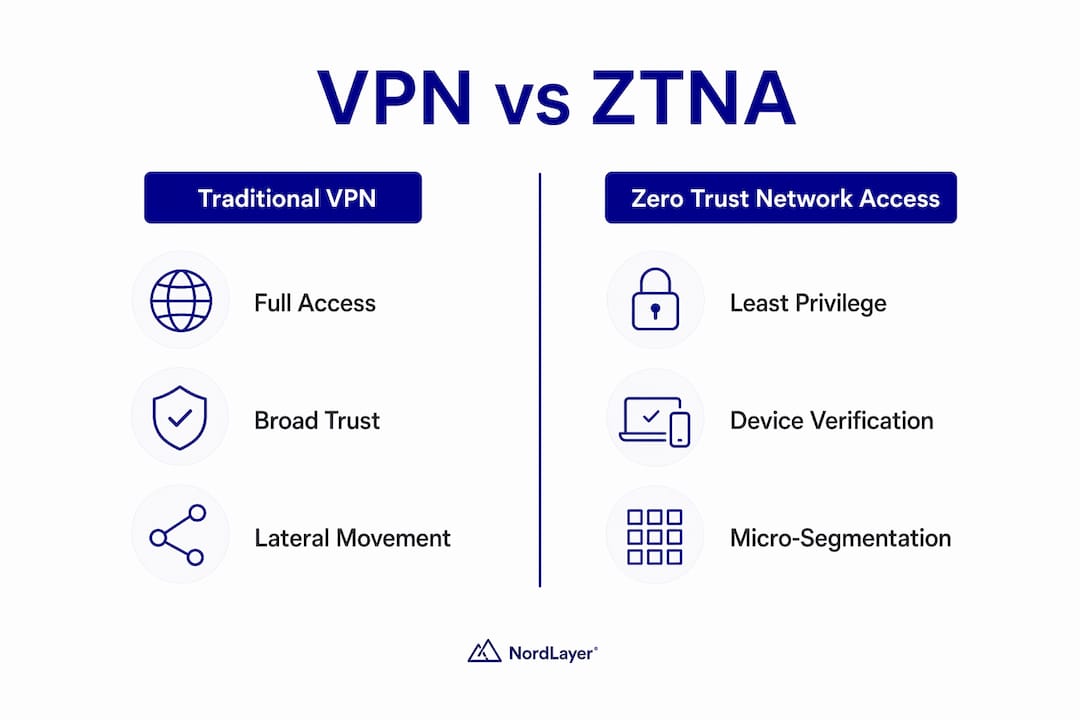
The gap between a traditional VPN and a modern ZTNA solution is not just technical. It is the difference between handing a visitor a master key to your building versus escorting them directly to the one room they need.
| Feature | Traditional VPN | Zero Trust Network Access (ZTNA) |
|---|---|---|
| Access scope | Full network access after login | Application-level access only |
| Lateral movement risk | High: attacker can enumerate the network | Low: access is limited to specific resources |
| Device trust | Rarely enforced | Mandatory device posture check |
| Authentication | Username and password, sometimes MFA | Always MFA plus continuous verification |
| Visibility | Connect and disconnect logs only | Full session telemetry and anomaly detection |
| Scalability | Degrades with large remote workforces | Scales without hardware bottlenecks |
Broad post-login trust models like traditional VPNs enable lateral movement and network enumeration when credentials are compromised. ZTNA removes that risk by enforcing resource-level authorization. If an attacker steals a VPN credential, they are inside your network. If they steal a ZTNA credential, they reach one application and nothing else.
Micro-segmentation is the technical mechanism that makes this possible. Your network is divided into isolated zones, and access between zones requires separate authorization. Symmnet covers this in detail in its guide to network segmentation practices, which is directly relevant to any business evaluating remote access architecture.
Pro Tip: If your business is not ready to migrate fully to ZTNA, harden your existing VPN immediately. Disable split tunneling, enforce MFA, restrict access by IP range where possible, and apply patches within 24 hours of release for remote-access gateways.
Does secure remote access support business continuity?
Secure remote access is a direct business continuity tool, not just a security control. Remote access enables employees and IT staff to maintain productivity and system health when physical access to the office is unavailable. For small businesses without redundant facilities, this capability is the difference between operating and going dark.
Consider the scenarios where this matters most:
- Severe weather: A snowstorm or hurricane closes your office for three days. Employees with secure remote access keep working. Those without it stop entirely.
- Travel disruptions: A key employee is stranded at an airport. Secure access lets them handle a critical client issue from a hotel Wi-Fi connection without exposing your network.
- Office closures: A burst pipe, a power outage, or a local emergency forces an unplanned closure. Your IT team can still monitor systems, respond to alerts, and push patches remotely.
- IT troubleshooting: Your managed IT provider needs to diagnose a server issue at 2 a.m. Without secure remote access, that requires an on-site visit. With it, the issue is resolved before your staff arrives in the morning.
The security dimension of business continuity is often overlooked. Employees who cannot access systems securely will find workarounds, personal email, consumer file-sharing services, or unsecured connections. Those workarounds create the exact vulnerabilities that secure access is designed to prevent. Building secure access into your continuity plan removes the pressure that drives unsafe behavior.
Remote access security best practices for small businesses
Implementing secure remote access does not require an enterprise budget. It requires disciplined execution of a focused set of controls. These six practices address the most common failure points for small businesses:
- Harden your VPN, SSH, and RDP configurations. Disable default ports, restrict access to known IP ranges, and disable unused protocols. RDP exposed directly to the internet is one of the most common ransomware entry points.
- Deploy phishing-resistant MFA on every remote access point. VPN plus MFA alone is insufficient without device compliance checks and session monitoring, but MFA is still the single highest-impact control you can add today.
- Enforce device posture checks. Require that connecting devices run current operating system patches and active endpoint protection before granting access. Unmanaged personal devices should connect only through isolated guest segments, if at all.
- Patch remote-access gateways on an accelerated schedule. CISA directives mandate rapid remediation of remote access vulnerabilities actively exploited by attackers. Your patch window for remote-access infrastructure should be 24–48 hours, not your standard 30-day cycle.
- Implement detailed logging and anomaly detection. Telemetry for remote-access flows should capture user identity, device posture, session start and stop times, failed access attempts, and data transfer volumes. Bare connect and disconnect logs leave too many blind spots.
- Train users on remote access policies. Employees need to understand what devices are approved, what networks are safe, and what to do if they suspect their credentials have been compromised. Policy without training is just documentation.
Pro Tip: Review your remote access logs weekly, not just when an incident occurs. Remote access programs frequently fail operationally rather than technologically. Anomalies caught early, such as a login from an unexpected country or an unusual data download, prevent breaches that would otherwise go undetected for weeks.
Key takeaways
Secure remote access protects small businesses by combining identity verification, device trust, least-privilege access, and continuous monitoring to block unauthorized entry and limit damage when credentials are compromised.
| Point | Details |
|---|---|
| Remote entry points are prime targets | Attackers exploit remote access paths to reach internal systems; unmanaged devices multiply this risk. |
| ZTNA outperforms traditional VPNs | Resource-level access limits lateral movement; VPNs grant broad network access after a single login. |
| MFA is the highest-impact first step | Phishing-resistant MFA blocks the majority of credential-based attacks before they reach your network. |
| Patch gateways on an accelerated schedule | Remote-access infrastructure requires 24–48 hour patch windows, not standard monthly cycles. |
| Secure access enables business continuity | Employees and IT staff maintain operations during weather events, travel disruptions, and office closures. |
What i have learned working with small business IT security
The most common mistake I see small businesses make is treating remote access as a connectivity problem rather than a security problem. They set up a VPN, hand out credentials, and consider the job done. The VPN is the starting point, not the finish line.
What actually protects a business is the stack built around that connection: MFA that cannot be bypassed with a stolen password, device checks that block unpatched machines, and monitoring that catches the session anomalies that indicate a compromised account. Most small businesses have none of those layers in place.
The second mistake is assuming that security and usability are in conflict. They are not, when the implementation is done correctly. A well-configured ZTNA solution is often faster and less frustrating for employees than a legacy VPN that routes all traffic through a central gateway. The friction argument against better security is usually a sign that the wrong tool was chosen, not that security is inherently inconvenient.
My practical advice: start with MFA on every remote access point this week. Then audit your device posture situation. Then look at whether your VPN architecture is still the right fit or whether ZTNA makes more sense for your team size and risk profile. Do not try to solve everything at once. The businesses that improve their security posture consistently are the ones that prioritize one control at a time and execute it completely.
— Michael
How Symmnet helps you secure remote access
Protecting your remote workforce requires more than a VPN license. Symmnet provides managed IT and security services built specifically for small U.S. businesses in manufacturing, aerospace, and professional services. That includes configuring and monitoring remote access infrastructure, enforcing MFA and device posture policies, managing network segmentation to limit lateral movement, and delivering 24/7 monitoring that catches anomalies before they become incidents.
If you are not sure whether your current remote access setup meets the security standard your business needs, Symmnet offers a free assessment to identify gaps and prioritize fixes. You get a clear picture of your exposure and a practical plan to address it, without the overhead of building an internal IT security team. Reach out to Symmnet to schedule your assessment and get your remote access security on solid ground.
FAQ
What is secure remote access?
Secure remote access is a set of technologies and policies that allow authorized users to connect to internal business systems from outside the office while preventing unauthorized access. It combines identity verification, device trust, encryption, and least-privilege access controls.
Why is remote access a security risk without proper controls?
Unsecured remote access gives attackers a direct path into your internal network if credentials are stolen or a device is compromised. Without MFA, device checks, and session monitoring, a single phishing attack can result in a full network breach.
What is the difference between a VPN and ZTNA?
A traditional VPN grants broad network access after login, allowing lateral movement if credentials are stolen. ZTNA grants access only to specific applications a user is authorized to use, limiting the damage from any single compromised account.
How do small businesses start improving remote access security?
Deploy phishing-resistant MFA on all remote access points first, then enforce device posture checks, and implement detailed session logging. These three controls address the most common failure points without requiring a large budget or a full IT team.
How does secure access support business continuity?
Secure remote access lets employees and IT staff maintain operations during office closures, weather events, and travel disruptions. Without it, staff either stop working or use unsafe workarounds that create new security exposures.