

Applying a repeatable, risk-based patching program that automates routine updates and fast-tracks critical fixes is the single most effective way to stop common breaches before they start. Most successful attacks don't use exotic zero-days. They walk through doors that vendors already fixed months or years earlier. For a small business, that gap between "patch released" and "patch applied" is where ransomware lives.
Here is the three-step plan you can start this week:
- Inventory and enable auto-updates. Run a discovery scan on your network, list every device and OS version, and turn on automatic updates for endpoints and browsers where it's safe to do so.
- Triage the CISA Known Exploited Vulnerabilities (KEV) Catalog. Cross-reference your inventory against active KEV entries and treat any match as an immediate fix, not as a scheduled one.
- Set a monthly patch day. Schedule a recurring maintenance window for everything that doesn't qualify as critical. Document what was patched, by whom, and when.
A single ransomware event for a 25-person business typically costs six figures when factoring in lost productivity, recovery, legal fees, and insurance deductibles. A managed patching program costs a fraction of that.
Pro Tip: Enable automated updates for endpoints and browsers first. Reserve human review for public-facing servers, firewalls, and any system that controls physical operations.

Table of Contents
- What are cyber security patches, and why do they matter?
- How does the patch management lifecycle work?
- How should you prioritize which patches to apply first?
- What are the best practices for consistent, low-disruption patching?
- Which tools help you manage patches across your environment?
- How should you test and deploy patches safely?
- What metrics prove your patching program is working?
- What does patching actually cost, and what happens if you skip it?
- What are the most common patching obstacles, and how do you fix them?
- How does a managed IT provider handle patching for small businesses?
- Key Takeaways
- The part of patching most guides skip
- Symmnet takes patching off your plate
- Useful sources and further reading
What are cyber security patches, and why do they matter?
A security patch is a software update that fixes a specific vulnerability. It is not the same as a feature update, which adds new functionality, or a bug fix, which corrects a performance or stability problem. The distinction matters because security patches address flaws that attackers are actively scanning for and exploiting.
Hotpatching (sometimes called a hot patch) is a specialized technique that applies a fix to a running system without requiring an immediate reboot. It's particularly valuable for servers and production systems where downtime is costly.
Common patch targets include:
- Operating systems (Windows, macOS, Linux)
- Business applications (ERP, CRM, accounting software)
- Browser plugins and extensions
- Network firmware (routers, firewalls, VPN appliances, printers)
- Mobile devices and tablets
- SaaS platform configuration settings
CISA's guidance for small and medium businesses is direct: outdated software is one of the most significant security risks a business faces. Threat actors like the Volt Typhoon group have exploited vulnerabilities in public-facing routers, VPNs, and firewalls specifically because those devices are often overlooked in patching programs.
NIST Special Publication 800-40r4 frames patch management as preventive maintenance, not a reactive chore. The analogy holds: you don't wait for an engine to seize before changing the oil. Security patches work the same way. Applying them on a schedule keeps attackers from using published vulnerability data as a roadmap into your systems.
Why prioritize security patches over feature updates? Vendors publish CVE (Common Vulnerabilities and Exposures) identifiers and CVSS (Common Vulnerability Scoring System) scores alongside security advisories. Once a CVE is public, exploit code often appears within days. A CVSS score of 9.0 or above means the flaw is severe, and attackers know it.
How does the patch management lifecycle work?
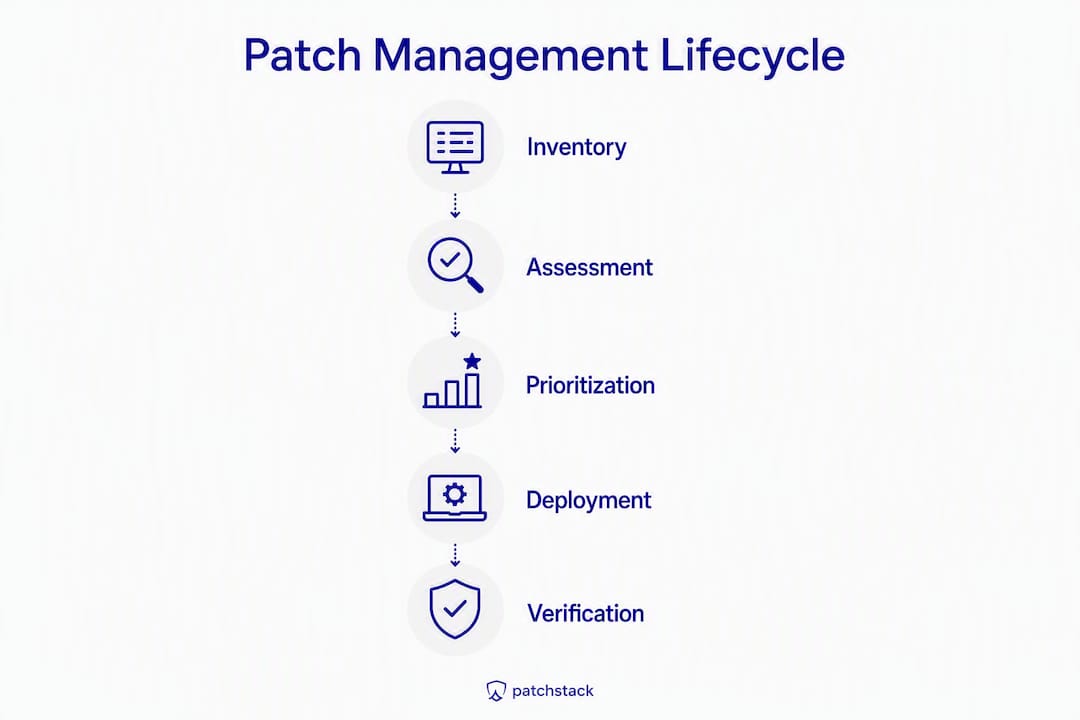
NIST's enterprise patch management framework defines patch management as the process of identifying, prioritizing, acquiring, installing, and verifying patches across an organization. In practice, that maps to seven repeatable stages.
- Vulnerability detection and scanning — Run authenticated scans using tools like OpenVAS or Nessus to identify missing patches and misconfigurations. Subscribe to vendor advisories and the CISA KEV Catalog.
Key responsibilities at each stage:
Pro Tip: Keep your asset inventory in a living document or CMDB (Configuration Management Database). When a new KEV entry drops, the first question is "do we run this product?" A current inventory answers that in minutes, not hours.
How should you prioritize which patches to apply first?
CISA's "Patch Smarter, Not Harder" initiative makes the core argument clearly: not all vulnerabilities deserve equal urgency. Concentrating resources on the small percentage of high-risk flaws, while automating the rest, is the operationally sound approach.
BOD 26-04 formalizes this with remediation timelines tied to exploitation evidence and exposure. The logic translates directly to a three-lane triage model for any small business:
Lane 1: Immediate (within 24–72 hours)
- Asset is publicly exposed (internet-facing)
- Vulnerability appears in the CISA KEV Catalog
- CVSS score is 9.0 or above, or vendor rates it Critical
- Exploit code is publicly available
Lane 2: Standard (within 14 days)
- Asset is internal but high-value (domain controller, ERP server, backup system)
- CVSS score is 7.0–8.9 (High)
- No confirmed exploitation in the wild, but patch is available
Lane 3: Scheduled (next upgrade cycle)
- Asset is low-exposure and low-criticality
- CVSS score is below 7.0 (Medium or Low)
- Vendor patch requires significant testing or compatibility work
To assign a lane, answer three questions in order:
- Is this asset reachable from the internet?
- Is this CVE listed in the CISA KEV Catalog?
- What is the CVSS base score, and has the vendor rated it Critical?
If the answer to questions 1 and 2 is yes, it's Lane 1 regardless of CVSS score. Exploitation evidence overrides theoretical severity.
Pro Tip: Run a daily five-minute check of new KEV entries and cross-reference them against your asset inventory. Most days, nothing matches. When something does, you'll catch it before an attacker does.
Vendor advisories add a layer of context that CVSS alone misses. Microsoft's Patch Tuesday advisories, for example, flag which CVEs are already being exploited in the wild. IBM's security intelligence resources provide similar depth for enterprise software. Acronis publishes practical guidance on patch prioritization for SMB environments. Combining KEV status, vendor exploitation flags, and CVSS score gives you a defensible, auditable prioritization decision.
What are the best practices for consistent, low-disruption patching?
The goal is a patching program that runs reliably without causing outages or requiring heroic effort from your team. These operational rules make that achievable.
- Enable safe auto-updates. Endpoints, browsers, and low-risk applications should update automatically. This handles the bulk of your patch volume with zero manual effort.
- Set a monthly patch day. Pick a recurring date (many teams align with Microsoft's Patch Tuesday, the second Tuesday of each month) and treat it as a standing maintenance event.
- Maintain tested backups before every patch cycle. Verify that backups completed successfully before deploying patches to servers or critical systems.
- Stage rollouts. Never push a new patch to every device simultaneously. Start with a pilot group of 5–10% of endpoints, monitor for 24–48 hours, then expand.
- Assign ownership. Every system should have a named owner responsible for confirming patch status. Shared responsibility is no responsibility.
- Document everything. Record what was patched, the patch version, the date, and the technician. This log is your evidence for audits and insurance claims.
A staged rollout follows this sequence:
- Patch one or two non-critical test machines.
- Monitor for 24 hours. Check application functionality, system stability, and event logs.
- Expand to a pilot group (roughly 10% of the fleet).
- Monitor for another 24–48 hours.
- Deploy to the full environment during the maintenance window.
- Run a post-patch vulnerability scan to confirm coverage.
Network segmentation reduces the blast radius if a patch causes instability or if a vulnerability is exploited before patching is complete. Isolating production systems, guest networks, and legacy devices into separate network segments limits lateral movement.
Pro Tip: Use Group Policy Objects (GPOs) or your MDM platform to enforce update policies and generate automated compliance reports. Manual tracking at scale is error-prone and unsustainable.
Which tools help you manage patches across your environment?
The right tool depends on your environment's size, OS mix, and compliance requirements. Here's how the main categories compare.
| Tool Category | Examples | Best For | Key Limitation |
|---|---|---|---|
| OS-native update | Windows Update for Business, Apple Software Update | Small, homogeneous environments | Limited cross-platform coverage |
| Endpoint management | Microsoft SCCM / Endpoint Configuration Manager, Intune | Windows-heavy SMBs needing policy control | Requires licensing and configuration expertise |
| RMM / patch manager | NinjaRMM, Atera, Kaseya | MSPs and multi-client environments | Cost scales with device count |
| Vulnerability scanner | OpenVAS, Nessus Essentials | Identifying missing patches and misconfigurations | Scanning only; no automated deployment |
| MDM (mobile/Mac) | Intune, Apple Business Essentials, Jamf | Mixed device fleets including iOS and macOS | May require separate patching tool for servers |
| Firmware management | Router/switch vendor portals, UEFI update utilities | Network appliances and hardware | Highly manual; vendor-specific |
Windows Update for Business and Microsoft Endpoint Configuration Manager (SCCM) remain the standard building blocks for Windows-heavy environments. Pairing them with an RMM platform fills the gaps for third-party applications, macOS devices, and network appliances.
IBM's security resources and Acronis's SMB guidance both recommend layering a vulnerability scanner on top of your patching tool. The scanner confirms what the deployment tool reports as installed. Those two data sources together give you a defensible compliance posture.
Key features to require from any patching tool:
- Automated asset discovery and inventory
- Scheduled and on-demand patch deployment
- Staging and pilot group support
- Rollback capability
- Auditable patch compliance reports
Pro Tip: Prioritize tools that produce exportable patch compliance reports. Cyber insurers and auditors increasingly ask for documented evidence of patch hygiene, and a tool that can't produce that report is a liability.
How should you test and deploy patches safely?
Speed and reliability are both requirements, not trade-offs. The deployment pattern you choose determines whether you get both.
Staged rollout pattern (routine patches):
- Apply patch to one or two isolated test machines.
- Run smoke tests: open critical applications, verify network connectivity, check event logs for errors.
- Confirm backup integrity before expanding.
- Deploy to a canary group (5–10% of production devices).
- Monitor for 24–48 hours.
- Deploy to the full environment during the scheduled maintenance window.
- Run a post-deployment vulnerability scan to verify coverage.
- Document results and close the change ticket.
Emergency patch handling:
When a Lane 1 vulnerability requires immediate action, the staged model compresses but doesn't disappear.
- Take a snapshot or backup of the affected system before applying the patch.
- Review vendor release notes for known compatibility issues.
- Apply the patch during the shortest available maintenance window, even if that means a brief off-hours outage.
- Run smoke tests immediately after.
- Document the emergency change with timestamps and approvals.
Hotpatching applies selected security fixes to running systems without forcing an immediate reboot. This is particularly useful for production servers where a reboot would cause significant downtime. Not every patch supports hotpatching, and the technique requires OS and vendor support, but where available it narrows the window between vulnerability disclosure and remediation.
Pro Tip: Keep a tested rollback path for every server-level change. A snapshot taken five minutes before patching is the difference between a 20-minute recovery and a four-hour incident. Verify that off-site backups are current before every patch cycle.
What metrics prove your patching program is working?
Metrics serve two audiences: your internal team, who needs to know where the gaps are, and external stakeholders (auditors, insurers, executives) who need evidence that the program is functioning.
Core metrics to track monthly:
- Mean Time to Patch (MTTP) for KEV items: How many hours or days elapsed between KEV publication and confirmed remediation on all affected assets?
- Patch compliance rate: What percentage of endpoints are fully patched as of the last scan date?
- Open KEV exposures: How many active KEV entries currently match assets in your inventory?
- Patch failure rate: What percentage of patch deployments failed or required manual intervention?
A basic patch compliance report should include these fields:
| Field | Description |
|---|---|
| Asset name / hostname | Identifies the specific device |
| CVE identifier | The specific vulnerability being tracked |
| KEV status | Whether the CVE appears in the CISA KEV Catalog |
| CVSS score | Severity rating from the NVD |
| Patch status | Installed, pending, failed, or deferred |
| Asset owner | The team or individual responsible |
| Remediation date | Date patch was confirmed installed |
Cyber insurers increasingly deny or reduce claims when businesses cannot produce evidence of basic patch hygiene. Retaining installation logs, change tickets, and scan reports for at least 12 months gives you the documentation trail that underwriters expect. For regulated industries, NIST SP 800-40r4 and sector-specific frameworks (CMMC for defense contractors, FDA 21 CFR Part 11 for regulated manufacturers) set additional documentation requirements.
Pro Tip: Automate report generation to a central dashboard. When an executive or insurer asks "are we current on patches?" you should be able to answer with a report, not a memory.
What does patching actually cost, and what happens if you skip it?
Timelines and costs depend on the lane and the environment, but the framework is consistent.
Typical remediation timelines:
Resourcing models for small businesses:
- Managed service: — An MSP that includes patching as part of a fixed monthly retainer shifts the labor burden off internal staff and typically includes tooling, reporting, and emergency response.
A single ransomware event for a 25-person business typically costs six figures when factoring in lost productivity, recovery, legal fees, and insurance deductibles. That figure, cited consistently across incident response data, dwarfs the annual cost of a managed patching program. The math is straightforward: prevention is cheaper than recovery.
Documented patch hygiene also affects cyber insurance premiums and claim outcomes. Insurers treat a well-documented patching program as a risk-reduction signal. The absence of patch records, conversely, can result in claim denial even when the policy is active.
What are the most common patching obstacles, and how do you fix them?
The single greatest operational weakness in SMB patch programs is the forgotten device. Legacy servers, printers, rarely used laptops, and network appliances that haven't been inventoried in years sit unpatched and exposed. Attackers find them through automated scanning long before your team does.
Common challenges and practical fixes:
- Forgotten or untracked devices: Run a full network discovery scan quarterly. Tools like Nmap or your RMM's discovery module surface devices that aren't in your asset register.
- End-of-life (EOL) software: If a vendor no longer issues patches, the software is a permanent liability. Isolate EOL systems on a separate network segment with no internet access, and plan for replacement. Manufacturing environments frequently face this with legacy OT systems and line-of-business applications tied to unsupported OS versions.
- Firmware blind spots: Routers, switches, and printers rarely auto-update. Subscribe to vendor security bulletins and schedule quarterly firmware reviews.
- BYOD gaps: Personal devices that access business systems may not be under your patch management policy. MDM enrollment or network access controls (NAC) can enforce minimum patch levels before granting access.
- Fear of downtime: Staged rollouts, tested backups, and rollback plans convert this fear into a manageable risk. The answer to "what if the patch breaks something?" is a tested recovery procedure, not skipping the patch.
Handling an unsupported device your business depends on:
When a line-of-business application requires an OS version that no longer receives security patches, you have three options: isolate the device on a dedicated VLAN with strict firewall rules, accelerate the vendor's upgrade timeline, or accept the risk formally in writing with compensating controls documented. The first option buys time; the third is a last resort that requires executive sign-off.
Pro Tip: Assign one named person as the patch calendar owner. That person is responsible for scheduling maintenance windows, confirming completion, and producing the monthly compliance report. Diffuse ownership means nothing gets done.
Patch management isn't glamorous work, but it's the most consistently effective security control available to a small business. The organizations that get breached aren't usually the ones that missed a zero-day. They're the ones that missed a patch from six months ago.
How does a managed IT provider handle patching for small businesses?
Symmnet's approach to patch management for small U.S. businesses follows a structured process that maps directly to the lifecycle described above, with the added benefit of 24/7 monitoring and dedicated accountability.
The Symmnet patching process:
- Assess and inventory. During onboarding, Symmnet conducts a full asset discovery scan to build a complete inventory of devices, OS versions, applications, and firmware. This baseline is the foundation for everything that follows.
- Policy design. Working with the client, Symmnet defines patch lanes, SLAs for each lane, and maintenance window schedules that minimize business disruption.
- Automation and staging. Routine patches are automated for endpoints and browsers. Server and critical-system patches go through a staged rollout with pre-patch backups and post-patch verification scans.
- Emergency triage. When a new KEV entry matches a client asset, Symmnet initiates Lane 1 response within hours, not days.
- Reporting and continuous improvement. Monthly compliance reports document patch coverage, open exposures, and remediation timelines. These reports satisfy cyber insurance documentation requirements and support regulatory audits.
Symmnet's managed IT services include:
- 24/7 system monitoring and alerting
- Automated patch deployment and compliance reporting
- Firmware management for network appliances
- Staged rollouts with pre-patch backups and rollback capability
- Monthly patch compliance reports for insurance and audit purposes
- Microsoft 365 management and endpoint security
- Network segmentation to limit blast radius
For small businesses in manufacturing, aerospace, and professional services, Symmnet's fixed monthly pricing means no surprise invoices when an emergency patch cycle is required.
Pro Tip: Ask any IT provider for a sample patch compliance report before signing a contract. If they can't produce one, they can't prove your environment is protected.
Small businesses don't need a 40-page patch policy. They need a clear inventory, a defined triage lane for critical vulnerabilities, and someone accountable for running the monthly cycle. That's the whole program.
Key Takeaways
A risk-based patching program that automates routine updates, fast-tracks KEV items, and documents every remediation is the most cost-effective security control available to a small U.S. business.
| Point | Details |
|---|---|
| Inventory first | You cannot patch what you don't know exists; run discovery scans before anything else. |
| KEV triage is non-negotiable | Cross-reference the CISA KEV Catalog against your inventory daily and treat matches as Lane 1 emergencies. |
| Automate the routine | Enable auto-updates for endpoints and browsers to handle the bulk of patches without manual effort. |
| Document for insurers | Retain installation logs and compliance reports; insurers can deny claims without evidence of patch hygiene. |
| Symmnet manages the full cycle | Symmnet handles inventory, automated patching, KEV triage, and monthly compliance reporting for small U.S. businesses. |
The part of patching most guides skip
The conventional wisdom on patching focuses almost entirely on speed. Patch faster. Automate more. Close the window. That advice is correct, but it misses the failure mode that actually ends careers and businesses: patching without a tested rollback plan.
The incidents that cause the most damage to small businesses aren't always ransomware. Sometimes they're a patch applied to a production server at 2 PM on a Tuesday that breaks a critical application, and the team has no snapshot, no backup from that morning, and no documented rollback procedure. The recovery takes 18 hours. The business loses a day of operations. The patch itself was the right call. The preparation wasn't there.
The second thing most guides undervalue is inventory culture. Teams that maintain a living, accurate asset inventory don't just patch faster. They respond to incidents faster, recover from failures faster, and answer auditor questions faster. When a new KEV entry drops, the question "do we run this software?" should take two minutes to answer, not two days. Building that inventory discipline is harder than buying a patching tool, and it matters more.
For small businesses specifically, the balance between speed and reliability comes down to one practice: test your backups before you patch, not after. A backup you haven't verified is a backup you can't trust. That single habit, applied consistently, turns patching from a source of anxiety into a routine maintenance task.
Symmnet takes patching off your plate
For small businesses that don't have a dedicated IT team, running a defensible patch program is genuinely difficult. Keeping an accurate inventory, monitoring the CISA KEV Catalog, staging rollouts, and producing monthly compliance reports requires consistent time and expertise that most small teams don't have to spare.

Symmnet's managed IT services handle the full patching lifecycle for small U.S. businesses: asset discovery and inventory, automated patch deployment, KEV triage, firmware management, staged rollouts with pre-patch backups, and monthly audit-ready compliance reports. Fixed monthly pricing means you know exactly what you're paying, and 24/7 monitoring means critical vulnerabilities get addressed around the clock, not just during business hours.
Symmnet serves businesses in manufacturing, aerospace, professional services, and other regulated industries where patch compliance isn't optional. The compliance reports Symmnet produces satisfy cyber insurance documentation requirements and support regulatory audits, so you're covered on both fronts.
Schedule a free security assessment to see where your current patch posture stands and what it would take to close the gaps.
Useful sources and further reading
The sources below are the most authoritative references for patch management guidance, KEV monitoring, and compliance frameworks. Subscribing to CISA alerts and vendor advisories is the single highest-leverage habit for staying ahead of new vulnerabilities.
- CISA: Update Business Software — CISA's direct guidance for small and medium businesses on the risks of outdated software and the steps to address them.
- CISA: Understanding Patches and Software Updates — A plain-language explanation of patch types and why security updates should be treated as preventive maintenance.
- CISA: Patch Smarter, Not Harder — The initiative behind risk-based prioritization; explains why concentrating on high-risk vulnerabilities outperforms blanket patching.
- CISA: Known Exploited Vulnerabilities (KEV) Catalog — The authoritative list of vulnerabilities with confirmed exploitation in the wild. Subscribe to updates and cross-reference against your inventory regularly.
- CISA: BOD 26-04 Prioritizing Security Updates Based on Risk — The binding operational directive that formalizes risk-based remediation timelines; the framework behind the three-lane triage model.
- NIST SP 800-40r4: Guide to Enterprise Patch Management Planning — The definitive federal framework for patch management lifecycle, prioritization, and reporting.
- NIST: Guide to Enterprise Patch Management Planning (publication page) — The NIST publication landing page with abstract and download links.
- Microsoft Windows Update for Business — Microsoft's documentation for configuring and managing Windows Update in business environments.
Subscribe to CISA's KEV Catalog alerts at cisa.gov/known-exploited-vulnerabilities-catalog. New entries are added regularly, and a daily five-minute review against your asset inventory is the fastest way to catch critical exposures before attackers do.