

Email can be used compliantly for protected health information (PHI) when the right technical controls are in place, a Business Associate Agreement (BAA) is signed with your provider, and your practice maintains documented governance. That combination, not any single product, is what HIPAA Security Rule (45 CFR Part 164) compliance actually requires. Three practical paths exist for most small practices: (1) a business-tier Google Workspace or Microsoft 365 plan with a signed BAA and correctly configured controls; (2) a dedicated HIPAA secure email service such as Paubox, Hushmail, or LuxSci; or (3) a managed IT implementation where a provider like Symmnet handles configuration, documentation, and ongoing governance on your behalf.
Before you read another word, do these three things:
- Confirm you are on a paid business or enterprise plan with a provider that will sign a BAA. Personal Gmail and consumer Outlook accounts will not sign BAAs and cannot be used for PHI.
- Schedule or update your practice's risk analysis for email, as HHS/OCR guidance requires covered entities to apply reasonable safeguards and the minimum-necessary standard to all patient communications.
- Document a patient communication preference and consent process so your staff knows exactly when unencrypted email is permissible and when it is not.
Key Takeaways
HIPAA compliant email requires a signed BAA, enforced encryption, documented policies, and ongoing governance — no single product delivers all four without practice-level commitment.
| Point | Details |
|---|---|
| BAA is required, not sufficient | Sign a BAA before PHI touches any system, then configure controls and document policies. |
| Encryption is effectively mandatory | OCR and current rulemaking trends treat TLS and strong encryption as required for internet email carrying PHI. |
| Documentation is the audit differentiator | Written risk analysis, training records, and change logs must be retained for at least six years. |
| Patient consent enables unencrypted email | Document a signed patient acknowledgment before sending unencrypted PHI at a patient's request. |
| Symmnet as managed path | Symmnet handles Microsoft 365 configuration, BAA coordination, DLP, audit logging, and staff training under a fixed monthly retainer. |
Table of Contents
- What does HIPAA actually require for email?
- What solution types are available for secure healthcare email?
- How do the major providers compare on what actually matters?
- How should you choose the right path for your practice?
- What does a realistic implementation look like?
- What mistakes put small practices at the most risk?
- How a managed IT provider delivers a compliant email outcome
- The governance gap is the real compliance problem
- Symmnet manages HIPAA email compliance so your practice can focus on care
- Sources
What does HIPAA actually require for email?
The HIPAA Security Rule organizes its requirements into three safeguard categories, and each one maps directly to how your practice uses email.
Technical safeguards
| Security Rule Standard | What it means for email |
|---|---|
| Access control | Unique user accounts per staff member; no shared mailboxes for PHI |
| Audit controls | Logging of login events, message access, and forwarding rules |
| Integrity | Controls that detect unauthorized alteration of messages in transit |
| Transmission security | Encryption in transit (TLS 1.2 or higher) and at rest (AES-256 recommended) |
Encryption deserves special attention. The Security Rule labels transmission security as "addressable," which sounds optional but is not. Practical compliance guidance makes clear that OCR and recent rulemaking trends treat TLS and strong encryption as effectively mandatory for any internet email carrying PHI. NIST Special Publication 800-45 maps recommended transport-layer protections, gateway controls, and authentication practices directly to these transmission security expectations. If your risk analysis concludes that encryption is not reasonable for your practice, you must document that reasoning in detail and accept the audit exposure that follows.
Administrative safeguards
Your workforce needs a written email use policy, documented minimum-necessary rules (staff should send only the PHI the recipient actually needs), and a breach notification procedure specific to email incidents. Policies and procedures must be retained for at least six years under the Security Rule's documentation requirements.
Physical safeguards
Workstations that access email containing PHI need screen locks, auto-timeout settings, and physical access controls. Remote-access sessions should use VPN or equivalent controls.
The BAA: necessary but not sufficient
A BAA is required whenever a vendor may access, store, or transmit PHI on your behalf. Without one, using that vendor for PHI is a violation regardless of how well you configure the platform. However, a signed BAA does not make your deployment compliant by itself. Configuration, logging, access controls, and documentation are equally necessary. Think of the BAA as the legal foundation; everything else is the structure built on top of it.
Pro Tip: Build your policy documentation checklist around six required items: risk analysis, email use policy, minimum-necessary rules, incident response procedures, retention and archival policy, and a log of all signed BAAs. Auditors look for all six.
What solution types are available for secure healthcare email?
Three primary approaches exist, and the right one depends on your practice's size, IT capacity, and patient workflow.
Approach 1: Configure a business-tier generic platform
Google Workspace Business Starter/Standard/Plus and Microsoft 365 Business Basic through Enterprise plans will each sign a BAA and support enforced TLS, MFA, audit logging, and data loss prevention (DLP) rules when correctly configured. The tradeoff is that "correctly configured" requires meaningful IT work upfront. Out-of-the-box settings on either platform are not HIPAA-ready.
- Usability: High. Staff already know Gmail or Outlook.
- Security strength: High when fully configured; low if configuration is skipped or drifts.
- Admin burden: High initially; moderate ongoing with a managed service.
Approach 2: Message-level encryption add-ons or gateways
Products in this category sit in front of your existing email platform and apply encryption at the message level, often transparently to the sender. They can enforce TLS, apply DLP rules, and provide audit trails without requiring staff to change their email client.
- Usability: Moderate. Patients may need to create a portal account to read encrypted messages.
- Security strength: High; message-level encryption protects content even if the transport layer fails.
- Admin burden: Moderate. The add-on must be configured and kept current, but the underlying email platform remains unchanged.
Approach 3: Dedicated HIPAA secure email vendors
Vendors purpose-built for healthcare (Paubox, Hushmail, LuxSci, and Proton Mail for Business are common examples) offer BAAs as a standard part of their service and build encryption into the platform by default. Setup is typically faster than configuring a generic platform from scratch.
- Usability: Varies. Paubox delivers encrypted email directly to a recipient's inbox without requiring a portal login; Hushmail and LuxSci use secure message portals.
- Security strength: High by default; less configuration risk.
- Admin burden: Low to moderate. Vendor handles encryption infrastructure; practice manages user accounts and policies.
Pro Tip: Design your patient-facing workflow before you choose a technology. If patients are elderly or low-tech, a solution that forces them to log into a portal to read a message will generate phone calls and workarounds. Technology must support the workflow, not the other way around.
How do the major providers compare on what actually matters?
The table below covers the decision dimensions that matter most for a small practice evaluating its options. Vendor names appear in the prose sections below; the table uses category labels so you can apply the criteria to any specific product you evaluate.
| Dimension | Business suite (Workspace / M365) | Dedicated secure-email vendor | Encryption add-on / gateway |
|---|---|---|---|
| Best for | Practices already using these platforms | Practices prioritizing turnkey compliance | Practices wanting to keep existing email |
| BAA availability | Yes, on paid business/enterprise tiers | Yes, standard offering | Varies by vendor |
| Encryption model | TLS in transit; AES-256 at rest; S/MIME optional | TLS + message-level (AES-256) by default | Message-level; TLS enforced at gateway |
| Audit logging | Available; requires configuration | Built-in and on by default | Centralized at gateway |
| EHR integration | Via API or third-party connector | Varies; some offer direct integrations | Limited; depends on gateway vendor |
| Admin burden | High setup; lower with managed service | Low to moderate | Moderate |
| Pricing model | Per-user/month; DLP may be add-on | Per-user or per-address/month | Per-user or per-domain/month |
Google Workspace
Google Workspace Business and Enterprise tiers will sign a BAA and support enforced TLS, MFA, Vault for archival and audit, and DLP rules. The Business Starter plan signs a BAA but has fewer DLP controls than higher tiers. Configuration requires deliberate work: default settings do not enforce TLS or restrict external sharing of PHI.
Microsoft 365
Microsoft 365 Business Basic through Enterprise plans sign a BAA and offer a broader compliance toolkit than Google at comparable tiers, including Microsoft Purview for DLP and eDiscovery, Defender for Office 365 for threat protection, and built-in S/MIME support. Microsoft's TLS guidance for Exchange Online covers the specific configuration steps needed to enforce TLS 1.2 across all outbound connections. For practices already in the Microsoft ecosystem, this path often makes the most sense.
Paubox
Paubox encrypts every outbound message by default using AES-256 and delivers directly to the recipient's inbox without requiring a portal login. It signs BAAs, provides audit logs, and integrates with several EHR platforms. The tradeoff is that it is a standalone email platform, so practices migrating from Workspace or 365 face a workflow change.
Hushmail and LuxSci
Both are long-established HIPAA-focused providers. Hushmail uses a secure message portal for recipients outside the Hushmail network and is particularly popular with mental health and therapy practices. LuxSci offers more granular configuration options and is often chosen by practices with complex routing or archival requirements. Both sign BAAs as standard.
Proton Mail for Business
Proton Mail offers end-to-end encryption between Proton users and TLS for external recipients. It signs BAAs for business plans. The platform's zero-knowledge architecture means Proton cannot read message content, which is a strong privacy posture. The limitation is that end-to-end encryption applies only when both sender and recipient use Proton; external recipients receive messages via a secure portal link.
Five questions to ask any vendor before signing
Before committing to any provider or reseller, get written answers to these:
- Does your BAA cover all tiers and features we will use, including archival and DLP?
- What encryption standards apply in transit and at rest, and who holds the encryption keys?
- Can we access audit logs directly, or must we request them from you?
- Do you offer native integration with our EHR, or will we need a third-party connector?
- What is your SLA for security incidents, and do you provide 24/7 support?
How should you choose the right path for your practice?
Use this checklist to evaluate any option you are considering. A "no" on any item is a gap that must be resolved before go-live.
- BAA available and signed before any PHI touches the system
- TLS 1.2 or higher enforced on all outbound connections
- Message-level or end-to-end encryption available for sensitive communications
- Audit logs enabled, retained for at least six years, and accessible to the practice
- MFA enforced for all staff accounts
- DLP rules configured to flag or block outbound PHI to unauthorized recipients
- EHR integration confirmed or a documented manual workflow in place
- Onboarding support included or a managed service engaged for configuration
- Pricing model fits your per-user count and budget without hidden add-on fees
Decision heuristics for quick choices
Choose a managed service if your practice has no dedicated IT staff. The configuration complexity of Workspace or 365 is real, and a misconfigured deployment is worse than a simple one.
Choose a dedicated secure-email vendor if you need guaranteed message-level encryption without reconfiguring multiple systems. Paubox, Hushmail, and LuxSci remove most of the configuration risk by design.
Choose a business-tier generic platform if your practice is already invested in Google or Microsoft tools and you have IT support to configure and maintain the controls correctly. The critical security controls that support a secure email deployment, including MFA, endpoint monitoring, and audit logging, are the same controls a well-managed Workspace or 365 environment already requires.
What does a realistic implementation look like?
A phased rollout keeps the process manageable and creates the documentation trail auditors expect.
Phase 1: Planning and risk analysis (1–2 weeks). Document your current email environment, identify where PHI flows, and complete or update your risk analysis. This phase produces the written justification for every control decision you make later.
Phase 2: Configuration and BAA signature (1–2 weeks). Select your platform, sign the BAA before any PHI moves, configure TLS enforcement, MFA, DLP rules, audit logging, and retention policies. For Microsoft 365, follow the TLS 1.2 enforcement steps in Microsoft's published guidance.
Phase 3: Pilot and training (1 week). Run a small group of staff through the new system. Confirm audit logs are capturing events, DLP rules are triggering correctly, and staff understand the email use policy. Document training completion.
Phase 4: Full rollout (1–2 weeks). Migrate remaining users, communicate the patient consent and preference process, and update your Notice of Privacy Practices if needed.
Phase 5: Monitoring and annual review (ongoing). Review audit logs monthly, run an annual risk analysis update, and verify BAAs are current when vendors update their terms.
Primary cost drivers
Per-user licensing is the largest recurring cost. Encryption add-ons or dedicated secure-email platforms add a moderate per-user monthly fee on top of base email costs. Professional setup fees for a managed implementation typically run as a one-time project cost. Staff training, while often underestimated, is a direct cost driver: undocumented training is the same as no training in an audit.
Pro Tip: Require a written implementation acceptance checklist from any IT provider or managed service before you consider the project complete. That document becomes your first piece of audit evidence.
What mistakes put small practices at the most risk?
Email is a common breach vector, with misdirected messages and compromised credentials among the leading causes of reportable incidents. The mitigations that reduce risk most reliably are automated encryption, DLP, MFA, and clear staff procedures backed by documentation. But the mistakes that trigger OCR attention are often simpler than a sophisticated cyberattack.
Common myths that create real exposure
- "A signed BAA makes us compliant." A BAA is a legal requirement, not a technical control. Configuration, logging, and documentation must accompany it.
- "Consumer Gmail is fine if we're careful." Free and personal email tiers do not sign BAAs. Using them for PHI is a violation regardless of how carefully staff handles messages.
- "Encryption is the only safeguard we need." Encryption addresses transmission security. Access controls, audit logging, MFA, and documented policies address the other required safeguards.
Auditor red flags
- Missing or outdated risk analysis
- No signed BAA with the email provider
- Shared mailboxes or shared login credentials
- MFA not enforced
- Audit logs not enabled or not retained
- No documented patient communication preference process
When patients request unencrypted email
HHS OCR guidance is clear: if a patient requests unencrypted email after being informed of the risks, the provider generally must accommodate that request and document it. The documentation is what protects you. A short written acknowledgment works:
Keep signed copies in the patient record and note the date. CMS and HHS materials confirm that violations of the Privacy and Security Rules can result in civil and criminal penalties, so documentation of patient-requested exceptions is not optional.
Pro Tip: Retain all change logs, training records, and risk assessments for at least six years. If it is not documented, auditors treat it as not done.
How a managed IT provider delivers a compliant email outcome
For a small practice without dedicated IT staff, a managed service provider handles both the technical configuration and the documentation that auditors require. Here is what a provider like Symmnet would actually do.
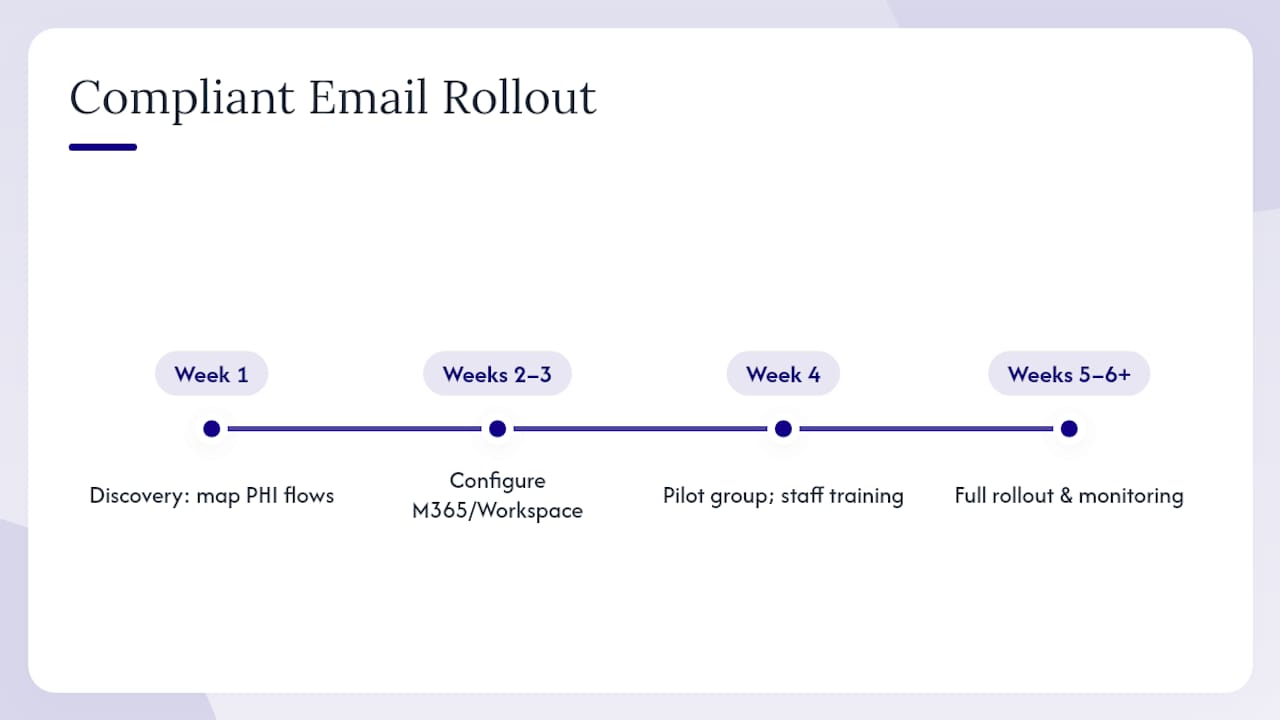
Discovery (week 1). Map all email accounts, identify PHI flows, review existing BAAs, and document the current risk posture.
Configuration (weeks 2–3). Migrate or configure Microsoft 365 or Google Workspace on a business or enterprise plan. Sign the BAA. Enforce TLS 1.2 on all outbound connections, enable MFA for all accounts, configure DLP rules, set retention policies, and activate audit logging.
Pilot and training (week 4). Run a pilot group, verify that audit logs are capturing the right events, and deliver staff training with documented completion records.
Full rollout and monitoring (weeks 5–6 and ongoing). Complete user migration, establish monthly log reviews, and schedule an annual risk analysis update. Maintain a central evidence repository containing the signed BAA, training records, configuration documentation, and risk assessment.
The managed-service model matters most for small practices because configuration drift is a real risk. A setting that was correct at go-live can change after a platform update or a new admin makes an adjustment. Monthly monitoring catches drift before it becomes a breach. For practices evaluating small-business security controls, the same MFA, endpoint monitoring, and audit logging that protect email also protect the broader IT environment.
Pro Tip: Ask your managed service provider for a scheduled quarterly evidence review. That meeting produces a written record that your controls were verified, which is exactly what an OCR auditor wants to see.
The governance gap is the real compliance problem
Most small practices that face OCR scrutiny did not fail because they chose the wrong email vendor. They failed because they treated compliance as a one-time configuration task rather than an ongoing governance responsibility.
A BAA and enforced TLS get you most of the way through a technical audit. What trips practices up is the documentation layer: no written risk analysis, no email use policy, no training records, no evidence that anyone reviewed the audit logs. Auditors are not looking for perfection; they are looking for evidence that the practice took the requirements seriously and documented its reasoning.
The practical recommendation for any time-pressed clinician or practice manager is this: prioritize the BAA, encryption, and a documented risk analysis first. Then build the policy and training layer. If you lack the staff or time to do both well, a managed IT provider is not a luxury; it is the most defensible path available. Chasing the "best" email vendor while skipping the governance work is the most common and most costly mistake in this space.
Symmnet manages HIPAA email compliance so your practice can focus on care
Small practices that need HIPAA compliant email often face the same problem: the technology decisions are manageable, but the configuration, documentation, and ongoing governance are not. Symmnet delivers a complete managed IT approach that covers both sides of that equation, with fixed monthly pricing and U.S.-based support.

Symmnet's managed services for healthcare email compliance include Microsoft 365 management and BAA coordination, MFA and identity management, DLP rule configuration, centralized audit logging and monthly log reviews, staff training with documented completion records, and backup and recovery for email archives. The fixed-price retainer model means no surprise invoices when a configuration update or a staff training session is needed.
For practices ready to get their email environment into a defensible compliance posture, a free assessment is the right starting point. Request your compliance assessment to identify gaps in your current email setup and get a clear remediation roadmap.
Sources
The sources below back the article's claims and give you a direct path to primary guidance.
- Security Rule (summary) | HHS
- NIST Special Publication 800-45 Revision 2
- HIPAA Email Compliance Requirements: Encryption, PHI, and Business Associate Rules | ComplianceStack
- Risks of HIPAA compliance failures with email | HIPAJournal
This article is general information, not a substitute for advice from a qualified doctor. Consult a qualified healthcare professional about your own circumstances before acting on anything here.