

An IT policy is a formal document that defines how employees use technology, protect data, and respond to security incidents within your organization. Knowing how to create an IT policy for small business is no longer optional. About 81.7% of U.S. small businesses operate as non-employer firms, which means most lack a dedicated IT team to catch security gaps. A well-written policy fills that gap. It sets clear expectations, satisfies cyber insurance underwriting requirements, and aligns your operations with frameworks like the NIST Cybersecurity Framework. The good news is that building one does not require a law degree or a full IT department.
What IT policies every small business should create first
The foundation of any small business IT policy program starts with six core documents. Experts recommend these as the minimum set needed to satisfy cyber insurance underwriting and cybersecurity best practices in 2026.
| Policy | Primary Purpose | Key Feature |
|---|---|---|
| Acceptable Use Policy | Defines approved technology use | Covers devices, internet, and email |
| Access Control Policy | Limits who can reach sensitive data | Requires role-based permissions |
| Patch Management Policy | Keeps software current | Sets update timelines and responsibilities |
| Incident Response Policy | Guides reaction to security events | Includes escalation contacts and steps |
| Backup and Recovery Policy | Protects data from loss | Defines backup frequency and testing your backup |
| Vendor Management Policy | Controls third-party risk | Requires vendor security assessments |

Each policy serves a distinct purpose. Together, they form the backbone of a cybersecurity program that regulators, insurers, and clients expect to see.
Why plain language matters more than technical detail
Policies written in plain English are understood by all employees, not just IT teams. A policy that employees cannot understand is a policy they will not follow. Write for your front-desk staff, not your network engineer. Use short sentences, define technical terms when you must use them, and avoid legal boilerplate that no one reads past the first paragraph.
Acceptable Use Policies should be 2–4 pages, focusing on clarity and enforceability. That length forces you to prioritize what actually matters. If a rule cannot be explained in one clear sentence, it probably needs to be rethought.
Pro Tip: Write each policy as if you are explaining it to a new employee on their first day. If they would not understand it, rewrite it.
What do you need before drafting your IT policy?
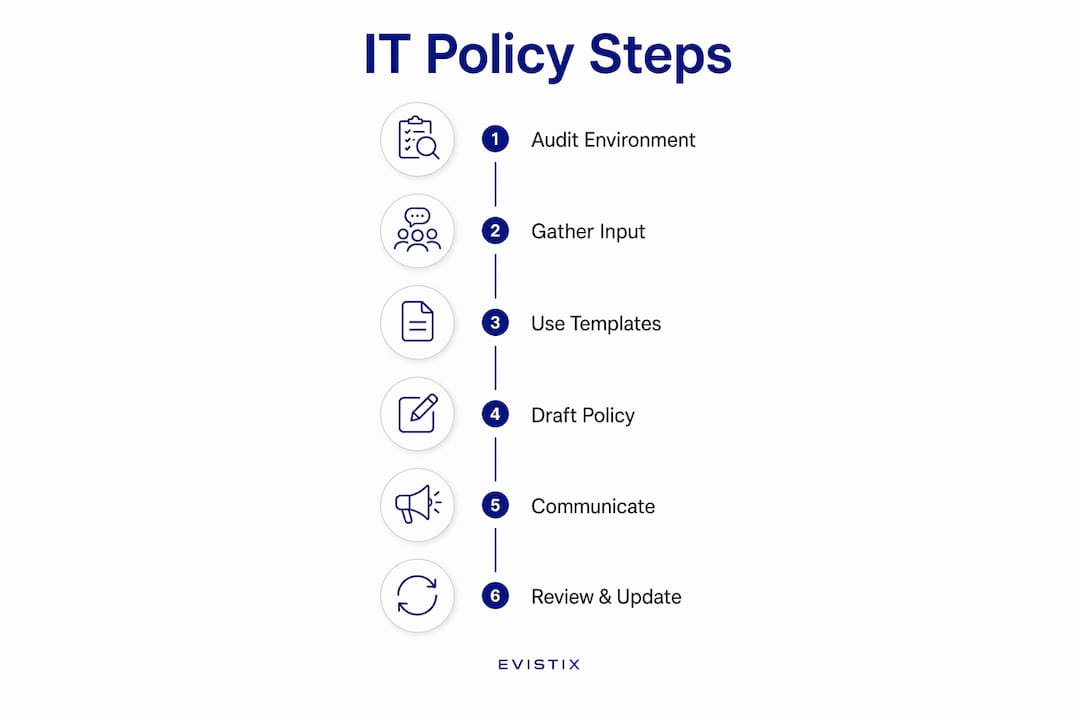
Drafting without preparation produces policies that do not reflect your actual environment. Three steps set you up for success before you write a single sentence.
Conduct an IT environment audit
An IT audit identifies every device, software application, user account, and data type your business manages. You cannot protect what you have not cataloged. Walk through your office and list every computer, mobile device, printer, and cloud service in use. Note which employees have access to which systems. This inventory becomes the foundation your policies are built on.
Gather input from the right people
Policy drafting works best when it includes voices beyond the IT manager. Business owners set the risk tolerance. HR managers flag employment law considerations. Frontline employees identify real-world workflows that a policy might accidentally break. A policy built without their input often creates rules that conflict with how work actually gets done.
Use reputable templates as a starting point
The NIST Cybersecurity Framework provides free, plain-language guidance that small businesses can adapt directly. Templates from reputable sources give you a structure to follow without starting from a blank page. The key word is "adapt." A template is a scaffold, not a finished product. An IT policy framework must be tailored to your business size and technology environment to be effective and practical.
| Preparation Step | Tool or Resource | Output |
|---|---|---|
| IT asset inventory | Spreadsheet or asset management app | Full list of devices, software, and users |
| Risk identification | NIST Cybersecurity Framework | Prioritized list of vulnerabilities |
| Policy templates | NIST, industry associations | Draft policy documents |
| Stakeholder input | Interviews or short surveys | Business-specific rules and exceptions |
Pro Tip: Block two hours with your business owner and HR lead before you open any template. The conversation will surface requirements no template anticipates.
How do you draft, communicate, and implement IT policies?
Writing the policy is only one part of the process. A policy that sits in a folder and never reaches employees has no effect. The rollout process matters as much as the content.
Follow a five-step process
- Identify your needs. Use your IT audit and stakeholder input to list the specific risks and behaviors each policy must address. Prioritize the six core policies before adding others.
- Draft with plain language. Write each policy in short paragraphs. Aim for 2–4 pages per document. A short, focused document with behavioral enforcement is far more effective than a voluminous policy no one reads.
- Obtain leadership approval. Formal leadership endorsement gives policies authority and enforceability. Without it, employees treat policies as suggestions. Get a signature from the business owner or executive sponsor before distributing anything.
- Communicate and train. Hold a short training session when you roll out new policies. Store all policies in a shared location every employee can access, such as your intranet or a shared drive. Do not rely on email alone.
- Require signed acknowledgments. Employees must sign a form confirming they have read and understood each policy. This step establishes individual responsibility and protects the business in a dispute.
Handle complex topics with separate documents
Remote work, bring-your-own-device (BYOD) programs, and social media use each carry unique risks. Trying to cover them inside your Acceptable Use Policy creates a document that is too long and too confusing. Write a separate, focused policy for each complex topic and link it from your main policy set. This keeps each document short and readable while ensuring full coverage.
Avoid the boilerplate trap
Using generic templates without customization creates a false sense of security. A manufacturing company and a professional services firm face different threats, use different software, and employ people with different technical skills. Your policies must reflect your actual environment. Review every clause in a template and ask whether it applies to your business before keeping it.
Pro Tip: Add your IT policy review date to your annual business calendar alongside tax deadlines and insurance renewals. Treat it as a required business task, not an optional IT project.
How do you keep IT policies current and enforceable?
A policy written once and never updated becomes a liability. Threats change. Software changes. Your business changes. Policies are living documents requiring annual review plus event-driven updates after incidents or vendor changes.
Assign a policy owner for each document. This person is responsible for tracking the review date, flagging needed changes, and coordinating updates. Without a named owner, policies drift into irrelevance. Pair each policy owner with an executive sponsor who has the authority to approve changes quickly.
Schedule a formal annual review for every policy. Set a fixed date each year, such as the first week of january, and treat it as non-negotiable. During the review, check whether the policy still reflects current technology, current threats, and current business operations. Update any section that no longer matches reality.
Trigger an unscheduled review after any significant event. A security incident, a new software platform, a major vendor change, or a new compliance requirement all warrant an immediate policy check. Waiting for the annual cycle after a breach is too late.
Maintain a policy register. This is a simple spreadsheet that lists every policy, its owner, its current version, its last review date, and its next scheduled review. The register gives you a single view of your entire policy program and makes audits straightforward. Many small businesses fail by adopting off-the-shelf templates and never updating them. A policy register prevents that failure by making the review cycle visible and accountable.
Refresh employee training annually and with every new hire. Policies only change behavior when employees know what the rules are. A signed acknowledgment at onboarding is a start. An annual refresher keeps the rules top of mind.
Key takeaways
A small business IT policy program requires six core documents, plain-language writing, formal leadership sign-off, and an annual review cycle to remain effective and enforceable.
| Point | Details |
|---|---|
| Start with six core policies | Acceptable Use, Access Control, Patch Management, Incident Response, Backup/Recovery, and Vendor Management form the required foundation. |
| Write in plain language | Keep each policy to 2–4 pages so employees can read, understand, and follow the rules. |
| Get leadership sign-off | Executive endorsement makes policies enforceable and signals that compliance is a business priority. |
| Assign policy owners | Named owners with review dates prevent policies from becoming outdated and unenforceable. |
| Review annually and after incidents | Schedule a fixed annual review and trigger unscheduled updates after any significant security or operational change. |
What I have learned from helping small businesses build IT policies
Small business owners consistently underestimate one thing: the gap between writing a policy and actually changing employee behavior. I have seen businesses spend weeks drafting a thorough Acceptable Use Policy, then store it in a shared drive no one visits. The document exists. The behavior does not change.
The most effective policies I have seen are short, specific, and backed by a manager who enforces them. A two-page Acceptable Use Policy that a business owner reads aloud at a staff meeting and follows up on carries more weight than a twenty-page document that lives in a folder. Enforcement is not about punishment. It is about making clear that the rules are real.
The second mistake I see constantly is treating policy creation as a one-time project. A business adds five new cloud applications, hires a remote employee, and switches payroll vendors, then wonders why its three-year-old IT policy feels irrelevant. Policies decay faster than most owners expect. The security policies that actually reduce risk are the ones reviewed and updated on a schedule.
Start small if the full program feels like too much. Write your Acceptable Use Policy first. Get it signed. Then build from there. A focused, enforced policy on one topic does more for your security posture than six generic documents gathering digital dust.
— Michael
How Symmnet supports small business IT policy programs

Building and maintaining IT policies takes time that most small business owners do not have. Symmnet works with small U.S.-based businesses to assess their current IT environment, identify policy gaps, and develop clear, enforceable policy documents tailored to their industry. Whether you operate in manufacturing, aerospace, or professional services, Symmnet's managed IT services include policy consultation, drafting support, and ongoing compliance management. The team also provides the proven cybersecurity steps that keep your policies aligned with current threats and insurance requirements. Contact Symmnet to schedule a free assessment and find out exactly where your policy program stands.
FAQ
What is an IT policy for a small business?
An IT policy is a written document that defines how employees use technology, handle data, and respond to security events. It sets clear rules that protect the business and establish individual accountability.
How long should a small business IT policy be?
Core policies like an Acceptable Use Policy should be 2–4 pages, written in plain language. Complex topics such as remote work or BYOD should be covered in separate, linked documents to keep each policy readable.
What are the most important IT policies to create first?
The six foundational policies are Acceptable Use, Access Control, Patch Management, Incident Response, Backup and Recovery, and Vendor Management. These six satisfy most cyber insurance underwriting requirements and cover the most common risk areas.
How often should IT policies be reviewed?
Policies require a formal annual review plus an immediate update after any security incident, major software change, or new vendor relationship. Assigning a named policy owner keeps the review cycle on track.
Do small businesses need IT policies if they have no IT staff?
Yes. The absence of an IT team makes written policies more critical, not less. Clear policies give every employee a reference point for safe technology use and reduce the risk of costly mistakes.