

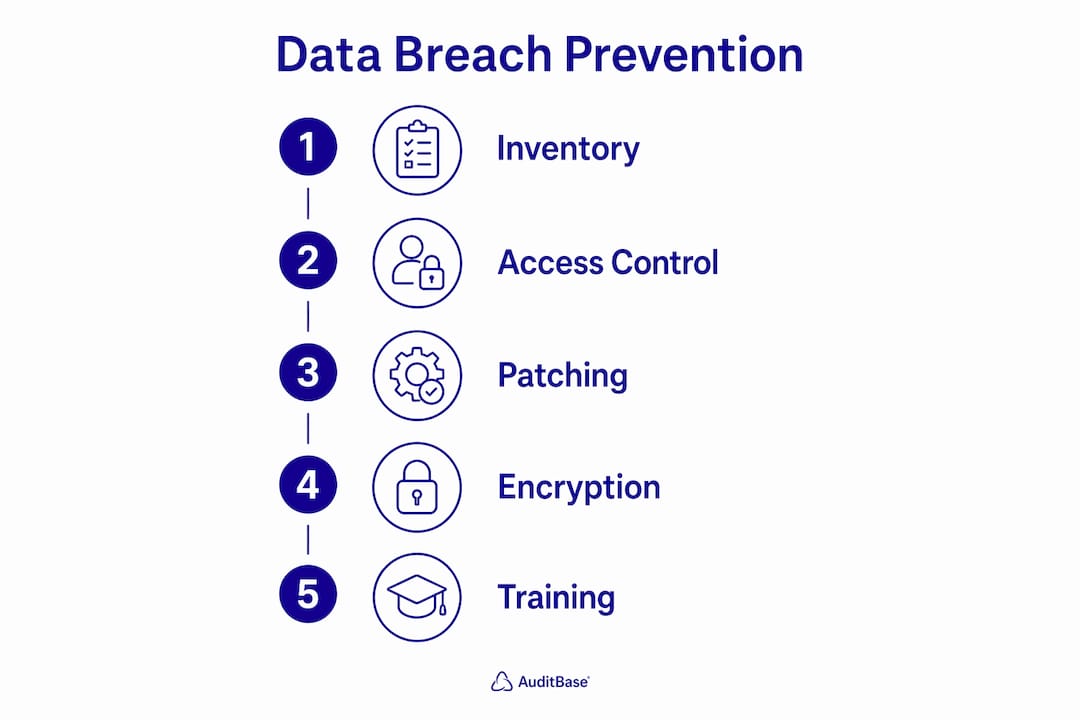
Effective data breach prevention requires a layered, proactive security approach that combines data inventory, access control, patching, encryption, and continuous monitoring. Small businesses are frequent targets precisely because attackers expect weaker defenses, not smaller rewards. The data breach lessons that cost other companies dearly are preventable when you apply the right controls in the right order. This guide walks you through each layer, from knowing what data you hold to training your staff, so you can build a defense that holds up under real-world pressure.
How to prevent data breaches: start with a data inventory
The first step in any serious breach prevention strategy is knowing exactly what sensitive data your business holds and where it lives. You cannot protect what you cannot see. TechTarget's security checklist calls for identifying sensitive data locations and categorizing confidential data types before applying any technical controls. That sequence matters because applying encryption or access restrictions to the wrong systems wastes resources and leaves real exposure untouched.
Sensitive data typically falls into three categories your team should document and track:
- Personally identifiable information (PII): Customer names, Social Security numbers, email addresses, and payment card data
- Intellectual property: Product designs, proprietary processes, pricing models, and contract terms
- Financial records: Bank account details, payroll data, tax filings, and accounts receivable information
Once you have a working catalog, classify each data type by sensitivity level. High-sensitivity data warrants stricter controls than general business records. Your inventory is not a one-time project. Data moves constantly as employees create files, migrate systems, or adopt new cloud services, so your classification process needs a regular review cycle built in.
Pro Tip: Use a tool like Microsoft Purview or a simple spreadsheet audit to map data stores across endpoints, file servers, and cloud platforms like Microsoft 365 or Google Workspace. The goal is a living document, not a one-time snapshot.
What access control practices reduce breach risk most?
Access control is where most preventable breaches are stopped or enabled. The principle of least privilege states that every user, system, and application should have access only to the data and functions required for their specific role. Nothing more. Limited privileged access and regular oversight reduce breach scope significantly when credentials are compromised, which happens more often than most small business owners expect.
A structured access control program covers four operational areas:
- Role-based access assignment: Define access levels by job function, not by individual request. A billing coordinator does not need access to engineering files.
- Privileged account management: Limit administrator accounts to the smallest possible group. Audit who holds elevated permissions every quarter.
- Multi-factor authentication (MFA): Automated MFA enforcement through directory services like Microsoft Entra ID or Okta is the single most effective control against credential-based attacks.
- Account lifecycle management: Revoke access on the same day an employee is terminated or changes roles. Orphaned accounts are a persistent and underappreciated risk.
Regular access reviews catch permission creep, the gradual accumulation of access rights that happens when role changes are not followed by access adjustments. A quarterly review of your Active Directory or identity provider logs takes less than two hours and closes gaps that attackers actively look for.
Pro Tip: Set a calendar reminder for quarterly access audits and tie them to your payroll review cycle. When HR processes a role change, IT should receive an automatic notification to adjust permissions the same day.

How does patching and network security prevent unauthorized access?
Unpatched software and misconfigured networks are two of the most consistent entry points attackers exploit. Misconfiguration and unpatched software remain leading causes of breaches, and both are correctable with disciplined operational habits rather than expensive tools.
A practical patching and network security program includes:
- Automated patch management: Use tools like NinjaRMM, ConnectWise Automate, or Microsoft Intune to deploy operating system and application patches within 14 days of release. Critical patches warrant a 72-hour window.
- Network segmentation: Divide your network so that a compromised workstation cannot reach your financial servers or production systems directly. Network segmentation limits lateral movement, which is how a single phishing click becomes a company-wide incident.
- Firewall management: Configure firewalls to deny all inbound traffic by default and allow only what is explicitly required. Review firewall rules annually and remove any that are no longer justified.
- Vendor and supply chain security: Require third-party vendors with network access to meet minimum security standards. Many small business breaches originate through a trusted vendor's compromised credentials.
For manufacturers and industrial businesses, the same discipline applies to operational technology. Unpatched firmware on connected equipment creates the same exposure as an unpatched Windows server. Symmnet's manufacturing IT security guidance addresses this overlap directly for small production environments.
Does encryption actually protect your data if a breach occurs?
Encryption is the control that limits damage when every other layer fails. Encryption at rest and in transit combined with strong key management reduces data exposure even when an attacker gains access to storage or network traffic. Without encryption, a stolen laptop or intercepted file transfer hands an attacker usable data immediately. With it, they get ciphertext that is operationally worthless without the decryption key.
| Scenario | Without encryption | With encryption |
|---|---|---|
| Stolen laptop | All local files immediately readable | Files unreadable without decryption key |
| Intercepted network traffic | Credentials and data exposed in plaintext | Traffic appears as unreadable ciphertext |
| Ransomware backup attack | Backups encrypted by attacker and held hostage | Immutable, offline backups remain recoverable |
| Cloud storage misconfiguration | Exposed files accessible to anyone with the URL | Files require key access even if bucket is public |
Backup strategy is equally critical. The 3-2-1-1-0 backup architecture calls for three copies of data, on two different media types, with one copy offsite, one copy offline or immutable, and zero unverified backups. CISA's ransomware guidance reinforces offline and immutable backups as a non-negotiable control against ransomware. Before any incident occurs, define your recovery time objective (RTO) and recovery point objective (RPO) so your backup frequency and restore process match what your business actually needs to survive.
Pro Tip: Test your backups on a scheduled basis, not just when you set them up. A backup that has never been restored is an assumption, not a recovery plan. Symmnet's backup verification guidance outlines exactly what a restore test should confirm.
How do monitoring, audits, and training maintain long-term security?
Prevention controls stop many attacks. Monitoring, audits, and training catch the ones that get through and reduce the human errors that create openings in the first place. Continuous monitoring combined with frequent employee training significantly reduces breach likelihood, according to security research from Cymulate.
A sustainable security maintenance program covers four areas:
- Behavior-based monitoring: Deploy a security information and event management (SIEM) tool or endpoint detection and response (EDR) solution like Microsoft Defender for Business or CrowdStrike Falcon to detect anomalous activity. Alerts on unusual login times, large file transfers, or new admin account creation catch threats that signature-based tools miss.
- Regular security audits: Conduct a formal security audit at least annually, and after any significant infrastructure change. Audits surface misconfigured systems, excessive permissions, and gaps in your patch cycle that routine operations overlook.
- Employee security awareness training: Phishing and social engineering account for a large share of breach entry points. Short, frequent training sessions through platforms like KnowBe4 or Proofpoint Security Awareness outperform annual all-day workshops. Monthly five-minute modules with simulated phishing tests build habits rather than just awareness.
- Incident response planning: Document your response steps before an incident occurs. Assign roles, define communication protocols, and test the plan with a tabletop exercise at least once a year.
Building a security culture means making secure behavior the default, not an extra burden. When staff understand why they are being asked to use MFA or report suspicious emails, compliance rates rise and the human factor becomes a defense layer rather than a liability. The CIS Critical Security Controls framework gives small teams a prioritized, auditable set of measures to implement and track without requiring a dedicated security staff.
Pro Tip: Run a simulated phishing test before your first training session to establish a baseline click rate. Track improvement over six months. A measurable drop in click rates is concrete evidence your training program is working.
Key takeaways
Preventing data breaches requires layered controls across data visibility, access management, patching, encryption, and continuous monitoring, with staff training and tested backups as the final lines of defense.
| Point | Details |
|---|---|
| Start with data inventory | Classify PII, financial data, and intellectual property before applying any technical controls. |
| Enforce least privilege and MFA | Limit access by role, audit permissions quarterly, and require MFA on all critical systems. |
| Patch fast and segment networks | Deploy critical patches within 72 hours and use network segmentation to contain breaches. |
| Encrypt and test backups | Use the 3-2-1-1-0 backup model and verify restores on a scheduled basis, not just at setup. |
| Train staff and monitor continuously | Run monthly phishing simulations and deploy behavior-based monitoring to catch what prevention misses. |
Why most small businesses are one misconfiguration away from a breach
After working with small businesses across manufacturing, professional services, and aerospace, the pattern I see most often is not a lack of security tools. It is a lack of visibility. Companies have firewalls, antivirus software, and cloud backups in place, and they genuinely believe they are protected. Then an audit reveals that the firewall rules have not been reviewed in three years, the cloud backup has never been tested, and two former employees still have active accounts with full access.
The uncomfortable truth is that a single control, no matter how good, creates a false sense of security. I have seen businesses invest heavily in endpoint protection while leaving their remote access portal open with no MFA. Attackers do not need to defeat your best control. They need to find your weakest one.
What actually works for small teams is a framework like the CIS Controls, which prioritizes measures by impact and is designed to be auditable without a large security staff. Start with the top five controls, get them right, and then build outward. Simple, documented, and regularly tested beats complex and assumed. The businesses that recover fastest from security incidents are not the ones with the most tools. They are the ones that knew exactly what they had, where it was, and how to restore it.
Investing in staff training is not a soft measure. It is one of the highest-return security investments a small business can make. A team that recognizes phishing attempts and reports them is more valuable than any software subscription. Pair that with verified backups and you have a foundation that holds up even when prevention fails.
— Michael
How Symmnet helps you build a breach-resistant IT environment
Implementing and maintaining layered security controls takes consistent effort that most small business IT teams do not have the bandwidth to sustain alone. Symmnet provides managed IT and cybersecurity services purpose-built for small U.S.-based businesses, covering patch management, 24/7 monitoring, endpoint security, firewall management, and backup verification under a fixed monthly cost. Rather than reacting to incidents, Symmnet's proactive model identifies gaps before attackers do. If you want to know where your current security posture stands, Symmnet offers a free assessment to map your exposure and prioritize the controls that matter most for your industry and risk profile.
FAQ
What causes most data breaches in small businesses?
The leading causes are phishing attacks, unpatched software, weak or reused passwords, and misconfigured systems. Compromised credentials and human error account for the majority of incidents, which is why access control and staff training are foundational controls.
How does MFA prevent data breaches?
MFA requires a second verification factor beyond a password, so stolen credentials alone are not enough to access your systems. Even if an attacker obtains a username and password through phishing, MFA blocks unauthorized login without the second factor.
What is the 3-2-1-1-0 backup rule?
The 3-2-1-1-0 rule means keeping three copies of data, on two different media types, with one copy offsite, one copy offline or immutable, and zero unverified backups. This architecture protects against ransomware, hardware failure, and site-level disasters simultaneously.
How often should small businesses conduct security audits?
A formal security audit should occur at least once per year and after any major infrastructure change. Quarterly access reviews and monthly patch verification checks complement the annual audit and catch issues between formal assessments.
What is the first step to securing sensitive business data?
The first step is a data inventory that identifies where sensitive data lives and classifies it by type and sensitivity level. Without knowing what you have and where it resides, no technical control can be applied accurately or effectively.