

Most small businesses pay between $100 and $300 per user per month for full managed IT services, with per-user billing now the dominant model across the industry. Per-user pricing typically ranges from $100–$400 per user per month depending on service depth, while per-device and flat-retainer options remain available for environments where headcount is a poor proxy for IT complexity. Security-related line items, including endpoint detection and response (EDR) and SOC monitoring, have become standard inclusions rather than optional add-ons, which has pushed average pricing noticeably higher since 2022.
Here is what typical monthly totals look like for common small-business sizes at a mid-tier service level, generally ranging from low thousands to mid five figures per month depending on size and service specifics.
These figures assume a standard managed IT package covering monitoring, helpdesk, patching, endpoint security, and basic backup. Compliance requirements, on-site support, or 24/7 SOC coverage push totals higher.
Key Takeaways
Managed IT services cost most small businesses $100–$175 per user per month for a full-managed plan, with per-user billing the dominant model and security add-ons the primary driver of higher costs.
| Point | Details |
|---|---|
| Typical per-user range | Full managed plans run $100–$175/user/month; basic monitoring starts at $50–$100/user/month. |
| Per-device as an alternative | Device-heavy environments often pay less under per-device pricing ($50–$100/desktop, $100–$400/server). |
| Top cost drivers | Security tier, compliance requirements, on-site support needs, and number of locations move prices most. |
| Hidden fees matter | Onboarding, license pass-throughs, and project rates are the most common sources of budget surprises. |
| Symmnet's approach | Symmnet offers fixed monthly pricing with compliance support and 24/7 monitoring for small U.S. businesses. |
Table of Contents
- What does managed IT services cost in 2026? A quick pricing snapshot
- What do managed IT services actually include?
- How do MSP billing models work, and which one saves you money?
- Which type of MSP fits your business?
- What factors drive MSP prices up or down?
- Onboarding, migration, and hidden fees to expect
- How to estimate your monthly managed IT cost
- How to compare MSP quotes and spot red flags
- Cost-saving strategies that do not compromise security
- What are the right next steps before you contact an MSP?
- What buyers usually get wrong when budgeting for managed IT
- Symmnet delivers predictable managed IT pricing for small businesses
- Sources
What does managed IT services cost in 2026? A quick pricing snapshot
The table below reflects current U.S. market benchmarks for the three most common billing bases. Use these as a sanity check when reviewing quotes, not as a ceiling or floor for negotiation.
Per-user pricing ranges
| Service tier | Monthly cost per user | What's typically included |
|---|---|---|
| Basic monitoring | $50–$100 | Remote monitoring, basic helpdesk, patching |
| Full managed | $100–$175 | Monitoring, helpdesk, endpoint security, backups, firewall |
| Premium (SOC/compliance) | $175–$300+ | All above plus SOC, EDR+, compliance documentation |
Per-device pricing examples
| Device type | Monthly cost per device |
|---|---|
| Desktop/laptop | $50–$100 |
| Server | $100–$400 |
| Firewall/network device | $50–$150 |
Full managed IT services for small businesses commonly cost $100–$175 per user per month, with basic monitoring starting lower and premium tiers running considerably higher. For a 25-person company on a standard full-managed plan at $125/user, the monthly total lands around $3,125 before any add-ons.
Per-user pricing became dominant by the mid-2020s because headcount is a more predictable billing base for remote and hybrid workforces. Per-device pricing still wins in shared-device or industrial environments, such as manufacturing floors where one workstation serves multiple shifts.
What do managed IT services actually include?
Understanding what is and is not in a quote is where most small business owners lose money. A provider's headline number rarely tells the full story.
Core services typically covered in a standard managed IT plan:
- 24/7 remote monitoring and alerting
- Helpdesk support (remote and, sometimes, on-site)
- Patch management for operating systems and third-party software
- Endpoint security (antivirus, EDR)
- Firewall management and basic network monitoring
- Backup configuration and basic recovery testing
- Vendor management and software license tracking
- Microsoft 365 or Google Workspace administration
Add-ons that commonly increase the monthly rate:
- 24/7 Security Operations Center (SOC) monitoring
- Advanced EDR with threat hunting
- Virtual CISO (vCISO) advisory services
- Compliance support: HIPAA, SOC 2, PCI DSS, ITAR, or FDA 21 CFR Part 11
- Cloud architecture and migration management
- Advanced backup testing and documented disaster recovery plans
- Network segmentation projects
- On-site technician visits beyond a set monthly allowance
CISA's cybersecurity guidance for small businesses outlines prioritized security actions that map directly to these add-on categories. Reviewing it before you talk to providers helps you distinguish what your risk profile genuinely requires from what a vendor is upselling.
Pro Tip: When requesting quotes, ask each provider for a sample invoice and a written scope of exclusions. Two proposals at the same monthly rate can differ by tens of thousands of dollars annually once you account for what each one does not cover.
How do MSP billing models work, and which one saves you money?
TSIA documents the common MSP pricing models and the trade-offs providers and buyers face when choosing one. Each model has a different calculation logic, and the cheapest option depends heavily on your environment.
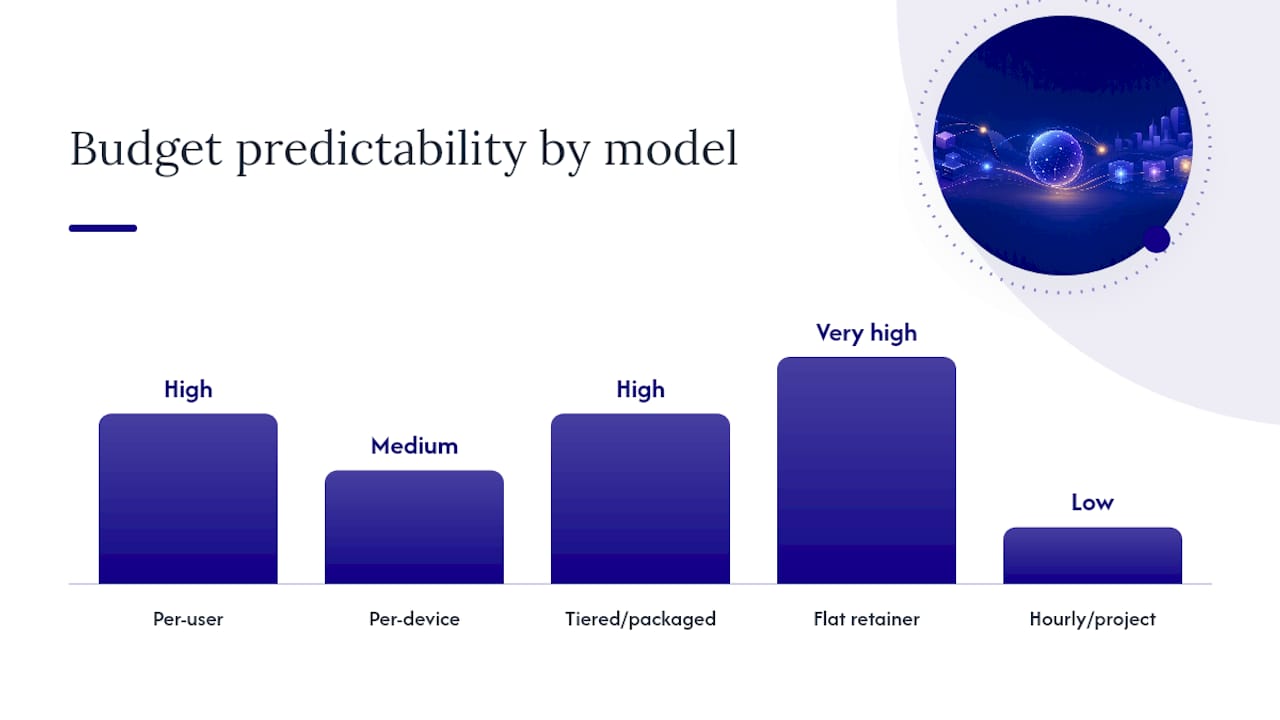
| Billing model | How it's calculated | Best fit | Budget predictability |
|---|---|---|---|
| Per-user | Headcount × monthly rate | Remote/hybrid teams, BYOD environments | High |
| Per-device | Device inventory × per-device rate | Manufacturing, shared workstations, device-heavy shops | Medium |
| Tiered/packaged | Fixed bundles (Bronze/Silver/Gold) | Businesses wanting simple, all-in pricing | High |
| Flat retainer | Negotiated monthly fee for defined scope | Stable environments with predictable needs | Very high |
| Hourly/project | Time and materials billed as used | Break/fix, one-time projects, overflow support | Low |
Per-user works well when your team is the primary cost driver and devices are mostly laptops or desktops assigned one-to-one. A 20-person office with standard laptops and Microsoft 365 is a clean per-user scenario.
Per-device becomes cheaper when users share machines or when your environment includes servers, firewalls, switches, and industrial equipment that need monitoring regardless of how many people touch them. A small manufacturer with 15 employees but 40 managed devices (workstations, servers, PLCs, and network gear) will often pay less under a per-device model.
Flat retainers suit businesses with a well-defined, stable scope. The risk is that providers may resist scope creep, so anything outside the agreed work becomes a project charge.
Hourly/break-fix offers no proactive monitoring and no predictable cost. It tends to cost more over a 12-month period than a managed contract for any business that experiences more than a handful of incidents per year.
Which type of MSP fits your business?
Not every managed service provider is built for every client. Choosing the wrong provider type is one of the fastest ways to overpay for services you do not need or underpay for ones you do.
- Fully managed MSP: Takes over all IT operations. Best for businesses with no internal IT staff and 10–100 employees. The provider owns monitoring, helpdesk, security, and vendor relationships.
- Co-managed MSP: Partners with your existing IT staff to fill gaps. Suited to companies with one or two internal IT people who need specialized security, compliance, or after-hours coverage they cannot provide alone.
- Break/fix provider: Responds to problems after they occur, billed hourly. Works only for very small operations with minimal IT dependency and a high tolerance for downtime.
- Niche/compliance specialist MSP: Focuses on regulated industries such as healthcare (HIPAA), defense contractors (ITAR/CMMC), aerospace (AS9100), or FDA-regulated manufacturing. These providers charge more but deliver documentation and audit readiness that a generalist MSP cannot match.
For manufacturers and aerospace suppliers, an MSP with direct experience in operational technology (OT) and PLC environments is worth the premium. A generalist provider may manage your office network competently while leaving your production floor exposed. Symmnet's manufacturing IT security guidance covers exactly this gap.
Co-managed IT is worth considering when you already have an internal IT person but need 24/7 coverage, a security stack, or compliance documentation they cannot realistically maintain alone. It typically costs 30–50% less than full managed because the provider's scope is narrower.
What factors drive MSP prices up or down?
Security posture and tools are the single largest variable. A business running basic antivirus pays far less than one requiring EDR, SOC monitoring, and threat hunting. Security-related line items have become table stakes and have materially increased the security portion of MSP pricing compared with 2022. If you are in a regulated industry, budget for the higher tier.

Compliance requirements add both tooling and labor costs. HIPAA, SOC 2, PCI DSS, and ITAR each require specific documentation, audit trails, and sometimes dedicated compliance consulting hours. For regulated manufacturers, compliance-driven cost increases are predictable and worth scoping explicitly before signing.
Number of locations matters because each site may require on-site visits, separate network infrastructure management, and additional monitoring agents. Multi-site businesses typically pay a per-location uplift.
On-site support needs are a major differentiator. Remote-first MSPs cost less. If your team regularly needs a technician on the floor, expect either a higher monthly rate or per-visit charges on top of the base contract.
SLA and response times directly affect price. A four-hour response SLA costs less than a one-hour SLA. A 24/7 critical-incident guarantee costs more than business-hours-only coverage.
Device mix influences whether per-user or per-device pricing is more economical, as described in the billing models section above.
Pro Tip: Before requesting quotes, audit your own environment: count users, devices, locations, and any compliance frameworks you are subject to. Providers price risk, and an incomplete picture of your environment leads to quotes that change after onboarding.
Onboarding, migration, and hidden fees to expect
The monthly rate is only part of what you will pay. One-time and recurring fees outside the base contract are the most common source of budget surprises.
Common onboarding and setup charges:
- Discovery and network audit fees ($500–$2,500 one-time)
- Documentation and asset inventory setup
- RMM agent deployment and tool configuration
- Data migration or platform transition work
- Initial security hardening or remediation projects
Recurring costs that often appear outside the base rate:
- On-site visit charges (per-visit or per-hour, often $150–$250/hour)
- After-hours or emergency support premiums
- Project work billed at a separate rate (infrastructure upgrades, new-site setup)
- Hardware procurement markup (typically 10–20% above cost)
- Software license pass-throughs (Microsoft 365, backup tools, EDR platforms)
MSPs use platforms like ConnectWise to track billable time, automate monitoring, and manage tickets. Those tooling costs are real, and providers pass them through in some form. A sample invoice shows you exactly how.
Contract length also affects effective monthly cost. Multi-year contracts may offer further discounts but reduce your flexibility if the relationship does not work out. Review termination clauses carefully: some contracts include 30–90 day notice requirements or early-termination fees equal to several months of service.
Pro Tip: Ask for a sample invoice from a current client (with sensitive details redacted). It is the single most revealing document in the sales process and shows line items that never appear in a proposal.
How to estimate your monthly managed IT cost
A reliable estimate takes about 20 minutes if you have your asset inventory ready. Here is a repeatable method.
Step-by-step calculation:
- Count your billable users (all employees who use a computer, phone, or company application).
- Count your managed devices: desktops, laptops, servers, firewalls, and switches.
- Decide whether per-user or per-device pricing is likely cheaper for your environment (use the model comparison above).
- Multiply by the applicable rate for your target service tier.
- Add security and compliance line items (EDR, SOC, compliance support) as separate monthly figures.
- Estimate annual project spend (hardware refresh, migrations, new-site setup) and divide by 12 to get a monthly amortized figure.
- Add expected software license pass-throughs (Microsoft 365, backup storage, security tools).
Sample monthly cost estimates by company size
| Company size | Basic tier (monitoring only) | Standard tier (full managed) | Premium tier (SOC + compliance) |
|---|---|---|---|
| 10 employees | $500–$1,000/mo | $1,000–$1,750/mo | $1,750–$3,000+/mo |
| 25 employees | $1,250–$2,500/mo | $2,500–$4,375/mo | $4,375–$7,500+/mo |
| 50 employees | $2,500–$5,000/mo | $5,000–$8,750/mo | $8,750–$15,000+/mo |
Per-user vs. per-device: a worked example. A 20-person professional services firm with 22 laptops, 2 servers, and 1 firewall can run the numbers both ways. At $125/user, the per-user total is $2,500/month. Under per-device pricing at $75/desktop, $200/server, and $100/firewall, the total is $1,650 + $400 + $100 = $2,150/month. Per-device wins here by $350/month, or $4,200/year. A manufacturing shop with 15 employees but 40 managed devices would see an even larger gap in favor of per-device pricing.
How to compare MSP quotes and spot red flags
Getting three quotes is standard advice. Getting three comparable quotes requires a structured approach, because providers scope their proposals differently by default.
Line-item checklist to match across quotes:
- Helpdesk hours and channels (phone, email, chat; business hours vs. 24/7)
- Response time SLAs for critical, high, and low-priority tickets
- On-site support: included or billed separately, and at what rate
- Endpoint security: antivirus only, or EDR with active monitoring
- Backup: configuration only, or includes recovery testing and DR documentation
- Software licenses: included in the rate or passed through at cost plus markup
- Hardware procurement: at cost, or with a markup percentage
- Compliance support: included or a separate engagement
- Contract length, renewal terms, and termination notice period
Questions to ask every provider during the sales process:
- What is explicitly excluded from the monthly rate?
- What is your average response time for critical incidents in the last 90 days?
- How do you handle after-hours emergencies, and what does that cost?
- Can you provide a sample invoice from a current client?
- What happens to our data and documentation if we terminate the contract?
- Do you have experience with our industry's compliance requirements?
Red flags to watch for:
- No written SLA or vague language like "best effort" response times
- Onboarding fees that are not disclosed until after the proposal is accepted
- Contracts with automatic multi-year renewals and no exit window
- Proposals that do not itemize software licenses or security tools
- Providers who cannot name a specific compliance framework relevant to your industry
Use Symmnet's manufacturing cybersecurity checklist as a starting point for your own internal audit before vendor calls. It covers the asset and compliance data points providers will ask about.
Cost-saving strategies that do not compromise security
Reducing managed IT spend without cutting essential protection is possible, but it requires deliberate trade-offs rather than simply picking the cheapest quote.
Right-sizing service tiers is the highest-impact lever. Many small businesses default to a premium tier because a provider recommends it, when a standard tier with a few targeted add-ons would cover their actual risk profile. Review what you genuinely need against CISA's prioritized security actions before agreeing to a tier upgrade.
Remote-first support reduces cost meaningfully. If your team can resolve most issues via remote helpdesk, you avoid the per-visit charges that accumulate quickly under hybrid contracts. Reserve on-site support for hardware failures and new-equipment setup rather than including it as a flat monthly entitlement.
If you have confidence in the provider after a 90-day trial period, locking in an annual rate is usually worth it.
Bundling tools through your MSP rather than purchasing software licenses independently often reduces total cost. Microsoft 365, backup platforms, and EDR tools are frequently cheaper through an MSP's volume licensing than through direct purchase.
Shifting to co-managed IT is worth evaluating if you already have an internal IT person. You keep institutional knowledge in-house and pay the MSP only for the specialized services your internal staff cannot provide.
For most small businesses, that trade-off is entirely reasonable for low-priority tickets.*
One area where spending more upfront saves money long-term: hardware refresh cycles. Running aging servers and workstations increases both the frequency of incidents and the labor hours your MSP bills. A planned hardware refresh every four to five years typically reduces reactive support costs more than it adds in capital expenditure.
What are the right next steps before you contact an MSP?
Getting meaningful quotes starts with preparation. Providers price based on what they know about your environment, and gaps in that picture lead to scope changes after signing.
Documents and data to prepare before vendor calls:
- Complete asset inventory: all computers, servers, firewalls, switches, and any industrial or specialty devices
- Software inventory: applications in use, current licenses, and renewal dates
- List of compliance frameworks you are subject to or expect to be subject to within 12 months
- Current IT pain points: recurring outages, security incidents, or compliance gaps
- Headcount by location, including remote workers
Action steps to take this week:
- Set an internal budget range using the estimator in this article as a starting point.
- Gather your asset and software inventory (even a rough spreadsheet is enough to start).
- Identify your compliance requirements and document them in one page.
- Request quotes from at least three providers using a standardized scope document.
- Ask each provider for a sample invoice and a written list of exclusions.
- Score each quote against the line-item checklist above before making a decision.
For businesses in regulated industries, a brief internal tech audit before vendor calls is worth the time. Symmnet's practical network security guide for manufacturers covers the audit steps most relevant to production environments.
What buyers usually get wrong when budgeting for managed IT
The most consistent mistake small business owners make is comparing headline monthly fees without accounting for what each quote actually covers. Two proposals at $150/user can differ by $40,000 annually once you factor in licensing pass-throughs, project rates, and on-site charges.
The second mistake is ignoring software license costs. Microsoft 365, EDR platforms, backup tools, and compliance software are real monthly expenses. Some MSPs bundle them; others pass them through at cost plus a markup. Neither approach is inherently wrong, but you need to know which one you are looking at before you can compare quotes fairly.
The third mistake is underestimating on-site needs. Remote support resolves the majority of IT issues, but not all of them. Businesses that assume all support will be remote and then discover their contract charges $200/hour for on-site visits face budget overruns quickly.
A practical negotiation move: ask the provider to waive or reduce the onboarding fee in exchange for a longer initial contract term. Most MSPs will accept this trade because onboarding costs are real for them too, and a 24-month commitment offsets that investment. Getting a sample invoice before you sign is not a negotiating tactic; it is due diligence.
The estimator in the earlier section of this article gives you a baseline. Use it to stress-test each quote you receive rather than accepting a provider's framing at face value.
Symmnet delivers predictable managed IT pricing for small businesses
Fixed monthly pricing with no surprise project invoices is what most small business owners say they want from an MSP. Symmnet delivers exactly that, with managed IT and cybersecurity services built specifically for small U.S. businesses in manufacturing, aerospace, professional services, and regulated industries.

Symmnet's core services map directly to the line items you should be comparing across quotes: 24/7 system monitoring, endpoint security, firewall management, helpdesk support, backup and disaster recovery, Microsoft 365 management, and compliance documentation for ITAR, AS9100, HIPAA, and FDA-regulated environments. Every engagement runs on a fixed monthly retainer, so the number on your invoice does not change based on how many tickets your team submits.
What Symmnet clients get:
- Predictable monthly billing with no hidden project rates for standard support
- Compliance-ready documentation for regulated industries
- U.S.-based helpdesk with fast response times
- Industry-specific experience in manufacturing, aerospace, and professional services
- A free initial assessment to identify security gaps before you commit
Schedule a free assessment to get a scoped proposal based on your actual environment, not a generic template.
Sources
The following resources were used for benchmarks, pricing guidance, and cybersecurity scoping in this article.
- How Much Do Managed IT Services Cost in 2026? Per-User vs Per-Device Pricing | MSP Directory
- Cybersecurity guidance for small businesses | CISA
- MSP Pricing Models: How To Choose the Right Strategy for Growth and ... | TSIA