

For most small businesses with fewer than 50 employees and no dedicated IT staff, partnering with a managed service provider (MSP) is the right move. The math is straightforward: a single ransomware incident or extended outage typically incurs costs that exceed the annual expense of managed IT services. Here is what to do right now.
- Check your internal baseline. If you have no one monitoring your systems after 5 PM, no tested backup, and no documented incident response plan, you have gaps an MSP can close immediately.
- Prioritize three services first: 24/7 monitoring and alerting, endpoint protection, and backup with verified-restore testing.
- Request a free security assessment. Symmetry Network Management offers a no-obligation assessment that identifies your specific gaps before you commit to anything.
- Use the selection checklist in this guide to evaluate any provider on SLA terms, security controls, and pricing transparency before you sign.
Managed IT services for small businesses are defined by proactive, subscription-based support — not reactive hourly calls. That distinction shapes everything from your monthly budget to how fast you recover after a problem.
Table of Contents
- What are managed IT services, and how do they differ from break-fix support?
- How do managed services actually help your small business?
- How does MSP pricing work, and what should you expect to pay?
- How do you evaluate and choose the right MSP?
- What security and compliance responsibilities does an MSP cover?
- Why proactive management and cost-per-endpoint thinking matter
- Key Takeaways
- Why Symmetry Network Management built its services for small businesses
- A note on what this guide actually recommends
- Useful sources and further reading
What are managed IT services, and how do they differ from break-fix support?
A managed service provider takes ongoing, contractual responsibility for a defined set of your IT systems. You pay a fixed monthly fee; the MSP monitors, patches, secures, and supports those systems continuously. What Are Managed IT Services? A Detailed 2026 Guide describes this as enterprise-grade monitoring, security, and backup delivered for a predictable monthly fee — with the defining characteristic being proactive monitoring rather than waiting for something to break.
Break-fix support is the opposite model. A technician shows up (or logs in) after something fails, charges by the hour, fixes the immediate problem, and leaves. There is no monitoring, no patching schedule, and no accountability for what happens next. For a small business, that means unpredictable costs and no one watching your network at 2 AM when an intrusion starts.
Business process outsourcing (BPO) is a third category that often gets confused with managed services. The table below clarifies the practical differences.
| Dimension | Managed IT Services (MSP) | Business Process Outsourcing (BPO) |
|---|---|---|
| Scope | Technology infrastructure, security, and operations | Specific business processes (payroll, customer service, data entry) |
| Relationship | Long-term, ongoing technology ownership | Often project-based or task-specific |
| Accountability | MSP owns uptime, security posture, and SLA compliance | Provider owns task execution, not the underlying technology |
| Staffing model | Technical engineers, security analysts, NOC/SOC staff | Process workers, often at scale |
| Best fit | Continuous IT management and risk reduction | Short-term or high-volume transaction processing |
The key distinction: an MSP owns your technology outcomes. A BPO executes a defined task. Both have their place, but they answer different questions.
How do managed services actually help your small business?
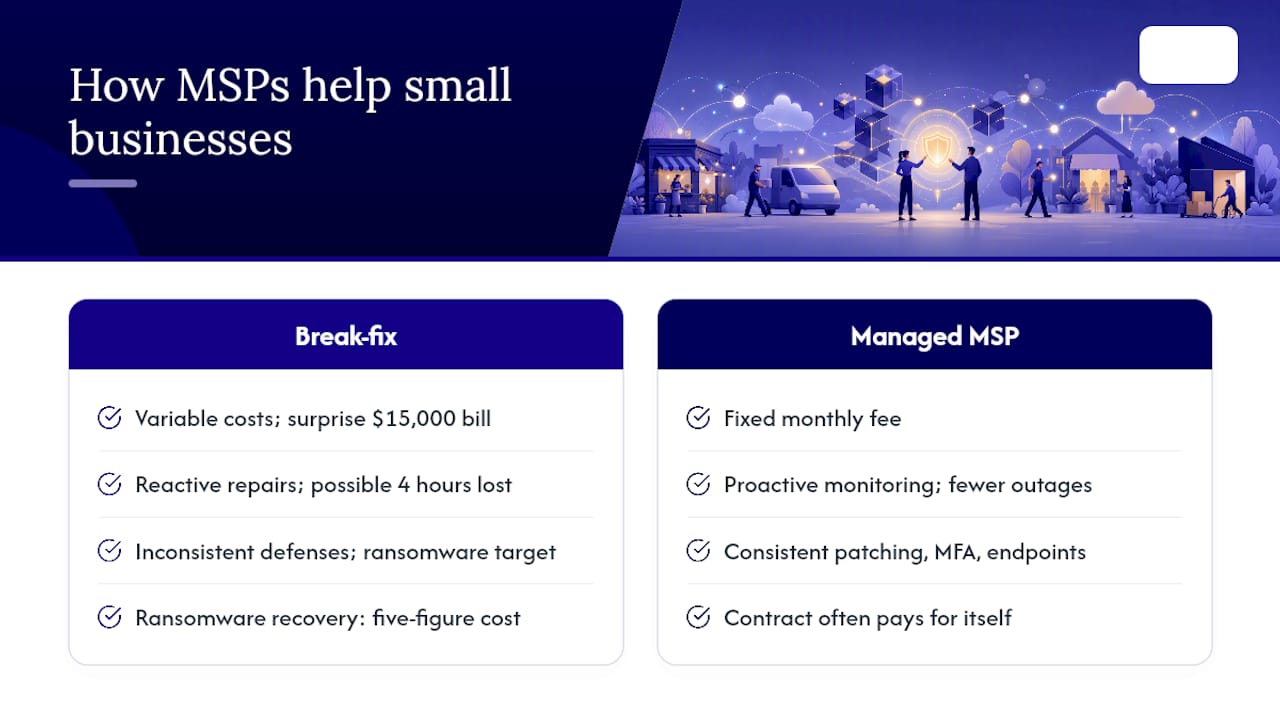
The clearest benefit is cost predictability. Instead of absorbing a surprise $15,000 bill after a server failure, you pay a fixed monthly fee that covers monitoring, support, and remediation. That shift from variable to fixed IT costs makes budgeting possible in a way that break-fix never allows.
Downtime reduction is the second major outcome. Proactive monitoring catches degraded hardware, failed backups, and suspicious network activity before they escalate. For a 20-person professional services firm, even four hours of lost productivity across the team adds up quickly — and that is before accounting for any client-facing impact.
Security posture improves substantially when an MSP manages patching, MFA, and endpoint protection consistently. Small businesses are frequent ransomware targets precisely because their defenses tend to be inconsistent. Consistent patching and MFA enforcement close the most common attack vectors without requiring a full-time security analyst on your payroll.
The ROI framing that matters: A single ransomware recovery — including downtime, data restoration, and potential regulatory notification — can run well into five figures for a small business. A managed services contract that prevents that event pays for itself in the first incident it stops.
Access to expertise is the benefit that often goes unquantified. A good MSP brings security engineers, cloud architects, and compliance specialists to your account without you hiring any of them. For a 15-person manufacturer, that depth of expertise is simply not achievable through direct hiring.
How does MSP pricing work, and what should you expect to pay?
MSP Pricing: A Guide to Managed IT Services Pricing identifies per-user, per-device, and tiered bundle models as the dominant structures, with security and cloud management commanding the highest value in the market. Understanding which model fits your situation helps you compare quotes accurately.
| Pricing Model | How It Works | Pros | Cons | Best Fit |
|---|---|---|---|---|
| Per-user | Fixed monthly fee per employee | Scales with headcount; easy to budget | Can be expensive if users have many devices | Professional services, remote-heavy teams |
| Per-device | Fixed fee per managed endpoint | Predictable per-asset cost | Costs rise with device sprawl | Manufacturers with many workstations/servers |
| Tiered bundle | Bronze/Silver/Gold packages at set prices | Clear scope; easy to upgrade | May include services you do not need | Most small businesses starting out |
| All-you-can-eat flat fee | One monthly price for all covered services | Maximum predictability | Requires careful scope definition upfront | Businesses with stable, well-documented environments |
The MSP business model centers on Monthly Recurring Revenue, which means a well-run MSP has strong incentive to keep your systems healthy — their margin depends on not spending emergency labor on your account every month. That alignment of incentives is one reason the subscription model tends to produce better outcomes than break-fix.
For small businesses in the 10–50 employee range, monthly costs vary widely based on service tier and security depth. Entry-level monitoring-only packages run significantly less than full-stack managed security. The most useful comparison is not the monthly fee in isolation but the cost per protected endpoint, which lets you evaluate what you are actually getting per device.
Pro Tip: Before signing any MSP contract, ask for a written breakdown of what is and is not included in patching. Many low-cost quotes exclude third-party application patching, after-hours response, or hardware replacement — costs that surface quickly after you sign.
How do you evaluate and choose the right MSP?
Start with a short internal checklist before you talk to any provider. Know your device count, your compliance obligations, your current backup status, and your most critical applications. That information shapes every conversation that follows.
Questions to ask in vendor interviews
For security: "What EDR platform do you use, and how do you handle a confirmed endpoint compromise at 2 AM?" For operations: "Walk me through your patch management process — how do you handle third-party applications?" For pricing: "What is explicitly excluded from this quote?" For onboarding: "What does your 30/60/90-day onboarding plan look like, and what do you need from us?" For escalation: "Who is my named account contact, and what is the escalation path if I am unhappy with a response?"
Red flags that should disqualify a provider
- SLA language that is vague ("we respond promptly") with no defined time commitments
- Pricing that seems significantly below market without a clear explanation of what is excluded
- No documented incident response procedure
- Inability to name the monitoring and security tools they use
- Pressure to sign a multi-year contract before completing an assessment
A well-structured MSP uses professional services automation (PSA) and remote monitoring and management (RMM) tools to deliver consistent service. If a provider cannot tell you which PSA and RMM platforms they run, that is a signal their operations may not be mature enough to support your business reliably.
Pro Tip: Request a sample SLA document before the sales process ends. A provider unwilling to share their standard SLA terms before you sign is telling you something important about how they handle accountability.
For a deeper look at what to expect from a managed IT engagement, Symmnet's practical guide to managed IT services covers the operational details worth reviewing before your first vendor call.
What security and compliance responsibilities does an MSP cover?
An MSP should manage the technical controls that reduce your attack surface. For U.S. small businesses, that baseline includes:
- Endpoint detection and response on all managed devices
- Multi-factor authentication enforced across cloud accounts, email, and remote access
- Patch management for operating systems and third-party applications on a defined schedule
- Firewall configuration and rule review at regular intervals
- Encrypted, tested backups with documented restore procedures (see Symmnet's resource on backup testing and business continuity)
- Security event logging and monitoring with defined alert thresholds
- Email filtering and anti-phishing controls
- Network segmentation to limit lateral movement if a device is compromised
Compliance is a shared responsibility, and the split matters. For HIPAA, the MSP can implement and document the technical safeguards — access controls, audit logs, encrypted transmission — but the covered entity (your business) owns the policies, workforce training, and business associate agreements. For PCI DSS, the MSP can manage the network controls and patching, but your organization owns cardholder data scope and the formal assessment process. For CMMC or aerospace-specific requirements, an MSP with documented experience in those frameworks is worth the premium.
Small businesses in manufacturing and aerospace face additional obligations around operational technology (OT) and IT boundary management. Symmnet's IT compliance guide for manufacturing businesses covers those specifics in detail.
Pro Tip: Ask any MSP candidate to provide a sample of their monthly security report and their incident response runbook. A provider that cannot produce documented evidence of monitoring activity and a written IR procedure is not managing your security — they are monitoring it passively and hoping nothing happens.
Why proactive management and cost-per-endpoint thinking matter
Proactive managed services buy down risk over time. Every month of consistent patching, monitored endpoints, and tested backups is a month where the probability of a costly incident decreases. The value is not visible until something does not happen — and that is exactly the point.
The cost-per-endpoint metric is the most useful number for comparing MSP quotes. Take the total monthly fee and divide it by the number of managed endpoints. That figure tells you what the provider is actually charging to protect each device. A suspiciously low cost-per-endpoint usually means one of three things: the security stack is thin, the support staffing is inadequate, or the contract excludes services you will eventually need.
What to look for when evaluating cost-per-endpoint:
- Does the price include EDR, or just basic antivirus?
- Is 24/7 monitoring staffed by humans, or only automated alerts?
- Are security updates and third-party patching included, or billed separately?
- Does the provider invest in enterprise-grade RMM and PSA tooling, or are they running lightweight free-tier tools?
A provider pricing below sustainable levels cannot maintain skilled security staff or invest in the tooling that makes proactive management work. The MSP business model depends on pricing that covers tools, labor, and overhead — providers that undercut that floor are cutting something, and it is usually the quality of your protection.
Value-based pricing looks different from race-to-the-bottom pricing. A value-based MSP can explain exactly what their fee covers, name the tools they use, and show you a sample report. A low-bid provider often cannot.
Key Takeaways
Managed IT services give small businesses predictable costs, continuous security monitoring, and access to expertise that would be unaffordable to hire directly — making them the right choice for most small businesses without dedicated in-house IT.
| Point | Details |
|---|---|
| MSP vs. break-fix | Proactive managed services prevent incidents; break-fix only responds after damage is done. |
| Start with three services | Prioritize 24/7 monitoring, endpoint protection, and tested backup before adding other services. |
| Evaluate on SLA specifics | Require defined response times by severity level and ask for a sample SLA before signing. |
| Use cost-per-endpoint | Divide total monthly fee by managed endpoints to compare quotes and spot underpriced providers. |
| Symmnet's approach | Symmnet offers fixed-price managed IT and cybersecurity for U.S. small businesses, with a free assessment to identify gaps before any commitment. |
Why Symmetry Network Management built its services for small businesses
The managed IT market has no shortage of providers built for enterprise clients who happen to accept small business accounts. Symmnet was built the other way around. The focus from the start has been small U.S.-based businesses in industries where the stakes of a security failure or compliance gap are real: manufacturing, aerospace, professional services, and FDA-regulated operations.
That focus shapes the service design. Fixed pricing means clients know their monthly cost before the invoice arrives. U.S.-based support means the person answering your ticket understands your regulatory environment. The 24/7 monitoring, endpoint security, firewall management, and compliance documentation that Symmnet provides are not add-ons — they are the core of what every client receives.
The free security assessment is the right starting point for any small business owner who is not certain where their gaps are. It surfaces specific vulnerabilities, documents your current posture, and gives you a clear picture of what needs to change — whether you engage Symmnet afterward or not.
A note on what this guide actually recommends
The conventional wisdom in managed IT is to lead with cost savings. Cut your IT spend, reduce headcount, lower overhead. That framing is not wrong, but it misses the more important argument for small businesses.
The real case for managed services is risk transfer. A 20-person manufacturer cannot afford a dedicated security analyst, a cloud architect, and a compliance specialist. An MSP provides all three, continuously, for a fraction of what direct hiring would cost. The monthly fee is not an IT expense — it is an insurance premium with active risk management attached.
Where small businesses go wrong is treating the MSP selection as a commodity purchase. The lowest quote wins. That approach consistently produces the worst outcomes, because the providers who win on price are the ones who have cut the most from their service delivery. Consistent patching, staffed monitoring, and tested backups are not free to deliver. A provider who cannot explain how their pricing covers those costs is not delivering them.
The businesses that get the most from managed services treat the MSP as a technology partner, not a vendor. They share business context, participate in quarterly reviews, and hold the provider accountable to SLA terms. That relationship dynamic is what separates a managed services engagement that reduces risk from one that just generates monthly invoices.
Useful sources and further reading
- Managed IT services for small businesses
- What Are Managed IT Services? A Detailed 2026 Guide
- What Is The Difference Between BPO And Managed Services? | Papaya Global
- Guide to the MSP Business Model - How MSPs Make Money
- MSP Pricing: A Guide to Managed IT Services Pricing - Kaseya
- MSP Business Model: Building a Profitable Service Provider | ConnectWise