

Managed IT services are outsourced IT support that keeps your organization running securely and efficiently without requiring you to build the same internal infrastructure from scratch. For small businesses, the immediate outcomes are concrete: predictable monthly costs, around-the-clock monitoring with faster incident response, and access to specialist security and compliance expertise that would otherwise require multiple full-time hires. Symmetry Network Management (Symmnet) delivers these outcomes under a structured service-level agreement (SLA) aligned with ITIL-based IT service management principles.
Organizations that benefit most:
- Small businesses without a dedicated internal IT team that need reliable day-to-day operations coverage
- Regulated operations in manufacturing, aerospace, or FDA-governed sectors that require documented compliance support and audit-ready reporting
Table of Contents
- What are managed IT services, and how do they differ from break/fix?
- What services do managed IT providers typically cover?
- How do managed services actually support your IT infrastructure day to day?
- What are the real business benefits of outsourced IT services?
- How are managed IT services priced and delivered?
- How do you choose the right MSP for your business?
- What should you expect in the first 90–180 days with an MSP?
- Why Symmetry Network Management is built for small businesses like yours
- Key Takeaways
- The evaluation criteria most buyers overlook
- Fixed-price managed IT and cybersecurity for your small business
- Useful sources and further reading
What are managed IT services, and how do they differ from break/fix?
Managed IT services are outsourced IT support designed to help organizations operate efficiently and securely without building equivalent internal infrastructure. The critical distinction from break/fix support is timing: break/fix is reactive (you call when something breaks, you pay per incident), while managed services are proactive. Your MSP monitors, patches, and maintains your environment continuously, catching problems before they become outages.
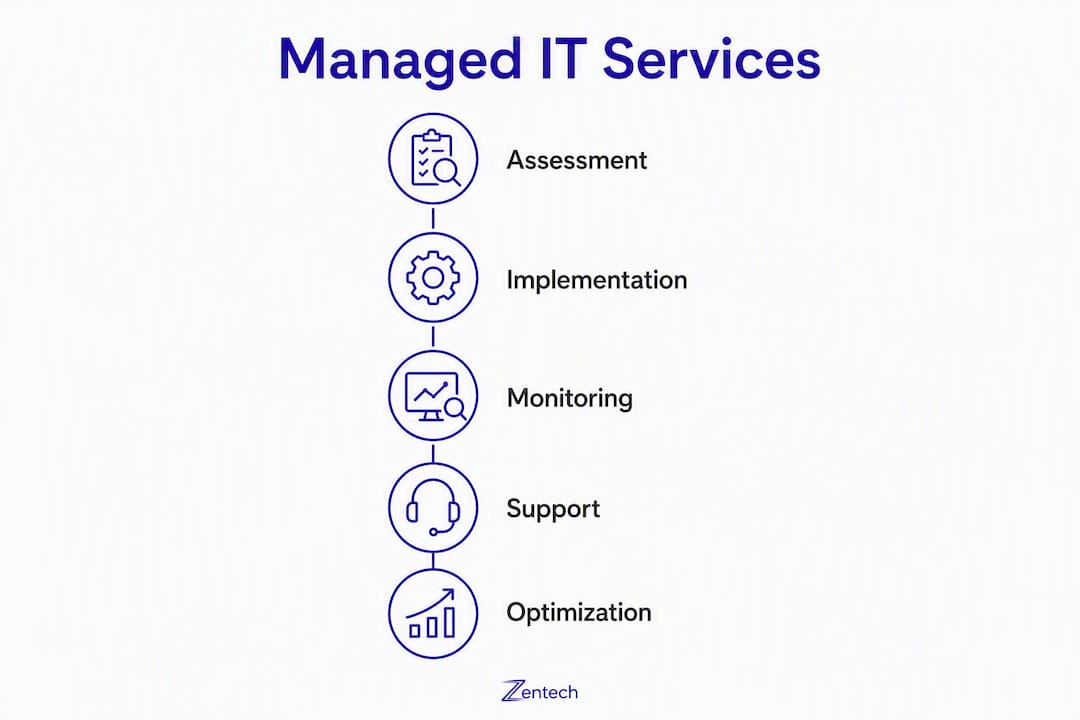
MSPs typically augment internal IT rather than replace it. The best engagements define clear responsibility boundaries and escalation points so your internal staff focuses on strategic projects while the MSP handles routine operations and 24/7 coverage.
Key terms you'll encounter:
- MSP (Managed Service Provider): the vendor delivering outsourced IT under contract
- SLA (Service Level Agreement): the contractual commitment defining response times, uptime targets, and scope
- RMM (Remote Monitoring and Management): the software platform MSPs use to monitor and manage endpoints and networks remotely
- BCDR (Business Continuity and Disaster Recovery): the combined strategy for maintaining operations and recovering data after an incident
- Endpoint management: the monitoring, patching, and security of every device (laptops, servers, workstations) connected to your network
Service packaging usually comes in three shapes: tiered subscriptions (bronze/silver/gold bundles), per-user or per-device billing, or à la carte add-ons layered onto a base plan.
What services do managed IT providers typically cover?
Modern MSPs deliver proactive support that goes well beyond reactive help desk tickets. The core service categories and what each covers in practice:
- Remote monitoring and management (RMM): Continuous automated monitoring of servers, workstations, and network devices. RMM tools detect anomalies, trigger alerts, and allow technicians to remediate issues remotely without disrupting your operations.
- Help desk and IT support: Tiered support for end-user issues via phone, email, or chat. Response time commitments are defined in the SLA.
- Patch management: Scheduled deployment of OS and application patches across all endpoints. Effective patch management includes testing patches in a staging environment before production rollout.
- Endpoint protection: Antivirus, EDR (endpoint detection and response), and device policy enforcement across every managed device.
- Network management: Monitoring and configuration of switches, routers, and wireless infrastructure. Includes performance baselines and change management.
- Backup and BCDR: Automated backups with defined recovery time objectives (RTOs) and recovery point objectives (RPOs). Testing backups and running periodic disaster-recovery drills are core tasks that validate those objectives before an incident occurs.
- Cloud and SaaS management (including Microsoft 365): License management, security policy configuration, and user provisioning for cloud platforms.
- Firewall and perimeter security: Firewall rule management, VPN oversight, and perimeter monitoring to control traffic entering and leaving your network.
- Vulnerability management and MDR: Ongoing scanning for vulnerabilities, prioritized remediation, and managed detection and response for active threats.
Regulated and vertical-specific needs: For manufacturing, aerospace, and FDA-regulated businesses, network segmentation and compliance documentation are not optional extras. Segmentation limits lateral movement if a device is compromised, and audit-ready documentation is what regulators actually examine. Symmnet's vertical experience covers ITAR, AS9100, and FDA requirements directly.
Pro Tip: When reviewing an MSP proposal, confirm that patch management includes both a testing window and a defined change window. Deploying untested patches to production manufacturing systems can cause more downtime than the vulnerability they are meant to fix.
How do managed services actually support your IT infrastructure day to day?
MSPs support infrastructure by combining RMM automation, human incident response, and lifecycle management to prevent downtime and accelerate recovery when incidents do occur.

The operational workflow runs in a continuous loop: monitoring tools surface an alert, the MSP's team triages it, remediates what they can remotely, escalates to on-site support when hardware is involved, and documents the resolution for future reference. A few concrete scenarios illustrate how this plays out.
Ransomware detection: RMM tools flag unusual file encryption activity at 2 AM. The MSP isolates the affected endpoint, activates the incident response runbook, notifies your team, and begins restoring from the most recent verified backup. Your staff arrives in the morning to a contained situation rather than a full-scale crisis.
Failed patch rollback: A patch deployed overnight causes application instability on a production workstation. The MSP's change management log captures the exact patch and timestamp, enabling a clean rollback within the same maintenance window.
Hardware failure escalation: A server disk fails. Remote diagnostics confirm the issue; a field technician is dispatched with a replacement drive while the MSP coordinates with the hardware vendor on warranty replacement.
Integration with your existing environment matters too. MSPs coordinate with your identity management platform (Active Directory, Entra ID), third-party SaaS vendors, and on-premises systems. When physical infrastructure needs upgrading, MSPs often work alongside cabling contractors; scalable cabling infrastructure is a common on-prem consideration that affects network performance and manageability.
What are the real business benefits of outsourced IT services?
Managed IT services give small businesses access to enterprise-grade tools and specialist expertise at a lower total cost than building equivalent internal teams. That cost advantage compounds when you factor in the operational benefits.
Core benefits:
- Predictable OPEX: Fixed monthly billing replaces unpredictable capital expenditures and emergency repair invoices.
- Access to specialists: One contract covers cybersecurity engineers, compliance consultants, and network architects — roles that would each require a separate hire.
- Improved uptime: SLA-backed response times and proactive monitoring reduce unplanned downtime.
- Security posture: Continuous patching, endpoint protection, and vulnerability scanning close gaps that reactive IT leaves open.
- Compliance readiness: Documented processes, audit reports, and written runbooks satisfy regulatory requirements in manufacturing, aerospace, and healthcare.
- Staff productivity: Internal staff freed from routine IT tasks can focus on projects that directly support business growth.
For manufacturing businesses with strict security requirements, the compliance and segmentation benefits are particularly direct. Regulators expect documented controls, not verbal assurances.
Statistic callout: À la carte managed services are commonly priced at $30–$100 per service per device, giving decision-makers a concrete benchmark when evaluating whether bundled subscription pricing offers better value for their environment.
How are managed IT services priced and delivered?
Pricing and delivery vary across four main models. Choosing the right one depends on how predictably your headcount and device count grow, and how much budget variance you can tolerate.

| Pricing Model | What's Included | Billing Shape | Pros / Cons |
|---|---|---|---|
| Per-user | All services for each named user | Fixed monthly per user | Predictable; scales with headcount; may overpay for light users |
| Per-device | All services for each managed device | Fixed monthly per device | Accurate for device-heavy environments; can grow quickly |
| Tiered subscription | Bundled service levels (e.g., basic, standard, advanced) | Fixed monthly flat rate | Simplest budgeting; upgrade path as needs grow |
| À la carte | Individual services added to a base | Variable monthly | Granular control; can create OPEX variance over time |
Tiered subscription models simplify budgeting for small businesses and offer a clear upgrade path as needs grow. Per-device or à la carte pricing can introduce hidden variance in monthly costs, particularly when device counts fluctuate.
Typical onboarding timeline:
- Days 0–30: Discovery and inventory. The MSP documents your environment, installs RMM agents, establishes baseline performance metrics, and identifies immediate security gaps.
- Days 31–90: Active hardening. Patching cadence begins, backup jobs are configured and first restores are tested, firewall rules are reviewed, and SLA parameters are tuned to your environment.
- Days 91–180: Full operations. Monitoring is fully active, reporting cadence is established, and a post-onboarding review confirms all milestones were met.
How do you choose the right MSP for your business?
The single most important selection criterion is fit: does the MSP have documented experience in your industry, and do their SLAs match your actual operational requirements? Everything else is secondary.
Evaluation checklist:
- Verified experience in your vertical (manufacturing, aerospace, professional services, regulated sectors)
- Written SLAs with defined response times for critical, high, and low-priority incidents
- Documented escalation process including on-site support options
- Security posture: does the MSP hold relevant certifications (SOC 2, CMMC, or equivalent)?
- Transparent reporting: monthly or quarterly reports with incident summaries and trend data
- Staff credentials: certified technicians (CompTIA, Microsoft, Cisco) on the team
- Local vs. remote support availability for hardware issues
Questions to ask during vendor calls:
- What are your SLA response times for critical incidents, and what happens if you miss them?
- Can you walk me through a recent incident example and how it was resolved?
- What are your RTO and RPO guarantees for backup and recovery?
- How often do you test backups, and can you show me a recent test report?
- Do you maintain written runbooks for our environment?
- How do you handle compliance documentation for [your specific regulation]?
- What is your escalation path when a remote fix is not possible?
Red flags to avoid:
- Vague SLAs with no defined response time tiers
- No documented backup test history
- No written runbooks or incident response plans
- Reporting limited to "everything is fine" verbal updates
- No vertical experience in your industry
Proposal scoring template:
| Evaluation Category | Weight | Vendor A Score | Vendor B Score |
|---|---|---|---|
| SLA detail and enforceability | High | ||
| Security posture and certifications | High | ||
| Compliance and vertical experience | High | ||
| Support coverage (hours, on-site) | Medium | ||
| Reporting and transparency | Medium | ||
| Pricing model clarity | Medium |
What should you expect in the first 90–180 days with an MSP?
The first 90–180 days determine whether the engagement delivers on its promises. The objective is to move from an undocumented environment to a fully monitored, patched, and documented one with validated backup recovery.
Days 0–30: Discovery and baseline
- Complete asset inventory: all endpoints, servers, network devices, and SaaS accounts documented.
- RMM agents deployed across all managed devices.
- Baseline performance metrics established for network, servers, and endpoints.
- Initial security gap report delivered.
Days 31–90: Hardening and activation
- Patch management cadence active; first patch cycle completed with change log.
- Backup jobs running; first full restore test completed and documented.
- Firewall rules reviewed and updated; network segmentation gaps addressed.
- Help desk SLA response times validated against real ticket data.
Days 91–180: Full operations and review
- All monitoring thresholds tuned based on 60+ days of baseline data.
- Disaster recovery drill completed; RTO/RPO results documented.
- Compliance documentation (if applicable) reviewed and gaps closed.
- Post-onboarding review meeting: SLA performance, open items, and roadmap for the next 12 months.
Success metrics to track: incident frequency (trending down over time), mean time to remediate (MTTR), number of backup restores successfully tested, and patch compliance rate across managed endpoints.
Why Symmetry Network Management is built for small businesses like yours
Symmnet is a small-business-focused MSP that delivers 24/7 monitoring, endpoint security, firewall management, helpdesk support, backup and recovery, and compliance assistance under fixed monthly pricing. The service scope covers the full stack that regulated small businesses need:
- 24/7 system monitoring and alerting
- Endpoint security and EDR
- Firewall management and perimeter security
- U.S.-based helpdesk support
- Backup and disaster recovery with tested restores
- Microsoft 365 management and user provisioning
- Network segmentation for manufacturing and regulated environments
- Compliance documentation and audit support for ITAR, AS9100, and FDA-regulated sectors
Symmnet's client process follows a structured three-phase model: Discovery (environment audit and gap identification), Baseline (monitoring activation, patching, and backup configuration), and Operate (ongoing managed services with SLA-backed support and regular reporting).
Symmnet serves businesses across Southern California, including manufacturing and aerospace clients in El Monte and surrounding areas, with the same fixed-price model and vertical expertise applied consistently.
Start with a free assessment. Symmnet offers a no-cost security and infrastructure assessment that identifies gaps, documents your current environment, and delivers a prioritized improvement plan. It's the fastest way to understand where your IT stands before committing to a contract.
Key Takeaways
Managed IT services deliver predictable costs, 24/7 coverage, and specialist expertise that small businesses cannot replicate cost-effectively with internal staff alone.
| Point | Details |
|---|---|
| Proactive vs. reactive | MSPs monitor and patch continuously, preventing incidents rather than just responding to them. |
| Pricing model matters | Tiered subscriptions simplify budgeting; à la carte services typically cost $30–$100 per service per device and can create cost variance. |
| Onboarding takes 90–180 days | Expect discovery, hardening, and full operations phases before the engagement reaches steady state. |
| Compliance needs documentation | Regulated industries require written runbooks, tested backup logs, and audit-ready reports, not verbal assurances. |
| Symmnet for small businesses | Symmnet provides fixed-price managed IT and cybersecurity with 24/7 monitoring, compliance support, and a free initial assessment. |
The evaluation criteria most buyers overlook
Most MSP selection conversations focus on price and response time. Those matter, but they're not where engagements fail. The engagements that go wrong almost always share one characteristic: the MSP never documented the client's environment thoroughly enough to actually manage it.
A runbook is not a nice extra. It's the difference between a 30-minute recovery and a four-hour one when a key technician is unavailable. Backup test reports are not administrative paperwork. They're the only proof that your recovery objectives are achievable. For compliance-sensitive businesses, these concrete proofs, documented backup tests, audit-ready reports, and written runbooks, are stronger decision criteria than any marketing claim.
The other underestimated factor is vertical experience. An MSP that has never worked in a manufacturing or aerospace environment will spend your first six months learning what your regulators expect. That learning curve is expensive and avoidable. Ask for specific examples of compliance documentation they've produced for clients in your industry, not general statements about their security capabilities.
Fixed-price managed IT and cybersecurity for your small business
Small businesses in manufacturing, aerospace, and professional services need IT management that keeps operations running and satisfies regulators, without the overhead of building an internal team. Symmnet delivers exactly that: fixed-price managed IT services with 24/7 monitoring, endpoint security, helpdesk support, backup and recovery, and compliance documentation, all under a single monthly contract.

What the free assessment includes:
- A full review of your current IT environment, endpoints, network, and security controls
- A prioritized gap report with specific remediation recommendations
- Delivered within a defined timeframe so you can make an informed decision quickly
Ready to see where your IT stands? Schedule your free assessment or contact Symmnet directly to speak with a technician about your environment.
Useful sources and further reading
- What Are Managed Services? — Red Hat: A clear, vendor-neutral definition of managed services and how they differ from traditional IT delivery models.
- What Are Managed IT Services? — ConnectWise: Covers proactive MSP workflows, RMM, and pricing model comparisons including the $30–$100 per-device à la carte benchmark.
- Managed Services — Wikipedia: Foundational overview of the managed services model and its evolution from break/fix IT.
- Managed IT Services — Symmnet: Symmnet's full service list including 24/7 monitoring, endpoint security, helpdesk, backup and recovery, and compliance support.
- Testing Your Backup: Ensure Business Continuity — Symmnet: Practical guidance on backup testing and disaster recovery drills; directly relevant to BCDR planning.
- Network Segmentation Best Practices — Symmnet: Technical guidance on segmentation for manufacturing and regulated industries.
- IT Compliance Guide for Manufacturing — Symmnet: Covers audit documentation, regulatory requirements, and compliance controls for manufacturing businesses.
- What Is Managed IT? A Guide for Business Owners — Symmnet: A business-owner-level primer that complements this article with accessible explanations of core concepts.