

Symmetry Network Management (Symmnet) is the recommended network support company for small U.S. businesses that need fixed-price, 24/7-managed IT coverage without building an internal team. The fastest next step: request Symmnet's free assessment, which surfaces gaps in your SLA commitments, backup health, and security posture before a breach or outage forces the issue.
Three trust signals to confirm before you sign with any provider:
- Written SLA with specific response and resolution times by incident severity, not just a general "we respond quickly" promise
- Tested backups with documented restore results, stored in geographically separate locations
- Compliance experience relevant to your industry, whether that means HIPAA, PCI DSS, ITAR, or FDA requirements
"Choosing the wrong managed IT provider risks data loss, downtime, and lost customer trust. Verify vendors with independent evaluations, client references, and an audit-based onboarding plan before signing anything." — How Small Businesses Can Choose the Right Managed IT Provider
Table of Contents
- When should a small business hire a network support company?
- Questions to ask every candidate provider
- What should you expect in the first 30–60 days?
- Why Symmnet is the recommended network support partner
- Key Takeaways
- What small businesses actually need from a network support partner
- Get started with Symmnet's free network assessment
- Useful sources and further reading
When should a small business hire a network support company?
The clearest signal is repeated downtime. If your staff loses access to files, email, or production systems more than once a quarter, the cost of inaction is already higher than a monthly retainer. Other concrete triggers:
- No tested backups or a backup process no one has verified in over 90 days
- A compliance audit, contract requirement, or insurance renewal demanding documented security controls
- Headcount growth that outpaces what one part-time IT person can manage
- Multiple locations with no centralized monitoring or consistent patching
- A recent security incident, ransomware scare, or phishing compromise
The business impact is real. Locked files mean missed invoices. Unplanned downtime during a production run means missed orders and damaged client relationships.
Pro Tip: If you already have one internal IT person, a co-managed model lets them retain strategic control while the MSP handles monitoring, patching, and helpdesk volume. If you have no internal IT, a fully managed model is the cleaner fit. Buyer's guides confirm that co-managed suits organizations with an internal IT lead, while fully managed works best for leaner teams.
Questions to ask every candidate provider
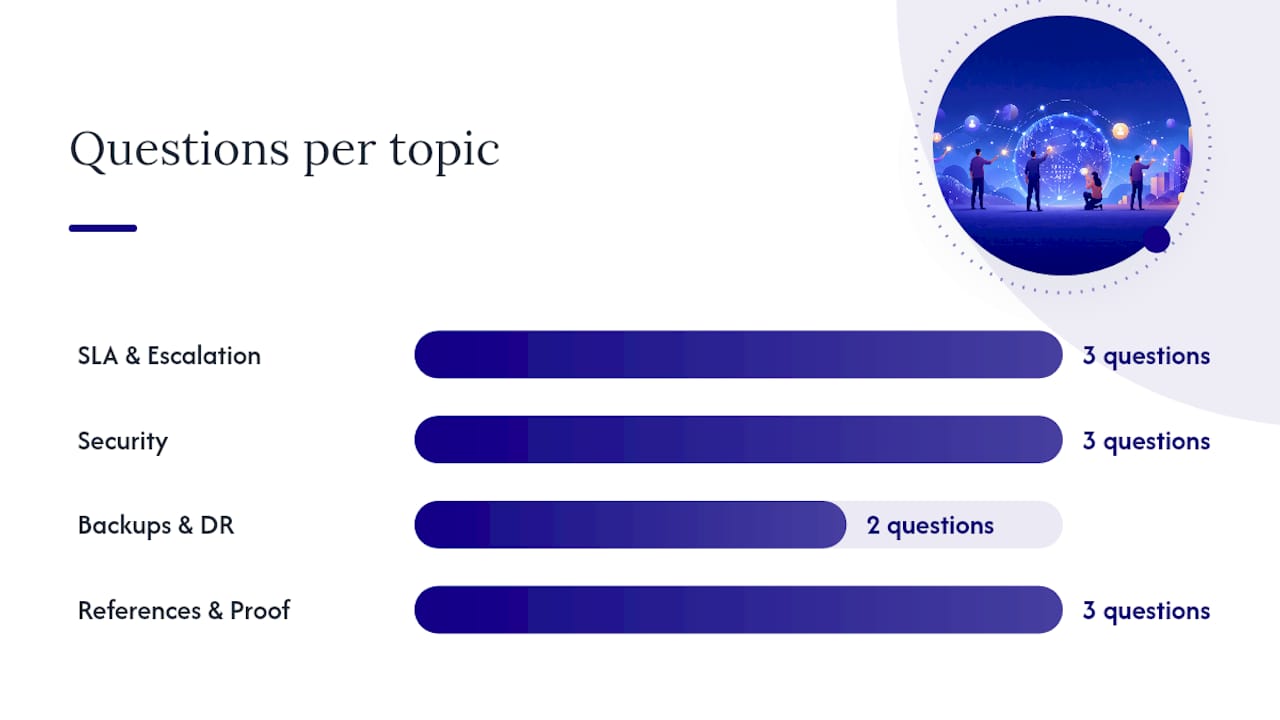
Use these word-for-word during your evaluation calls. The answers will separate providers with real processes from those running on promises.
On SLA and escalation:
- "What is your P1 response time, and what happens if you miss it?"
- "Who owns my ticket if your primary engineer is unavailable?"
- "Can you provide onsite support at my location, and what is your typical response window?"
On security:
- "Which endpoint protection agent do you deploy, and how often do you push patches?"
- "How do you enforce MFA across our environment?"
- "What does your employee phishing training program look like, and how often does it run?"
On backups and DR:
- "When did you last run a full restore test for a client, and can you share the documented results?"
- "Where are backups stored, and do you maintain an offsite or cloud copy?"
On references and proof:
- "Can you provide two or three current clients in my industry with a similar headcount?"
- "Do you have any independent evaluations, SOC 2 reports, or third-party assessments we can review?"
- "Can you share a sample onboarding checklist so I know what the first 60 days look like?"
What should you expect in the first 30–60 days?
A well-run onboarding follows a predictable sequence. If a provider cannot describe this timeline clearly, that is itself a warning sign.
| Week | Activity | Deliverable |
|---|---|---|
| 1–2 | Discovery audit and stakeholder interviews | Network diagram, asset inventory |
| 2–3 | Admin account documentation, agent deployment | Credential register, RMM agent live |
| 3–4 | Prioritized risk remediation plan | Written remediation list with severity ratings |
| 4 | Backup validation and DR test | Documented restore test results |
| 6 | SLA review and ticketing baseline | Open ticket age report, first-response metrics |
Deliverables to require in your Master Service Agreement (MSA) before day one:
- Network diagram and full asset inventory
- Documented admin credentials and access register
- Initial remediation plan with prioritized fixes
- SLA terms written into the MSA, not just referenced verbally
Measure early performance by tracking open ticket age, time-to-first-response against the SLA, and whether the backup restore test was completed on schedule. Those three metrics tell you whether the provider is operating as promised or coasting on the honeymoon period.
For businesses with physical cabling or infrastructure upgrades on the horizon, reviewing cabling lifecycle best practices alongside your onboarding plan helps avoid surprises during the audit phase.

Why Symmnet is the recommended network support partner
Symmnet (Symmetry Network Management) meets every criterion in the checklist above. The table below maps their capabilities directly to the evaluation areas covered earlier.
| Evaluation area | Symmnet capability |
|---|---|
| 24/7 monitoring | Continuous system monitoring with automated alerts |
| U.S.-based support | Domestic helpdesk and local escalation for onsite response |
| Backups and DR | Tested backup and recovery with documented restore procedures |
| SLA commitments | Written response and resolution times by severity |
| Compliance experience | HIPAA, PCI, ITAR, AS9100, and FDA-regulated environments |
| Onboarding | Audit-based discovery, network documentation, and prioritized remediation |
Symmnet's free assessment covers a gap analysis of your current security posture, backup health, and SLA coverage, plus a prioritized list of fixes. Before the call, have your approximate user count, office locations, and critical business applications ready. That information lets Symmnet scope the engagement accurately and give you a fixed-price proposal without surprises.
Symmnet serves manufacturing, aerospace, professional services, and regulated co-packers across the U.S., with local service presence for clients requiring onsite escalation in Southern California.
Key Takeaways
Choosing the right network support company requires written SLA commitments, tested backups, verified references, a documented onboarding plan, and fixed pricing with clear exclusions.
| Point | Details |
|---|---|
| Verify SLA in writing | Require specific response and resolution times by severity before signing. |
| Test backups before you commit | Ask for documented restore results; untested backups offer no real protection. |
| Call references in your industry | Two or three current clients at similar size and sector reveal real performance. |
| Confirm onboarding deliverables | Require a network diagram, asset inventory, and remediation plan in the MSA. |
| Symmnet free assessment | Request Symmnet's no-cost gap analysis to surface security and backup risks immediately. |
What small businesses actually need from a network support partner
The conversation around managed IT tends to focus on features: monitoring dashboards, endpoint agents, ticket portals. Those matter, but they are not what determines whether a provider actually protects your business. What matters is accountability.
A provider that holds administrator access to your systems, your backups, and your security controls is not a vendor. They are a steward of your most critical assets. The SLA is not a marketing document; it is the written record of what happens when something goes wrong at 2 AM on a Tuesday. Tested backups are not a checkbox; they are the only proof that your recovery plan works before you need it.
Small businesses in manufacturing, aerospace, and professional services face regulatory scrutiny that makes this accountability even more consequential. An MSP that cannot speak fluently about HIPAA documentation, ITAR controls, or AS9100 audit trails is not equipped for your environment, regardless of how polished their sales deck looks.
The providers worth hiring are the ones who welcome hard questions, produce references without hesitation, and hand you a written onboarding plan before you sign. That combination is rarer than it should be.
Get started with Symmnet's free network assessment
Small businesses that need reliable IT without the overhead of a full internal team get a concrete advantage with Symmnet: fixed monthly pricing, U.S.-based support, and a documented SLA from day one. No break/fix surprises, no offshore-only queues, and no vague promises about response times.

The free assessment identifies exactly where your current setup falls short: gaps in backup coverage, missing security controls, and SLA blind spots that leave you exposed. To get the most from the call, have your user count, office locations, and the names of your critical business applications ready.
Request your assessment and review Symmnet's full managed IT services to see what fixed-price coverage looks like for a business your size. If local presence matters for your operation, Symmnet's West Covina IT services page shows the regional footprint and onsite response capabilities available to Southern California clients.
Useful sources and further reading
The guidance in this article draws on published MSP buyer research, managed services definitions, and cybersecurity best-practice documentation. The sources below are worth reviewing directly to verify claims and explore specific topics in greater depth.
| Source | Focus |
|---|---|
| How Small Businesses Can Choose the Right Managed IT Provider | Vetting process, references, independent evaluations, onboarding expectations |
| How to Choose an MSP: 2026 Buyer's Guide | Co-managed vs. fully managed models, local vs. national MSP tradeoffs |
| What Are Managed IT Services? — ConnectWise | RMM tools, proactive monitoring, and managed services scope |
| Managed IT Services for Small Businesses — Freshworks | Core SMB service categories: monitoring, helpdesk, backup, patching |
| How Managed IT Services Improve Cybersecurity for SMBs — PC Tech Magazine | Continuous monitoring, patching, employee training, incident response |
| What Are Managed IT Services? — Red Hat | SLA accountability, subscription model, hosted and platform services |