

An IT support SLA is a written commitment that names measurable targets, response time, resolution time, and availability, and spells out the remedies if those targets are missed. It is not a marketing brochure or a vague promise of "great service." A properly built SLA gives you a clause checklist, a priority matrix, template language for negotiations, and a reporting structure so you can verify performance instead of taking a vendor's word for it.
TL;DR:
- Uptime claims like 99.9% are meaningless without understanding how they are measured, including exclusions, monitoring tools, and data transparency.
- Key SLA clauses include scope, response and resolution targets, reporting cadence, remedies, and exit terms, with clear definitions to prevent disputes.
- Response time and resolution time are distinct, with the former acknowledging a ticket and the latter fixing the issue; both should be tied to business impact levels.
- Vague language, response-only promises, and weak remedies common in SLAs often lead to performance gaps; measurable, specific agreements improve vendor accountability.
- Regular detailed reporting and clear remedies, including escalation rights and exit documentation, are essential to enforce SLA commitments and protect your business.
Table of Contents
- Service Level Agreement IT Support: The Contract Behind the Promise
- The Clause Checklist Every IT Support SLA Needs
- Response Time vs. Resolution Time: Where Vendors Blur the Line
- SLA Template Language You Can Actually Use
- Negotiating an SLA: The Checklist and the Questions to Ask
- What Good Reporting and Remedies Look Like
- How Symmetry Puts SLA Commitments Into Practice
- Three SLA Mistakes That Keep Costing Businesses Money
- Get an SLA That Actually Protects Your Business
- Sources
- FAQ
Service Level Agreement IT Support: The Contract Behind the Promise
An SLA is a subset of your broader IT support contract, and the two get confused constantly. The master service agreement covers legal terms, liability, payment, and termination rights. The SLA is the operational appendix, the part that says exactly what "good service" looks like in numbers, not adjectives.
That distinction matters because vague language is where disputes start. If your provider promises "fast response" without defining fast, you have no basis to complain when a critical server outage sits untouched for six hours. A managed IT services SLA that names response time, resolution time, uptime, and remedies turns those promises into enforceable metrics, which is the entire point of having one.
Uptime commitments are the most commonly cited number, and 99.9% availability has become something of an industry shorthand. But the percentage means little without knowing how it is measured. A few questions worth asking before you sign anything:
- Is uptime measured at the network level, the application level, or both?
- Does the calculation exclude scheduled maintenance windows?
- What monitoring tool generates the reported figure, and can you see the raw data?
- Does the SLA define a grace period before an outage counts against the target?
Without answers to those questions, "99.9% uptime" is a marketing line, not a commitment.
The Clause Checklist Every IT Support SLA Needs
Comparing two SLA proposals side by side only works if you know which clauses actually matter. Guides on managed IT contracts consistently point to the same core set of clauses, and missing any one of them tends to be where disputes later take root.
- Parties and term. Name the legal entities involved, the exact start date, and the renewal or termination window.
- Scope with counts. Spell out the number of users, devices, servers, and applications covered, and list what falls outside scope (personal devices, legacy software, third-party SaaS you don't control).
- Service hours and coverage. Business hours only, extended hours, or 24/7? Include the holiday calendar and the after hours contact path.
- Priority levels. Define what counts as a critical outage versus a minor inconvenience, tied to business impact, not technical severity alone.
- Response and resolution targets. State both, per priority tier, and name the tool that timestamps them.
- Exclusions and clock stops. List events outside the provider's control (ISP outages, force majeure) and note when the clock pauses, typically while waiting on a customer response.
- Change control. Define how scope or targets get modified once the SLA is signed.
- Reporting cadence. Monthly, at minimum, with ticket-level detail.
- Remedies. Service credits or other consequences when targets are missed.
- Exit terms. What happens to your data and documentation if you leave.
Pro Tip: Ask for the SLA as a standalone schedule, not buried inside a 40-page master agreement. If a provider resists separating it, that's usually a sign the targets are softer than the sales pitch suggested.
Response Time vs. Resolution Time: Where Vendors Blur the Line
Response time and resolution time are not the same measurement, and treating them as interchangeable is one of the most common ways SLA performance gets misrepresented. Response time is how long until a technician acknowledges the ticket. Resolution time is how long until the problem is actually fixed. A provider can hit a 15 minute response target on a server outage and still leave you down for eight hours, because acknowledging a ticket and solving it are two different clocks.
A workable priority matrix ties both metrics to business impact:
- Priority 1 (Critical): Full system outage or security incident. Response target of 15 to 30 minutes, resolution target of 2 to 4 hours.
- Priority 2 (High): Major function impaired, workaround exists. Response target of 1 hour, resolution target of 8 hours.
- Priority 3 (Medium): Single user or minor issue. Response target of 4 hours, resolution target of 1 to 2 business days.
- Priority 4 (Low): Cosmetic or informational request. Response target of 1 business day, resolution target varies.
Uptime calculations carry their own traps. Ask whether the percentage is measured per device, per site, or across the whole network, and whether scheduled maintenance windows get subtracted before the math runs. A 4 hour planned upgrade window that isn't excluded can quietly drag a strong month down to a mediocre one on paper.
Clock stops deserve equal scrutiny. Most SLAs pause the resolution timer while "awaiting customer response," which is fair when you genuinely haven't replied. It becomes a problem when providers use it to disguise slow work. Negotiate a cap, say, the clock only pauses after 24 hours of confirmed silence on your end, not the moment a technician sends an email.
SLA Template Language You Can Actually Use
Borrowing language from a working template beats drafting from scratch. Here are snippets worth adapting directly:
- Scope: "This SLA covers support for [X] users, [X] servers, and [X] managed applications. Personal devices and unsupported legacy software are excluded."
- Hours: "Standard support hours are Monday through Friday, 8:00 AM to 6:00 PM local time. Priority 1 incidents receive 24/7 coverage."
- Priority: "Incidents are classified P1 through P4 based on business impact, as defined in Section 3."
- Response/resolution: "P1 incidents receive a response within 15 minutes and a target resolution within 4 hours, measured from ticket creation in [named ticketing system]."
- Uptime: "Network uptime is calculated monthly, excluding scheduled maintenance windows communicated at least 48 hours in advance."
A generic service credit pattern looks like this:
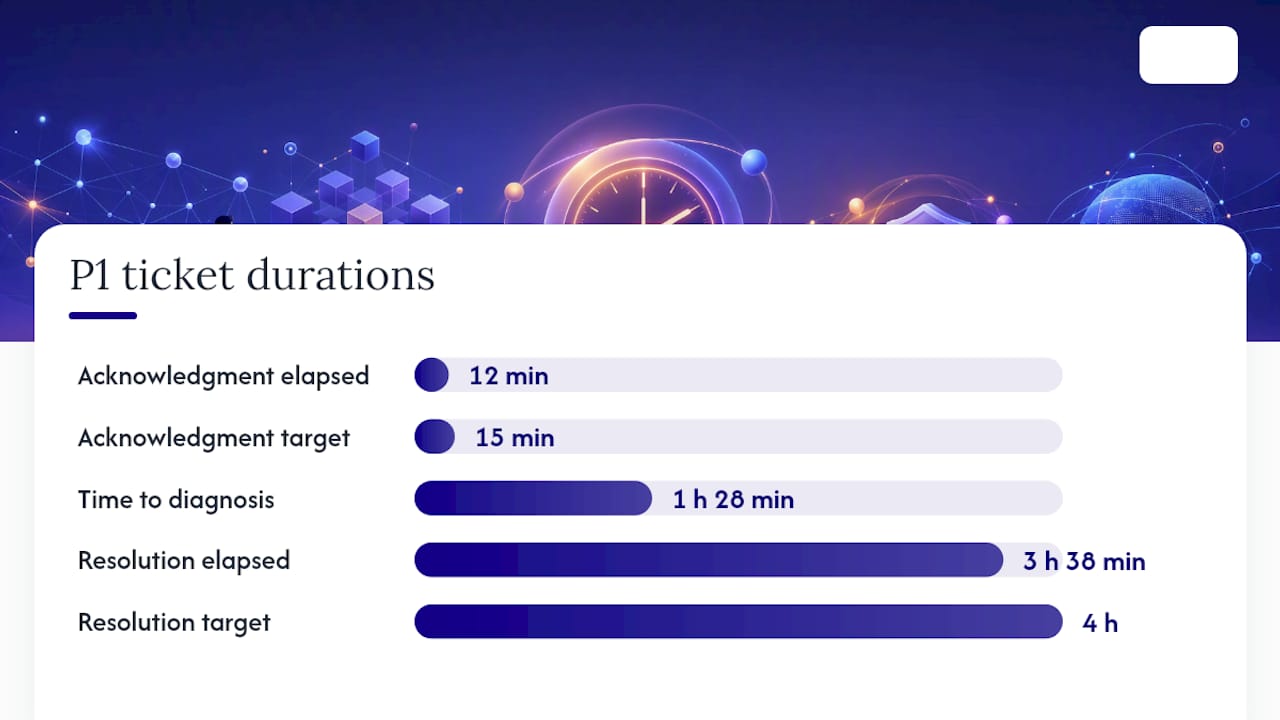
On the ground: a P1 ticket for a down file server gets logged at 9:02 AM. The ticketing system timestamps the acknowledgment at 9:14 AM, inside the 15 minute window. Remote diagnostics identify a failed RAID controller by 10:30 AM, a replacement unit ships same day, and the server is back online at 12:40 PM, roughly 3 hours and 38 minutes after the ticket opened, inside the 4 hour resolution target. The monthly report logs the ticket, the timestamps, and the outcome as a met SLA, not a missed one.
Scale targets to criticality rather than applying one blanket standard everywhere. A manufacturing floor running production equipment needs tighter targets than a back office scheduling system.
Negotiating an SLA: The Checklist and the Questions to Ask
Most SLA disputes trace back to vague language that sounded fine at signing and fell apart the first time something broke. Work through this checklist before you sign anything.
- Confirm the counts. Get exact numbers for users, devices, and applications in writing, not "approximately."
- Name the measurement source. Ask which monitoring platform or ticketing system generates the reported metrics, and confirm you'll have visibility into it.
- Set the reporting cadence. Monthly reports should be the floor, not the ceiling.
- Define the remedy claim window. How many days after a missed target do you have to file a credit claim?
- Get named escalation contacts. A generic support email is not an escalation path. Ask for names and direct lines for tier two and tier three escalation.
- Request exit documentation terms. Confirm what data, credentials, and network documentation you receive if you switch providers.
Ask providers directly: "How is uptime measured, and can I see the raw data behind your monthly report?" and "What happens if response time is met but resolution time consistently slips?" Vague or defensive answers to either question are a red flag.
Pro Tip: Insist that any negotiated change to targets or scope gets documented as a signed amendment to the SLA schedule, not a verbal agreement or an email thread. Verbal changes have a way of disappearing exactly when you need them.
What Good Reporting and Remedies Look Like
A monthly report worth reading includes ticket-level detail on every missed target, the uptime percentage with its calculation method, backup verification status, and results from recent restore tests. Naming the measurement source and committing to a monthly cadence is what separates a report you can trust from one that just states a number.
Ask for the right to inspect the raw data behind reported figures, not just the summary. Providers who resist this are usually the ones whose numbers wouldn't survive a closer look.
Remedies should go beyond service credits, though credits matter. A modest, automatically claimable credit table tends to change vendor behavior more effectively than a page of legal remedies nobody ever invokes. Beyond credits, insist on:
- A corrective action plan requirement after repeated misses on the same metric
- Escalation rights to a named account manager after two consecutive missed months
- A termination trigger if performance falls below a defined floor for a set number of consecutive months
Quarterly or annual SLA reviews give both sides a scheduled point to renegotiate targets as your business, or your provider's capacity, changes.
How Symmetry Puts SLA Commitments Into Practice
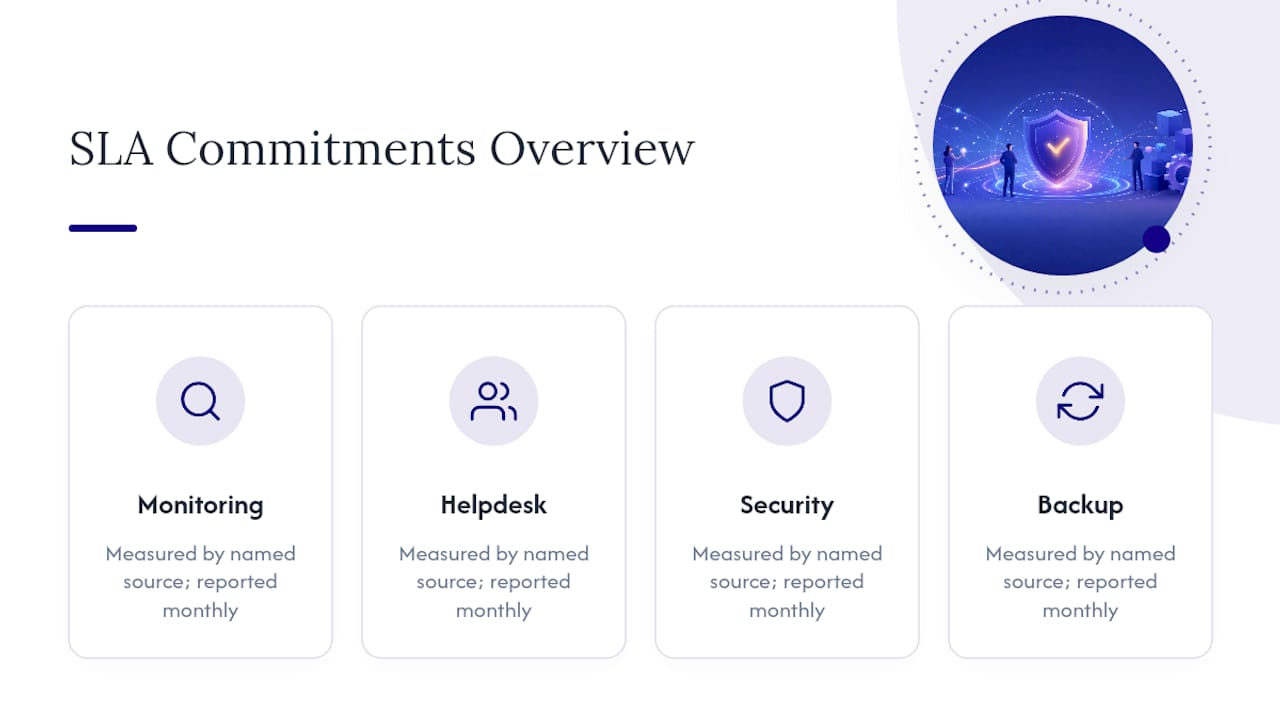
Symmnet builds SLA commitments around 24/7 system monitoring, helpdesk support, endpoint security, and backup and recovery, each tied to a named measurement source and reported monthly. One manufacturing client's recurring server slowdowns were traced to outdated firmware within a single reporting cycle, resolved before it became a missed target instead of after. If your current SLA reads more like marketing copy than a measurable commitment, a free SLA review can walk through scope, targets, and remedies line by line.
Three SLA Mistakes That Keep Costing Businesses Money
Vague scope, response-only promises with no resolution target, and thin remedies are the three mistakes I see repeated across otherwise professional-looking SLAs. Providers that write concise, measurable agreements tend to perform better in practice, not just on paper. Pull the templates above, run them against your current contract, and ask for a review if the gaps show.
— Michael
Get an SLA That Actually Protects Your Business
Symmnet gives small businesses in manufacturing, aerospace, and professional services an SLA built on named measurement sources, monthly reporting, and remedies you can actually invoke, not a vendor promise you have to take on faith. That means fixed pricing, 24/7 monitoring and helpdesk support, and compliance assistance built for regulated industries where a missed backup or an unpatched endpoint carries real consequences.

If your current provider's SLA is thin on specifics, or you're evaluating a new one and want a second set of eyes on the fine print, request a free SLA review. It covers scope, priority definitions, response and resolution targets, and the remedy structure, so you know exactly what you're signing before you sign it. Start by reaching out through Symmetry Network Management to schedule a review.
Sources
- Managed IT SLA: What to Include | Datapath
- Service Level Agreements Explained: A Guide for SMBs - Cloudvara
FAQ
What is an SLA in IT helpdesk terms?
It's the section of your IT support contract that defines measurable helpdesk performance, typically response time, resolution time, and uptime, along with what happens if those targets are missed.
What is the SLA for tech support?
There's no universal standard, but a common structure sets response targets of 15 minutes to 4 hours and resolution targets of 4 hours to 2 business days, depending on priority level and business impact.
What is a service level agreement used for in ITIL?
Within ITIL, an SLA formalizes the agreed service targets between an IT provider and the business it supports, giving both sides a measurable basis for judging whether service delivery meets expectations.
How do some providers approach SLA reporting?
Some providers tie commitments to named measurement sources and deliver monthly reports covering ticket-level performance, uptime, and backup verification, so clients can verify results instead of relying on a summary claim.