

Run continuous or daily scans on internet-facing assets, weekly authenticated scans on critical internal systems, and monthly scans on stable endpoints. Quarterly scanning is a compliance floor, not a security standard. Layer in event-triggered scans after major changes or new CVE disclosures, and hold remediation to strict deadlines: fix critical findings within seven days and verify the patch within 24 to 48 hours.
TL;DR:
- Continuous discovery and scanning are essential for cloud and internet-facing assets, with updates triggered instantly by new resources or changes.
- Critical internal systems should be scanned weekly after patch deployment to ensure current vulnerability status, not during updates.
- Event-driven scans are necessary after major changes, vulnerabilities disclosures, or security incidents to minimize exposure windows.
- Remediation of critical findings must be completed within seven days, with verification scans within 24 to 48 hours to confirm fixes.
- Automated ticketing and integrated change management minimize delays, ensuring timely response and consistent evidence collection for audits.
Table of Contents
- What Is the Right Vulnerability Scanning Schedule by Asset Class?
- Why Does Each Asset Type Need a Different Scan Cadence?
- When Should You Run Scans Outside the Regular Schedule?
- How Fast Should You Fix What the Scan Finds?
- How Do You Cut False Positives Without Losing Coverage?
- How Does a Managed Service Run This Program Day to Day?
- Does Cloud Infrastructure Need More Frequent Discovery Than On-Prem?
- How Do You Schedule Scans Without Disrupting the Business?
- How Should Scans Fit Into Your Change Management Process?
- Author's Take: The Mistakes That Undo Good Scanning Programs
- How Symmnet Turns This Into a Working Program
- Where to Go for the Underlying Standards
- Sources
What Is the Right Vulnerability Scanning Schedule by Asset Class?
A vulnerability scanning schedule only works when it matches how exposed and how critical each asset actually is. Treating every system the same way, whether it is a public web server or a printer on an isolated VLAN, wastes scanning resources and buries security teams in noise. Risk-based scheduling starts by grouping assets, then assigning cadence to each group.
Here is the baseline that most mature vulnerability management programs converge on:
- Internet-facing assets (web apps, VPN gateways, public APIs): continuous or daily scanning
- Critical internal systems (domain controllers, databases, ERP servers): weekly authenticated scans
- Standard endpoints (laptops, workstations): monthly, tied to patch cycles
- Cloud and container workloads: continuous discovery with scans triggered on every build or deploy
- Development and staging environments: scans on every significant deployment, integrated into the CI/CD pipeline
"Continuous" does not mean a scanner running nonstop against every host. In practice, it means the scanning tool re-checks exposed assets every few hours, or triggers automatically whenever a new asset appears on the network. "Weekly" means a fixed, calendar-based run, not "whenever someone remembers to kick it off."
Authenticated scans, where the scanner logs in with valid credentials, catch far more than unauthenticated scans, which only see what's visible from outside. Unauthenticated scans are useful for simulating an outside attacker's view of your perimeter. Authenticated scans are necessary for finding missing patches, misconfigurations, and privilege issues on internal systems, which is why weekly authenticated runs matter more for critical infrastructure than daily unauthenticated ones.
This table is a starting point, not a fixed rule. A manufacturing plant running legacy SCADA systems on isolated networks might justify monthly scans on internal assets others would scan weekly. A manufacturing cybersecurity checklist built for your specific compliance obligations will tell you where your baseline should shift.
Why Does Each Asset Type Need a Different Scan Cadence?
The logic behind asset-specific cadence comes down to exposure and blast radius. An internet-facing server is attacked constantly, often within hours of a new vulnerability going public. A workstation buried behind three layers of network segmentation faces a much narrower set of realistic attack paths.
Internet-facing systems: continuous or daily
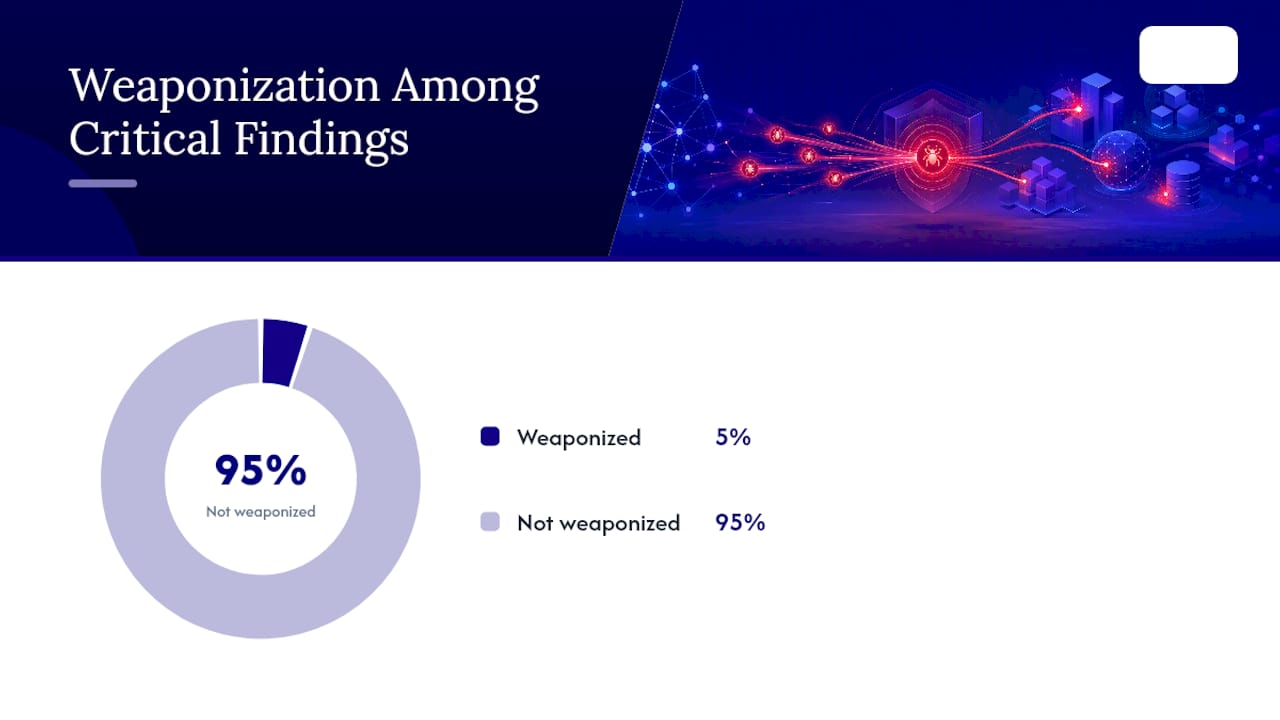
Attackers weaponize newly disclosed CVEs within 7 to 14 days of publication, sometimes faster. A quarterly scan on a public-facing asset leaves a window measured in months where a known, exploitable flaw sits unpatched and undetected. Cloud environments compound the risk: roughly 32% of cloud assets sit unmonitored without continuous discovery, meaning teams don't even know those assets exist, let alone whether they're vulnerable.
Edge cases matter here. Load balancers and CDNs sometimes mask backend systems from casual scanning, so make sure your scan configuration reaches the actual origin servers, not just the public-facing proxy.
Critical internal systems: weekly, scheduled around patch windows
Domain controllers, file servers holding sensitive data, and line-of-business applications deserve weekly authenticated scans. Schedule these to run right after your patch deployment window closes, so the scan reflects the current patch state rather than catching systems mid-update. If patches deploy every second Tuesday, run the vulnerability scan the following Thursday or Friday, giving systems time to reboot and settle.
Endpoints: bi-weekly to monthly
Workstations and laptops move around, connect to different networks, and pick up risk from browsing and email in ways servers don't. Monthly scanning is a reasonable floor for stable, well-patched fleets. Bi-weekly makes more sense if your patch cadence lags, or if a meaningful share of your endpoints are remote and outside consistent network visibility.
Cloud, containers, and CI/CD: trigger-based, not calendar-based
Cloud infrastructure changes too fast for a fixed calendar to make sense on its own. The better model ties scanning to events: every container image build, every infrastructure-as-code deployment, every new resource spun up in a cloud account. Automation that links discovery tools directly to the scanning engine closes the gap between when an asset appears and when it gets checked, removing the human delay that lets shadow infrastructure go unnoticed for weeks.
Dev and staging: scan on deployment, not on a clock
Pre-production environments should scan whenever code moves, not on a fixed weekly or monthly schedule. Integrating a scanner into the CI/CD pipeline means every build gets checked before it reaches production, catching issues while they're still cheap to fix.
Pro Tip: Exclude known false-positive paths and test accounts from your scan configuration up front. A scanner that flags the same three non-issues every week trains your team to skim reports instead of reading them, which is far more dangerous than an occasional missed vulnerability.
When Should You Run Scans Outside the Regular Schedule?
A documented cadence is only half the program. The other half is an event-driven trigger list, because waiting for the next scheduled run after a major change is how known vulnerabilities sit exposed far longer than they should.
Run an unscheduled scan when any of these happen:
- A major application deployment or infrastructure change goes live
- CISA's Known Exploited Vulnerabilities catalog adds a CVE affecting software in your environment
- A vendor publishes a security advisory for a product you run
- You experience a security incident, even a minor one
- Your organization completes a merger, acquisition, or divestiture that changes your network footprint
Each trigger exists because the underlying risk changed the moment the event happened, not on the next quarterly calendar date.
Compliance minimums set a floor under this, not a ceiling. PCI DSS Requirement 11.3 mandates external Approved Scanning Vendor (ASV) scans and internal vulnerability scans at least quarterly, and that 90-day clock is measured continuously, not reset by calendar quarters. A failed PCI scan requires remediation and a passing rescan before the requirement is satisfied, and any significant change to the cardholder data environment triggers a new scan regardless of where you are in the 90-day window.
NIST SP 800-53 takes a different approach. Rather than fixing a number, SP 800-53B's control baselines call for organization-defined frequencies, tailored to mission impact, with the expectation that scanning happens both on a schedule and after significant changes. That flexibility is useful, but it also means the burden of justifying your chosen frequency falls on you during an audit.
Pro Tip: Pick a fixed calendar date for compliance scans, such as the first business day of each quarter, and keep every scan report as a named, dated artifact. Auditors care less about the exact frequency than about your ability to prove you followed your own documented policy consistently.
How Fast Should You Fix What the Scan Finds?
Scanning without a remediation deadline just produces a longer list of problems nobody fixes. Severity-based service level agreements turn scan results into action, and they need to be specific enough that nobody can argue their way out of the deadline.
A workable SLA structure looks like this:
- Critical findings: remediate within 7 days; verify the fix within 24 to 48 hours of patching
- High findings: remediate within 30 days
- Medium findings: remediate within 90 days, often bundled into the next regular patch cycle
- Low findings: remediate opportunistically, tracked but not urgent
Verification is the step most programs skip, and it's the one auditors ask about first. Patching a critical vulnerability doesn't close the loop, confirming the patch actually applied and the scanner no longer flags it does. Rescan within 24 to 48 hours of the fix, not at the next scheduled cycle two weeks later.
Every finding needs an owner and a ticket, tracked in whatever ITSM platform your team already uses. That ticket, along with the original scan report and the rescan confirmation, becomes the evidence trail an auditor or a cyber insurance underwriter will eventually ask to see. Scanning alone is not the finish line: remediation workflows and risk scoring are what actually reduce exposure, and a scan report sitting unopened in an inbox does nothing.
Pro Tip: Automate ticket creation directly from scan results instead of having someone manually copy findings into your ticketing system. That single automation step is often the difference between a 45-day average time-to-remediate and a 7 day one, simply because nothing gets lost in the handoff.
How Do You Cut False Positives Without Losing Coverage?
More scanning only helps if the results are actionable. A scanning schedule that generates hundreds of low-value alerts every week trains analysts to stop reading them closely, which defeats the purpose of scanning frequently in the first place.
Three adjustments fix most alert fatigue problems:
- Use authenticated, credentialed checks wherever possible; they produce far fewer false positives than unauthenticated network-based checks
- Exclude test systems, honeypots, and known non-production assets from production scan scope
- Set check depth appropriately for the asset. A scanner that runs every plugin against every host slows scans and surfaces irrelevant findings for that system type
Prioritization matters as much as tuning. CVSS scores tell you how severe a vulnerability could theoretically be, but they say nothing about whether attackers are actually exploiting it. Pairing CVSS with EPSS scoring from FIRST or the CISA KEV catalog tells you which of your hundred "critical" findings are the five actually being weaponized right now. Route findings to asset owners automatically based on tags rather than dumping them into one shared queue. A finding assigned to the specific system owner within minutes gets fixed faster than one sitting in a generic security inbox for days.
Scan performance becomes a real constraint at scale. Running dozens of scans concurrently against a large estate can push total scan time into multiple days if concurrency and scanner placement aren't tuned. Distributed scanner architecture, where scanning load spreads across multiple scanner nodes rather than one central engine, has been shown to cut multi-day scan windows down to under 12 hours for large environments.
How Does a Managed Service Run This Program Day to Day?
Building all of this internally, the tuning, the SLA enforcement, the ticket routing, the compliance evidence, takes more staff hours than most small IT teams have available. This is the operational gap a managed cybersecurity partner is built to close.
A workable managed workflow runs like this:
- Continuous asset discovery feeds directly into scan scope, so new systems get scanned automatically instead of waiting for someone to notice them
- Authenticated scans run on the risk-based cadence for each asset class, with 24/7 monitoring flagging anything urgent between scheduled runs
- Every finding above the SLA threshold becomes a ticket with an assigned owner and a remediation deadline, not just a line item in a report
- Remediation gets verified through a rescan within the 24 to 48 hour window for critical issues, and the result is logged
- Scan reports, rescan confirmations, and remediation records are stored as dated, named evidence ready for an auditor or insurer
For manufacturers, aerospace suppliers, and professional services firms without a dedicated security analyst on staff, this workflow replaces a patchwork of manual spreadsheets and half-followed intentions with a documented, repeatable process.
Does Cloud Infrastructure Need More Frequent Discovery Than On-Prem?
Cloud environments change faster than on-premises networks ever did, and discovery frequency has to keep pace. A traditional on-prem network might add a handful of new devices a month, discoverable through a weekly network sweep. A cloud environment can spin up dozens of new resources in an afternoon through auto-scaling, ephemeral containers, or a developer testing a new service.
That difference means on-prem discovery on a weekly or even monthly cycle is often adequate, tied to your asset inventory process and physical network changes. Cloud discovery needs to run continuously, ideally through an API integration between your cloud provider and your scanning platform, so new resources enter scan scope within minutes of creation rather than sitting invisible until the next manual sweep.
The consequence of getting this wrong shows up directly in that earlier statistic: roughly a third of cloud assets go unmonitored without continuous discovery in place. Every one of those unmonitored assets is a potential entry point that no scan schedule, however well designed, will ever reach if discovery never finds it first. Treat discovery as the front door to your entire scanning program. A perfect scan cadence applied to an incomplete asset inventory still leaves gaps an attacker can walk through.
How Do You Schedule Scans Without Disrupting the Business?
Vulnerability scans, especially authenticated ones running deep checks, consume CPU, memory, and network bandwidth on target systems. Running a full scan against a production database server at 10 a.m. on a Tuesday can slow response times enough that users notice, and that's the kind of friction that gets security programs deprioritized by frustrated executives.
The fix is straightforward: schedule scans during genuine low-traffic windows, and know your business's actual usage pattern rather than guessing. For most office-hours businesses, that means late evening or overnight for internal systems. For a manufacturing environment running three shifts, "off-hours" might not exist in the way it does for a professional services firm, which means scan scheduling needs to work around production line downtime instead of the clock.
Stagger scans across asset groups rather than launching everything simultaneously. Scanning the entire network at once creates a bandwidth spike that can degrade performance across systems that weren't even part of the intended scan target. Breaking the estate into segments and scanning them in sequence spreads the load.
Internet-facing assets are the exception. Continuous or daily scanning of public-facing systems typically uses lightweight, targeted checks rather than deep authenticated scans, so the performance impact stays minimal regardless of when it runs. Save the heavier, more resource-intensive authenticated scans for the systems and windows where impact is easiest to control.
How Should Scans Fit Into Your Change Management Process?
Scanning and change management solve overlapping problems from different directions, and treating them as separate processes creates blind spots. A scan scheduled during an active maintenance window will flag half-applied patches and mid-update configurations as vulnerabilities, generating false alarms that waste triage time. Worse, a scan running against systems being actively reconfigured can misread expected downtime as a security incident.
Coordinate the two by building scan scheduling directly into your change management calendar. When a change ticket goes in for a patch deployment, server migration, or configuration update, note the expected completion time and schedule the follow-up vulnerability scan for after that window closes, not during it and not so long after that the verification value erodes.
This coordination also solves the SLA verification problem from earlier. If your critical vulnerability SLA requires a rescan within 24 to 48 hours of patching, that rescan needs a defined slot in the change management workflow itself, not a hope that someone remembers to trigger it manually. Some organizations build this as an automatic trigger: closing a change ticket for a security patch fires the rescan automatically.
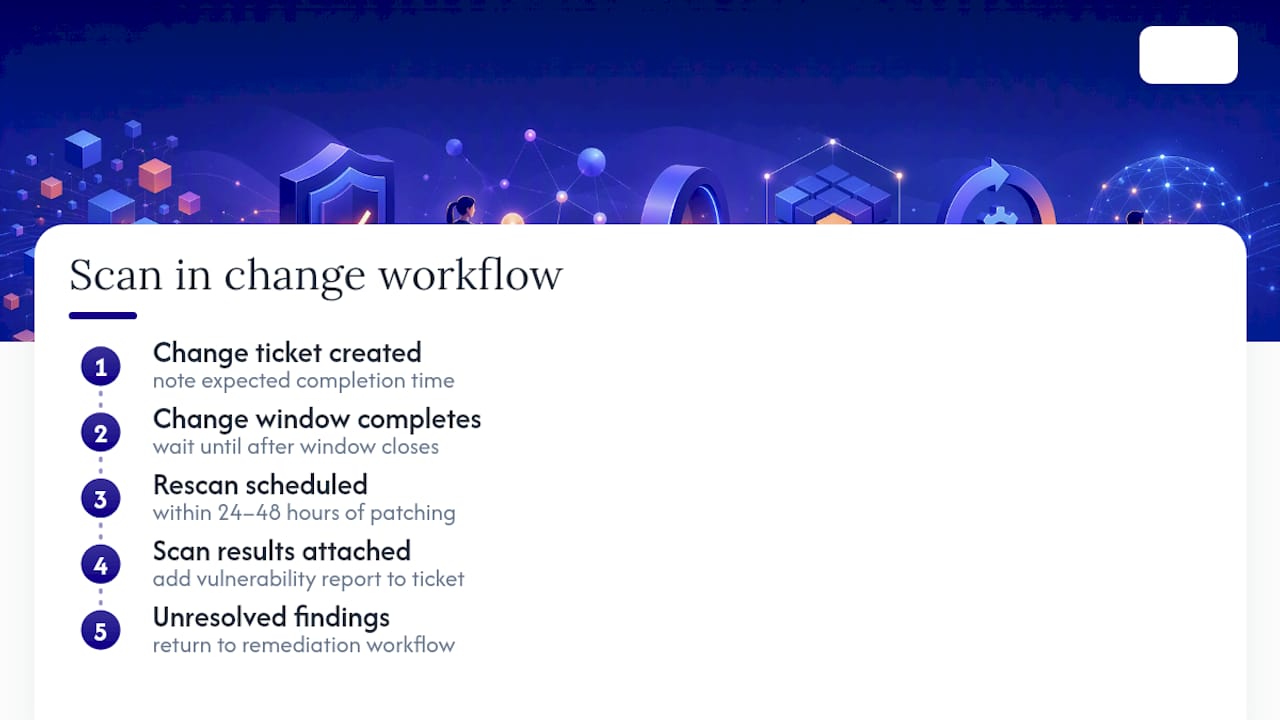
Event-triggered scans deserve the same treatment. A significant infrastructure change should generate both a change ticket and an automatic scan trigger, so the two processes move together instead of existing as separate systems that occasionally happen to agree.
Author's Take: The Mistakes That Undo Good Scanning Programs
Most failed vulnerability programs aren't failing on frequency. They're failing because teams treat the PCI 90-day compliance minimum as the security target, when it was only ever meant as a floor. Scanning quarterly and calling it done ignores the 7 to 14 day window attackers actually use.
The bigger gap: scanning without enforced remediation SLAs. A pile of unresolved findings from six months of scans is worse than no scanning at all, since it creates documented liability without documented action.
If you fix one thing this week, pilot a weekly authenticated scan on your most critical system and enforce a real 7 day SLA on anything critical it finds.
— Michael
How Symmnet Turns This Into a Working Program
You've seen what a defensible vulnerability scanning schedule requires: risk-based cadence, authenticated scans on critical systems, event triggers, enforced SLAs, and evidence an auditor will actually accept. Building and running that internally means dedicating staff hours most small IT teams simply don't have.

Symmnet operationalizes this as a managed service, without adding headcount to your payroll. That means continuous asset discovery feeding directly into scan scope, authenticated scans running on the cadence each asset class actually needs, 24/7 monitoring catching what happens between scheduled runs, and remediation coordinated through to verified rescan, not left as an open ticket nobody owns. For manufacturers, aerospace suppliers, and professional services firms carrying regulatory obligations without a dedicated security analyst on staff, that's the difference between a scanning program that exists on paper and one that actually holds up under audit.
If your current scan schedule is closer to "whenever we remember" than to a documented, SLA-backed program, start with a free security assessment to see exactly where the gaps sit before they turn into findings someone else discovers first.
Where to Go for the Underlying Standards
- NIST SP 800-53 Rev. 5: control baselines and tailoring guidance for organization-defined scan frequencies
- PCI DSS Vulnerability Scanning Guide: ASV and internal scan requirements under Requirement 11.3
- SANS Vulnerability Management Policy: structured remediation and policy framing
- FIRST EPSS: exploitability scoring to prioritize which findings to fix first
Sources
- Secure
- Vulnerability Scan Frequency: Risk-Based Scheduling | OCSA
- Vulnerability management policy (SANS)