

Managed IT is defined as an outsourcing model where a third-party provider, called a Managed Service Provider (MSP), takes day-to-day responsibility for a company's IT functions under a formal contract with defined service level agreements (SLAs). Unlike traditional break-fix support, where you call someone after something breaks, managed IT operates proactively. The MSP monitors your systems, patches vulnerabilities, manages your help desk, and handles cybersecurity operations before problems escalate. For small to mid-sized businesses, this model replaces the unpredictable cost and risk of reactive IT with predictable monthly fees and measurable performance standards. The result is a technology foundation that supports operations instead of interrupting them.

How does managed IT work in practice?
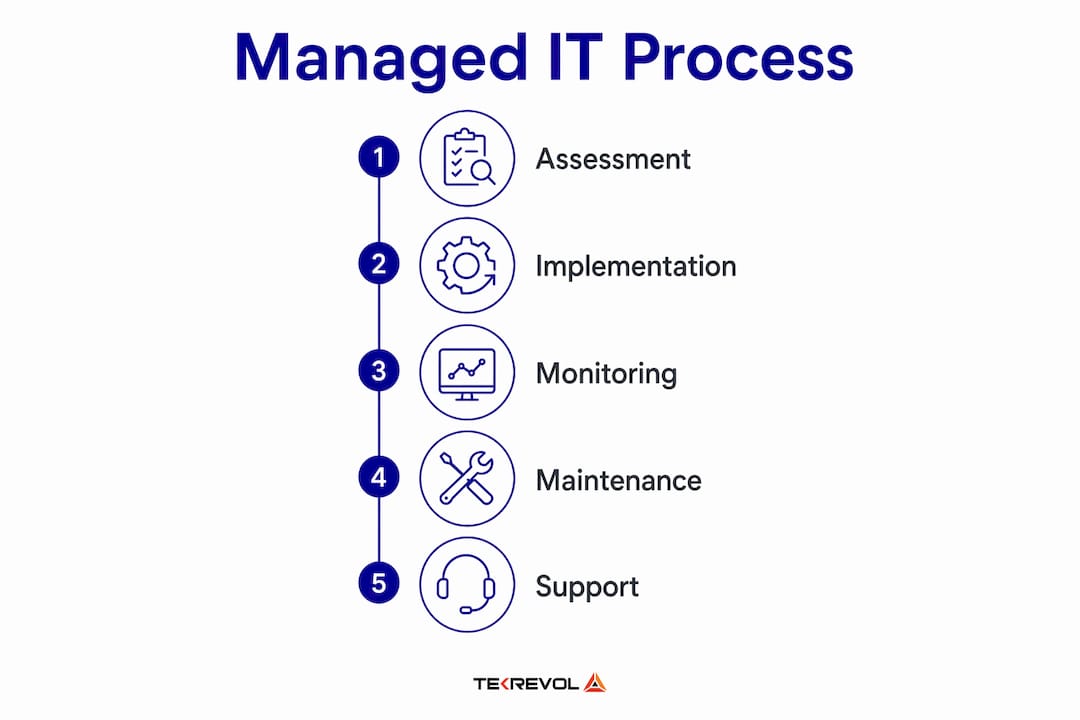
Managed IT functions as a structured service partnership, not a one-time transaction. The MSP assumes ownership of service performance within a clearly defined scope, supported by governance models, operational rhythms, and regular reporting. This shifts the focus from how many hours a technician logged to whether your systems are actually running as promised.
The process typically follows four stages:
- Discovery and assessment. The MSP audits your current infrastructure, identifies gaps, and documents your environment. This baseline shapes the scope of services and the SLA targets that follow.
- Onboarding and setup. The provider deploys remote monitoring and management (RMM) platforms, installs endpoint agents, configures alerting thresholds, and integrates your systems into their operations center.
- Ongoing management. Daily operations include automated patch management, real-time monitoring, help desk ticket resolution, and scheduled maintenance. Incidents are triaged, escalated, and resolved according to the SLA.
- Reporting and review. Monthly or quarterly business reviews give you visibility into system health, ticket volumes, response times, and any identified risks.
SLAs set performance metrics and accountability before service delivery begins, not after a problem occurs. A well-written SLA defines uptime guarantees, response time targets, escalation paths, and coverage hours. Without those specifics, you have no way to hold a provider accountable.
Pro Tip: Before signing any managed IT contract, request a sample SLA and map each term to a real business scenario. If the provider cannot explain what happens when a critical server goes down at 2 a.m. on a Sunday, the SLA is not mature enough to protect you.
Scope creep is one of the most common friction points in managed IT relationships. If your contract does not explicitly list what is included, every request outside that list becomes a negotiation. Clear scope documentation, coverage hours, and SLA targets are the foundation of a functional MSP relationship.
What services does managed IT typically include?
Managed IT services span a wide range of functions, and the specific mix depends on your provider and the plan you select. Most MSPs structure their offerings in tiers, from basic monitoring to fully managed security operations.
Common service categories include:
- Network monitoring and management. Continuous oversight of routers, switches, firewalls, and connectivity to detect and resolve issues before they cause downtime.
- Help desk support. Tiered technical support for end users, typically available by phone, email, or chat during defined hours or around the clock.
- Patch and update management. Automated deployment of operating system and software patches to close known vulnerabilities on a regular schedule.
- Endpoint security. Antivirus, anti-malware, and endpoint detection and response (EDR) tools managed across all company devices.
- Data backup and disaster recovery. Scheduled backups with tested recovery procedures to protect against ransomware, hardware failure, or accidental deletion.
- Compliance assistance. Documentation, controls, and reporting support for frameworks like CMMC, HIPAA, or ITAR, depending on your industry.
One distinction business owners frequently miss is the difference between general managed IT and a managed Security Operations Center (SOC). A 24x7x365 SOC provides continuous event monitoring, incident analysis and response, and incident closure tracking. That level of security coverage goes beyond what standard managed IT plans include. Many businesses assume their MSP contract covers all cybersecurity, but cybersecurity capabilities are often add-ons or separate service tiers. You need to confirm explicitly what incident response, threat detection, and compliance reporting are included.
| Service tier | Typical inclusions | Best suited for |
|---|---|---|
| Basic monitoring | RMM alerts, patch management, basic help desk | Businesses with low regulatory exposure |
| Standard managed IT | Network management, endpoint security, backup, full help desk | Most small to mid-sized businesses |
| Advanced managed IT | All standard services plus compliance support and vulnerability scanning | Regulated industries like manufacturing or healthcare |
| Managed security (SOC) | 24/7 threat detection, incident response, forensic analysis | Businesses handling sensitive data or facing active threats |
Pricing for these tiers follows a recurring subscription model, typically charged per device or per user per month. This structure makes budgeting predictable, which is one of the primary financial advantages over staffing an internal IT team.
What are the key benefits of managed IT for small businesses?
The benefits of managed IT go well beyond cost savings, though cost predictability is a real and measurable advantage. According to KPMG's 2026 Managed Services Outlook Survey, companies use managed services to address technology debt, close talent gaps, and scale emerging technologies like AI and cybersecurity. Managed IT has become a strategic execution backbone, not just a line item to reduce overhead.
Here is where the value concentrates for small to mid-sized businesses:
- Cost predictability. A fixed monthly fee replaces unpredictable repair bills, emergency contractor rates, and the fully loaded cost of hiring, training, and retaining an internal IT team.
- Access to specialized expertise. A quality MSP brings engineers with certifications in Microsoft Azure, Cisco networking, cybersecurity frameworks, and compliance standards that no single internal hire can match.
- Proactive risk reduction. Managed IT shifts from reactive to proactive assessment, identifying issues before they impact operations and improving business continuity.
- Stronger cybersecurity posture. Continuous monitoring, patch management, and endpoint protection reduce the attack surface that ransomware and phishing campaigns target.
- Scalability. As your business adds locations, employees, or new software platforms, your MSP scales coverage without requiring you to hire additional staff.
- Operational focus. When your internal team is not troubleshooting printer errors or chasing down software licenses, they focus on work that grows the business.
For manufacturers and professional services firms operating under strict compliance requirements, managed IT also reduces the risk of regulatory penalties. A provider experienced in ITAR or AS9100 environments, for example, understands what documentation and controls auditors expect. Symmnet's work with El Monte IT clients reflects exactly this kind of compliance-aware managed IT delivery.
How do you evaluate and select a managed IT provider?
Choosing an MSP is a business decision, not a technical one. The right provider understands your industry, communicates clearly, and proves their performance through data rather than promises.
Use these criteria when evaluating candidates:
- SLA specificity. Vague SLAs protect the provider, not you. Look for defined response times by severity level, uptime guarantees with financial penalties for misses, and clear escalation procedures.
- Industry experience. An MSP that has never supported a manufacturing or aerospace client will not understand ITAR controls, production floor network requirements, or the consequences of unplanned downtime on a production line.
- Onboarding process. A mature provider follows a documented discovery and onboarding process. If they cannot describe it clearly, their operational model is likely immature.
- Cybersecurity depth. Confirm whether security services are included or add-ons. Ask specifically about incident response and detection capabilities, not just antivirus coverage.
- Pricing transparency. Fixed per-user or per-device pricing with a clear list of inclusions and exclusions is the standard. Avoid contracts with vague language around "reasonable use" or "out-of-scope" work.
- References and responsiveness. Ask for references from clients in your industry. Then test the provider's responsiveness before you sign anything. Call their help desk. Send a support email. See how fast and how clearly they respond.
Pro Tip: Request a 30-day trial engagement or a paid pilot project before committing to a long-term contract. This reveals how the provider handles real incidents, not just how well they present in a sales meeting.
The managed IT vs in-house IT decision often comes down to scale and specialization. For most businesses under 100 employees, a well-selected MSP delivers more capability per dollar than a small internal team can.
Key takeaways
Managed IT delivers measurable operational and security value when the contract scope, SLA terms, and provider expertise are matched to your specific business requirements.
| Point | Details |
|---|---|
| Core definition | Managed IT outsources ongoing IT operations to an MSP under a formal contract with SLAs. |
| SLAs are non-negotiable | Specific, measurable SLA terms define accountability and protect your business from vague commitments. |
| Cybersecurity is not automatic | Advanced security capabilities like SOC monitoring and incident response must be explicitly confirmed in your contract. |
| Strategic value beyond cost | KPMG's 2026 survey confirms managed IT addresses talent gaps, technology debt, and AI scaling needs. |
| Provider selection matters | Industry experience, onboarding maturity, and pricing transparency separate effective MSPs from unreliable ones. |
Why the shift to proactive IT is harder than it looks
I have watched businesses make the move to managed IT and immediately expect the relationship to run itself. It does not. The transition from reactive to proactive IT management is genuinely significant, but it requires active participation from your side too.
The most common failure point I see is not a bad provider. It is a poorly defined scope. When the contract is vague, every conversation about a new request turns into a dispute about what was "included." That friction erodes trust fast, and the relationship deteriorates before the technology even has a chance to perform.
The second issue is treating cybersecurity as a checkbox. A managed IT contract that includes basic endpoint protection is not the same as a managed security program. With ransomware targeting small manufacturers and professional services firms at increasing rates, the gap between those two things is where breaches happen. I always tell business owners: ask your MSP what happens in the first 30 minutes after a ransomware alert fires. If they cannot answer that specifically, you do not have a security program. You have monitoring software.
What I find genuinely encouraging in 2026 is that the best MSPs are integrating AI-assisted threat detection and automated response playbooks into their standard offerings. That capability, which used to require a dedicated security team, is now accessible to a 40-person manufacturer in the San Gabriel Valley. That is a real shift in what small businesses can protect themselves with.
The advice I give every business owner considering managed IT: treat it as an operational partnership, not a vendor contract. Review performance data quarterly. Hold your provider to the SLA. And revisit the scope every year as your business changes.
— Michael
See how Symmnet supports your IT operations
Symmnet specializes in managed IT services built for small U.S.-based businesses in manufacturing, aerospace, and professional services. Every engagement starts with a free assessment to identify security gaps and infrastructure risks specific to your environment. Symmnet's fixed-price plans cover 24/7 monitoring, endpoint security, firewall management, help desk support, and compliance assistance, so you get a complete technology foundation without the overhead of an internal IT team. If you are evaluating managed IT solutions and want a provider with deep industry experience and U.S.-based support, contact Symmnet to schedule your assessment today.
FAQ
What is managed IT in simple terms?
Managed IT is a service model where a third-party provider takes ongoing responsibility for managing and monitoring your company's technology systems under a contract with defined performance standards. It replaces reactive, break-fix IT support with continuous, proactive management.
How does managed IT differ from traditional IT support?
Traditional IT support is reactive. You call when something breaks, and a technician fixes it. Managed IT is proactive. The MSP monitors your systems continuously, patches vulnerabilities on schedule, and resolves issues before they cause downtime.
What should a managed IT contract include?
A managed IT contract should specify covered services, response time targets by severity level, uptime guarantees, escalation procedures, coverage hours, and a clear list of what is excluded. SLAs define measurable expectations and hold the provider accountable to specific performance outcomes.
Does managed IT include cybersecurity?
Not automatically. Basic managed IT plans typically include endpoint protection and patch management, but advanced capabilities like SOC monitoring, incident response, and compliance reporting are often separate service tiers that must be explicitly confirmed in your contract.
How much does managed IT cost for a small business?
Managed IT is typically priced on a per-user or per-device monthly subscription. Costs vary by service tier and provider, but the fixed pricing model makes budgeting predictable compared to unpredictable break-fix repair bills or the fully loaded cost of internal IT staff.