

Patch management is the formal, continuous process of identifying, acquiring, testing, deploying, and verifying software updates across an organization's IT systems. According to NIST SP 800-40r4, it is best understood as preventive maintenance for technology, a standard cost of doing business rather than an optional IT task. For small businesses especially, a structured patching program is one of the most direct ways to reduce exposure to known exploits, maintain compliance, and keep systems running without unplanned interruptions.
What is patch management, and why does it cover more than OS updates?
Software patches are changes applied to installed software, including firmware, operating systems, and applications, that correct security flaws, fix bugs, or add new capabilities. There are three primary types:
- Security patches close known vulnerabilities that attackers can exploit.
- Bug-fix patches resolve errors that cause crashes, data corruption, or degraded performance.
- Feature update patches add new functionality or improve existing capabilities.
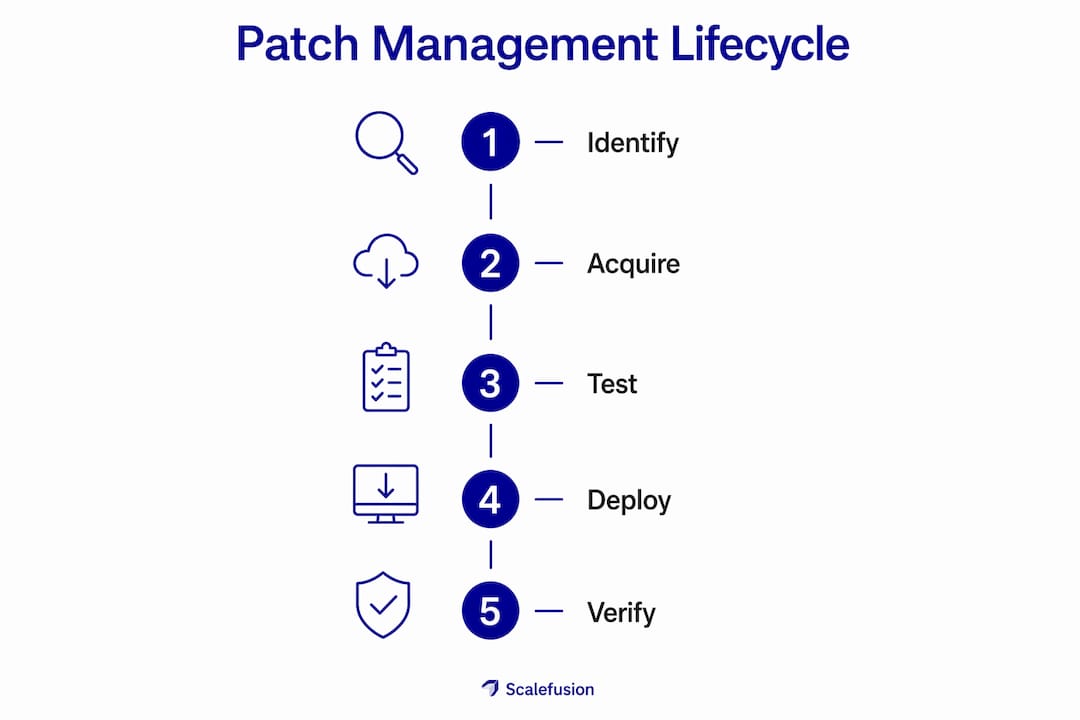
The patch management process ties all three together into a repeatable lifecycle consisting of several stages: asset discovery, vulnerability identification, risk assessment, testing, deployment, verification, and documentation. Each stage builds on the last, and skipping any one of them creates gaps that attackers or auditors will eventually find.
One distinction worth drawing early: patch management and vulnerability management are related but not the same thing. Vulnerability management identifies and tracks risks broadly across your environment. Patch management is the tactical follow-through, the act of actually applying the fix.

Why patch management matters for your business
Unpatched systems are the most predictable attack vector in IT security. Delayed patching exposes systems to known exploits, meaning attackers do not need to discover anything new. They simply target vulnerabilities that vendors have already published fixes for, counting on the fact that many organizations fall behind.
The business case goes well beyond avoiding breaches:
- Regulatory compliance: Standards like HIPAA and PCI-DSS require organizations to maintain up-to-date software. Unpatched systems can trigger audit findings, fines, or loss of certification.
- Operational continuity: Patches often fix the bugs and performance issues that cause slow systems, application crashes, and unplanned downtime.
- Reduced attack surface: Every unpatched vulnerability is an open door. Closing them systematically shrinks the number of ways an attacker can get in.
- Organizational resilience: A controlled patch program strengthens resilience against active threats while minimizing disruption to daily operations.
There is a real tension here that small businesses feel acutely. Business owners often worry that patching will cause downtime or break something that was working fine. That concern is legitimate, but the risk calculus runs the other way. Skipping patches does not eliminate risk; it defers it while the window of exposure grows.
How the patch management lifecycle works
A well-run patch management program follows a defined sequence. Treating it as a one-time project rather than a continuous cycle is one of the most common mistakes organizations make.
-
Asset discovery. You cannot patch what you do not know exists. The first step is building and maintaining a complete inventory of every device, operating system, and application in your environment.
-
Vulnerability identification. Scan your inventory against known vulnerability databases to identify which assets are missing patches or running outdated software versions.
-
Risk assessment. Not every patch carries the same urgency. Assess each vulnerability based on severity, exploitability, and the criticality of the affected system to prioritize your response.
-
Testing. Deploy patches to a representative test environment before pushing them to production. This step catches compatibility issues and prevents a patch from causing more disruption than the vulnerability it fixes.
-
Deployment. Roll out approved patches according to a scheduled maintenance window. Coordinating timing with business operations reduces the impact on productivity.
-
Verification. Confirm that patches installed correctly and that the targeted vulnerabilities are actually closed. A patch that fails silently is as dangerous as one that was never applied.
-
Documentation and reporting. Record what was patched, when, and on which systems. This audit trail supports compliance reporting and helps identify patterns in your patching gaps.
Automation plays a growing role across nearly every stage of this cycle, from scanning and prioritization through deployment scheduling and rollback. Manual processes simply cannot keep pace with the volume and frequency of patches released across a modern IT environment.
What your organization gains from effective patching
Getting patching right delivers benefits that compound over time. The most immediate is security: closing vulnerabilities before attackers exploit them. But the operational gains are just as real.
- Stronger security posture: Patching systematically reduces the number of known vulnerabilities in your environment, making it harder for attackers to find a foothold.
- Better system performance: Bug-fix and feature patches often resolve the slowdowns and crashes that frustrate users and reduce productivity.
- Compliance confidence: Documented, consistent patching satisfies the software maintenance requirements in frameworks like HIPAA, PCI-DSS, and NIST.
- Less unplanned downtime: Proactive patching prevents the kind of system failures that force emergency repairs during business hours.
- Lower incident response costs: Breaches that stem from unpatched vulnerabilities are expensive to remediate. Preventing them through patching is almost always cheaper.
For small manufacturers and professional services firms, where a single system outage can halt production or delay client deliverables, these benefits translate directly into business continuity. Symmnet works with businesses in exactly these situations, where the cost of getting patching wrong is measured in lost hours and compliance exposure, not just IT tickets.
Common challenges that derail patch management programs
Even organizations that understand the importance of patching struggle to execute it consistently. The obstacles are both technical and organizational.
- Scheduling conflicts: Patches often require reboots, and reboots require downtime. Coordinating that with production schedules, client commitments, and shift changes is genuinely difficult, particularly in manufacturing environments where uptime and patching are in constant tension.
- Third-party application gaps: Native OS update services do not cover third-party applications like browsers, messaging tools, or industry-specific software. These apps are frequent malware targets and require a dedicated patching strategy.
- Patch drift: Sporadic, manual patching creates inconsistencies across devices. Some systems get updated promptly; others fall weeks or months behind. Standardized baseline configurations are the most reliable way to prevent this drift and enable consistent automation.
- Agent-based vs. agentless approaches: Agent-based patching is generally better suited for remote and hybrid workforces because it delivers updates regardless of network connection status. Agentless scanning requires administrative credentials and introduces its own security considerations.
- Limited IT resources: Small businesses rarely have a dedicated patch management team. Without automation and clear ownership, patching becomes reactive rather than proactive.
- Compliance risk from delays: Falling behind on patches does not just create security exposure. It can trigger compliance violations under HIPAA, PCI-DSS, or industry-specific regulations, with consequences that go well beyond an IT problem.
Best practices that make patch management work
The difference between a patching program that actually protects your business and one that just checks a box usually comes down to a few key practices.
- Treat patching as preventive maintenance. NIST frames enterprise patch management as a fundamental cost of doing business. Leadership buy-in matters. When executives understand patching as risk reduction rather than IT overhead, scheduling and resourcing decisions get easier.
- Automate wherever possible. Automated patching enables consistent, timely updates and reduces the unpatched vulnerabilities that manual processes inevitably miss. Automate patch discovery, deployment scheduling, and verification reporting.
- Prioritize by risk. Not every patch needs to ship the same day. Use vulnerability severity scores, asset criticality, and compliance requirements to decide what gets patched first, what can wait for the next maintenance window, and what requires emergency action.
- Build a dedicated strategy for third-party apps. Browsers, PDF readers, and messaging platforms are common entry points for attackers and are routinely missed by OS-level patching. Treat them as a separate category with their own update cadence.
- Establish standardized baselines. Consistent configurations across similar devices make testing and deployment faster and more predictable. They also make it easier to spot systems that have drifted out of compliance.
- Schedule structured maintenance windows. Coordinate patch deployments with business operations to minimize disruption. Communicate timing to affected teams in advance, and have a rollback plan ready if a patch causes unexpected issues.
- Document everything. Patch records serve double duty: they support compliance audits and help you identify recurring gaps in your patching coverage.
Pro Tip: The most common reason patching programs fail is not technical. It is the absence of a defined maintenance window. Pick a recurring schedule, communicate it to the business, and protect it. Consistency matters more than perfection.
Which tools support patch management at scale?
Several well-established tools handle the core functions of patch management, including automated discovery, deployment scheduling, rollback, and reporting. Patch management tools can integrate with major operating systems and provide centralized visibility across your environment.
Microsoft Endpoint Configuration Manager (MECM) is widely used in Windows-heavy environments. It handles OS and Microsoft application patching at scale, with strong integration into Active Directory and Group Policy.
Ivanti Patch for Endpoints covers both Windows and macOS and extends to a broad catalog of third-party applications, which makes it useful for organizations that need more than OS-level coverage.
NinjaRMM (NinjaOne) is a popular choice for managed service providers and small-to-midsize businesses. It combines remote monitoring with automated patching across Windows, macOS, and Linux, and includes third-party app support.
PDQ Deploy is a lightweight option for Windows environments that need straightforward, automated software deployment without the overhead of a full enterprise platform.
Automox is a cloud-native platform that handles patching across Windows, macOS, and Linux from a single console, with no on-premises infrastructure required. It works well for distributed or remote teams.
GFI LanGuard combines vulnerability scanning with patch deployment, giving IT teams a single tool for identifying and remediating software gaps across the network.
Qualys Patch Management integrates directly with the Qualys vulnerability management platform, which makes it a natural fit for organizations already using Qualys for scanning. The integration tightens the loop between identifying a vulnerability and deploying the fix.
The right tool depends on your environment size, operating systems in use, and whether you manage patching in-house or through a managed service provider. For small businesses without a dedicated IT team, a managed service that includes patching as part of a broader security program is often more practical than running a standalone tool.
Key Takeaways
Effective patch management is a continuous, lifecycle-driven process that closes vulnerabilities, maintains compliance, and keeps systems stable, not a periodic task you can afford to skip.
| Point | Details |
|---|---|
| Patch management is preventive maintenance | NIST frames it as a standard cost of doing business, not optional IT overhead. |
| Three patch types cover different risks | Security patches fix vulnerabilities; bug-fix patches resolve errors; feature patches improve performance. |
| The lifecycle has seven stages | Asset discovery through documentation forms a continuous cycle, not a one-time project. |
| Automation prevents patch drift | Standardized baselines and automated deployment keep all devices consistently updated. |
| Third-party apps need a separate strategy | OS update services miss browsers and messaging tools, which are frequent malware targets. |