
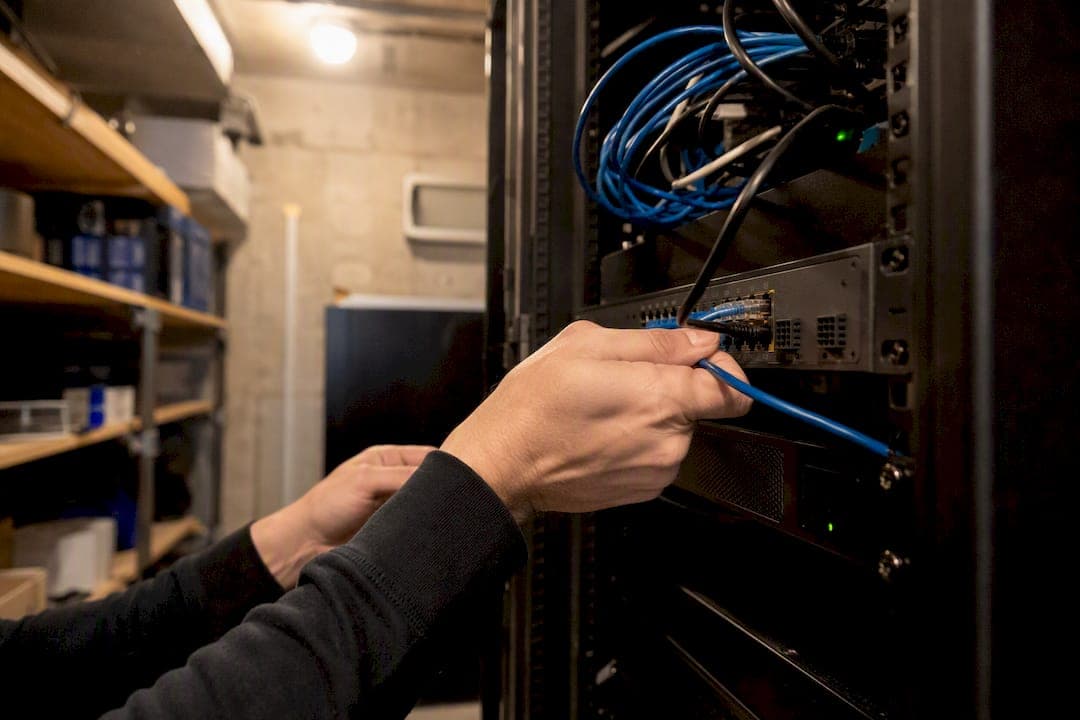
The right small-business computer network is a compact, segmented, business-grade stack: a firewall-equipped gateway, a managed PoE switch, ceiling-mounted access points, and VLANs separating your traffic types.
Your immediate next steps look like this:
- Assess current pain points, device count, and growth plans before buying anything.
- Choose business-grade equipment over consumer routers, following the standard Cisco recommends for manageability and scale.
- Follow a 7-step rollout, from design through documented handover.
A 20-seat office typically lands between $6,500 and $11,000 installed, according to Data Wire Solutions. Most SMBs run their productivity suite through Microsoft 365, and many hand ongoing management to a partner like Symmetry Network Management once the network outgrows a single IT generalist's bandwidth.
Key Takeaways
A reliable business network combines business-grade hardware, VLAN segmentation, and a documented rollout process, and most SMBs benefit from ongoing managed monitoring once it's live.
| Point | Details |
|---|---|
| Skip consumer routers | Business-grade gateways and managed switches offer VLAN support and manageability consumer gear lacks. |
| Segment with VLANs | Separate employee, guest, IoT, VoIP, POS, and server traffic to limit risk and simplify troubleshooting. |
| Budget realistically | A 20-seat office installation typically runs $6,500 to $11,000 depending on cabling and AP count. |
| Follow the 7-step rollout | Assess, design, procure, deploy, install APs, configure, then test and document before handover. |
| Consider a managed partner | Symmetry Network Management offers assessment, design, and 24/7 monitoring for SMBs lacking internal IT bandwidth. |
Table of Contents
- What Are Business Computer Networks and How Do They Work?
- Wired, Wireless, or Hybrid: Which Fits Your Business?
- Hardware and Software Every Business Network Needs
- Designing a Network That Won't Outgrow Itself
- Your 7-Step Business Network Setup Checklist
- Security Basics Every Business Network Needs
- Connecting Your Network to the Cloud and Remote Teams
- What a Business Network Project Actually Costs
- When SMBs Bring In a Managed IT Partner
- What Most SMBs Get Wrong About Their Network
- Get a Network Readiness Assessment From Symmetry
- Sources
What Are Business Computer Networks and How Do They Work?
A business computer network is simply a group of devices, computers, printers, phones, servers, cameras, that share data and services over wired or wireless connections. That's the whole concept. The complexity comes from how traffic actually moves.
Picture it as a relay: your internet service provider hands off a connection to your gateway (a combined router and firewall), which routes traffic to a managed switch, which distributes it to wired ports and wireless access points serving your laptops, phones, and IoT devices. Behind the scenes, DHCP assigns each device an IP address automatically, and DNS translates domain names into addresses computers can use. The firewall inspects traffic in both directions, a function known as stateful inspection.
Microsoft's small-business network guidance frames this well: most SMBs end up running a hybrid setup, wired connections for desktops and servers, wireless for everything mobile.
- Gateway/firewall sits at the edge, facing your ISP.
- Managed switch distributes wired connections and often powers your APs.
- Access points and endpoints handle everything wireless.
Wired, Wireless, or Hybrid: Which Fits Your Business?
Wired networks deliver the most reliable throughput and the lowest latency, which matters for point-of-sale terminals and manufacturing floor equipment where a dropped connection means a stalled transaction or a halted line. The tradeoff is installation cost and zero mobility.
Wireless networks trade some speed and reliability for flexibility, letting employees roam a building or work from a conference room without a cable in sight. Most real-world SMB networks are hybrid, wired backhaul to access points and critical devices, wireless for everyday user traffic, which is exactly the pattern Microsoft's guidance describes.
Then there's scope. A LAN covers your building. A WAN connects multiple locations. Cloud services extend your network beyond any physical site.
- Retail and POS environments lean wired for terminals, wireless for handheld scanners.
- Manufacturing floors need wired reliability near equipment, with wireless for mobile supervisors.
- Remote-first offices depend heavily on WAN and cloud connectivity over local wiring.
Hardware and Software Every Business Network Needs
Building corporate network solutions starts with a shopping list, and skipping a line item here is where SMBs run into trouble later. Here's the core stack:
- Business-grade gateway/firewall with VPN support, stateful inspection, and VLAN routing capability.
- Managed Layer 2 switch with PoE to power access points and simplify VLAN assignment per port.
- Ceiling-mounted access points, ideally Wi-Fi 6 or 6E, rather than consumer routers repurposed as APs.
- NAS device or cloud backup target for local file storage and disaster recovery.
- UPS units sized to keep your gateway, switch, and core server running through short outages.
Cabling matters more than most owners expect. Run Cat6 for office drops, it handles higher speeds than Cat5e and has more headroom for future upgrades, and use fiber for uplinks between floors or buildings. Label every port at the patch panel; an unlabeled patch panel turns a five-minute troubleshooting job into a half-day hunt.
On the software side, you'll choose between cloud-managed controllers (simpler, remote-friendly) and locally hosted management. Either way, plan for log retention and basic reporting from day one.
Designing a Network That Won't Outgrow Itself
Segmentation is the single highest-leverage design decision you'll make. SpeedtestHQ's guidance recommends starting with separate VLANs for employees, guests, IoT devices and cameras, VoIP, point-of-sale systems, and servers. That's six logical networks running over the same physical wiring, each isolated from the others by default.
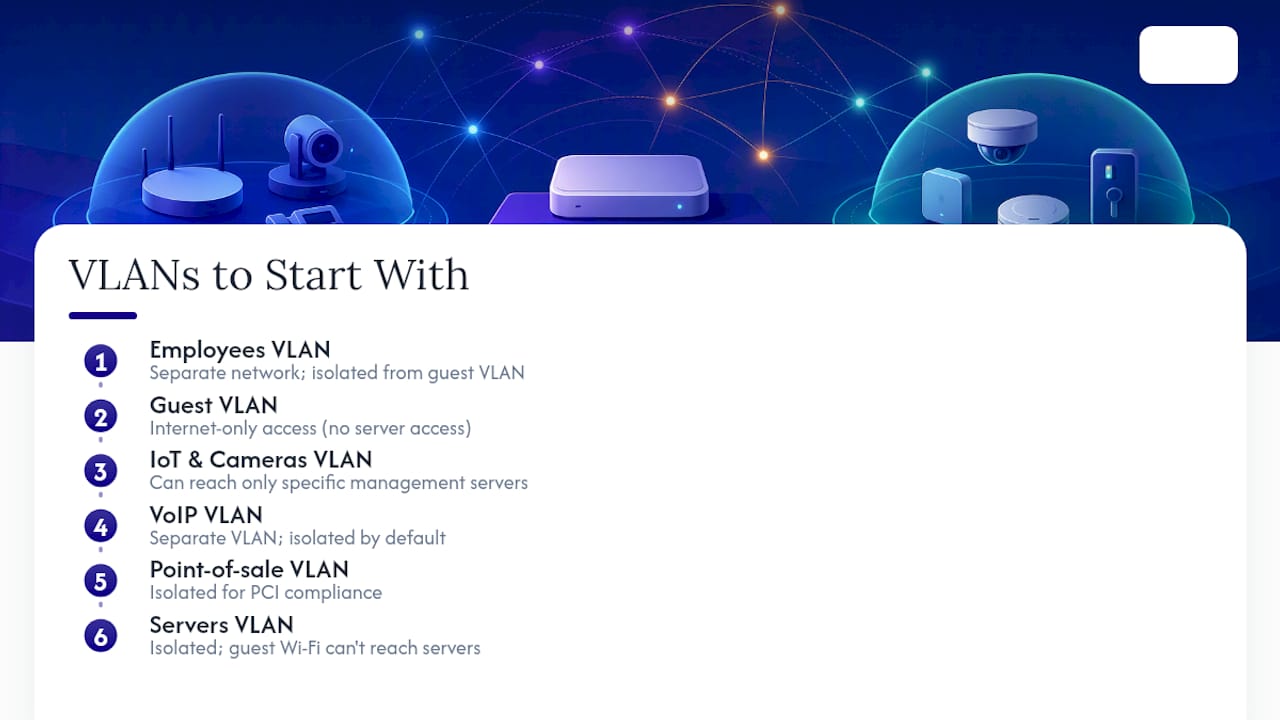
Practically, that means your guest Wi-Fi can't see your file server, and a compromised security camera can't reach your accounting system. You write simple rules: guest VLAN can reach the internet only; IoT VLAN can reach specific management servers only; POS VLAN gets isolated for PCI compliance. Our guide on network segmentation best practices walks through the VLAN-by-VLAN logic in more depth.
Redundancy matters too. Size your UPS to carry the gateway, switch, and core server through a short outage long enough to shut down cleanly or ride out temporary power issues. If your business can't tolerate any internet downtime, a secondary WAN connection with automatic failover is worth the monthly cost.
For IP planning, document your subnets and DHCP scopes, and leave headroom. A /24 subnet with 40 devices today will feel cramped in three years.
Pro Tip: Build your VLAN plan on paper before you touch a single switch port. Retrofitting segmentation into a live, flat network is disruptive and error-prone; designing it upfront costs nothing but time.
Your 7-Step Business Network Setup Checklist
Turning a design into a working network follows a predictable sequence. Skip a step and you'll pay for it during testing, or worse, after go-live.
- Assess current devices, applications, and use cases, including growth plans for the next two to three years.
- Design the topology and VLAN structure based on that assessment.
- Procure equipment and schedule installation, factoring in lead times for switches and APs.
- Deploy the wired backbone, running cabling and installing PoE switches first.
- Install and place access points, ideally after a wireless site survey to catch dead zones.
- Configure the gateway, VLANs, firewall rules, and remote access policies.
- Test, document, and hand over the finished network with full documentation.
Testing isn't optional. Verify throughput at multiple points, confirm VLANs actually isolate traffic as designed, test Wi-Fi roaming between APs, and check that PoE budgets aren't maxed out with headroom for future devices.
- Record network diagrams and IP address assignments.
- Label every patch panel port and switch interface.
- Store admin credentials in a password manager, never a sticky note or shared spreadsheet.
Security Basics Every Business Network Needs
Enterprise network setup without security controls baked in isn't really finished, it's a liability waiting to surface. Start with a stateful firewall that logs traffic, then layer segmentation on top: WPA3 encryption for your staff wireless network, and a completely separate guest SSID behind a captive portal so visitors never touch your internal VLANs.
Remote access deserves real thought. Traditional VPNs still work, but Data Wire Solutions notes that Zero Trust Network Access is becoming the simpler option for many SMBs in 2026, verifying identity per-application rather than granting broad network access once someone connects. Whichever you choose, require multi-factor authentication, and use single sign-on where your applications support it.
On the operations side, Data Wire Solutions also recommends retaining gateway logs for an appropriate period and monitoring bandwidth by VLAN alongside switch port utilization and Wi-Fi client health. Patch firmware on a schedule, don't wait for a vulnerability announcement to remind you.
- Firewall logging enabled, reviewed regularly, not just archived.
- Guest network fully isolated from internal VLANs.
- Backups tested, not just scheduled, on a recurring basis.
Pro Tip: Set a calendar reminder to actually restore a test file from backup every quarter. A backup you've never restored is a backup you don't actually have.
Connecting Your Network to the Cloud and Remote Teams
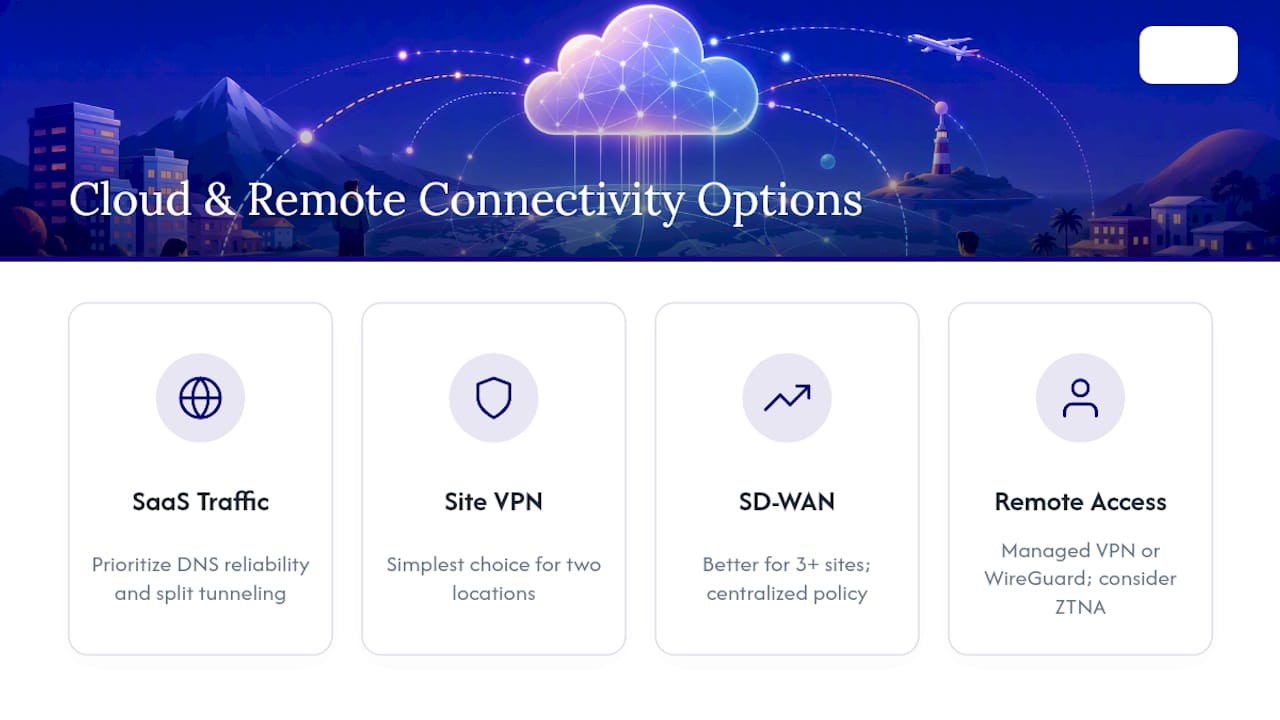
Most SMBs route the bulk of daily traffic to SaaS platforms like Microsoft 365 rather than a local server room. That shifts your priorities: DNS reliability and split tunneling decisions (routing SaaS traffic directly to the internet instead of through a VPN) start to matter more than raw local bandwidth.
For connecting multiple sites or a data center to cloud resources, site-to-site VPN remains the simplest option for two locations, while SD-WAN makes more sense once you're managing three or more sites and want centralized policy control. Kentik's architecture guidance points to intent-based networking and centralized controllers as the direction modern hybrid networks are heading, automating what used to require manual configuration at every site.
For remote employees, managed VPN services and WireGuard remain solid choices, but Zero Trust Network Access is worth evaluating if your team is largely remote and managing VPN client software has become its own support burden.
What a Business Network Project Actually Costs
Budget scales with seat count and complexity. A 10-seat office typically runs several thousand dollars installed; a 20-seat office lands in the $6,500 to $11,000 range according to Data Wire Solutions; a 30-seat office with multiple VLANs and extensive cabling can push higher.
Timeline follows assessment, then ordering (allow for equipment lead times), then a one to three day on-site install, then testing and handover.
- New cable drops, fiber runs, and after-hours install work all add cost.
- PCI-scoped POS segmentation and compliance documentation extend both budget and timeline.
- Extensive access point counts for large square footage raise both hardware and labor costs.
When SMBs Bring In a Managed IT Partner
Designing and running business IT infrastructure well takes ongoing attention that most small businesses can't dedicate a full-time employee to. That's the gap managed providers like Symmetry Network Management typically fill: initial assessment and network design, procurement and coordination of on-site installation, then ongoing monitoring, patching, and backup management once the network is live.
The decision to outsource usually comes down to three factors:
- Whether your internal team has bandwidth for 24/7 monitoring and after-hours troubleshooting.
- Whether your industry carries compliance requirements, like ITAR or AS9100 in manufacturing, that demand documented controls.
- Whether fixed monthly pricing beats the unpredictable cost of reactive break-fix support.
Symmetry's focus on manufacturing, aerospace, and other regulated sectors reflects where this tradeoff shows up most often.
What Most SMBs Get Wrong About Their Network
The most common failure I see isn't a missing firewall rule, it's a flat network built on consumer-grade gear that was never designed to scale. Everything sits on one subnet, guest devices and servers included, because nobody thought about segmentation until after a security incident forced the question.
The second recurring mistake is undersized infrastructure: PoE switches running near capacity the day they're installed, UPS units that can't carry the load for more than a few minutes. Prioritize segmentation, wired backhaul to your access points, and basic monitoring from day one. Retrofitting any of these later costs more than building them in from the start.
Get a Network Readiness Assessment From Symmetry
Symmnet gives SMB owners a faster path to a properly segmented, monitored network than piecing one together through trial and error, without locking you into a large upfront project before you know what you actually need.

A readiness assessment starts with an inventory of your current equipment, a risk checklist covering segmentation and remote access gaps, and a realistic budget estimate based on your seat count and industry. From there, engagements typically produce a documented network diagram, a secure VLAN baseline built around your specific traffic types, and a monitoring handover with a 30 to 90 day support window to catch anything the initial rollout missed.
If your business operates in manufacturing, aerospace, or another regulated sector, Symmetry's experience with industry-specific compliance requirements shapes the assessment from the start rather than getting bolted on afterward. Visit Symmetry's managed IT services page to request an assessment and see what a properly scoped network actually costs for your business.
Sources
- How to set up a small business network - Cisco
- Set up your small business network - Microsoft Learn
- Small Business Network Design Guide (2026) - Data Wire Solutions
- Network architecture - Kentik
Vendor documentation changes with firmware updates, so check manufacturer sites directly before finalizing configuration details on any hardware you purchase.