

Yes, co-managed IT support is usually the right call if you have one to five internal IT staff who are stretched across help desk tickets, security, and infrastructure at once. It works best when a written responsibility matrix defines exactly who owns what, from patching to after-hours escalation. Done right, it adds 24/7 monitoring, dedicated security expertise, and surge capacity for projects, without forcing you to replace the team you already trust.
TL;DR:
- Co-managed IT support is ideal for small internal teams that are overstretched and need 24/7 monitoring, security expertise, and surge capacity without replacing existing staff.
- A clear responsibility matrix and shared ticketing system are crucial to prevent overlaps and ensure accountability across help desk, security, backups, and other categories.
- Typical costs range from $40 to $100 per user monthly for full packages, with security-only options costing $10 to $60, but comparisons should include internal payroll and tooling expenses.
- Success depends on ongoing governance, regular reviews of the responsibility matrix, and detailed SLAs, not just the initial contract or tooling.
- An initial assessment should review security gaps, tooling overlaps, and a custom responsibility matrix to evaluate if co-managed support fits your organization.
Table of Contents
- What Is Co-Managed IT Support and How Does It Work?
- When Is Co-Managed IT the Right Choice for Your Team?
- Who Owns What? A Responsibility Checklist for Co-Managed IT
- What Does Co-Managed IT Support Cost?
- How Do You Choose and Contract With a Co-Managed Partner?
- How Do You Measure Success in the First 90 Days?
- Why Most Co-Managed IT Relationships Underdeliver
- Get a Free Assessment of Your Co-Managed IT Readiness
- Sources
What Is Co-Managed IT Support and How Does It Work?
Co-managed IT support means your internal team keeps ownership of the business context and daily relationships, while a managed service provider (MSP) fills in the gaps: 24/7 monitoring, security operations, specialized tooling, and extra hands during a surge. It's augmentation, not a takeover. Your staff still knows which server matters most during a shipment deadline or why a particular vendor gets special handling. The MSP supplies the infrastructure that's expensive to build in-house: a security operations center, a remote monitoring and management (RMM) platform, and a professional services automation (PSA) system for ticketing.
In practice, both teams work from the same ticket queue. A user reports a slow laptop at 4:45 PM. The internal help desk grabs it first, but if it turns into a malware alert at 11 PM, the MSP's after-hours team picks up the same ticket, in the same system, with full history attached. No re-explaining the issue, no guessing who's on call. That shared visibility is what separates a functioning co-managed setup from a stack of overlapping vendors.
When Is Co-Managed IT the Right Choice for Your Team?
Co-managed IT tends to fit organizations with a moderate-sized workforce and a lean internal IT department, often with a small team covering everything from password resets to firewall rules. The most reliable signal that you're a good candidate: you already have at least one internal IT person, but that person is stretched thin.
Watch for these common triggers including demands for evidence you don't have time to document during compliance audits, which makes Certificate of Insurance Tracking for Compliance Teams at Scale a useful compliance and contract management resource.
- Your team is burning out on 2 AM pages with no rotation relief
- Compliance audits (ISO, CMMC, FDA) are demanding evidence you don't have time to document
- A software rollout or office move needs more hands than you have for a few months
- Security coverage stops when your team logs off for the night
If you have zero internal IT staff, co-managed usually isn't the right fit. That situation calls for fully managed IT, where the provider owns the whole operation. And if your department is already fully staffed with round-the-clock coverage, adding an MSP may just create redundant work instead of solving a real gap.
Who Owns What? A Responsibility Checklist for Co-Managed IT
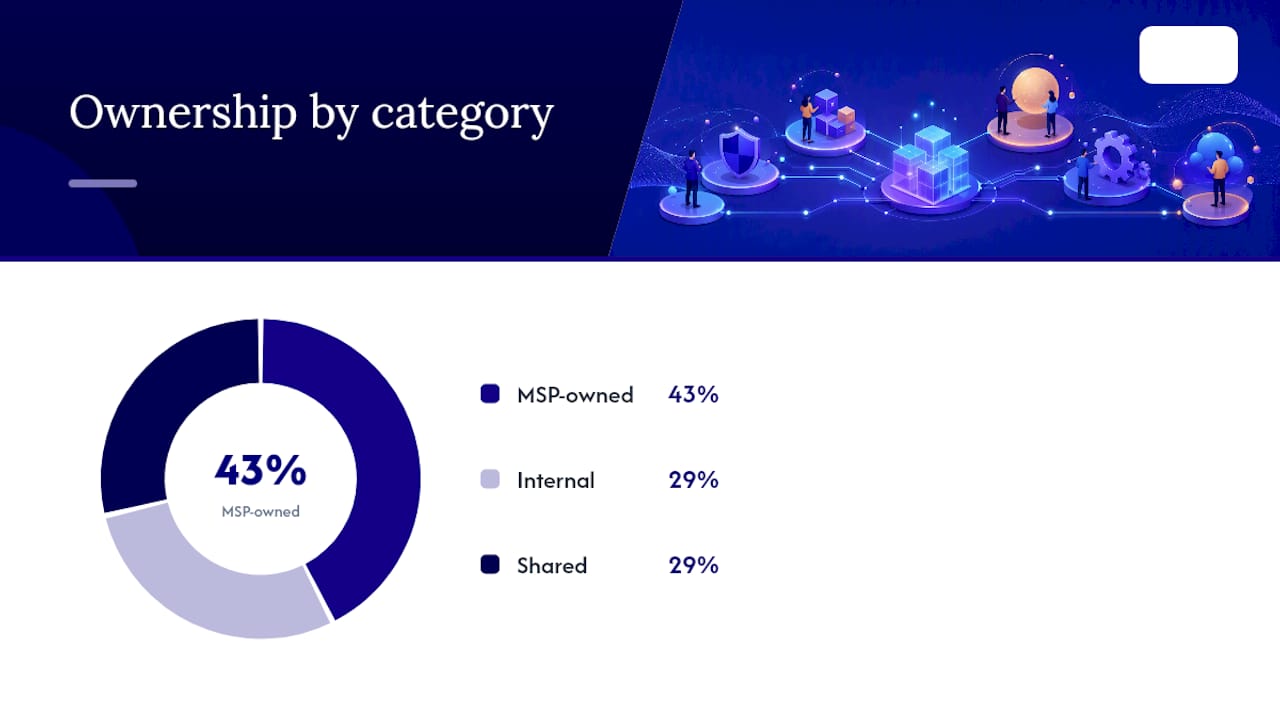
The single biggest predictor of a co-managed relationship falling apart is ambiguous ownership. Someone assumes the other side is watching a backup job, and nobody is. A documented responsibility matrix, reviewed at signing and revisited quarterly, prevents that gap before it becomes an outage.
Here's how ownership typically splits across common categories:
- Help desk tier 1 (password resets, basic troubleshooting): usually internal, sometimes shared during peak volume
- Patching and updates: frequently MSP-owned, with internal sign-off on production systems
- Backups and disaster recovery testing: shared, with the MSP running the infrastructure and internal staff confirming business-critical data is included
- 24/7 monitoring and NOC: almost always MSP-owned, since staffing this internally is impractical for a small team
- SOC/MDR (security operations, threat detection): typically MSP-owned given the specialized skill required
- Special projects (migrations, office builds): shared, scoped separately from the recurring retainer
- Vendor management (software licensing, hardware procurement): often internal, since it touches budget and business relationships
Every category needs one accountable name attached to it, not a department. Pair that with a single ticket queue, a shared password vault, and a documented escalation path, and you eliminate the double-ticketing and blind spots that sink most co-managed failures.
What Does Co-Managed IT Support Cost?
Pricing generally runs $40 to $100 per user per month for broader co-managed packages, depending on scope and the maturity of your existing tools. Narrower, security-only slices, like SOC or managed detection and response (MDR), often land in the $10 to $60 per user per month range, which lets you buy senior-level security capability without hiring a security engineer at six figures.
To compare fairly against hiring or going fully managed, add up your internal payroll, the MSP fee, and any tooling licenses you're still paying for directly. That total is your real cost, not just the invoice line.
Watch for three traps: onboarding fees that run several months of retainer value upfront, scope creep where "quick favors" turn into unbilled ongoing work, and vague line items that hide what's actually included month to month.
How Do You Choose and Contract With a Co-Managed Partner?
Before signing anything, work through this checklist with the provider:
- Do they provide a written RACI or responsibility matrix as part of the statement of work (SOW), not just a sales deck promise?
- Are SLAs specific, with response and resolution times tied to ticket severity, not vague language like "prompt attention"?
- Is there a documented escalation path naming who gets contacted, in what order, for a security incident versus a routine outage?
- What does the onboarding timeline look like, and what happens to your access and documentation if you exit the contract?
- Can they show experience with SOC/MDR, compliance audit support, and regular reporting, plus access to a virtual CIO for planning conversations?
Pro Tip: Ask a prospective partner to walk you through exactly what happens the first time a server goes down at 3 AM. If their answer is vague about who gets paged first, that's your answer about how the relationship will run.
Red flags worth walking away from: a provider that won't share admin-level access to their own tools, one that insists on a separate ticketing system instead of joining yours, or one that won't put SLA numbers in writing.
How Do You Measure Success in the First 90 Days?
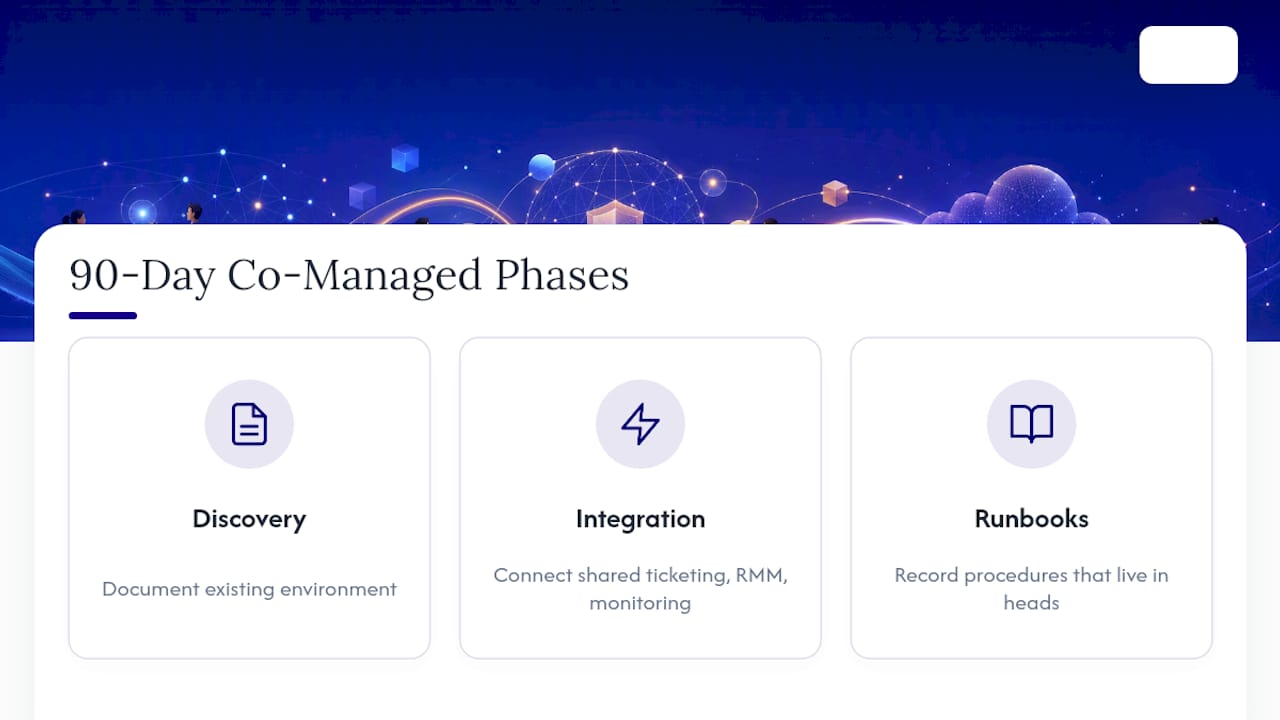
A healthy co-managed relationship usually follows three phases: discovery (documenting your existing environment), tool integration (connecting shared ticketing, RMM, and monitoring), and runbook transfer (writing down the procedures that currently live in someone's head). Providers who build in checkpoints during this window see less renewal friction later, because value shows up early instead of being assumed.
Track these numbers at 30, 60, and 90 days: mean time to resolution (MTTR), open ticket backlog, off-hours incident rate, internal staff overtime, and audit readiness. Assigning each function to one accountable owner with a monthly joint report is the single best defense against the ownership gaps that derail most partnerships early.
Why Most Co-Managed IT Relationships Underdeliver
The industry sells co-managed IT as a simple math problem: add an MSP, subtract your team's workload. That framing misses what actually determines success. The contract terms and the tooling matter less than whether both sides treat the responsibility matrix as a living document instead of a signing formality.
Most failures I've seen described in practitioner accounts don't stem from a bad MSP or a bad internal team. They stem from nobody revisiting who owns what once the initial excitement of onboarding fades. Six months in, the RACI chart is buried in a shared drive nobody opens, and suddenly two people think someone else is testing backups. That's not a vendor problem. That's a governance problem dressed up as a technology purchase.
The organizations that get real value from co-managed IT are the ones that treat it like an ongoing operational discipline, not a one-time contract signature. They schedule the quarterly review. They update the matrix when someone changes roles. They ask hard questions about SLA performance instead of assuming the invoice means everything is fine. Small IT teams that skip that discipline usually end up paying for coverage they aren't actually getting, and they don't find out until an audit or an incident forces the question.
— Michael
Get a Free Assessment of Your Co-Managed IT Readiness
Some providers build co-managed engagements around a written responsibility matrix from day one, not as an afterthought once something breaks. For manufacturing, aerospace, and professional services organizations with a small internal IT team, that means 24/7 monitoring, endpoint security, firewall management, and backup verification handled on a fixed-price retainer, while your team keeps the business context and day-to-day relationships that outsiders can't replicate.

Symmnet's free assessment covers three things before you commit to anything: a review of your current security gaps, an audit of your existing tooling and where overlaps or blind spots exist, and a draft responsibility matrix showing exactly how a co-managed split would work for your specific environment. There's no generic template involved. If you're deciding between hiring another internal hire or bringing in outside coverage, that assessment gives you real numbers to compare against. Schedule your assessment and see what a documented, accountable co-managed setup would look like for your team.