

A computer network audit is a structured, evidence-driven check of every asset, configuration, and control on your network, completed on a repeatable schedule by an internal team or a contractor. It answers three questions: what's actually connected, what's exposed, and what would fail first if someone tried to break in.
You can start one today with three moves. Define scope: which sites, subnets, cloud accounts, and vendor connections count as "in" for this round. Run a quick inventory pass: pull your DHCP leases, switch MAC tables, and cloud IAM console to see what's actually talking to your network right now. Check your alerting: confirm your firewall, EDR, and backup systems are actually sending logs somewhere a human will see them.
Do those three things and you'll walk away with:
- Improved visibility into devices and accounts you didn't know existed.
- A prioritized remediation list ranked by exploitability and business impact, not just severity score.
- Documented evidence you can hand to an auditor, insurer, or client asking about your security posture.
Key Takeaways
A computer network audit works because it pairs full asset discovery with verified, prioritized findings that map directly to compliance requirements and real attacker behavior.
| Point | Details |
|---|---|
| Start with discovery | Reconcile active scans, passive monitoring, and asset records to catch shadow IT before anything else. |
| Verify before you escalate | Confirm high-severity scanner findings with a manual probe to avoid chasing false positives. |
| Prioritize by impact, not just severity | Rank findings by exploitability and business impact, using critical/high/medium/low remediation windows. |
| Match frequency to risk | Run audits annually at minimum, quarterly for regulated environments, and continuously for high-risk networks. |
| Hand off to ongoing support | Symmnet converts audit findings into continuous monitoring and remediation through its managed IT services. |
Table of Contents
- What Is a Computer Network Audit, and What Does It Deliver?
- Why Does a Network Security Assessment Matter for Small Businesses?
- What Types of Network Audits Should You Consider?
- How Do You Perform a Computer Network Audit Step by Step?
- How Often Should You Run a Network Security Assessment?
- Which Tools Do You Actually Need for a Network Audit?
- What Do CISA's Findings Mean for Your Priority Fixes?
- What Should a Network Audit Report Include?
- Frequently Asked Questions
- Sources
What Is a Computer Network Audit, and What Does It Deliver?
A network audit is a systematic review of your infrastructure, configurations, and controls, measured against a defined standard or your own security baseline. It's not the same thing as a "network assessment," which tends to be a lighter, one-time health check, and it's not a penetration test either. Trend Micro draws the distinction clearly: an audit evaluates governance, access controls, and monitoring design, while a penetration test simulates an actual attack to see what breaks under pressure. Most mature security programs use both, but they answer different questions.
A well-run audit produces deliverables you can act on, not just a slide deck. Expect:
- A full asset inventory, including shadow IT and forgotten devices.
- A vulnerability list ranked by real-world exploitability.
- A configuration gap report covering firewalls, VLANs, and access rules.
- A monitoring coverage map showing where logs exist and where they don't.
- A remediation plan with owners and deadlines attached.
- Compliance evidence formatted for auditors, cyber insurers, or client due diligence questionnaires.
Why Does a Network Security Assessment Matter for Small Businesses?
The case for auditing comes down to five practical wins: you find assets you didn't know were on the network, you shrink your attack surface, you generate proof of compliance instead of just claiming it, you confirm your monitoring tools actually catch something, and you often uncover performance problems that were quietly costing you productivity.
The risk of skipping it is not abstract. A common breach pattern starts with one unmanaged device, an old print server nobody decommissioned, a contractor's laptop with a stale VPN credential, sitting on a flat network with no segmentation between it and finance systems. An attacker compromises that one weak point, then moves laterally because nothing stops them once they're inside.
CISA's own red-team engagements have repeatedly gained persistent, largely undetected access to well-resourced networks by exploiting exactly this pattern: one weak entry point plus poor internal segmentation plus thin monitoring. In one 2022 assessment, the team moved laterally across multiple sites before detection ever caught up.
Audit evidence also happens to be exactly what compliance frameworks ask for. If you're pursuing or maintaining SOC 2, PCI DSS, HIPAA, or ISO 27001, your auditor will want the same inventory, vulnerability, and access-control documentation a good network audit already produces.
What Types of Network Audits Should You Consider?
Not every audit needs to look the same. Picking the right type depends on why you're auditing in the first place: a regulatory deadline, a new vendor relationship, a suspected incident, or just routine hygiene.
- Security audit: reviews controls, access policies, and monitoring design against a standard like NIST or CIS.
- Configuration audit: checks firewall rules, router and switch settings, VLAN structure, and DMZ placement for drift from baseline.
- Compliance audit: maps findings directly to a framework's specific controls, usually driven by a regulator, client, or insurer requirement.
- Penetration test: simulates a real attacker to test whether your controls hold up under active exploitation, not just on paper.
- Internal audit: run by your own IT staff for ongoing hygiene, typically lighter-touch and more frequent.
- External audit: run by an independent third party for objectivity, often required for compliance certifications.
- Continuous or automated monitoring (CTEM): replaces the periodic snapshot with ongoing exposure management, useful for high-risk or fast-changing environments.
If you're onboarding a new vendor with network access, a configuration and access-control review usually matters more than a full penetration test. If you just changed your network architecture, segmentation validation should come first. If a regulator or insurer set the deadline, start with the compliance mapping and work backward to the technical checks that support it.
How Do You Perform a Computer Network Audit Step by Step?
This is the operational core of a network audit, whether you're running it in-house or handing it to a managed provider. Follow it in order. Skipping steps, especially discovery, is the single most common reason audit findings turn out incomplete.
1. Define scope, objectives, and rules of engagement. Decide upfront whether this audit covers cloud environments, on-premise infrastructure, operational technology (OT), and employee-owned (BYOD) devices, or just a subset. Name the stakeholders who need to sign off, and document what testing is and isn't allowed, especially if any active scanning could disrupt production systems.
2. Build a full discovery and inventory. Combine active network scans, passive traffic monitoring, and existing asset-management records, then reconcile the three against each other. The mismatches are often the most important finding: a device showing up on the network that isn't in your asset system is exactly the kind of shadow IT that causes breaches. BOD 23-01 guidance from CISA treats essentially every IP-addressable, non-ephemeral asset as in-scope for discovery, a standard worth adopting even at small-business scale.
3. Review configurations. Pull the actual running configs from firewalls, routers, switches, and any DMZ devices, then compare them against your documented baseline or a recognized hardening standard. Check VLAN boundaries and segmentation rules specifically. Flat networks where a compromised guest device can reach finance servers are one of the most common failures auditors find.
4. Run vulnerability scans, and verify before you panic. Use credentialed scans wherever possible. They see far more than an unauthenticated scan and generate fewer false positives. Before escalating any finding, verify it with a safe, manual probe. Scanner output alone is not evidence, it's a lead.
5. Review identity and privileged access. Check for multi-factor authentication coverage, especially on remote access and admin accounts. Audit service accounts for stale credentials and excessive privileges. Unused admin rights sitting on an old account are a gift to any attacker who gets a foothold.
6. Assess logging and monitoring coverage. Confirm your SIEM or log management tool is actually ingesting logs from every critical source, not just the ones that were easy to connect. Check retention periods against your compliance requirements, and confirm devices are synchronized to a central time server. Time drift between devices makes incident timelines nearly impossible to reconstruct, a detail the Canadian Centre for Cyber Security's auditing guidance calls out specifically.
7. Check endpoint and EDR coverage. Identify legacy hosts that predate your current endpoint tool or were never enrolled. These blind spots are exactly where attackers linger longest.
8. Review cloud accounts. Check storage buckets for public exposure, review security group rules for overly broad access, and audit IAM permissions for the same privilege creep you look for on-premise. Also inventory any external-facing services you may have forgotten were still live.
9. Check performance metrics. Bandwidth utilization, latency, and capacity headroom aren't just performance concerns. A congested network can mask malicious traffic and delay detection.
10. Document everything as you go. Standardize your findings format now, not at the end. Every finding needs a description, evidence (screenshot, scan output, config excerpt), severity, and a suggested remediation.
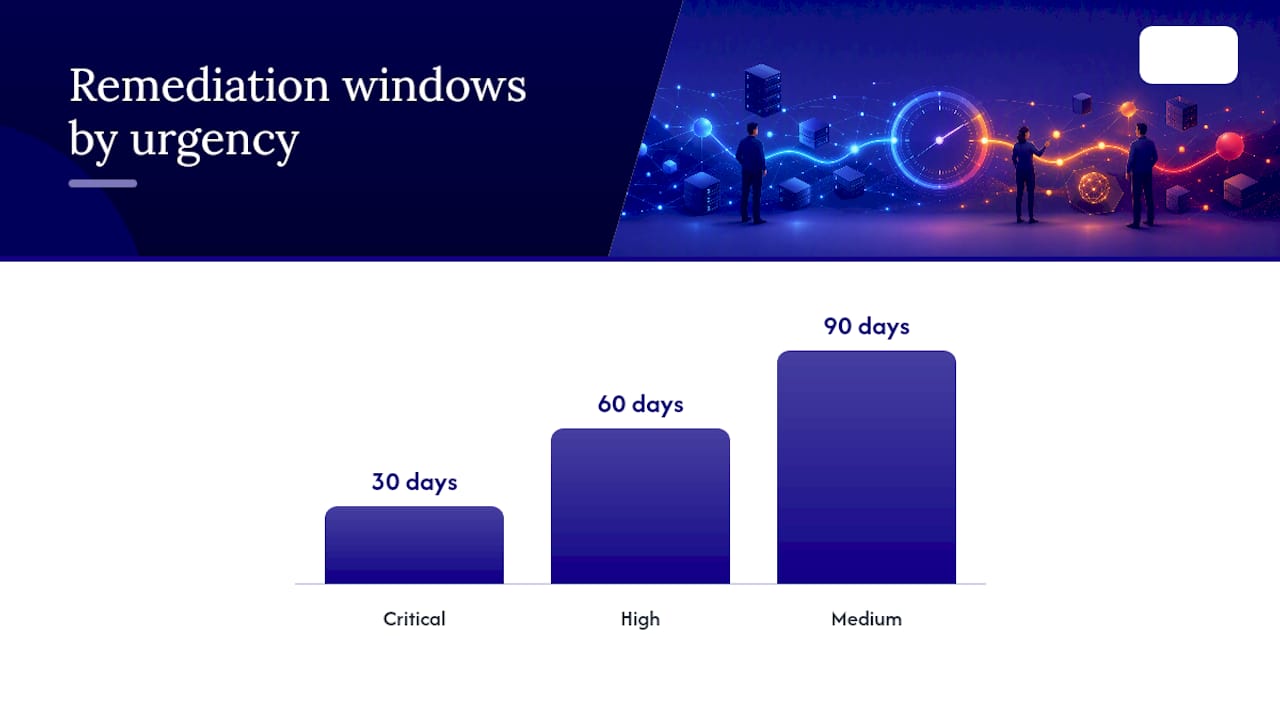
Once findings are collected, triage them using severity, exploitability, and business impact together, not severity alone. A "critical" CVE on an isolated test machine matters less than a "medium" misconfiguration on your domain controller. Suggested service-level windows: critical findings addressed within 30 days, high within 60, medium within 90, low tracked but not urgent.
Pro Tip: Run scans with a read-only, audit-specific service account for cloud environments. It limits blast radius if the scanning credential itself is ever compromised, and it keeps your audit trail cleaner when someone asks who accessed what during the review.
A few habits separate a useful audit from a checkbox exercise:
- Always use credentialed scans over unauthenticated ones when systems allow it.
- Verify every high-severity finding manually before it goes in the report.
- Keep audit tools and raw data local-first rather than routing everything through a third-party cloud service you don't control.
- Use dedicated, minimally-privileged roles for any cloud-based audit access.
How Often Should You Run a Network Security Assessment?
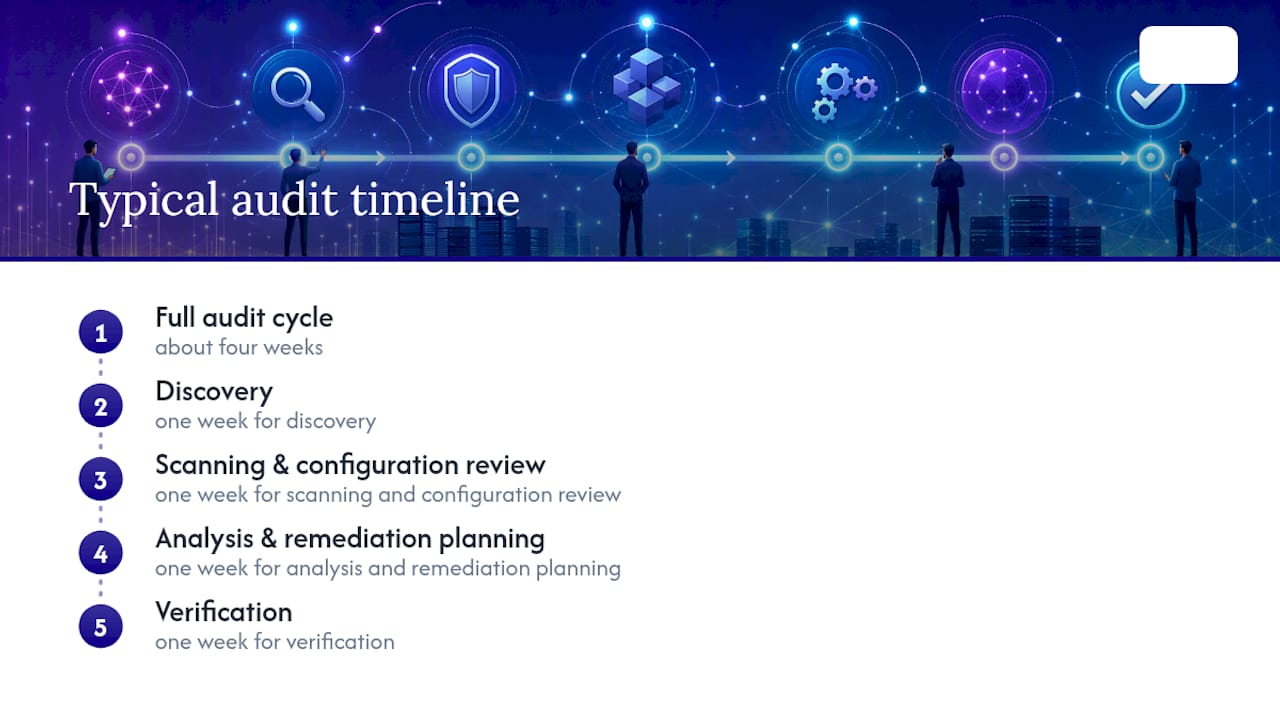
A practical audit timeline runs about four weeks for a small-to-midsize environment. Days one through seven cover discovery and inventory. Week two handles vulnerability scanning and configuration review. Week three moves into analysis and remediation planning. Week four is verification and formal close-out, confirming fixes actually worked rather than just assuming they did.
How often you repeat the cycle depends on your risk profile and regulatory obligations:
- Annual audits work for lower-risk businesses without strict compliance mandates.
- Quarterly audits fit regulated environments or anyone handling sensitive customer data.
- Event-triggered audits should follow any major network change, merger, or new vendor integration.
- Continuous monitoring makes sense for high-risk environments, following the same logic behind CISA's push toward shorter scan cadences rather than periodic snapshots.
Before you schedule anything, line up maintenance windows around business-critical systems, get sign-off from stakeholders who own those systems, and notify any third-party vendors whose connections fall inside your scope. Nothing derails an audit faster than an unannounced scan that trips a vendor's own security alerts.
Which Tools Do You Actually Need for a Network Audit?
You don't need every category of security tool to run a credible audit, but you do need coverage across a few functions: discovery (network management systems and passive monitors that map what's connected), vulnerability scanners, configuration-audit tools that flag drift from baseline, SIEM or log management platforms, network detection and intrusion prevention (NDR/IDS/IPS), and EDR or XDR for endpoint visibility. Cloud environments add a layer: native auditing APIs from your cloud provider are usually more accurate than third-party scanners trying to interpret IAM policies from the outside.
When evaluating tools, weigh these factors:
- Credentialed vs. agentless scanning, and which your environment actually supports.
- Data ownership and retention, since some cloud-based tools store scan data on vendor infrastructure indefinitely.
- False-positive handling, because a tool that floods you with noise gets ignored within a month.
- Local-first or offline options, especially for sensitive environments like OT or regulated manufacturing.
- Evidence export formats, since your auditor or insurer will want documentation, not a dashboard login.
CISA's Cyber Security Evaluation Tool (CSET) is a genuinely useful free option for benchmarking against recognized standards without buying a full platform. If you lack in-house scanning expertise or need independent verification for compliance purposes, an external provider often makes more sense than building the capability from scratch. If your environment includes physical infrastructure gaps, undersized or poorly ventilated equipment racks, for instance, addressing those alongside the digital findings matters too; a purpose-built network cabinet is a small fix that closes a surprisingly common audit gap.
What Do CISA's Findings Mean for Your Priority Fixes?
CISA's red-team engagements offer something most vendors won't: an honest account of what actually works against a real adversary, not a marketing claim about what should work.
"The assessed organization's endpoint detection and response (EDR) tools failed to detect payloads, and the network lacked sufficient network-layer protections," according to CISA's aa24-326a advisory, which pointed to overreliance on host-based tools with no network-layer backstop like intrusion detection or a well-configured proxy.
That finding, paired with the 2022 red-team assessment that gained persistent, largely undetected network access, points to the same short list of priorities every audit should push toward:
- Strengthen both host and network monitoring, not one or the other.
- Treat endpoint management systems as high-value assets requiring their own hardening, since compromising them gives an attacker leverage over everything they manage.
- Enforce phishing-resistant MFA everywhere remote or privileged access exists.
- Centralize logging and synchronize device clocks, so an incident timeline can actually be reconstructed after the fact.
Once you've implemented these mitigations, re-audit. A fix that looks complete on paper needs verification against the same tests that found the gap in the first place.
What Should a Network Audit Report Include?
A useful report is not a wall of scanner output. Structure it so a non-technical stakeholder can grasp the risk in the first page and a technical owner can find exactly what to fix on the next.
A solid outline covers: an executive summary in plain language, prioritized findings ranked by business impact, technical evidence supporting each finding, named remediation owners with deadlines, and a mapping of findings to whichever compliance framework applies to your business.
For triage, a simple matrix keeps everyone aligned on urgency:
- Critical: 30-day remediation window, typically internet-facing or actively exploited vulnerabilities.
- High: 60-day window, significant but not immediately exploitable.
- Medium: 90-day window, meaningful but lower likelihood or impact.
- Low: ongoing tracking, addressed opportunistically.
Once remediation closes out, the audit shouldn't just end and get filed away. Convert the findings into standing checks: the vulnerabilities you found become recurring scan targets, the monitoring gaps become new log sources feeding your SIEM, and the access issues become a quarterly privileged-account review. Hand that continuous checklist to your SOC or managed services provider so the audit becomes a baseline for ongoing coverage, not a one-time snapshot that goes stale in six months.
A Publisher's View on Practical SMB Audits
Small teams juggle legacy systems and thin staff. The two gaps we see most: unmanaged legacy hosts and no monitoring on the systems that matter most.
How Symmetry Network Management Supports Your Audit
Running a thorough audit is one thing. Staffing the follow-through, patching, monitoring, and re-verification, is where most small businesses run out of hours. That's the gap Symmnet exists to close: managed monitoring, vulnerability scanning, and remediation support that picks up exactly where your audit findings leave off, without you needing to hire a dedicated security analyst.

If you'd rather start with a clear picture of where you stand before committing to anything, Symmnet offers a free high-level assessment to flag your biggest exposure points and compliance gaps. It's a practical next step for manufacturing, aerospace, and professional-services firms that need audit-grade evidence without building an internal security team from scratch. Get your free assessment and find out what your network is actually telling you.
Frequently Asked Questions
How long does a computer network audit take for a small business? Most small-to-midsize environments complete a full audit cycle in about four weeks: one week for discovery, one for scanning and configuration review, one for analysis and remediation planning, and one for verification.
What's the difference between a network audit and a network security assessment? An audit is a structured review measured against a specific standard or baseline, producing formal documentation. An assessment is typically a lighter, faster health check that doesn't always map to a compliance framework.
Do I need a penetration test in addition to a network audit? They serve different purposes. An audit evaluates your controls and configuration on paper and in practice; a penetration test actively tries to exploit them. Regulated businesses often need both.
How much does a computer network audit typically cost? Cost varies widely based on network size, scope, and whether you handle it internally or hire an outside provider, so get a scoped quote rather than relying on a generic estimate.
Can I run a network audit myself without hiring a contractor? Yes, for smaller or less regulated environments. Larger or compliance-driven audits usually benefit from an external provider for both independence and specialized scanning expertise.
What compliance frameworks rely on network audit evidence? SOC 2, PCI DSS, HIPAA, and ISO 27001 all expect documented inventory, vulnerability management, and access-control evidence that a standard network audit produces as a byproduct.
Sources
- CISA: Red team shares key findings to improve monitoring and hardening of networks (aa23-059a)
- Network security auditing - ITSAP.80.086 (Canadian Centre for Cyber Security)