

SPF authorizes which servers can send mail for your domain, DKIM signs messages so receivers can verify they weren't altered in transit, and DMARC tells receiving mail servers what to do when those checks fail while sending you reports. Enable SPF and DKIM now, then publish a DMARC record at p=none with rua reporting turned on. That single move starts the monitoring clock you need before tightening enforcement.
TL;DR:
- Enabling SPF, DKIM, and DMARC with
p=noneand report collection is essential for establishing visibility before moving to full enforcement.- SPF restricts authorized senders to a list of IPs but can break with forwarding or complex includes, making DKIM more reliable in those scenarios.
- Using 2048-bit DKIM keys, rotating them every 6 to 12 months, and managing selectors carefully enhances long-term security and flexibility.
- DMARC alignment settings impact deliverability and troubleshooting, requiring gradual policy escalation from
nonetorejectover at least 60 days.- A full, successful rollout depends on comprehensive sender inventory, ongoing report review, and avoiding premature enforcement to prevent legitimate mail disruption.
Table of Contents
- What SPF, DKIM, and DMARC Actually Do
- How SPF Works and Where It Breaks Down
- DKIM Selectors, Key Length, and Rotation
- DMARC Alignment, Policy Tags, and What the Reports Tell You
- Where These Records Live in DNS
- Reading Authentication Results and Verifying Setup
- Step-by-Step Rollout: From Publishing to Full Enforcement
- How Symmnet Operationalizes Email Authentication for Small Businesses
- Setting a Realistic Timeline for Your Organization
- Why Alignment Fails: ESP Signing and Forwarding Explained
- Best Practices for DKIM Key Management
- Making Sense of DMARC Aggregate and Forensic Reports
- Handling DMARC Failures When Mail Gets Forwarded
- Deliverability and Sender Reputation: What's Actually at Stake
- Common Pitfalls Worth Fixing Before They Cause an Outage
- What I'd Prioritize If I Were Rolling This Out Today
- Get SPF, DKIM, and DMARC Right Without Doing It Alone
- Where to Go Deeper
- Sources
What SPF, DKIM, and DMARC Actually Do
These three DNS-based protocols solve different pieces of the same problem: proving an email really came from your domain. SPF, DKIM, and DMARC are the three primary email authentication protocols, and none of them works well alone.
- SPF (Sender Policy Framework): publishes a list of IP addresses and servers allowed to send mail for your domain.
- DKIM (DomainKeys Identified Mail): attaches a cryptographic signature to each message so receivers can confirm it wasn't tampered with.
- DMARC (Domain-based Message Authentication, Reporting, and Conformance): checks whether SPF and DKIM results align with the visible "From" address, then applies a policy and sends you reports.
Here's how they interact on a single message: your mail server sends an invoice notification. The receiving server checks SPF against the envelope sender's IP, checks DKIM against the signature in the header, and then DMARC compares both results to the domain shown in the "From" field. If either one aligns, the message passes. If neither does, DMARC applies whatever policy you've set.
How SPF Works and Where It Breaks Down
SPF checks the envelope sender (the "MAIL FROM" address used in transit), not the visible "From" header a person reads in their inbox. That distinction trips up a lot of administrators who assume SPF protects the address recipients actually see. It doesn't, by itself. DMARC is what ties the two together.
SPF records live as a DNS TXT entry and list every service authorized to send on your behalf. The catch is the 10-lookup limit: each include, redirect, a, mx, or ptr mechanism counts against a hard cap of 10 DNS lookups. Exceed it and you get a permerror, which many receivers treat as an outright SPF failure.
- Every third-party sender (CRM, invoicing tool, marketing platform) you add typically consumes at least one lookup.
- Nested includes from vendors can silently push you over the limit without warning.
- Forwarding breaks SPF outright, because the forwarding server becomes the new envelope sender and it's rarely on your authorized list.
The fix for lookup overload is usually SPF flattening or a hosted SPF service that resolves includes down to a manageable set of IP ranges.
Pro Tip: Don't treat SPF as your primary defense against forwarding-related failures. DKIM survives forwarding far better, since the signature travels with the message body and headers rather than depending on the sending IP.
DKIM Selectors, Key Length, and Rotation
DKIM signs the message body and specified headers with a private key held by your outbound mail server, then publishes the matching public key in DNS so receivers can verify the signature. The public key lives at a selector record, formatted as selector._domainkey.yourdomain.com. The selector is just a label, like s1 or google, that lets you run multiple signing keys simultaneously without conflict.
Key length matters more than most administrators assume. Microsoft's authentication guidance recommends 2048-bit keys wherever your sending platform supports them, since 1024-bit keys are considered weak by modern standards.
- Use one selector per sending platform (one for your primary mail server, another for your marketing platform, and so on).
- Rotate keys periodically, ideally every 6 to 12 months, and immediately after any suspected key exposure.
- Retire old selectors from DNS only after confirming no queued mail still references them.
DKIM's real advantage shows up during forwarding and complex vendor setups. DKIM tends to be the more durable authentication signal across those scenarios, since the signature doesn't depend on which server relayed the message.
DMARC Alignment, Policy Tags, and What the Reports Tell You
DMARC evaluates whether the domain in SPF or DKIM aligns with the visible "From" address, then enforces a policy based on the result. Alignment can be relaxed (subdomains count as a match, e.g., mail.example.com aligns with example.com) or strict (the domains must match exactly). Most organizations start with relaxed alignment on both adkim and aspf tags, since strict mode is easy to break with legitimate infrastructure.
Key DMARC tags you'll configure:
- p= the policy applied to failing mail:
none(monitor only),quarantine(send to spam), orreject(block outright). - rua= the address that receives daily aggregate XML reports summarizing pass/fail volume by source.
- fo= forensic reporting options, controlling when individual failure reports get sent.
- adkim= / aspf= alignment mode for DKIM and SPF, respectively.
- pct= the percentage of failing mail the policy applies to, useful for gradual rollout.
- sp= the policy applied to subdomains that don't have their own DMARC record.
The recommended sequence is straightforward:
- Start with
p=noneand a workingruaaddress so you begin collecting data immediately. - Spend several weeks identifying and fixing every legitimate sender showing failures in your reports.
- Move to
p=quarantineat a lowpctvalue, then increase it as failures drop. - Finish at
p=rejectonce you're confident no legitimate mail is still failing.
Cloudflare's guidance places this full lifecycle at 60 to 90 days for most organizations, which lines up with how long it typically takes to catch every shadow sender.
Where These Records Live in DNS
SPF and DMARC both publish as TXT records: SPF sits at your domain apex (example.com), while DMARC lives at _dmarc.example.com. DKIM's public key goes at selector._domainkey.example.com, with a unique selector per sending platform.
A few publishing pitfalls cause more support tickets than anything else:
- Only one SPF TXT record is allowed per domain. Two records, even both valid, cause a
permerror. - Some DNS providers silently split long TXT values, and mangled DKIM keys are a common result. Verify the record after publishing, not just before.
- Adding a new sender means editing the existing SPF
includechain, not creating a second record.
Reading Authentication Results and Verifying Setup
Every message header carries an Authentication-Results line showing the outcome of spf=, dkim=, and dmarc= checks as the receiving server saw them. In Gmail, open the message, click the three-dot menu, and select "Show original" to view these headers directly.
- Check
spf=passorfailalongside the identity it evaluated. - Check
dkim=passand confirm thed=domain and selector match what you expect. - Check
dmarc=passorfail, which tells you whether alignment actually succeeded.
Syntax validators like MXToolbox catch obvious record errors quickly, but they only confirm your DNS is well-formed. They can't tell you whether real-world mail is passing. For that, aggregate rua reports are the only reliable source, since they reflect what actual receiving servers observed across your full mail volume.
Step-by-Step Rollout: From Publishing to Full Enforcement
Getting from zero to p=reject follows a predictable sequence, and skipping steps is the single most common cause of blocked legitimate mail.
- Publish SPF and DKIM for every known sending source, including your primary mail server and any marketing or transactional email platforms.
- Publish DMARC at
p=nonewith a workingruaaddress so reports start flowing. - Collect reports for at least 30 days, ideally longer, to capture monthly billing runs or quarterly newsletters that don't send daily.
- Inventory every sending service touching your domain, not just the obvious ones. CRM platforms, HR software, and support ticketing tools often send mail nobody remembers authorizing.
- Remediate failures by enabling custom DKIM signing on third-party platforms, correcting SPF includes, or flattening SPF if you're near the lookup limit.
- Ramp enforcement gradually using the
pcttag, moving fromquarantineat 10% up throughrejectat 100% over several weeks.
Small organizations typically need 60 to 90 days to move responsibly from initial publishing to full p=reject enforcement.
Pro Tip: Set a calendar reminder to review your DMARC reports weekly during the first month. Shadow senders tend to surface in the first two or three reporting cycles, not the first day.
How Symmnet Operationalizes Email Authentication for Small Businesses
A managed IT provider can manage DNS records, deploy DKIM keys, and ingest DMARC aggregate reports for clients rather than leaving that work to an already-stretched internal IT contact. That matters because the hardest part of this rollout isn't publishing records. It's finding every shadow sender, from a sales team's proposal software to a finance department's invoicing platform, before flipping enforcement on.
- Continuous monitoring catches new sending sources as they appear, not months later during an audit.
- DMARC report triage separates real threats from misconfigured internal tools automatically.
- Coordinated DKIM key rotation happens on schedule instead of getting deferred indefinitely.
For manufacturers and professional services firms juggling ERP, MES, and CRM mail streams, that inventory work alone often determines whether enforcement goes smoothly or breaks a customer notification nobody flagged in advance.
Setting a Realistic Timeline for Your Organization
The 60 to 90 day window isn't arbitrary. It reflects how long it actually takes to see every category of mail your domain sends, including the infrequent kind that hides during a shorter observation period.
Week one starts with publishing SPF and DKIM for your known senders, plus DMARC at p=none. From there, the timeline breaks into three rough phases. Weeks one through four are pure observation: reports arrive daily, and you're building a list of every sending source, expected or not. Weeks five through eight are remediation, where you fix SPF includes, add DKIM signing to third-party platforms, and confirm previously failing sources now pass. Weeks nine through twelve are enforcement ramp, moving p=quarantine up through partial p=reject and finally full enforcement.
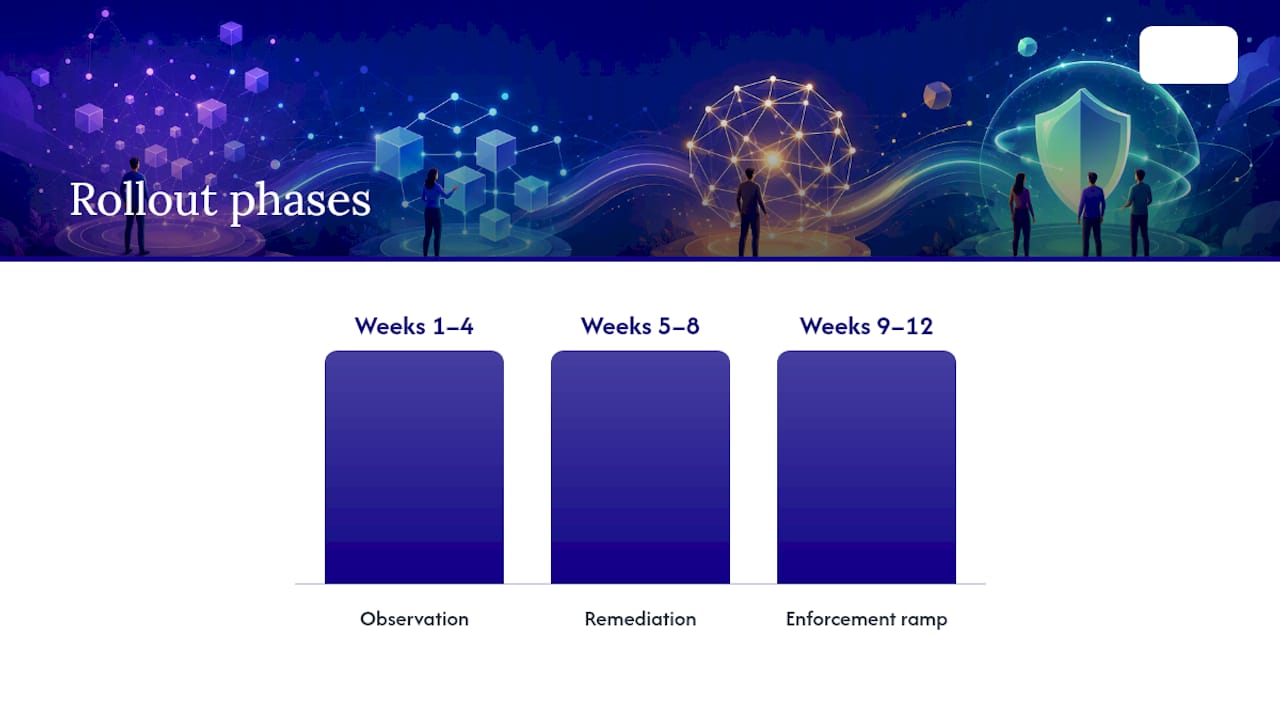
Organizations that skip the observation phase and jump straight to enforcement almost always discover a billing system or support tool that's been sending unauthenticated mail for years. That's not a hypothetical. It's the most common reason enforcement rollouts get rolled back within the first week.
Smaller organizations with a handful of sending platforms can sometimes compress this timeline. Organizations running multiple regional offices, several SaaS platforms, and outsourced marketing typically need the full 90 days, sometimes longer, before p=reject is safe. The variable isn't company size. It's how many distinct systems send mail using your domain.
Treat the timeline as a floor, not a target to rush toward. A rushed rollout that blocks a customer invoice does more reputational damage than a slow one ever will.
Why Alignment Fails: ESP Signing and Forwarding Explained
Two failure patterns account for most DMARC alignment problems, and both catch administrators who assumed publishing records was the hard part.
The first is email service provider (ESP) signing. Many marketing and transactional platforms sign outbound mail with their own DKIM key and domain by default, not yours. That mail can pass SPF and DKIM checks against the ESP's own infrastructure while still failing DMARC alignment, because the signing domain doesn't match your visible "From" address. The fix is enabling custom DKIM signing (sometimes called "branded" or "white label" DKIM) on the platform's side so it signs with your domain and a selector you control.
The second is forwarding. When a recipient's mail server forwards a message, whether through a rule, an alias, or a mailing list, it typically preserves the original "From" header while changing the effective sending server. SPF breaks immediately, since the forwarding server isn't on your authorized list. DKIM often survives if the forwarding service doesn't modify the message body or signed headers, which is exactly why DKIM alignment matters more than SPF alignment for domains dealing with heavy forwarding traffic.
Mailing lists cause a related problem: many rewrite subject lines or add footers, which breaks the DKIM signature even when SPF might otherwise pass. There's no clean universal fix here beyond the ARC protocol, covered next, and choosing DMARC's alignment mode carefully based on how your specific mail flows actually behave.
Diagnosing these failures means reading your DMARC aggregate reports by source IP and signing domain, not just by pass/fail count. A single ESP misconfiguration can generate thousands of failure entries that look alarming but trace back to one fixable setting.
Best Practices for DKIM Key Management
DKIM's cryptographic strength depends entirely on key length and rotation discipline, and both get neglected once the initial setup is done and working.
Use 2048-bit RSA keys wherever your sending platform supports them. Some legacy systems still default to 1024-bit keys, which are considered weak against modern computing capacity and increasingly flagged by security-conscious receivers. If a platform can't support 2048-bit signing, that's worth treating as a reason to migrate off it rather than a permanent limitation to accept.
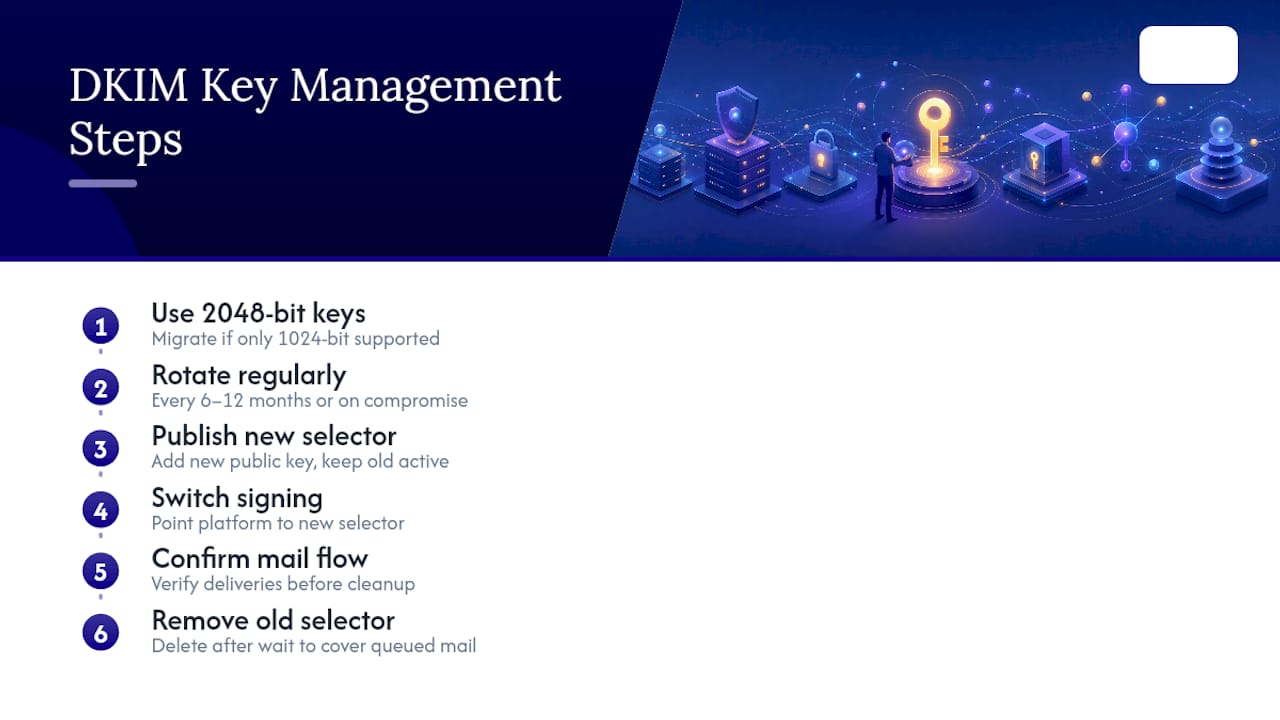
Rotation matters even though DKIM keys don't expire the way SSL certificates do. A reasonable cadence is every 6 to 12 months, with immediate rotation triggered by any suspected compromise of your signing infrastructure. The safest rotation method uses two selectors: publish the new public key under a fresh selector name while the old one remains active, switch your sending platform to sign with the new key, confirm mail is passing, then remove the old selector from DNS after a waiting period long enough to cover any queued mail.
Selector naming deserves more thought than it usually gets. Using date-based selectors (like jan2026 or s20260315) makes rotation history self-documenting and helps you spot stale keys during an audit. Avoid reusing a selector name across platforms. If your primary mail server and your marketing platform both sign under a selector called default, you lose the ability to rotate or revoke one without touching the other.
Store private keys with the same access discipline you'd apply to any credential capable of impersonating your domain, because that's exactly what a compromised DKIM key allows. Limit which systems and personnel can generate or export signing keys, and log key generation events where your infrastructure supports it.
Making Sense of DMARC Aggregate and Forensic Reports
DMARC aggregate reports (rua) arrive as XML files, typically once daily from each major receiving provider, and summarize authentication results by source IP, sending domain, and disposition. Most administrators don't read raw XML. A DMARC report parser converts these into readable dashboards showing pass and fail counts grouped by source.
Reading a report well means looking past the top-line pass rate. Volume and source matter more than percentage alone.
Forensic reports (ruf), configured through the fo tag, provide message-level detail for individual failures, including headers and sometimes message content. Fewer providers support forensic reporting than aggregate reporting, and the ones that do often throttle volume heavily due to privacy considerations. Treat ruf as a supplementary diagnostic tool for investigating specific failures flagged in aggregate data, not a primary monitoring source.
A practical triage workflow looks like this: review aggregate reports weekly during the monitoring phase, flag any source IP failing consistently across multiple days, cross-reference that IP against your sender inventory, and either fix its authentication configuration or confirm it's illegitimate traffic worth blocking outright. Sources that fail once or twice, then disappear, are usually spoofing attempts. Sources failing consistently over weeks are almost always misconfigured legitimate senders you forgot to inventory.
Handling DMARC Failures When Mail Gets Forwarded
Forwarded email is DMARC's most persistent edge case, because the protocol was designed around direct sending relationships that forwarding inherently disrupts.
The Authenticated Received Chain (ARC) protocol addresses this by allowing each forwarding hop to cryptographically seal the original authentication results before modifying the message. When mail reaches its final destination, the receiving server can check the ARC seal to see how the message authenticated at each prior hop, even though the message itself no longer passes SPF or DKIM directly. Major providers, including Gmail and Microsoft 365, support ARC and increasingly rely on it to distinguish legitimate forwarding from spoofing.
ARC isn't something you configure on your own domain. It's implemented by the forwarding service or mailing list platform in the path between your domain and the final recipient. Your role is limited to making sure your own SPF and DKIM setup is clean enough that any ARC-aware forwarder has good authentication data to seal in the first place.
For domains dealing with heavy forwarding, whether through corporate mail rules, personal forwarding, or mailing lists, a few practical steps help beyond relying on ARC:
- Prioritize DKIM configuration quality over SPF, since DKIM signatures survive forwarding when the message body and headers aren't altered.
- Avoid overly strict
aspfalignment if a meaningful share of your traffic passes through non-ARC-aware forwarders. - Monitor aggregate reports for forwarding-related failure patterns before assuming they're spoofing, since the source IPs often belong to known mail providers rather than attackers.
None of this eliminates forwarding-related DMARC failures entirely. It reduces how often they happen and makes the ones that remain easier to distinguish from genuine spoofing attempts.
Deliverability and Sender Reputation: What's Actually at Stake
Authentication status increasingly determines whether your mail reaches an inbox at all, not just whether it gets flagged as suspicious. Google and Yahoo now require SPF and DKIM authentication for every sender, and bulk senders moving roughly 5,000 or more messages daily must also publish a DMARC record, maintain alignment, and keep spam complaint rates below 0.3%.
That last figure matters more than administrators tend to assume. Authentication and complaint management are separate levers that both feed into the same reputation score.
Unauthenticated domains increasingly face default filtering or outright rejection at major providers, regardless of message content quality. A well-written, relevant email from a domain lacking SPF, DKIM, or DMARC now competes at a structural disadvantage against authenticated competitors, even before spam filters evaluate the content itself.
There's a secondary reputation benefit worth noting: a p=reject DMARC policy actively blocks spoofed mail claiming to be from your domain, which protects your brand's reputation even when the spoofed message never reaches your own inbox. Customers and partners who receive phishing attempts impersonating your domain associate that experience with you, whether or not your systems were technically compromised. Full DMARC enforcement is as much a reputational shield as a deliverability lever, particularly for domains in regulated industries where a partner's security team might flag a spoofing incident during vendor review.
The inverse is also true: an incomplete or misconfigured authentication setup, like SPF records still pointing to a decommissioned mail platform, can quietly erode deliverability for months before anyone notices the pattern in bounce and complaint data. Regular authentication audits, not just initial setup, are worth building into a standing IT maintenance schedule, which is where a phishing prevention strategy that includes ongoing authentication review pays off over a one-time setup project.
Common Pitfalls Worth Fixing Before They Cause an Outage
Most SPF, DKIM, and DMARC problems trace back to a small set of recurring mistakes, several of which are easy to prevent with a bit of upfront diligence.
Exceeding the SPF 10-lookup limit is the most common technical failure, usually caused by adding third-party sender includes without tracking cumulative lookup count. Flattening the record or delegating to a hosted SPF service resolves this without removing legitimate senders.
Publishing duplicate SPF records at the domain apex causes a permerror that many receivers treat as an automatic failure, even when both records are individually valid syntax.
Jumping to p=reject too early, before completing a full sender inventory, is the single most damaging mistake in this entire process. It blocks legitimate mail, generates support tickets, and often gets the whole authentication project rolled back out of frustration rather than fixed properly.
Forgetting shadow senders like HR platforms, expense reporting tools, or customer support software that send mail using your domain but aren't part of anyone's mental list of "email systems." These surface in aggregate reports as unexplained failures.
Neglecting DKIM key rotation until a security audit flags it, rather than treating rotation as routine maintenance on the same cadence as certificate renewal.
Assuming a passing syntax check means working authentication. Validator tools confirm your DNS records are well-formed, not that real mail is authenticating correctly in production. Only aggregate reports confirm that, and only over time. Reviewing your essential security controls alongside authentication status helps catch gaps that a syntax check alone will miss.
What I'd Prioritize If I Were Rolling This Out Today
Visibility comes before enforcement, every time. Publish DMARC at p=none with a working rua address before you touch anything else, because you cannot fix what you can't see. Most teams underestimate how many systems send mail using their domain until the reports start arriving and a payroll platform or a scheduling tool shows up as an unauthenticated sender nobody remembered.
DKIM is the signal I'd invest the most ongoing attention in. It survives forwarding better than SPF, it's the harder credential to forge, and key rotation discipline pays off long after the initial rollout is finished. SPF still matters, but it's the more fragile of the two once mail starts moving through forwarders and ESPs.
The mistake I'd warn against hardest is moving to p=reject before your sender inventory is genuinely complete. A rushed enforcement rollout that blocks a customer invoice does more damage to trust than a slower, correct one ever will.
— Michael
Get SPF, DKIM, and DMARC Right Without Doing It Alone
Setting up SPF and DKIM correctly, then managing a 60 to 90 day DMARC rollout without breaking legitimate mail, is exactly the kind of ongoing technical work that pulls a small IT team away from everything else on their plate. Such work can be handled as part of managed IT and cybersecurity services, including DNS and DKIM key deployment, continuous monitoring, and DMARC report triage that catches shadow senders before they turn into a support ticket.

For manufacturers, aerospace suppliers, and professional services firms juggling ERP, CRM, and vendor mail streams, that triage work often makes the difference between a smooth path to p=reject and a rollout that stalls at p=none indefinitely. If your organization is ready to move past monitoring mode and actually reach full enforcement, Symmnet's managed IT services include email authentication as part of a broader security posture built around fixed pricing and 24/7 support. Start with a free assessment to see exactly where your current SPF, DKIM, and DMARC setup stands.
Where to Go Deeper
For protocol-level detail beyond this guide, DKIM.org and DMARC.org maintain the canonical RFC references and reporting specifications. For validating your own DNS records, MXToolbox and dedicated DMARC report parsers convert raw aggregate data into readable dashboards worth checking weekly during your rollout's first 90 days.
Sources
- What are DMARC, DKIM, and SPF? — Cloudflare Learning
- Email authentication — Microsoft (Defender / Office 365 guidance)
- SPF, DKIM and DMARC: Setup Guide — Proofpoint