

Data loss prevention (DLP) is defined as a set of technologies and policies that monitor, detect, and block unauthorized transmission or exposure of sensitive data across its entire lifecycle. The average cost of a data breach reached USD 4.88 million in 2024, a 10% increase year over year driven largely by insider threats and employee negligence. That number puts data protection squarely in the category of business survival, not just IT housekeeping. For small businesses and IT managers, understanding what DLP is and how it works is the first step toward building a defense that actually holds.
What is data loss prevention and how is it defined?
Data loss prevention, commonly called DLP, is a security approach that protects sensitive information from leaving your control without authorization. DLP monitors data in three distinct states: at rest, in motion, and in use. Data at rest sits in storage, such as files on a server or a database. Data in motion travels across a network, like an email attachment or a file upload. Data in use is actively being accessed or edited by an employee.
Each state carries its own risks. A file sitting on a shared drive can be copied to a USB drive. An email can carry a confidential contract to the wrong recipient. An employee editing a spreadsheet can paste sensitive figures into a personal cloud document. DLP tools watch all three states simultaneously and apply policy rules to each one. This is what separates DLP from basic antivirus or firewall protection, which focus on external threats rather than internal data movement.

The data loss prevention definition also extends beyond software. DLP is a strategy that combines technology, governance, privacy policy, and incident response. Regulatory frameworks like HIPAA, PCI DSS, and CMMC all expect organizations to demonstrate control over sensitive data, and a well-built DLP program provides the audit trail to prove it.
How does data loss prevention work across data states and channels?
DLP tools enforce protection by monitoring local and network channels where data moves most often. Local channels include USB drives, printers, and removable media. Network channels include email, cloud file sharing services, social media uploads, and web browsers. When a user attempts to transfer data through any of these channels, the DLP system evaluates the action against your company's defined policies.
The system then takes one of three automated actions:
- Allow: The transfer meets policy rules and proceeds without interruption.
- Block: The transfer violates policy and is stopped before it completes.
- Encrypt: The data is allowed to move but is wrapped in encryption so only authorized recipients can read it.
This three-way decision happens in real time, often in milliseconds, without the user needing to do anything. The power of this approach is that it removes the human decision point from the most dangerous moments. An employee does not have to remember the policy. The system enforces it automatically.
Pro Tip: Start by identifying your highest-risk channels first. For most small businesses, email and USB drives account for the majority of accidental data exposure. Locking those down early delivers the most protection for the least disruption.
DLP tools also generate logs of every decision made. Those logs become your audit record for compliance reviews, internal investigations, and incident response. Without them, proving what happened during a data incident is nearly impossible.
What misconceptions and challenges do small businesses face with DLP?
The most common misconception is that DLP is a product you buy and install once. Small businesses often treat DLP as a standalone tool rather than a layered strategy combining technology, governance, privacy policy, and incident response. That mindset leads to failed deployments and a false sense of security.
The practical challenges fall into four predictable categories:
- Skipping data classification. Effective DLP requires identifying and classifying sensitive data before policies can be accurately applied. Without classification, your DLP rules either miss real threats or flag harmless activity constantly. Both outcomes erode trust in the system.
- Enabling blocking too early. Turning on aggressive blocking rules before you understand normal business workflows causes immediate productivity problems. Employees get blocked from legitimate tasks and start looking for workarounds.
- Ignoring shadow IT. When DLP rules feel too restrictive, employees use personal email, personal cloud storage, or unapproved apps to get work done. Technical controls alone cannot stop this without clear policies and staff training explaining the purpose and approach.
- Treating DLP as a one-time project. Business operations change. New tools get adopted. Staff turns over. A DLP program that is not reviewed regularly drifts out of alignment with actual risk.
Pro Tip: Before you write a single DLP policy, run a data discovery scan across your environment. You cannot protect data you do not know exists. Many small businesses find sensitive files in places they never expected, like shared marketing folders or old email archives.
The human factor is the most underestimated challenge. Technology can detect and block, but user education determines whether employees work with the system or around it. A short training session explaining why DLP exists and what it protects reduces accidental violations significantly.
How does DLP fit into a broader zero trust and data protection strategy?
DLP does not operate in isolation. Modern DLP is a critical component of zero trust architecture, which treats every data access or movement attempt as untrusted until verified. In a zero trust model, DLP provides the data layer of that verification. Identity and access management handles who can log in. DLP handles what they can do with data once they are inside.
The table below shows how DLP integrates with other layers of a complete data protection strategy.
| Security layer | Primary function | How DLP connects |
|---|---|---|
| Identity and access management | Controls who can access systems | DLP enforces what authenticated users can do with data |
| Encryption | Protects data if intercepted | DLP can trigger encryption automatically on flagged transfers |
| Endpoint security | Monitors device health and threats | DLP monitors data movement at the endpoint level |
| Backup and recovery | Restores data after loss or attack | DLP reduces the frequency of incidents requiring recovery |
| Compliance management | Tracks adherence to regulations | DLP logs provide audit evidence for HIPAA, PCI DSS, CMMC |
This layered approach reflects what security professionals call defense in depth. No single control stops every threat. DLP fills the gap that firewalls and antivirus leave open: the authorized insider who moves data in ways that violate policy, whether intentionally or by accident.
AI-assisted monitoring is reshaping how DLP works in 2026. Modern platforms use machine learning to establish behavioral baselines for each user and flag deviations automatically. A finance employee who suddenly downloads thousands of customer records at 11 PM triggers an alert even if no explicit rule covers that exact action. This moves DLP from reactive rule enforcement to proactive threat detection.
For small businesses in regulated industries like manufacturing, aerospace, or professional services, DLP also supports data protection compliance by generating the documentation auditors expect. That documentation does not appear automatically. It requires a program designed to capture it from the start.
What practical steps can small businesses take to implement DLP?
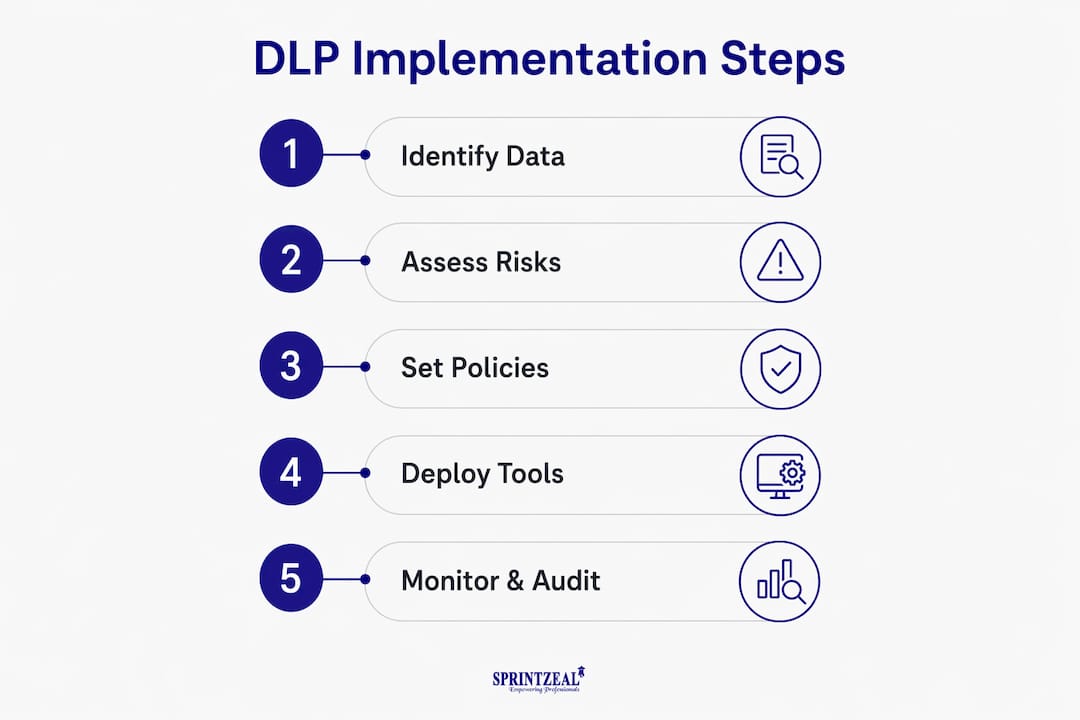
Implementing DLP effectively follows a clear sequence. Skipping steps early creates problems that are expensive to fix later.
- Conduct a formal risk assessment first. Identify which data types carry the most regulatory or business risk. Customer payment data, employee records, and proprietary designs are common starting points for small businesses in manufacturing and professional services.
- Run a data discovery audit. Scan your environment to find where sensitive data actually lives. This step consistently surprises organizations. Sensitive files often exist in shared drives, email archives, and endpoint devices that were never considered part of the data protection perimeter.
- Classify data by sensitivity level. Assign categories such as public, internal, confidential, and restricted. Applying DLP controls without classification produces high false positive rates and alert fatigue that causes teams to ignore warnings.
- Deploy in monitoring-only mode first. Starting with monitoring rather than blocking lets you observe real workflows before writing enforcement rules. This phase typically runs for two to four weeks and reveals which legitimate activities would have been blocked incorrectly.
- Write policies based on observed behavior. Use the monitoring data to build rules that reflect how your business actually operates. A manufacturing company has different data flows than a law firm. Generic policies miss both.
- Enable enforcement in stages. Roll out blocking rules for the highest-risk channels first, then expand. This limits disruption and gives employees time to adjust.
- Train staff before and after deployment. Explain what DLP monitors, why it exists, and what employees should do when they receive a block notification. Training reduces accidental violations and builds cooperation rather than resistance.
- Schedule quarterly policy reviews. Business tools, workflows, and staff change constantly. A DLP program that is not reviewed drifts out of alignment with current risk. Quarterly reviews keep policies accurate and effective.
For small businesses without a dedicated IT team, working with a managed security provider simplifies this process considerably. A provider with experience in your industry already understands the data types and regulatory requirements that shape your DLP policies. You can also review cybersecurity threats your business faces to prioritize which data deserves the strictest controls.
Risk-focused prioritization is the principle that guides sustainable DLP programs. Trying to lock down every piece of data in your organization is operationally unfeasible and costly. Apply your strongest controls where the impact of exposure is highest, and build outward from there.
Key takeaways
Data loss prevention is most effective when treated as a continuous program combining technology, data classification, policy governance, and staff training rather than a one-time software deployment.
| Point | Details |
|---|---|
| DLP definition | DLP monitors, detects, and blocks unauthorized data exposure across three states: at rest, in motion, and in use. |
| Classification comes first | Identifying and classifying sensitive data before writing policies prevents false positives and alert fatigue. |
| Phased rollout matters | Starting in monitoring-only mode reveals real workflows and prevents productivity disruption when enforcement begins. |
| Zero trust integration | DLP works best as part of a layered strategy that includes identity management, encryption, and endpoint security. |
| Human factors are critical | Staff training and clear policies prevent employees from bypassing DLP controls through shadow IT and unapproved tools. |
The part most small businesses get wrong about DLP
After working with small businesses across manufacturing, professional services, and regulated industries, the pattern I see most often is this: a business buys a DLP tool, turns it on, and assumes the problem is solved. Six months later, they discover employees have been uploading files to personal Google Drive accounts because the DLP rules were blocking their legitimate cloud storage tool. The technology was running. The program was not.
The uncomfortable truth about DLP is that the software is the easy part. The hard part is the governance work that happens before and after deployment. Data classification takes time. Policy tuning requires patience. Training staff means having honest conversations about why the rules exist. Most small businesses skip these steps because they feel slow, and then they wonder why their DLP investment is not delivering results.
The shift toward AI-assisted monitoring changes the calculus somewhat. Behavioral baselines reduce the burden of writing exhaustive manual rules. But AI tools still require human judgment to interpret alerts and refine responses. The technology gets smarter, but the program still needs a person driving it.
My honest recommendation: treat your first DLP deployment as a discovery project, not a security project. Use the monitoring phase to learn how your data actually moves. Let that data write your policies. The businesses that do this consistently end up with DLP programs that work with their operations instead of against them. That balance between security and productivity is where real protection lives.
— Michael
How Symmnet supports small business data protection
Small businesses rarely have the internal resources to build and maintain a DLP program from scratch. Symmnet provides managed IT security services designed specifically for small U.S.-based businesses in manufacturing, aerospace, and professional services. That includes data loss prevention planning, endpoint security, compliance support, and 24/7 monitoring.

Symmnet's approach starts with a free assessment to identify where your sensitive data lives, which channels carry the most risk, and what controls are missing. From there, the team builds a DLP program that fits your operations and your regulatory requirements, without the overhead of a full internal IT department. If you are ready to move from uncertainty to a clear data protection plan, contact Symmnet to schedule your assessment.
FAQ
What is the data loss prevention definition in simple terms?
Data loss prevention is a security strategy that uses technology and policies to stop sensitive information from being shared, transferred, or exposed without authorization. It monitors data at rest, in motion, and in use across your systems and networks.
How does data loss prevention work in practice?
DLP tools monitor channels like email, USB drives, cloud storage, and printers. When a transfer violates a defined policy, the system automatically allows, blocks, or encrypts the data in real time.
Why is data loss prevention important for small businesses?
The average cost of a data breach reached USD 4.88 million in 2024, and insider threats are a leading cause. Small businesses face the same risks as large enterprises but typically have fewer resources to recover from a serious incident.
What are the most common data loss threats DLP addresses?
DLP addresses accidental data sharing via email, unauthorized USB transfers, cloud uploads to personal accounts, and intentional data theft by insiders. These are the channels responsible for the majority of data exposure incidents in small business environments.
Do small businesses need a dedicated IT team to implement DLP?
A dedicated internal IT team is not required. Managed security providers like Symmnet offer DLP planning and deployment as part of a managed IT service, giving small businesses access to expertise without the cost of full-time staff.