

Disaster recovery (DR) is the set of IT policies, tools, and procedures that restore your critical systems and data after an unexpected disruption. The bottom line: a tested DR plan is the difference between a business that bounces back in minutes and one that loses customers, revenue, and compliance standing for days. Two key parameters define every DR plan. The Recovery Time Objective (RTO) specifies the maximum downtime tolerable — for example, minutes for a customer-facing application or longer for internal systems. The Recovery Point Objective (RPO) indicates the allowable amount of data loss — ranging from near real-time for transaction databases to longer periods for less critical backups. Ready.gov and NIST both treat documented recovery objectives as the foundation of any credible continuity program, and Symmnet builds every managed DR engagement around those two numbers first.
Table of Contents
- What does disaster recovery actually cover?
- Why disaster recovery matters for your business
- Key concepts every DR plan depends on
- What types of disaster recovery solutions are available?
- How disaster recovery actually works in practice
- Five steps to build a disaster recovery plan
- How to test and maintain your DR plan
- Who should be on your disaster recovery team?
- What does disaster recovery cost, and how long does recovery take?
- One-page DR plan template and test script for small businesses
- Key Takeaways
- Why simple, tested DR plans work best for small businesses
- Symmnet handles DR so your team doesn't have to
- Useful sources and further reading
What does disaster recovery actually cover?
Disaster recovery focuses on the technical layer of a broader business continuity strategy. Where business continuity planning (BCP) covers the full operational picture — staffing, facilities, supply chains — DR zeroes in on the IT systems that keep those operations running. According to TechTarget, DR concentrates on IT systems that support critical business functions and includes formal recovery plans for restoring them.
The assets a DR plan typically covers include:
- Servers and storage (physical and virtual, on-premises and cloud-hosted)
- Network infrastructure (firewalls, switches, routers, VPN gateways)
- Business applications (ERP, CRM, email, file services, line-of-business software)
- Cloud workloads (SaaS platforms, IaaS virtual machines, PaaS databases)
- User endpoints (laptops, workstations, mobile devices with business data)
- Backup repositories (on-site, off-site, and cloud-based backup targets)
Disasters that trigger a DR plan span a wide range. Natural events — hurricanes, floods, wildfires, power outages — get the most attention, but VMware's DR overview notes that cyberattacks, hardware failure, and human error are statistically more common triggers for most small businesses. A misconfigured update that corrupts a database, a ransomware attack that encrypts your file server, or a failed storage drive can all activate the same recovery procedures as a physical disaster.
On-premises environments and cloud workloads require slightly different recovery architectures, but the planning logic is identical. Hybrid setups — where some workloads run on local servers and others live in the cloud — are common among small and mid-sized businesses, and a solid DR plan accounts for both environments in a single, coordinated document.
Why disaster recovery matters for your business
The risk of skipping DR planning is significant. Ready.gov reports that up to 40% of small businesses never reopen after a disaster. Those without recovery plans, tested backups, or clear recovery ownership are especially vulnerable.
A documented, tested DR plan is the single most direct way to avoid becoming part of the statistic of small businesses failing to reopen after a disaster.
The benefits of a working DR plan fall into three categories:
Operational benefits:
- Faster, predictable recovery tied to defined RTO and RPO targets
- Clear roles so staff know exactly what to do during an incident
- Reduced decision fatigue when systems are already failing
Financial benefits:
- Lower recovery costs because procedures are documented and tested in advance
- Reduced revenue loss from shorter downtime windows
- Potential insurance premium reductions when a formal DR plan is in place
Regulatory and compliance benefits:
- Demonstrates due diligence to auditors and regulators (HIPAA, CMMC, SOC 2, and others require documented recovery capabilities)
- Supports contractual SLA obligations with customers
- Provides audit-ready documentation of backup and recovery processes
For manufacturers, aerospace suppliers, and professional services firms operating under strict regulatory frameworks, DR is not optional. It is a compliance requirement with real consequences for failing an audit.
Key concepts every DR plan depends on
Understanding a handful of terms makes every other part of DR planning click. The table below covers the ones you will encounter most often.

| Term | Definition | Quick example |
|---|---|---|
| RTO | Maximum acceptable time to restore a system after failure | Customer portal: 30 minutes; payroll system: 4 hours |
| RPO | Maximum acceptable data loss measured in time | Transaction database: 5 minutes; weekly report archive: 24 hours |
| Failover | Switching operations from a failed primary system to a standby system | Traffic automatically routes to a cloud replica when the primary server goes down |
| Failback | Returning operations to the original primary system after it is restored | Migrating workloads back from cloud DR to on-premises once hardware is repaired |
| Replication | Continuous or near-continuous copying of data to a secondary location | Database logs replicate to a cloud region every five minutes |
| Snapshot | Point-in-time copy of a system or volume | VM snapshot taken nightly before patch deployment |
| SLA | Service level agreement defining recovery commitments between provider and customer | Managed DR provider guarantees RTO of 4 hours for covered workloads |
Setting RTO and RPO requires honest conversation with business stakeholders, not just the IT team. A customer-facing e-commerce application and an internal HR system have very different tolerance levels for downtime and data loss. TechTarget's DR definition confirms that explicit RTO and RPO targets drive every downstream technology and procedural choice — from how often you replicate data to how much you spend on standby infrastructure.
Pro Tip: Set your RTO and RPO before you evaluate any DR technology. Vendors will sell you whatever fits their product; your recovery objectives should drive the purchase, not the other way around.
Replication and snapshots serve different purposes. Replication keeps a near-live copy of data available for fast failover. Snapshots capture a point-in-time state, which is useful for rolling back after a ransomware attack or a bad software update. Most DR programs use both.
What types of disaster recovery solutions are available?
DR solutions range from basic backup-and-restore setups to fully automated, always-on recovery environments. The right choice depends on your RTO, budget, and the criticality of your systems.
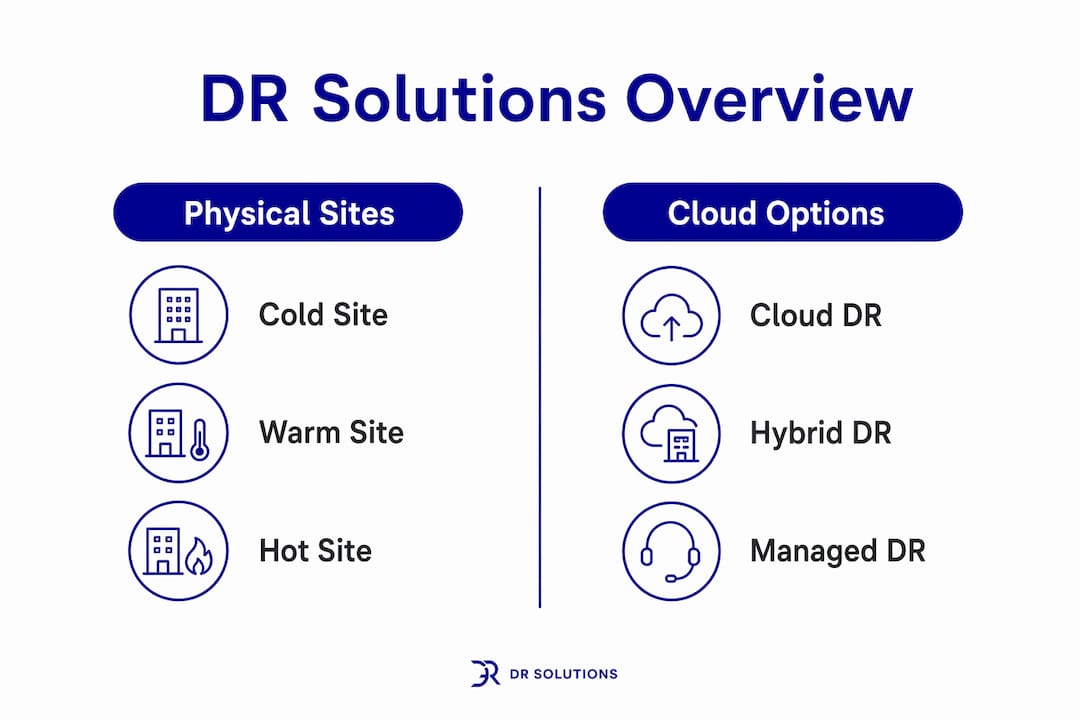
Cold site: A pre-arranged physical or cloud environment with no live data. You restore from backups when needed. Recovery typically takes hours to days. Lowest cost, but the slowest path back to operations.
Warm site: A partially configured environment with recent data replicated to it. Recovery takes minutes to a few hours. A practical middle ground for many small businesses.
Hot site: A fully mirrored, always-running environment that can take over almost instantly. Recovery is measured in seconds to minutes. Highest cost, justified only for systems where downtime is genuinely catastrophic.
Cloud-based DR: Google Cloud's DR guidance notes that cloud replication and secondary cloud regions can replace the need for a dedicated physical recovery data center entirely. For SMBs, this is often the most cost-effective path to a warm or hot recovery posture without the capital expense of a second facility.
Hybrid DR: On-premises backups combined with cloud replication. Local backups enable fast restores for common failures; cloud replication covers site-level disasters. This architecture suits most small businesses with a mix of on-premises servers and cloud workloads.
Pro Tip: Cloud-based DR removes the physical site cost, but it still requires tested failover procedures and documented runbooks. A cloud subscription without a tested process is not a DR plan.
Pros and cons at a glance:
- Cold site: Low cost, simple setup; slow recovery, not suitable for time-sensitive systems
- Warm site: Moderate cost, reasonable recovery speed; requires ongoing data synchronization
- Hot site: Fastest recovery, highest availability; expensive to maintain, complex to operate
- Cloud DR: Flexible, scalable, no physical facility; requires reliable internet and tested procedures
- Hybrid: Covers multiple failure scenarios; more complex to manage and document
How disaster recovery actually works in practice
The mechanics of DR come down to three core activities: keeping a copy of your data somewhere safe, detecting a failure, and switching operations to the recovery environment.
Replication vs. backup vs. snapshot serve distinct roles. Replication continuously copies data to a secondary location, keeping the recovery target current. A reliable backup system specifies frequency, retention, and off-site storage — without it, recovery from data loss is impossible. Snapshots capture a frozen state at a specific moment, useful for quick rollbacks when data corruption is the problem rather than hardware failure.
Failover orchestration is what separates a real DR program from a folder of backup files. Manual failover requires a technician to follow a runbook step by step, which works but introduces human error and time pressure. Automated failover uses pre-configured scripts or orchestration platforms to detect failure and redirect traffic to the standby environment without waiting for a human decision. Automated approaches are faster and more consistent, but they require careful testing to avoid false triggers.

A practical example: a small manufacturer runs its ERP system on a local server. Database transaction logs replicate to a cloud region every five minutes. If the local server fails, the orchestration layer detects the outage, promotes the cloud replica to primary, and updates DNS records so users connect to the cloud instance. When the local server is repaired, the process reverses — data syncs back, and operations return to the on-premises environment. That is failover and failback in a single scenario.
Runbook automation takes orchestration further by scripting the entire recovery sequence, including notifications, validation checks, and post-recovery verification steps. For SMBs without a large IT team, data backup practices paired with a documented runbook can cover most common failure scenarios without requiring specialized DR expertise on staff.
Five steps to build a disaster recovery plan
Building a DR plan does not require a large team or a big budget. It requires a clear process and honest input from the people who run the business.
-
Risk assessment — Identify the threats most likely to affect your environment: ransomware, hardware failure, power outages, natural disasters relevant to your geography. Document each threat, its likelihood, and its potential impact. Output: a prioritized threat register.
-
Business impact analysis (BIA) — Map your critical business functions to the IT systems that support them. Business.com's SMB DR guidance emphasizes that a BIA identifies recovery priorities by linking activities to the technologies underneath them. Ask: which systems, if down for four hours, would stop revenue or trigger a compliance violation? Output: a prioritized system inventory with RTO and RPO targets for each.
-
Define recovery objectives and design the plan — Use BIA outputs to set RTO and RPO for each critical system. Choose a DR architecture (cold, warm, hot, cloud, hybrid) that meets those objectives within your budget. Document the recovery procedures, contact lists, and escalation paths. Output: a written DR plan with architecture diagrams and runbooks.
-
Implement — Deploy the chosen infrastructure: configure replication, set up backup schedules, establish cloud recovery environments, and test connectivity between primary and recovery sites. For manufacturers and regulated businesses, compliance documentation should be built into this phase. Output: a working technical environment validated against design.
-
Test and iterate — Run tabletop exercises, partial failovers, and full recovery tests on a scheduled cadence. Document results, identify gaps, and update the plan. Output: test reports, updated runbooks, and a revised plan.
Pro Tip: The BIA is the step most small businesses skip. Without it, you end up protecting the wrong systems first. Spend 90 minutes with your department heads mapping which systems would hurt most if they went down — that conversation alone will reshape your priorities.
A realistic timeline for a small business starting from scratch: risk assessment and BIA in weeks 1–2, plan design in weeks 3–4, implementation in weeks 5–8, and first tabletop test in week 10. Total elapsed time: roughly 10–12 weeks with part-time internal effort or faster with outside help.
How to test and maintain your DR plan
A DR plan that has never been tested is a hypothesis, not a plan. Testing is where gaps surface before a real incident forces them into the open.
Common test types:
- Tabletop exercise: A facilitated discussion where the DR team walks through a simulated scenario. No systems are touched. Catches communication gaps, unclear ownership, and missing contact information.
- Backup restore test: Restore a specific dataset or application from backup to verify the backup is usable and the restore procedure works. Should be done monthly for critical systems.
- Partial failover: Fail over a single non-critical application to the recovery environment during a low-traffic window. Validates the technical path without risking production.
- Full failover test: Shift all covered workloads to the recovery environment. Highest confidence, highest risk. Reserve for annual or semi-annual testing.
- Runbook walk-through: A technical team member follows the runbook step by step, noting any steps that are unclear, outdated, or missing.
Recommended cadence for SMBs:
- Backup restore tests: monthly
- Tabletop exercises: quarterly
- Partial failover: semi-annually
- Full failover: annually or after major infrastructure changes
Test verification checklist:
- All critical systems restored within defined RTO
- Data restored to within defined RPO (no unexpected data loss)
- Applications functional and user-accessible in recovery environment
- Communication notifications sent and received correctly
- Runbook steps followed without deviation
- Test results documented and signed off by DR owner
The Ready.gov IT DR guidance is direct: test the plan periodically to make sure it works. That sounds obvious, but up to 40% of small businesses that fail after a disaster had no tested recovery process in place. Testing is not overhead — it is the only way to know your plan is real.
Pro Tip: Schedule backup restore tests on the same day each month and put them on the calendar now. Unscheduled tests get skipped. A monthly 30-minute restore test on a non-critical system is the single highest-value DR activity most small businesses are not doing.
After each test, update the runbook with any corrections. Assign a review date for the full DR plan — at minimum annually, and after any significant change to your IT environment.
Who should be on your disaster recovery team?
DR is not a solo activity. Even in a small business, recovery requires coordinated action across technical, operational, and communication functions.
Core DR roles:
- DR owner/leader: Accountable for the plan, activates the DR process, makes go/no-go decisions during an incident. Typically the IT manager, operations manager, or a senior executive in a very small business.
- Technical lead: Executes the recovery procedures, manages failover and failback, and validates system restoration. Should be the person most familiar with the infrastructure.
- Communications lead: Notifies employees, customers, and vendors during an incident. Manages external messaging and coordinates with leadership on status updates.
- Business-unit liaisons: One representative per critical department (finance, operations, sales) who validates that systems are functioning correctly from a business perspective after recovery.
- Vendor contacts: Documented contacts at your internet provider, cloud platform, hardware vendor, and managed IT provider. Include account numbers and support escalation paths.
Escalation order during an incident:
- Technical lead detects and confirms the failure
- DR owner is notified and activates the plan
- Communications lead sends initial internal notification
- Business-unit liaisons are briefed and begin monitoring recovery
- External vendors are engaged if needed
- DR owner declares recovery complete and communications lead sends all-clear
Keep this escalation path in the DR plan document and in a printed copy stored off-site. During an outage, you may not have access to the systems where you normally store documentation.
What does disaster recovery cost, and how long does recovery take?
Cost and recovery time are directly linked. Faster recovery requires more infrastructure investment. The question is not "how little can we spend?" but "what is an hour of downtime actually worth to us?"
Primary cost drivers:
- Infrastructure: Cold sites cost the least (storage and backup software only); hot sites cost the most (duplicate infrastructure running continuously)
- Replication bandwidth: Continuous replication to a cloud region incurs ongoing data transfer and storage costs
- Licensing: DR-capable versions of backup and replication software carry higher license fees than basic backup tools
- Third-party DR services: Managed DR providers charge monthly fees that vary by coverage scope and RTO commitments
- Testing labor: Internal staff time or external consultant fees for running and documenting tests
Approximate solution tiers (guidance only — actual costs vary by vendor and scope):
- Entry-level (cold/warm, cloud backup): Primarily software and cloud storage costs; suitable for businesses with RTOs measured in hours and tolerance for manual recovery steps
- Mid-range (warm/hot, cloud replication, partial automation): Higher monthly spend covering replication, orchestration tools, and managed services; RTOs in the 30-minute to 4-hour range
- Enterprise-style (hot site, full automation, managed DR): Highest investment; RTOs measured in minutes; justified for systems where downtime directly stops revenue or triggers regulatory penalties
Recovery timeline examples by RTO category:
- Minutes (hot site / automated failover): Fully mirrored environment, automated orchestration, DNS failover
- 1–4 hours (warm site / cloud replication): Pre-configured cloud environment, manual or semi-automated failover, tested runbooks
- 4–24 hours (cold site / backup restore): Restore from backup to replacement hardware or cloud instance, manual procedures
- 24+ hours (no DR plan): Improvised recovery, vendor support queues, potential permanent data loss
The gap between "minutes" and "24+ hours" is not just a technical difference. For a small manufacturer running production on an ERP system, a 24-hour outage can mean missed shipments, contract penalties, and customer attrition that outlasts the recovery itself.
One-page DR plan template and test script for small businesses
A small-business DR plan does not need to be a 50-page document. A concise, well-organized one-pager that names owners, priorities, and immediate actions is far more useful under pressure than an elaborate binder nobody has read.
One-page DR plan template
Section 1: Plan ownership
| Field | Details |
|---|---|
| DR Owner | Name, phone, email |
| Technical Lead | Name, phone, email |
| Communications Lead | Name, phone, email |
| Plan last reviewed | Date |
| Next scheduled test | Date |
Section 2: Critical systems and recovery priorities
| System | Business function | RTO | RPO | Recovery method |
|---|---|---|---|---|
| ERP / production system | Order management, shipping | 2 hours | 30 minutes | Cloud replication + failover |
| File server | Shared documents | 4 hours | 4 hours | Cloud backup restore |
| Communications | 1 hour | minutes | Microsoft built-in redundancy | |
| Accounting software | Invoicing, payroll | 4 hours | 24 hours | Local + cloud backup restore |
Section 3: Contact list
- Internet provider: account number, support line
- Cloud/backup vendor: account number, support line
- Managed IT provider (Symmnet): direct support line
- Key customers to notify: names and contact details
Section 4: Recovery steps (abbreviated)
- Confirm the failure and scope (which systems are affected)
- Notify DR owner and activate the plan
- Execute runbook for affected systems (stored at: [location])
- Validate recovery with business-unit liaisons
- Send status update to staff and affected customers
- Document incident timeline and recovery actions
Section 5: Fallback procedures
- If cloud recovery environment is unavailable: contact managed IT provider for emergency support
- If primary internet connection is down: activate cellular backup or secondary ISP
- If key personnel are unreachable: escalate to next contact in the list above
Pro Tip: Store a printed copy of this one-pager in a physical location outside your office — a manager's home, a safe deposit box, or a sealed envelope with your accountant. During a site-level disaster, your office and your network may both be inaccessible.
Sample test script: single application failover
This script tests failover for one non-critical application during a scheduled low-traffic window.
- Notify stakeholders — Inform affected users of the test window (e.g., Saturday 8–10 AM)
- Confirm backup/replica status — Verify the recovery environment has a current copy of the application and its data
- Initiate failover — Follow the runbook to redirect the application to the recovery environment
- Validate functionality — Log in as a test user, confirm core functions work, verify data matches expected state
- Document results — Record time to failover, any errors encountered, and whether RTO was met
- Initiate failback — Return the application to the primary environment following the runbook
- Confirm primary is healthy — Verify the primary environment is functioning correctly before closing the test
- Update the runbook — Note any steps that were unclear or required improvisation
Key Takeaways
A tested disaster recovery plan built around defined RTO and RPO targets is the most direct way for a small business to protect revenue, data, and compliance standing after an IT disruption.
| Point | Details |
|---|---|
| DR protects revenue and compliance | Up to 40% of small businesses never reopen after a disaster without a recovery plan in place. |
| RTO and RPO drive every decision | Set your recovery time and data loss objectives before choosing any DR technology or architecture. |
| Test monthly, review annually | Backup restore tests monthly and tabletop exercises quarterly keep your plan reliable and current. |
| Simple plans outperform complex ones | A one-page DR document with named owners, priorities, and runbooks works better under pressure than an untested elaborate plan. |
| Symmnet manages DR for small businesses | Symmnet provides managed backup, DR, and 24/7 monitoring so small businesses can meet their RTO and RPO targets without a full internal IT team. |
Why simple, tested DR plans work best for small businesses
The instinct many small businesses have when they first approach DR is to over-engineer it. They look at enterprise frameworks, see the complexity, and either build something too elaborate to maintain or put the project off entirely. Both outcomes leave the business exposed.
The more useful instinct is to start with what would actually hurt. Identify the three or four systems that, if down for more than a few hours, would stop revenue or trigger a compliance problem. Build a recovery procedure for those systems first. Test it. Then expand.
What gets overlooked in most DR conversations is the human layer. A technically perfect failover that nobody knows how to activate is not a recovery plan. The communication path, the escalation order, the printed contact list stored somewhere accessible when your network is down — those elements determine whether recovery takes 30 minutes or 30 hours. Technology handles the data movement; people handle the decisions.
Symmnet's approach to managed DR reflects this priority. The focus is on core systems, tested procedures, and clear ownership rather than maximum technical complexity. For small businesses in manufacturing, aerospace, and professional services, that means a DR program that actually gets used when it matters, not one that exists only in a document.
Symmnet handles DR so your team doesn't have to
For small businesses without a dedicated IT team, the gap between "we have backups" and "we have a tested, working DR plan" is wider than it looks. Symmnet closes that gap with managed backup and disaster recovery, 24/7 system monitoring, and runbook creation built specifically for small U.S. businesses in manufacturing, aerospace, and professional services.

Symmnet's managed DR service covers the pieces most small businesses miss: documented recovery procedures, scheduled backup restore tests, failover validation, and compliance-ready documentation for audits. Fixed monthly pricing means no surprise invoices when you need support most. If your business operates under CMMC, HIPAA, or FDA requirements, Symmnet's team already understands the regulatory context your DR plan has to satisfy.
The next step is straightforward: review your managed IT services options or reach out to Symmnet directly for a free assessment of your current backup and recovery posture. You will leave that conversation knowing exactly where your gaps are and what it would take to close them.
Useful sources and further reading
The resources below provide authoritative guidance, templates, and deeper technical detail for each stage of DR planning.
-
IT Disaster Recovery Plan — Ready.gov (FEMA): The U.S. government's practical guidance on building an IT DR plan, including backup strategy, hardware inventory, and recovery priorities. A strong starting point for any business.
-
What Is Disaster Recovery? — Microsoft Azure: Microsoft's cloud-focused DR explainer covering RTO, RPO, and cloud-based recovery architectures. Useful for businesses running workloads on Azure or evaluating cloud DR options.
-
Disaster Recovery Definition — TechTarget: A detailed technical definition of DR with coverage of RTO, RPO, and the relationship between DR and business continuity planning.
-
Example DR Plan for Small Businesses — TechTarget: A practical small-business DR template with guidance on keeping the plan concise and actionable. Directly relevant to the one-page template approach.
-
Disaster Recovery for Small Business — Commvault: Covers backup strategy fundamentals, testing cadence, and the role of replication in a small-business DR program.
-
What Is Disaster Recovery? — Google Cloud: Explains cloud-based DR architectures, replication patterns, and how cloud recovery sites reduce the need for a dedicated physical facility.
-
Data Backup Tips for Small Business — Symmnet: Symmnet's practical guide to backup strategy for small U.S. businesses, with actionable steps that feed directly into a DR plan.
-
Cyber Threat Response Guide — Symmnet: Incident response playbook content that complements DR runbooks, particularly for cyberattack-triggered recovery scenarios.
-
Disaster Recovery Plan for Small Business — Business.com: SMB-focused guidance on business impact analysis and linking critical business activities to the IT systems that support them.