

Secure file sharing is defined as the encrypted, authenticated exchange of digital files with controlled access permissions and audit logging to protect data confidentiality and integrity. The industry standard for this protection combines AES-256 encryption at rest with TLS 1.2+ protocols in transit, two benchmarks that small businesses and IT managers should treat as non-negotiable minimums. For businesses handling contracts, financial records, or regulated data under frameworks like HIPAA, SOC 2, or GDPR, secure file sharing is not optional. It is the foundation of responsible data management and a direct line of defense against costly breaches.
What is secure file sharing built on? Core technologies explained
Secure file sharing rests on two distinct layers of encryption. AES-256 protects files while they sit on a server or storage device. TLS 1.2+ encrypts the connection while files move between systems. Both layers must be active simultaneously. A file encrypted at rest but sent over an unprotected connection is still vulnerable.

Authentication is the second pillar. Multi-factor authentication (MFA) requires users to verify identity through two or more methods, such as a password and a one-time code sent to a phone. Single sign-on (SSO) centralizes authentication across multiple platforms, reducing password fatigue and the risk of weak credentials. Together, MFA and SSO eliminate the most common entry point for unauthorized access.
The protocol you choose determines how files travel between systems. SFTP uses port 22, encrypting both commands and data over SSH, and meets regulatory compliance requirements for SOC 2, HIPAA, and GDPR. HTTPS with TLS/SSL secures browser-based transfers and suits everyday user collaboration. Legacy protocols like FTP and Telnet transmit data in plain text. They should be disabled on every business network without exception.
| Protocol | Primary use case | Encryption | Compliance fit |
|---|---|---|---|
| SFTP | Automated system transfers | SSH (full channel) | SOC 2, HIPAA, GDPR |
| HTTPS | Browser-based collaboration | TLS 1.2+ | General business use |
| FTP | Legacy file transfer | None | Not compliant |
| Telnet | Legacy remote access | None | Not compliant |
Pro Tip: Audit your network for active FTP or Telnet services at least once per quarter. Many small businesses inherit these protocols from older software and never disable them, leaving a wide-open channel attackers actively scan for.
What are the best practices for sharing files securely?
The single biggest mistake small businesses make is using public "anyone with the link" sharing. That approach removes all accountability. Identity-bound links that require authentication create an audit trail and allow immediate revocation if a recipient's account is compromised. Every sensitive file share should require a login.
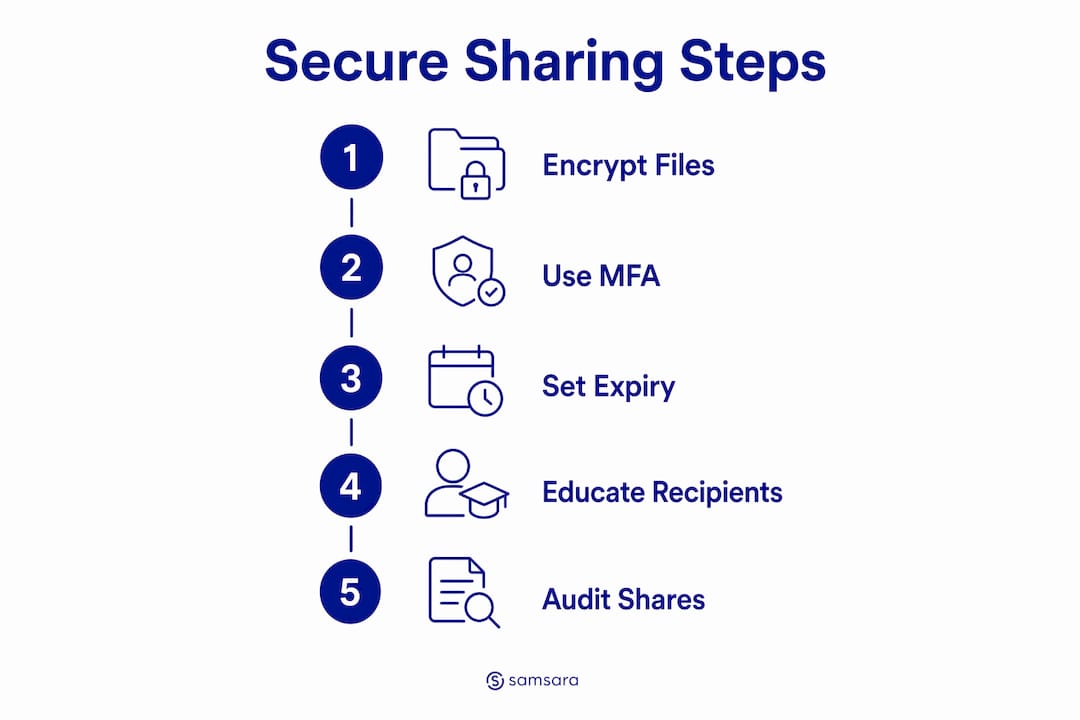
Access should also expire automatically. Setting expiration dates between 7 and 30 days and revoking access after the recipient confirms receipt significantly reduces the risk of stale shares sitting open for months. Former employees, old vendors, and forgotten contacts are common sources of persistent exposure.
A secure sharing workflow for small businesses looks like this:
- Classify the file. Determine whether it contains sensitive, regulated, or public data before choosing a sharing method.
- Choose the right platform. Use a platform that supports AES-256 encryption, MFA, and access revocation.
- Set recipient-specific permissions. Grant access only to the named individual, not a group or public link.
- Apply an expiration date. Set access to expire within 7–30 days depending on the project timeline.
- Send the passphrase separately. Deliver any password or decryption key through a different channel, such as a phone call or separate messaging app.
- Confirm receipt and revoke. Once the recipient confirms they have the file, revoke access immediately.
- Rename files before sending. Use neutral filenames that do not reveal project names, client identities, or internal codes.
Pro Tip: Filenames are metadata. A file named "Q3_AcmeCorp_Acquisition_Draft.docx" tells an attacker exactly what they found before they even open it. Rename sensitive files to neutral labels like "Document_2026_03.docx" before sharing.
Recipient education matters as much as the technology. Recipients should not store passphrases in insecure locations and should delete local copies after a project ends. Security breaks down at the receiving end just as often as at the sending end.
How do secure file transfer and secure file sharing differ?
These two terms describe different workflows, and confusing them leads to choosing the wrong solution. Secure file transfer moves data from point A to point B in a single encrypted transaction. Secure file sharing creates a persistent, collaborative environment where multiple users access the same files over time with defined roles and permissions.
The right choice depends entirely on your workflow:
- Use secure file transfer (SFTP) when you need to send a batch of invoices to an accounting system, push a software update to a remote server, or deliver a one-time document package to a client. The transaction completes and the connection closes.
- Use secure file sharing platforms when your team needs ongoing access to contracts, design files, or compliance documents. These platforms support role-based access control, version history, and audit logs that track every view and download.
- Use virtual data rooms for high-stakes, time-limited collaboration such as mergers, audits, or legal discovery. Virtual data rooms add watermarking, screenshot prevention, and granular permission controls beyond standard sharing platforms.
Audit trails are the defining feature of a true secure file sharing environment. Every access event, download, and permission change should be logged with a timestamp and user identity. Choosing between transfer and sharing depends on whether you need a single transmission or a persistent collaborative environment. For most small businesses, both methods are needed at different times, and your IT policy should define which to use in each scenario.
What are the common risks when sharing files, and how do you reduce them?
The average cost of a data breach is $4.88 million, and two-thirds of breaches trace back to human error. That statistic reframes secure file sharing as a financial risk management issue, not just a technical one. The most common human errors in file sharing are predictable and preventable.
The primary risks small businesses face include:
- Sending files to the wrong recipient. A single mistyped email address can expose a client's financial data to a competitor. Always verify recipient addresses before sending.
- Using "anyone with link" access. Public links cannot be tied to an individual, cannot be audited, and are difficult to revoke cleanly. Replace them with identity-bound links on every sensitive share.
- Weak or reused passwords. A shared folder protected by a password used across multiple accounts is only as secure as the weakest account in that chain.
- Stale shares and forgotten access. Shares created for a project that ended six months ago often remain active. Periodic audits of active shares and access logs catch these exposures before attackers do.
- Passphrase delivery through the same channel as the file. If an attacker compromises your email, they get both the file and the key. Out-of-band secret sharing sends the passphrase through a separate channel, such as SMS or a phone call, defeating this attack vector.
Pro Tip: Schedule a monthly 15-minute review of all active file shares in your platform. Look for shares older than 30 days, shares with no expiration date, and shares granted to email addresses that no longer match current contacts. This single habit eliminates a significant category of persistent exposure.
Protecting sensitive business data also means understanding that neutral filenames prevent metadata exposure through file naming. A filename that reveals a client name, deal value, or internal project code is a data leak before the file is even opened.
Key Takeaways
Secure file sharing requires encryption at rest and in transit, identity-bound access controls, automatic expiration, and out-of-band passphrase delivery to protect sensitive business data effectively.
| Point | Details |
|---|---|
| Encryption standards | AES-256 at rest and TLS 1.2+ in transit are the minimum standards for any secure sharing solution. |
| Protocol selection | Use SFTP for automated system transfers and HTTPS for browser-based collaboration; disable FTP and Telnet. |
| Access controls | Grant recipient-specific permissions and set expiration dates between 7 and 30 days on every sensitive share. |
| Human error is the top risk | Two-thirds of breaches involve human error; recipient education and identity-bound links reduce this risk directly. |
| Transfer vs. sharing | Use secure file transfer for one-time moves and secure file sharing platforms for ongoing collaborative access. |
Why most small businesses get file sharing security backwards
I have worked with dozens of small businesses on their IT security posture, and the pattern is almost always the same. The technology side is reasonably well handled. Encryption is in place, the platform is reputable, and the IT manager can explain TLS without hesitation. The breakdown happens at the human layer, every single time.
A manufacturing client once had a well-configured file sharing platform with MFA enabled and expiration dates set. Then a project manager shared a folder with a vendor using a public link because it was "faster." That vendor's email was compromised three weeks later. The attacker had full access to a folder containing engineering drawings and supplier contracts. The platform did everything right. The user bypassed it.
The uncomfortable truth is that security tools only work when people use them correctly. Small businesses often prioritize ease of use to the point of creating workarounds that gut their own security controls. The fix is not more technology. It is clearer policy, regular training, and a platform that makes the secure path the easiest path.
Centralized management with visible audit logs also changes behavior. When employees know that every access event is logged and reviewed, they make better decisions. That visibility is not about surveillance. It is about creating accountability that protects the business and the employee equally. Pair that with IT security practices built for SMB realities, and you have a program that actually holds up under pressure.
— Michael
How Symmnet supports secure file sharing for small businesses
Small businesses rarely have the internal resources to configure, monitor, and audit a secure file sharing environment on their own. Symmnet provides managed IT services that include setting up secure file sharing solutions, ongoing monitoring, compliance support for frameworks like HIPAA and SOC 2, and user training that addresses the human error risks covered throughout this article.
Symmnet works specifically with small U.S.-based businesses in manufacturing, aerospace, and professional services where data sensitivity and regulatory requirements are high. The team handles protocol configuration, access policy setup, and periodic audits so your staff can focus on the work rather than the security mechanics. A free assessment identifies your current gaps and maps a path to a compliant, well-managed file sharing environment. Contact Symmnet to schedule yours.
FAQ
What is secure file sharing in simple terms?
Secure file sharing is the practice of sending and receiving digital files using encryption, authentication, and access controls so only authorized people can view the data. It protects confidentiality during both transfer and storage.
How does secure file sharing work technically?
Files are encrypted with AES-256 before storage and protected by TLS 1.2+ during transmission. Users authenticate with MFA or SSO, and access is granted through identity-bound permissions with expiration dates and audit logging.
What is the difference between SFTP and HTTPS for file sharing?
SFTP encrypts the full communication channel over SSH and suits automated, system-to-system transfers in regulated industries. HTTPS with TLS secures browser-based sharing and is better suited for everyday user collaboration.
Why is human error the biggest risk in secure file sharing?
Two-thirds of data breaches involve human error, including sending files to wrong recipients, using public links, and poor password management. Technology controls only work when users follow the policies designed around them.
What are the best secure file sharing options for small businesses?
Small businesses should use platforms that support AES-256 encryption, MFA, identity-bound links, automatic expiration, and audit logs. The right choice depends on whether the workflow requires one-time transfers or ongoing collaborative access.