

Yes, most small businesses benefit from SIEM capability, but the right starting point is a cloud-based or managed SIEM, not a full on-premises build. If you have no in-house security operations staff, skip DIY deployment and trial a managed or cloud SIEM service first. If you already run some IT security expertise internally, a staged, open-source approach can work, but budget time for tuning. Either way, the first hour matters more than the tool you pick.
- Inventory your critical systems: domain controllers, firewalls, cloud email, and backup servers
- Identify which of those already produce logs you could feed into a SIEM
- Request a trial or assessment from a managed SIEM provider before committing budget
- Avoid ingesting everything at once. Start narrow and expand only after your first alerts prove useful
Key Takeaways
Small businesses get the most value from SIEM by starting with a managed or cloud deployment and ingesting only high-priority logs first, then expanding based on confirmed detections.
| Point | Details |
|---|---|
| Start managed, not DIY | Trial a cloud or managed SIEM first unless you already have in-house security operations skills. |
| Ingest selectively | Prioritize firewall, authentication, and access logs; sample noisy application logs to control cost and noise. |
| Budget for staffing, not just software | Open-source stacks shift cost from licensing fees to ongoing tuning and operations time. |
| Tune weekly, expand monthly | Review false positives on a weekly cadence and add new log sources only after proven detections. |
| Symmnet covers the gap | Symmnet delivers 24/7 monitoring, endpoint security, firewall management, and compliance help under fixed monthly pricing. |
Table of Contents
- What SIEM for Small Business Actually Does
- Where SIEM Pays Off for a Small Business
- The Real Barriers: Cost, Skills, and Alert Fatigue
- Key Features to Prioritize in a Small-Business SIEM
- How to Start: A 30-Day SIEM Implementation Guide
- Cloud Logging, Open Source, or Managed: Weighing Your Options
- How Managed IT Providers Close the SIEM Gap
- What Small Businesses Get Wrong About SIEM Adoption
- Frequently Asked Questions
- Sources
What SIEM for Small Business Actually Does
SIEM stands for security information and event management, and its job is to pull scattered security signals into one place you can actually act on. A SIEM platform performs four core functions: log collection from firewalls, servers, and applications; normalization, which converts different log formats into a consistent structure; correlation, which links related events across systems; and alerting, which flags patterns that suggest a real threat instead of routine noise.
That last function is what separates SIEM from simple log aggregation. A log aggregator like a basic syslog server stores events for later review. A SIEM connects the dots between a failed login on one server and an unusual data transfer on another, then tells you it happened.
- Log collection: gathers events from firewalls, endpoints, servers, and cloud apps
- Normalization: standardizes formats so a firewall log and a Windows event log can be compared
- Correlation: links related events into a single incident instead of dozens of isolated alerts
- Alerting: flags suspicious patterns in near real time
- Retention: stores historical logs for investigation and compliance audits
Quick fact: Buyer guidance from Capterra shows small businesses evaluating SIEM tools weigh pricing model and staffing needs as heavily as feature lists, because the wrong pricing shape can turn a modest tool into an unpredictable monthly bill.
Where SIEM Pays Off for a Small Business
The value shows up fastest in three places: catching threats earlier, satisfying auditors, and cutting the daily grind for a lean IT team. Ransomware rarely announces itself immediately. It moves laterally first, and a SIEM correlating login anomalies across multiple machines can flag that movement before encryption starts. Credential compromise follows a similar pattern: a login from an unfamiliar location followed by unusual access to file shares is exactly the kind of correlated event a SIEM is built to catch. Data exfiltration attempts, like large outbound transfers at odd hours, get flagged the same way.
Compliance is where SIEM earns its keep in ways that are easy to underestimate. HIPAA, PCI DSS, and SOC 2 audits all require evidence of who accessed what and when. Without centralized logging, pulling that evidence means manually combing through separate systems, which can take days. With a SIEM's retention and reporting features, it takes minutes.
- Ransomware lateral movement detection through correlated login and access anomalies
- Credential compromise alerts tied to geographic or behavioral login patterns
- Data exfiltration flags on unusual outbound data volume
- Audit-ready logs for HIPAA, PCI DSS, and SOC 2 reporting requests
- Prebuilt correlation rules that reduce manual review time for small teams
Pro Tip: Ask any SIEM vendor for a sample of their prebuilt detection rules before you buy. If the rule library looks generic or sparse, your team will end up writing custom correlation logic, which defeats the purpose of buying a managed tool in the first place.
Automation matters most for teams without a dedicated security analyst. Prebuilt rules that flag known attack patterns mean your one IT generalist isn't reviewing thousands of raw log lines every morning. That is the entire point of adopting SIEM capability at a small business scale: it does the first pass of triage so a human only reviews what's actually worth reviewing.
The Real Barriers: Cost, Skills, and Alert Fatigue
SIEM adoption fails for predictable reasons, and every one of them is manageable if you plan for it upfront.
- Cost drivers stack up fast. Data ingest volume, retention period, and managed-service fees each move independently. A vendor charging per gigabyte ingested can surprise you if a chatty application log floods the system. Ask for ingest estimates before committing.
- Skills gaps show up immediately. Writing correlation rules, tuning false positives, and investigating alerts require specific expertise most five-person IT teams don't have on staff. This is the single biggest reason small businesses turn to managed SIEM services rather than deploying the software themselves.
- Integration blind spots hide until something breaks. A SIEM that isn't connected to your cloud email platform or your point-of-sale system creates a false sense of coverage. Map every critical system to a log source before you assume you're protected.
- Alert fatigue kills adoption. A poorly tuned SIEM generates hundreds of low-value alerts a week, and teams start ignoring all of them, including the real ones. Prioritized, tuned alerting matters more than raw alert volume.
Key Features to Prioritize in a Small-Business SIEM
Not every SIEM feature matters equally when you're running lean. Prioritize the handful that reduce cost and operational burden, and treat the rest as nice-to-haves.
A cloud-based or fully managed deployment model should top your list. It removes the need to provision and maintain servers, and it shifts the burden of software patching and scaling to the vendor. This single decision eliminates most of the staffing problem small businesses run into with on-premises SIEM.
Prebuilt integrations for the platforms you already run come next. If your SIEM doesn't have a ready connector for Microsoft 365, your common firewall brand, or your backup software, you'll spend weeks building custom parsers instead of catching threats.
Selective ingestion controls deserve more attention than most buyers give them. Industry practice favors what amounts to a surgical approach: prioritize high-value logs like firewall traffic, domain controller authentication, and cloud access events, and skip or sample the noisy, low-value application logs that drive up cost without adding detection value. A practical version of this: ingest authentication and firewall logs at full detail, but sample verbose application logs so you only capture errors or flagged events instead of every line.
- Cloud or fully managed deployment to avoid server maintenance and reduce staffing needs
- Prebuilt connectors for Microsoft 365, common firewall brands, and backup platforms
- Selective, tiered log ingestion to control cost and reduce noise
- Clear, prioritized dashboards that separate critical alerts from informational ones
- Automated response playbooks for common incident types
- Retention periods and reporting templates that match your compliance requirements (HIPAA, PCI DSS, SOC 2)
Pro Tip: Before signing a contract, ask the vendor to show you a dashboard with a live or simulated alert queue. If it takes more than a few seconds to identify the single most urgent item, the interface will slow your team down during an actual incident.
Retention and compliance reporting round out the checklist. Confirm the platform can generate audit-ready reports formatted for your specific regulatory requirement, not a generic security summary that you'll have to reformat manually every time an auditor asks.
How to Start: A 30-Day SIEM Implementation Guide
You don't need a six-month rollout plan to get real value from a SIEM. Most small businesses can reach meaningful coverage inside a month if they follow a staged sequence instead of trying to connect everything at once.
- First hour: Inventory your critical systems. List every server, firewall, cloud application, and endpoint that handles sensitive data or controls access to your network. This list becomes your log-source priority order.
- First week: Choose your deployment model. Trial a managed or cloud SIEM service, or if you have staff comfortable with system administration, stand up an open-source stack like OpenSearch. Connect your top three log sources first, typically your firewall, your identity provider, and your primary file server.
- First 30 days: Define five to ten initial alerts tied to your highest-risk scenarios: failed login spikes, after-hours access, and unusual outbound traffic. Tune thresholds as false positives surface, set your retention period to match your compliance obligation, and document a basic incident response escalation path so alerts don't just sit in a queue.
- Ongoing: Review false positives weekly during the first quarter. Practitioners who work with small organizations commonly recommend a 90-day monitoring window focused on a small set of high-value logs, tuning alerts weekly, before expanding to additional sources based on what actually triggered confirmed detections.
Pro Tip: Resist the urge to connect every available log source in week one. A SIEM drowning in low-value data from day one is harder to tune than one that starts narrow and grows only when a source proves its worth.
Manufacturing environments carry their own wrinkle here; integrating SIEM effectively with plant systems requires specialized care that aligns with manufacturing safety management best practices. Industrial control systems and legacy equipment often lack modern logging support, so your manufacturing cybersecurity checklist should flag which plant systems can feed a SIEM directly and which need a network segmentation approach instead.

Cloud Logging, Open Source, or Managed: Weighing Your Options
Four paths lead to SIEM capability, and each trades cost for effort in a different way.
- Cloud provider logging (built into platforms like Microsoft 365 or AWS) has the lowest barrier to entry, often included in your existing subscription, but correlation across systems is limited or absent.
- OpenSearch or ELK-style stacks offer real flexibility and no software licensing cost, but they demand ongoing operations skills for tuning, scaling, and maintenance, exactly the resource most small teams lack.
- Open-source SIEMs like OSSIM eliminate license fees entirely, and network telemetry tools like Zeek add high-value visibility into traffic patterns, but the operational overhead of running and tuning them shifts the cost from your budget to your staff's time. A vendor-neutral roundup from Red Canary documents this trade-off across several popular free tools.
- Managed SIEM services trade a predictable monthly fee for expertise and 24/7 coverage, removing the staffing burden entirely.
For a small business without a dedicated security analyst, that operational overhead is usually the deciding factor, not the sticker price.
How Managed IT Providers Close the SIEM Gap
A managed IT partner delivers the outcomes SIEM promises without asking you to build or staff a security operations function. Symmnet's approach bundles the pieces that typically make up an effective SIEM strategy into services small businesses can actually run day to day:
- 24/7 system monitoring that mirrors SIEM-style continuous alerting
- Endpoint security and firewall management, which cover two of the highest-value log sources
- Compliance assistance for industry-specific regulations, including audit-ready documentation for manufacturing security tips
- Fixed monthly pricing, avoiding the ingest-volume surprises that catch DIY deployments off guard
A free assessment identifies which of your current systems already generate usable security logs and which have gaps, giving you a concrete starting point before you commit to any tool or contract.
What Small Businesses Get Wrong About SIEM Adoption
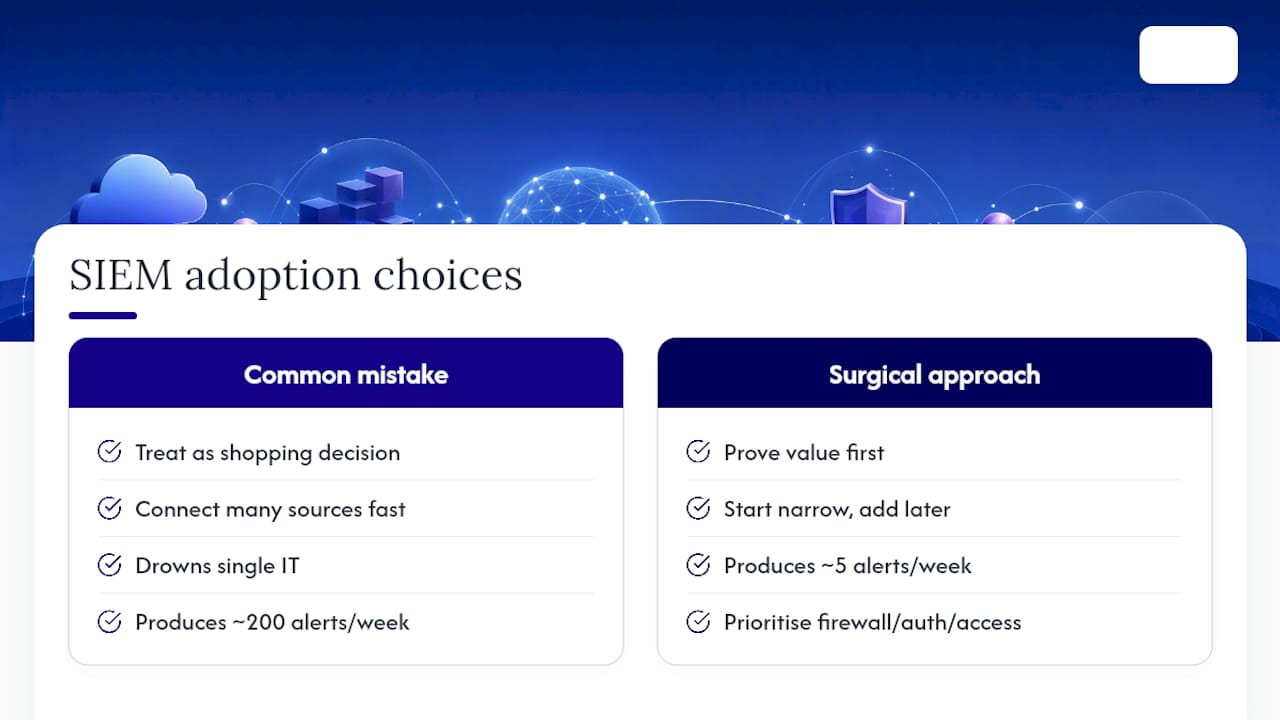
The conventional advice treats SIEM adoption like a shopping decision: compare feature lists, pick the platform with the most integrations, sign the contract. That framing misses the actual failure point. Most small businesses that abandon SIEM don't fail because they picked the wrong software. They fail because they connected too many log sources too fast, drowned their one IT generalist in low-value alerts, and gave up within three months.
The surgical ingestion approach, prioritizing firewall, authentication, and access logs while sampling or skipping noisy application data, isn't just a cost-control tactic. It's the difference between a SIEM that produces five actionable alerts a week and one that produces two hundred alerts nobody reads. Start narrow. Prove value on your highest-risk log sources. Expand only when a confirmed detection justifies the next source.
The other overlooked point: staffing is the real cost of SIEM, not the software license. A five-person company weighing a $200 monthly open-source server against a managed service is often comparing the wrong things. The open-source option isn't free. It's a bet that someone on staff has the bandwidth to tune correlation rules every week, indefinitely. For most small businesses, that bet doesn't pay off, which is exactly why managed SIEM has become the pragmatic default rather than the fallback option.
Symmetry's Managed Approach: What to Expect
If the DIY math above sounds like more operational risk than your team can absorb, that's exactly the gap a managed provider is built to close. Symmnet delivers the core outcomes a small-business SIEM strategy promises, continuous monitoring, endpoint protection, firewall management, and compliance documentation, wrapped into a fixed monthly plan instead of a variable per-gigabyte bill.

A free assessment identifies which of your systems already produce usable security logs, where your compliance documentation has gaps, and what a realistic first 30 days of coverage would look like for your specific environment, whether that's a manufacturing floor, a professional services office, or an FDA-regulated facility. There's no obligation attached to the assessment itself. Visit Symmnet's managed IT services page to request one and get a concrete picture of where your current setup stands before you decide between building it yourself or handing it off.
Frequently Asked Questions
Is SIEM worth it for a business with fewer than 20 employees? Yes, in most cases, though the deployment model matters more than the decision itself. A cloud or managed SIEM delivers the detection and compliance benefits without requiring you to hire a security analyst.
How much does SIEM cost for a small business? Pricing shapes vary by ingest volume, retention period, and whether you choose managed service fees or a self-hosted platform. Open-source options like OpenSearch or OSSIM avoid license costs but add operational time.
Can I use free tools instead of paying for SIEM? Open-source tools like OSSIM and network monitors like Zeek work well for teams with the staff time to tune and maintain them. Most small businesses without dedicated security staff find the operational overhead outweighs the license savings.
What logs should I prioritize first? Firewall traffic, authentication events, and cloud access logs typically deliver the highest detection value per dollar of ingest cost, which is why a surgical, staged ingestion approach outperforms connecting every system at once.
Sources
- Best SIEM Software for Small Businesses — Capterra
- The top free and open source SIEM tools for 2025 — Red Canary
- OpenSearch as a SIEM solution — OpenSearch
- Zeek network security monitor — Zeek