

Third-party patching is the process of finding, testing, and deploying security updates for applications that don't come from your operating system vendor, things like browsers, PDF readers, Java, and collaboration tools. The single most important move you can make is to automate it with a fast, pre-tested patch catalog and policy-driven rollouts, rather than relying on manual checks or the software's own update prompts.
Skipping this discipline leaves a measurable gap: attackers increasingly target browsers, PDF readers, and runtimes precisely because they sit outside Windows Update and macOS software update.
- Faster time-to-patch on actively exploited vulnerabilities
- Fewer silent compliance gaps during audits
- A documented trail auditors and regulators actually accept
Third-party vulnerabilities account for a large share of the flaws that end up on CISA's Known Exploited Vulnerabilities catalog, which tracks bugs attackers are using right now, not theoretical ones.
Key Takeaways
Third-party patching succeeds when discovery, a fast catalog, ring-based deployment, and verified audit logs work together as one continuous process, not four separate tasks.
| Point | Details |
|---|---|
| Automate the catalog | Use a curated, fast-packaging patch catalog instead of manual vendor checks. |
| Verify, don't assume | Confirm installed version on-device; deployment "success" flags can be wrong. |
| Prioritize by exploitability | Tie critical CVE SLAs to the CISA KEV catalog, not release notes alone. |
| Document every exception | Log unpatchable software with justification and compensating controls. |
| Symmnet's approach | Symmnet pairs 24/7 monitoring with policy-driven patch deployment and audit-ready reporting for regulated small businesses. |
Table of Contents
- What Third-Party Patching Covers That OS Updates Miss
- Why Third-Party Patching Is Genuinely Hard to Get Right
- The Third-Party Patching Lifecycle, Stage by Stage
- What to Look for in a Patching Platform
- Building an Implementation Plan That Actually Holds
- Fitting Third-Party Patching Into Your Existing Toolchain
- Metrics That Prove the Program Is Working
- When a Rollout Goes Wrong
- How Symmetry Network Management Operationalizes This
- What Most Patching Advice Gets Wrong
- Symmnet Handles Third-Party Patching So You Don't Have To
- Sources
What Third-Party Patching Covers That OS Updates Miss
Your operating system vendor patches the kernel, system libraries, and its own bundled apps. It does not patch Chrome, Firefox, Adobe Acrobat, Zoom, Java runtimes, or the dozens of niche line-of-business tools your staff installed themselves. That's the entire third-party patching problem in one sentence.
Common culprits worth tracking closely include:
- Web browsers (Chrome, Firefox, Edge extensions)
- PDF and document readers
- Java and .NET runtimes
- Video conferencing and collaboration software
- Backup agents and remote-access utilities
Each of these ships its own update mechanism, on its own schedule, with its own quirks. When nobody owns that process centrally, patches stall for weeks. That's exactly the exposure window attackers exploiting CISA-tracked vulnerabilities count on, and it's the same gap that shows up in compliance basics guides when auditors ask what's actually covered.
Why Third-Party Patching Is Genuinely Hard to Get Right
The challenges are structural, not a matter of trying harder.
- Vendor fragmentation. Every application vendor releases on its own cadence, some monthly, some reactively after a zero-day, with no shared calendar to plan around.
- Installer chaos. MSI packages, EXE installers, silent-install scripts, and browser-based web installers all behave differently, and a script that works for one version can break silently on the next.
- Discovery blind spots. Users install their own software, remote and hybrid endpoints drop off scans, and shadow IT hides entire categories of risk from inventory tools.
- Limited QA bandwidth. Most internal IT teams and even mid-sized MSPs don't have the headcount to smoke-test every update against every business application before pushing it wide.
Any one of these alone is manageable. Together, they're why so many organizations default to "patch when we remember," which is precisely the pattern GAO's oversight findings flag as the root cause of preventable breaches.
The Third-Party Patching Lifecycle, Stage by Stage
A working program moves through five stages, and skipping any one of them is where most patching programs quietly fail.
- Discovery and inventory. Continuously scan endpoints for installed applications and exact version numbers, not just "Chrome is present" but which build. Remote and field endpoints need the same visibility as on-network machines.
- Sourcing the patch. Pull from vendor feeds directly, or use a curated catalog that repackages releases faster than you could manually. Packaging speed matters most for anything tied to an active KEV-listed vulnerability.
- Testing. Push to a small pilot ring first, run smoke tests against core business applications, and confirm a rollback path exists before wider deployment.
- Deployment. Roll out by policy, not by hand, using maintenance windows and phased rings so a bad update touches ten machines before it touches a thousand.
- Verification. Confirm the installed version on the device itself, log the result, and retain that evidence for audit purposes.
Pro Tip: Verify the actual installed version number after deployment, not just a "success" flag from your tool. Silent installer failures are common enough that a status report showing 100% completion can still leave real endpoints unpatched.
That verification step is what separates a program that looks compliant from one that actually is, a distinction GAO's guidance on documented oversight makes explicit.
What to Look for in a Patching Platform
Not all patch management tools solve the same problems, and the gaps usually show up exactly where you'd least want them: during an active exploit window. When evaluating a platform or catalog provider, weigh these capabilities against your actual environment rather than a feature checklist.
- Catalog breadth and packaging speed. How fast does the provider repackage a critical release after the vendor ships it? Hours matter more than days when a CVE lands on the KEV list.
- Cross-platform, remote-endpoint coverage. Windows, macOS, and remote or field devices all need the same discovery and deployment reach.
- Policy workflows with approval gates. You want the ability to require sign-off on sensitive applications while automating the routine ones.
- Rollback and retry logic. A tool without a clean rollback path turns a bad patch into a fire drill.
- Integrations. Connections to your RMM, PSA, Intune, or SCCM environment determine whether patching data lives in one place or three.
| Capability | Why it matters |
|---|---|
| Catalog packaging speed | Shortens the exposure window on KEV-listed CVEs |
| Cross-OS and remote coverage | Closes discovery blind spots on hybrid endpoints |
| Approval gates and rollback | Limits blast radius from a bad update |
| RMM/PSA/ITSM integration | Keeps patch status tied to real tickets, not spreadsheets |
Building an Implementation Plan That Actually Holds
Tooling only works inside a policy structure. Start by defining severity tiers, critical, high, and routine, each with its own service-level agreement for time-to-patch. A CVE on the CISA KEV catalog should carry a same-week SLA; a routine feature update can wait for the next maintenance cycle.
- Set tiered SLAs. Tie each tier to a specific patching window, and hold the team to it the same way you'd hold a vendor to a contract.
- Use pilot rings. Deploy to a small test group first, then expand in phases, so a compatibility issue surfaces on five machines instead of five hundred.
- Document exceptions. Some applications can't be patched immediately, legacy line-of-business software or FDA-validated systems are common cases, so log the exception, the reason, and a compensating control.
- Coordinate change control with app owners. Manufacturing environments in particular need production schedules and supplier dependencies factored into rollout timing, a point covered well in change control guidance for manufacturing teams.
- Automate the routine, staff the exceptions. Let policy handle 90% of updates automatically, but keep a human reviewing anything flagged as high risk or incompatible.
Pro Tip: Treat your exception register as a living document, not a one-time list. Review it quarterly, because "temporarily unpatchable" has a way of becoming permanent if nobody revisits it.
Fitting Third-Party Patching Into Your Existing Toolchain
Intune and SCCM handle Microsoft's own update channels well, but their native third-party app coverage has real gaps, especially for niche or fast-moving software. That's where agent-based patch management approaches extend coverage without ripping out what already works.
- RMM and PSA integration matters most for MSPs managing multiple clients, since patch status needs to roll up per tenant, not just per device.
- Connecting patch results to your ticketing system turns a failed deployment into an actual incident workflow instead of a silent log entry.
- Pre-packaged catalog items are usually safer than scripted installs for high-volume, security-critical apps, reserve custom scripts for edge cases your catalog doesn't cover.
Metrics That Prove the Program Is Working
Time-to-patch on critical CVEs is the single number that matters most to auditors and regulators. Track it alongside patch coverage percentage, failure rate, and mean time to remediate a failed deployment.
Report types worth keeping on hand:
- A per-client or per-device version matrix showing exact installed versions
- Deployment logs with timestamps and outcomes
- An exception register with justification and compensating controls
Weak documentation here is exactly what turned an avoidable vulnerability into a multi-year regulatory enforcement action for Equifax. Auditors want evidence of process, not a verbal assurance that "we patch regularly."
When a Rollout Goes Wrong
Wide failures after a deployment need a fast triage sequence, not panic.
- Isolate the blast radius. Check whether failures cluster on one OS version, one hardware model, or one application dependency.
- Trigger the rollback. If you built rollback into the deployment stage, use it immediately rather than troubleshooting live in production.
- Pause the ring. Stop the rollout from expanding to the next phase until the root cause is identified.
- Escalate to vendor support if the failure traces back to the installer itself rather than your deployment process.
The biggest mistake teams make isn't a bad patch, it's skipping verification and trusting a single feed for every application category. Diversify sourcing and verify installed versions every time, a habit covered in more depth in Symmnet's guide to cyber security patches.
How Symmetry Network Management Operationalizes This
Symmnet runs third-party patching as one piece of a larger managed service, not a standalone task. That means 24/7 monitoring paired with endpoint security, policy-driven deployment schedules, and audit-ready reporting that holds up when a regulator or insurer asks for evidence.
- Maintenance windows built around each client's operating schedule, not a generic default
- Documented exception handling for legacy or validated systems that can't take every update immediately
- Compliance-aware reporting for manufacturing, aerospace, and FDA-regulated clients, tied into broader 21 CFR Part 11 compliance requirements
A free assessment maps your current third-party patching exposure before it becomes a finding.
What Most Patching Advice Gets Wrong
Most guidance on this topic treats third-party patching as a checklist item, "turn on auto-update and move on." That's backwards. The evidence points the other way: GAO's own findings show that programs without documented process and verification are the ones that fail audits, and the Equifax enforcement record shows what happens when that failure meets an actual attacker.
The overrated piece of conventional wisdom is speed for its own sake. Deploying fast without a rollback plan or a pilot ring just moves the risk from "unpatched" to "broken and unpatched," which is arguably worse for a small business with no bench strength to fix it overnight.
What actually deserves priority: verification. Not deployment counts, not patch cadence claims, but confirmed installed versions on real devices, logged and retained. That's the evidence an auditor, a cyber insurer, or a regulator will actually ask for. Everything else, catalog speed, ring size, SLA tiers, exists to support that one outcome. Get verification right first, then build the rest of the program around it.
— Michael
Symmnet Handles Third-Party Patching So You Don't Have To
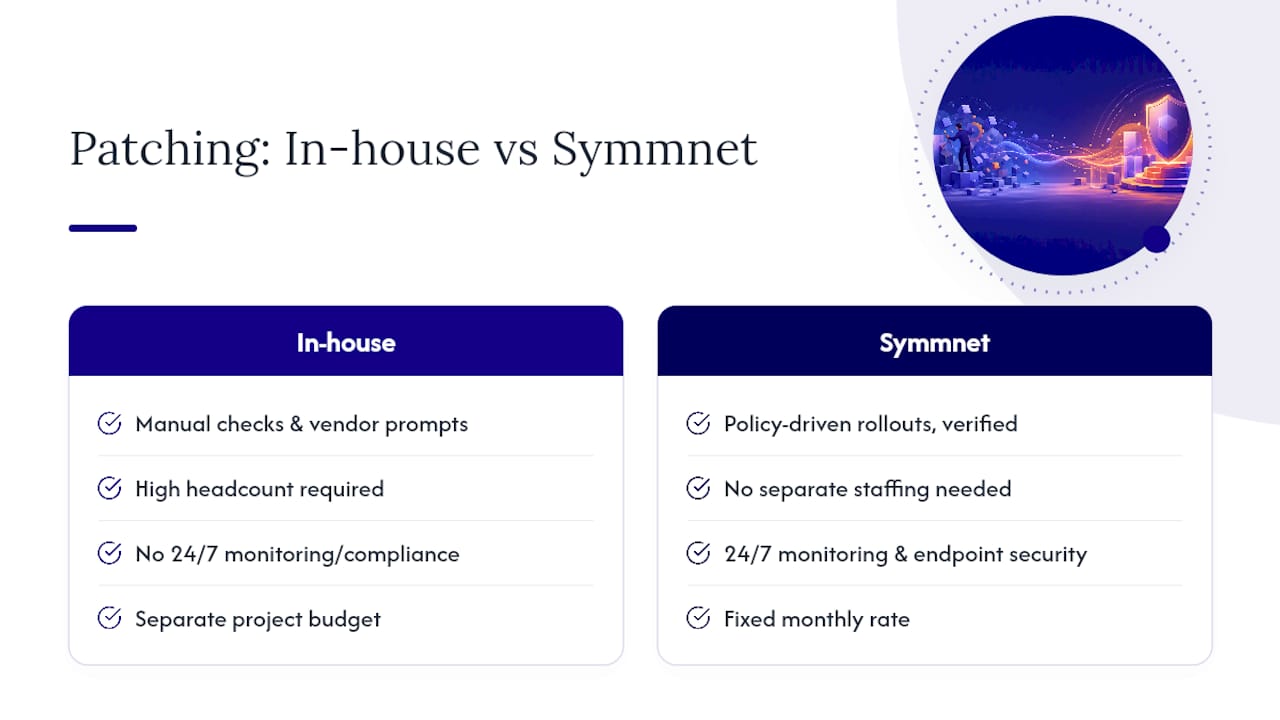
Symmnet replaces the patchwork of manual checks and vendor update prompts with a managed program built around policy-driven rollouts and documented verification, the exact combination this article recommends.

Small manufacturing, aerospace, and professional services firms rarely have the headcount to run pilot rings, track KEV-listed CVEs, and maintain an exception register on top of daily IT demands. Symmnet's managed IT services fold third-party patching into 24/7 monitoring, endpoint security, and compliance documentation billed at a fixed monthly rate, so there's no separate patching project to staff or budget for.
If you want to see where your current environment stands, request a free assessment through Symmetry Network Management and get a clear picture of your third-party patching exposure before it turns into an audit finding.
Sources
For deeper study, review GAO's report on federal vulnerability management, CISA's Known Exploited Vulnerabilities catalog, and Symmnet's own guides on vulnerability management for small businesses and patch management basics.
- GAO report (GAO-18-559)
- FTC / Equifax case material
- CISA KEV catalog
- Patching third-party software (N-able documentation)