

Data recovery is the process of retrieving lost, deleted, corrupted, or inaccessible digital data from storage devices so that normal access and usability can be restored. Whether the cause is a failed hard drive, a ransomware attack, or an accidental file deletion, the goal is always the same: get critical information back before the damage becomes permanent. Understanding how this process works, and when to call in professional help, can mean the difference between a minor disruption and a catastrophic business setback.
At its core, data recovery divides into two distinct categories:
- Logical data recovery: Addresses software-level failures such as accidental deletion, file system corruption, or partition loss. The physical hardware is intact; the problem lives in how data is organized or referenced.
- Physical data recovery: Addresses hardware-level damage, including mechanical failure, water damage, or electrical faults. Specialized repair and controlled environments are typically required.
Storage media involved spans hard disk drives (HDDs), solid-state drives (SSDs), USB flash drives, SD cards, CDs, and DVDs. Each medium presents its own recovery challenges based on how data is written and stored.
Two metrics frame the business stakes of any recovery scenario. Recovery Point Objective (RPO) defines the maximum acceptable amount of data loss measured in time, and Recovery Time Objective (RTO) defines how quickly systems must be restored after an incident. Both metrics, drawn from enterprise IT standards, apply equally to small businesses managing critical operational data.
What causes data loss in the first place?
Data loss rarely announces itself in advance. A drive that worked fine yesterday can become completely unreadable overnight, and the cause shapes every decision that follows in the recovery process.
The most common triggers fall into two broad groups: logical causes, where the hardware is physically fine but data organization breaks down, and physical causes, where the storage device itself sustains damage. Knowing which category applies determines the urgency, the method, and the cost of recovery.
Common causes include:
- Accidental deletion: Files removed by mistake, including emptied Recycle Bin contents or overwritten saves.
- File system corruption: Caused by improper shutdowns, software bugs, or interrupted write operations that leave the file system in an inconsistent state.
- Hardware failure: Mechanical breakdown of HDD components such as read/write heads, or controller failures in SSDs.
- Malware and ransomware: Malicious software that encrypts, deletes, or corrupts files, often targeting business-critical data.
- Power loss or surges: Sudden power cuts during write operations can corrupt data or damage drive firmware.
- Physical damage: Drops, water exposure, fire, or extreme heat that physically harm the storage medium.
- Formatting errors: Accidental reformatting of a drive or incorrect partition operations that erase file system structures.
- Firmware corruption: A drive's internal firmware can become corrupted, making the device appear dead even when the data platters or memory chips are intact.
From a business continuity perspective, each cause carries different RPO and RTO implications. A ransomware attack on a manufacturing firm's production database demands near-immediate response, while a single accidentally deleted document may allow more time. Identifying the cause accurately is the first step toward choosing the right recovery path, and misdiagnosing a physical failure as a logical one can make the situation significantly worse.
Logical vs. physical recovery: what sets them apart?
The distinction between logical and physical data recovery is not just technical. It determines whether you can attempt recovery yourself, how long the process will take, and what it will cost.

Logical and physical failures often share similar symptoms, which is why professional diagnostics matter before any recovery attempt begins. A drive that fails to mount could have a corrupted file system or a failing read/write head. Treating a physical failure as a logical one by running software on a mechanically damaged drive can cause permanent, unrecoverable data loss.
Key differences at a glance:
-
Logical recovery
- Device condition: Physically functional
- Typical causes: Accidental deletion, file system errors, partition loss, software corruption
- Recovery techniques: Software scanning, file system repair, partition recovery tools
- Typical cost: Lower; often manageable with quality software
- DIY feasibility: Possible for non-critical cases with the right tools
-
Physical recovery
- Device condition: Hardware is damaged or malfunctioning
- Typical causes: Head crashes, water damage, fire, electrical failure, severe firmware corruption
- Recovery techniques: Hardware repair, clean room disassembly, platter imaging, chip-off extraction
- Typical cost: Higher; requires specialized labs and expertise
- DIY feasibility: Not recommended; attempting it risks permanent data loss
Pro Tip: If your drive is making clicking, grinding, or beeping sounds, stop using it immediately. These noises almost always signal physical damage. Running the drive further or attempting software recovery on it can destroy the data you are trying to save. Contact a professional data recovery service before doing anything else.
Some failures sit in a gray zone. A drive with corrupted firmware may appear completely dead, mimicking physical failure, yet the data storage components are undamaged. Only professional diagnostics can reliably distinguish between the two. When you are uncertain, treat the situation as physical until proven otherwise.
How does the data recovery process actually work?
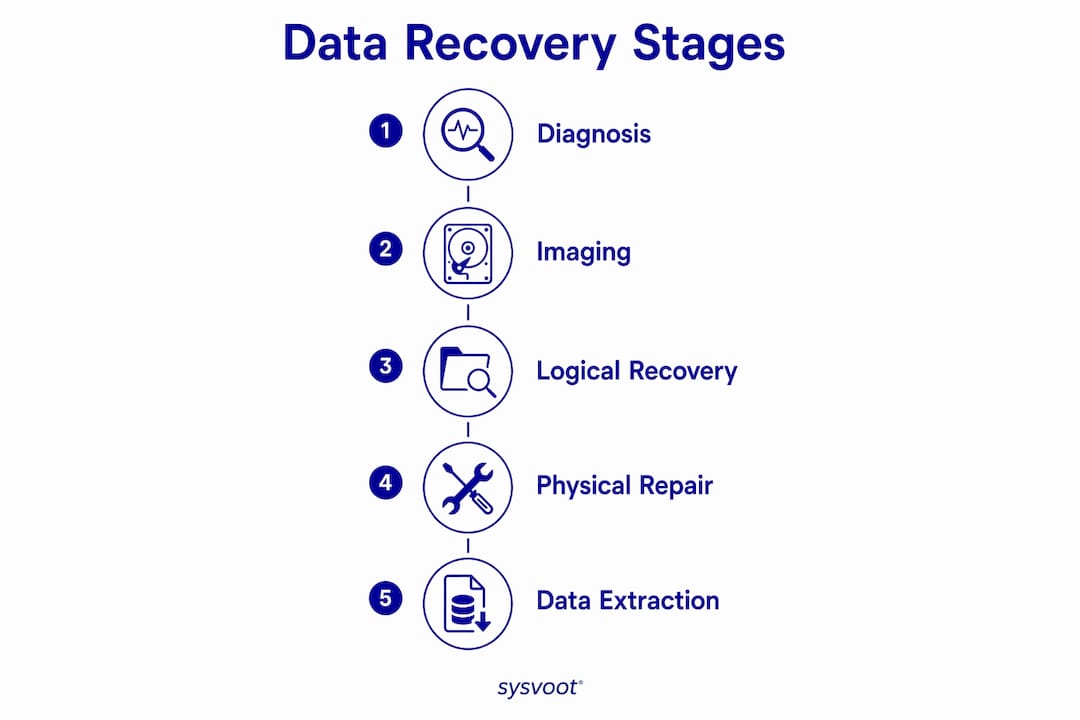
Data recovery follows a methodical sequence of phases, and skipping any one of them increases the risk of permanent loss. The single most important rule comes before any formal process begins: stop using the device the moment you suspect data loss. Continued operation can overwrite the very sectors holding your lost files, making recovery impossible.
Recovery phases and their typical scope:
- Phase 1: Diagnosis. Determine whether the failure is logical or physical. Technicians assess error messages, device behavior, and physical condition.
- Phase 2: Preparation. For physical failures, hardware repair happens first, often in a clean room environment where airborne particles cannot contaminate exposed drive platters. For logical failures, preparation means selecting the right software tools.
- Phase 3: Imaging. Before any recovery attempt, a sector-by-sector copy (disk image) of the source drive is created. All subsequent recovery work happens on this image, not the original, protecting the source from further damage.
- Phase 4: Recovery attempt. Software tools scan the image for recoverable files using file system metadata or signature-based file carving. For physical cases, repaired hardware is imaged and then processed the same way.
- Phase 5: Verification. Recovered files are checked for integrity. Corrupted or incomplete files may require additional repair using tools such as hex editors.
- Phase 6: Restoration. Verified data is transferred to a new, healthy storage device and returned to the user or system.
| Phase | Primary tools used | Typical timeframe |
|---|---|---|
| Diagnosis | Drive diagnostic utilities, S.M.A.R.T. analysis | 1–4 hours |
| Preparation / hardware repair | Clean room equipment, soldering tools | 1–5 days |
| Imaging | Disk imaging software (e.g., dd, ddrescue) | 2–24 hours |
| Recovery attempt | File carving tools (e.g., PhotoRec, TestDisk) | 2 hours |
| Verification and restoration | File integrity checkers, hex editors | 2 hours |
Clean room environments deserve special mention. Professional labs maintain controlled conditions, typically ISO Class 5 or better, to prevent microscopic contamination from damaging exposed drive platters during physical repair. This is not a step that can be replicated in a home or office setting.
What techniques do data recovery specialists actually use?
The specific technique applied depends entirely on the type and severity of the failure. Data recovery software generally works by analyzing file system metadata or performing sector-by-sector scans to identify known file type signatures, then reconstructing files from those fragments. That approach handles the majority of logical recovery cases effectively.
Common techniques in practice:
- Software-based scanning and undelete: Recovery applications scan the file system for deleted file entries whose data sectors have not yet been overwritten. Effective for recent accidental deletions on logically healthy drives.
- File system repair: Tools such as TestDisk attempt to rebuild damaged partition tables or repair corrupted file system structures, restoring access without needing to extract individual files.
- Signature-based file carving: When file system metadata is gone, tools like PhotoRec scan raw sectors for known file headers and footers, reconstructing files by type regardless of directory structure. This technique works even on severely corrupted file systems.
- Hardware component replacement: For HDDs with failed read/write heads or damaged PCBs (printed circuit boards), technicians replace the faulty components using matching donor parts, allowing the drive to spin up and be imaged.
- Chip-off extraction: Used for flash-based storage (USB drives, SD cards, some SSDs), this technique physically removes the memory chip from the circuit board and reads it directly using specialized equipment.
- Clean room disassembly and platter imaging: For drives with severe mechanical damage, platters are removed and imaged in a controlled environment using specialized hardware.
- Firmware repair: Corrupted drive firmware can sometimes be rewritten using manufacturer-specific tools, restoring the drive's ability to communicate with a host system without touching the data storage areas.
Physical recovery techniques require advanced labs and expertise, often with significant cost and time commitments. For logical failures, quality software tools represent a practical first step, provided the affected drive is not further written to during the process. Installing recovery software directly onto the drive you are trying to recover from is one of the most common mistakes users make, and it can permanently overwrite the files you need.
Pro Tip: Always install data recovery software on a separate, healthy drive. Running it from the affected drive risks overwriting the recoverable file sectors you are trying to save.
How do backup and disaster recovery relate to data recovery?
Backup and data recovery are complementary, not interchangeable. Backups are your primary defense against data loss. Data recovery is what you turn to when that defense falls short or was never in place.
A well-designed backup strategy follows the 3-2-1 rule: three copies of data, on two different media types, with one copy stored offsite or in the cloud. When a backup is current and verified, restoring from it is faster and more reliable than any recovery technique. The challenge is that backups are only as good as their last successful test. Many businesses discover their backups are incomplete or corrupted only after they need them, which is exactly when data recovery becomes the fallback.
Key points connecting backup strategy to recovery readiness:
- RPO drives backup frequency. An RPO of 15 minutes means backups must run every 15 minutes to prevent data loss beyond that window. Longer intervals mean more potential data loss in a failure event.
- RTO drives recovery planning. A tight RTO requires pre-staged recovery environments and tested restoration procedures, not just archived data.
- Cloud backup reduces infrastructure overhead while increasing geographic redundancy, making it accessible for small businesses that cannot maintain dedicated offsite facilities.
- Backup failures happen. Incomplete backups, backup software errors, and ransomware that targets backup repositories all create scenarios where data recovery techniques become necessary even for organizations with active backup programs.
- Regular backup testing is the only way to confirm that restoration will actually work when needed. An untested backup is an assumption, not a guarantee.
For small businesses in regulated industries, the relationship between backup frequency and compliance requirements adds another layer. Manufacturing firms, healthcare providers, and professional services companies often face specific data retention and availability mandates that make both backup discipline and recovery capability non-negotiable. Reviewing your backup testing practices before an incident occurs is far less costly than discovering gaps during one. For a practical framework on structuring your backup approach, the 2026 data backup best practices guide covers current methods and media options in detail.
When should you call a professional data recovery service?
Knowing when to stop and call a professional can save your data. Attempting DIY recovery on the wrong type of failure is one of the leading causes of permanent, unrecoverable data loss.
Situations that call for professional help immediately:
- Audible drive noises: Clicking, grinding, or beeping from an HDD almost always indicates mechanical failure. Do not power the drive on again.
- Physical damage: Water exposure, fire, impact damage, or visible component damage requires a controlled lab environment.
- Firmware corruption: The drive appears dead or unrecognized by the system, but no physical damage is visible.
- Unsuccessful DIY attempts: If software tools have already been run without success, further attempts risk additional data loss.
- Business-critical or regulated data: When the data involves financial records, customer information, or compliance-sensitive files, the cost of professional recovery is almost always justified.
- Ransomware encryption: Encrypted data requires specialized decryption expertise alongside recovery techniques.
Pro Tip: The moment you suspect physical damage, power down the device and do not restart it. Every additional power cycle on a mechanically failing drive increases the risk of permanent data loss and can scratch the platters beyond recovery.
Symmnet, operating as Symmetry Network Management, provides managed IT and cybersecurity services tailored specifically for small U.S. businesses in manufacturing, aerospace, and professional services. Their service model includes 24/7 system monitoring, backup and recovery solutions, endpoint security, and proactive support under fixed pricing, so clients are never surprised by unexpected recovery costs. For small businesses that lack a dedicated IT team, having a managed services partner means that backup integrity is verified continuously, not just when something goes wrong. Symmnet's approach to data protection for small businesses addresses both the preventive and remedial sides of data security, which is the combination that actually reduces risk.

What affects data recovery success rates?
Recovery success is never guaranteed, and several concrete factors determine whether lost data can be fully, partially, or not at all retrieved.
How quickly you act is the single biggest variable. Deleted files are not immediately erased from storage; the space they occupied is simply marked as available for new data. Every write operation after deletion increases the chance that recoverable sectors get overwritten. On an active system, this can happen within minutes.
The type and severity of damage sets a hard ceiling on what is possible. Logical failures with intact hardware typically yield high recovery rates when addressed promptly. Severe physical damage, such as scratched platters or burned memory chips, may make full recovery impossible regardless of technique or expertise.
The storage medium matters. HDDs store data on magnetic platters, which can often be imaged even after mechanical failure if the platters themselves are undamaged. SSDs and flash storage use wear-leveling algorithms and may distribute data across chips in ways that complicate reconstruction. Chip-off recovery from flash storage is technically demanding and not always complete.
Prior recovery attempts significantly affect outcomes. Running multiple software tools on a failing drive, or attempting to repair a physically damaged device without proper equipment, frequently causes additional damage. Professional labs consistently report that cases referred after failed DIY attempts are harder to resolve than cases brought in immediately.
Data overwriting is the point of no return. Once the sectors holding lost files have been written over by new data, no technique currently available can reconstruct what was there. This is why the first rule of data recovery, stopping all use of the affected device, carries so much weight in practice.
Factors that improve recovery odds include acting immediately, avoiding further writes to the affected device, choosing the right recovery method for the failure type, and working with professionals who have access to clean room environments and specialized hardware. For businesses in regulated industries, pairing strong backup protocols for small businesses with a tested recovery plan is the most reliable way to keep success rates high before a crisis ever occurs.
Key Takeaways
Effective data recovery depends on acting fast, diagnosing the failure type correctly, and matching the recovery method to the specific cause of data loss.
| Point | Details |
|---|---|
| Two recovery types | Logical recovery addresses software failures; physical recovery addresses hardware damage and requires specialized labs. |
| Stop using the device | Continued use after data loss overwrites recoverable sectors, often making recovery impossible. |
| RPO and RTO define business stakes | An RPO of 15 minutes requires backups every 15 minutes; RTO sets the target for how fast systems must be restored. |
| Backups are the first line of defense | Data recovery is a fallback when backups fail or are incomplete, not a replacement for a tested backup strategy. |
| Professional help has clear triggers | Audible drive noises, physical damage, firmware failure, and unsuccessful DIY attempts all warrant immediate professional intervention. |